

- Posts: 966
- Thank you received: 11
Variant Not Saving
2 years 8 months ago #359424
by MyWorld
Variant Not Saving was created by MyWorld
I have a few products where I'm trying to add Small and Black but it just won't add it.
What could be causing this please?
Thanks!
What could be causing this please?
Thanks!
Please Log in or Create an account to join the conversation.

2 years 8 months ago #359428
by nicolas
Replied by nicolas on topic Variant Not Saving
Hi,
So, you're saying that it works for most products, but it doesn't only for a few of them ?
In that case, it must be a problem with how the product is configured.
Could you provide screenshots of all the settings of a product with the issue, including what you see under the variants tab of the product ?
So, you're saying that it works for most products, but it doesn't only for a few of them ?
In that case, it must be a problem with how the product is configured.
Could you provide screenshots of all the settings of a product with the issue, including what you see under the variants tab of the product ?
Please Log in or Create an account to join the conversation.
2 years 8 months ago - 2 years 8 months ago #359456
by MyWorld
Replied by MyWorld on topic Variant Not Saving
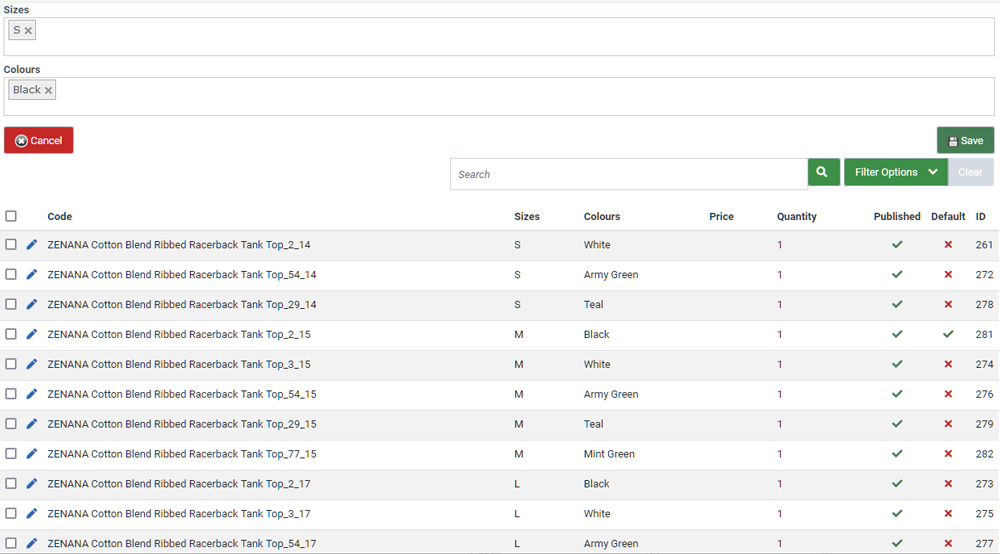
As you can see from the attached I was able to add small for other colors. And the options for black and small are selected but when I save it doesn't add to the variants.
Thanks!
Thanks!
Last edit: 2 years 8 months ago by MyWorld.
Please Log in or Create an account to join the conversation.
2 years 8 months ago #359457
by MyWorld
Replied by MyWorld on topic Variant Not Saving
Oh and it's seems to be affecting only this one item.
Please Log in or Create an account to join the conversation.
2 years 8 months ago #359461
by MyWorld
Replied by MyWorld on topic Variant Not Saving
I have another question.
The variant is displaying a size that is not available in the list.
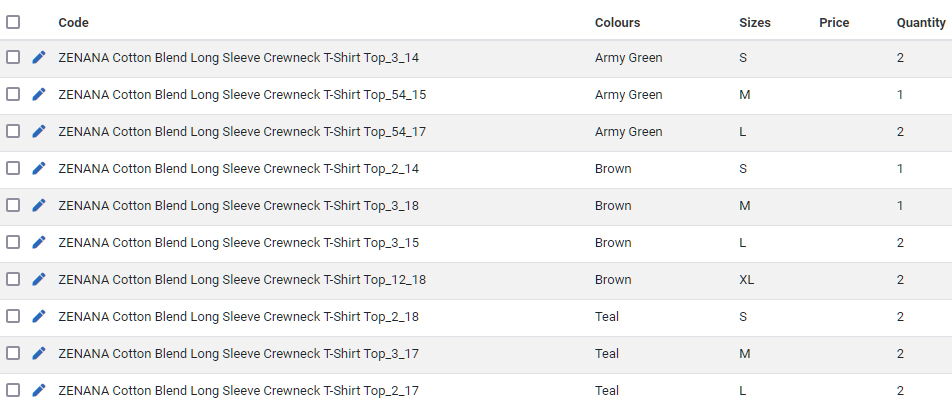
As you can see from the attached, only the brown has an XL large size. On the front end when I choose one of the other colours the XL size is showing but I didn't add XL for those 2 sizes. When I click on it, is says Sold Out, but I would prefer not to have a size listed that I did not add.
Is there a way to have only the variant that is added displayed for that item.
Thanks!
The variant is displaying a size that is not available in the list.
As you can see from the attached, only the brown has an XL large size. On the front end when I choose one of the other colours the XL size is showing but I didn't add XL for those 2 sizes. When I click on it, is says Sold Out, but I would prefer not to have a size listed that I did not add.
Is there a way to have only the variant that is added displayed for that item.
Thanks!
Please Log in or Create an account to join the conversation.
2 years 8 months ago #359466
by nicolas
Replied by nicolas on topic Variant Not Saving
Hi,
1. In that case, there must be something wrong with how that product is configured.
If it's just one product, you can delete it and create a new one the same way. You mot likely won't have the problem with the new one.
2. Yes. To do that, you need to activate the "Characteristics dynamic display" setting of the HikaShop configuration.
In that case, HikaShop will recalculate the characteristics choices on the fly on the frontend.
1. In that case, there must be something wrong with how that product is configured.
If it's just one product, you can delete it and create a new one the same way. You mot likely won't have the problem with the new one.
2. Yes. To do that, you need to activate the "Characteristics dynamic display" setting of the HikaShop configuration.
In that case, HikaShop will recalculate the characteristics choices on the fly on the frontend.
Please Log in or Create an account to join the conversation.
Time to create page: 0.081 seconds