
- Posts: 92
- Thank you received: 3
display options gets messed up
- ezomerdijk
-
 Topic Author
- Offline
Less
More
2 years 2 months ago #362856
by ezomerdijk
display options gets messed up was created by ezomerdijk
-- url of the page with the problem -- :
crux.nl/outdoor/canyoning/product/basic-canyoneer
-- HikaShop version -- : 5.0.4
-- Joomla version -- : 4.4.5
Hi,
When you make the browser smaller on the product page, the options layout gets messed up.
Ofcourse this is because the space is not big enough than.
I would like to keep de title of the options readable.
I was thinking, it would be better if the titles were above the options, instead of in front of them. But I cannot find where to change that.
Besides this, I would like all options (list items and text items) to start aligned.
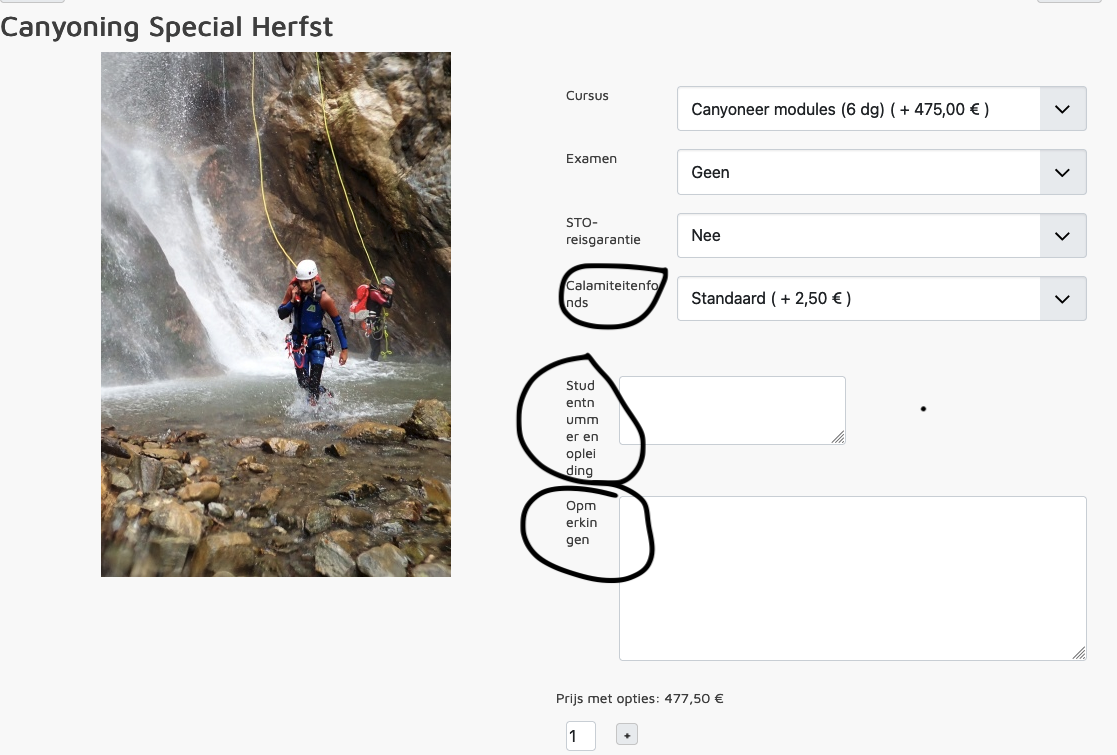
-- HikaShop version -- : 5.0.4
-- Joomla version -- : 4.4.5
Hi,
When you make the browser smaller on the product page, the options layout gets messed up.
Ofcourse this is because the space is not big enough than.
I would like to keep de title of the options readable.
I was thinking, it would be better if the titles were above the options, instead of in front of them. But I cannot find where to change that.
Besides this, I would like all options (list items and text items) to start aligned.
Please Log in or Create an account to join the conversation.

2 years 2 months ago #362861
by nicolas
Replied by nicolas on topic display options gets messed up
Hi,
You could do that with CSS code. For example, you could add this CSS code on your website:
www.hikashop.com/support/documentation/1...ize-the-display.html
You could do that with CSS code. For example, you could add this CSS code on your website:
Code:
.hikashop_product_options td, .hikashop_product_custom_item_info_table td {
display: block;
}
The following user(s) said Thank You: ezomerdijk
Please Log in or Create an account to join the conversation.
Time to create page: 0.073 seconds