
- Posts: 18
- Thank you received: 1
Moving Variants
- JipdeMulder
-
 Topic Author
- Offline
Less
More
1 year 11 months ago - 1 year 11 months ago #364889
by JipdeMulder
Moving Variants was created by JipdeMulder
-- url of the page with the problem -- :
www.presentdanger.nl/
-- HikaShop version -- : hikashop_essential_v5.1.2
-- Joomla version -- : 5.2.2.
-- PHP version -- : 8.3.14
-- Browser(s) name and version -- : Chrome
Hello
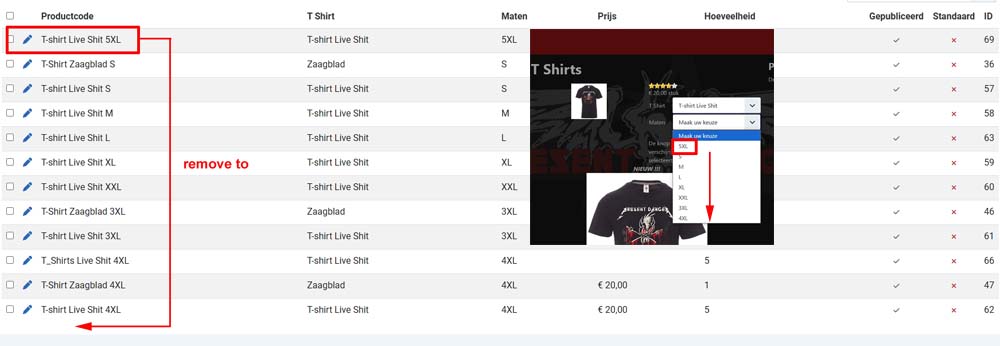
How do I move a variant down?
-- HikaShop version -- : hikashop_essential_v5.1.2
-- Joomla version -- : 5.2.2.
-- PHP version -- : 8.3.14
-- Browser(s) name and version -- : Chrome
Hello
How do I move a variant down?
Last edit: 1 year 11 months ago by JipdeMulder. Reason: 1 afbeelding weggehaald
Please Log in or Create an account to join the conversation.

1 year 11 months ago #364892
by nicolas
Replied by nicolas on topic Moving Variants
Hi,
Variants are ordered based on the order of the values. So edit the characteristic via the Products>Characteristics menu, and on the right side area with the listing of values, make sure that the values are in the correct order.
Variants are ordered based on the order of the values. So edit the characteristic via the Products>Characteristics menu, and on the right side area with the listing of values, make sure that the values are in the correct order.
Please Log in or Create an account to join the conversation.
- JipdeMulder
-
Topic Author
- Offline
Less
More
- Posts: 18
- Thank you received: 1
1 year 11 months ago #364895
by JipdeMulder
Replied by JipdeMulder on topic Moving Variants
Hello Nicolaas
Thanks for your answer
Difficult. My problem with the order has been solved but I deleted something that I shouldn't have done. I don't remember what it was. It was a product name that was no longer sold. At the front I get the error message for T Shirts: The default value of one of the features of that product is not available as a variant. Check the features and variants of that product.
Even with the help of ChatGPT I can't solve it. I understand the error message but can't find the error.
(Maybe I should put this problem in a new topic?)
Thanks for your answer
Difficult. My problem with the order has been solved but I deleted something that I shouldn't have done. I don't remember what it was. It was a product name that was no longer sold. At the front I get the error message for T Shirts: The default value of one of the features of that product is not available as a variant. Check the features and variants of that product.
Even with the help of ChatGPT I can't solve it. I understand the error message but can't find the error.
(Maybe I should put this problem in a new topic?)
Please Log in or Create an account to join the conversation.
- JipdeMulder
-
Topic Author
- Offline
Less
More
- Posts: 18
- Thank you received: 1
1 year 11 months ago #364897
by JipdeMulder
Replied by JipdeMulder on topic Moving Variants
Problem solved
Specifications and properties gave some ambiguities but that was the problem. Good reading is not given to everyone......

Specifications and properties gave some ambiguities but that was the problem. Good reading is not given to everyone......
Please Log in or Create an account to join the conversation.
Time to create page: 0.079 seconds