

- Posts: 15
- Thank you received: 0
Image instead plain text for Downloads
1 year 8 months ago #365612
by koshi
Image instead plain text for Downloads was created by koshi
-- url of the page with the problem -- :
eppmexico.com/productos/zapato-borcegui-biotech-cafe-berrendo
-- HikaShop version -- : 5.1.3
-- Joomla version -- : 5.2.3
-- PHP version -- : 8.3
-- Error-message(debug-mod must be tuned on) -- : None
Hello, is there a way to put an image instead of a file name for download in a product? Something like we can do in specifications, color, where we can use <img src=" eppmexico.com/images/coloricon/rojo.png " /> to show color and not plain text "Red"
What i want to do, is insted of saying "Technical Sheet", place an image. Example here eppmexico.com/productos/zapato-borcegui-biotech-cafe-berrendo
Thank you!
-- HikaShop version -- : 5.1.3
-- Joomla version -- : 5.2.3
-- PHP version -- : 8.3
-- Error-message(debug-mod must be tuned on) -- : None
Hello, is there a way to put an image instead of a file name for download in a product? Something like we can do in specifications, color, where we can use <img src=" eppmexico.com/images/coloricon/rojo.png " /> to show color and not plain text "Red"
What i want to do, is insted of saying "Technical Sheet", place an image. Example here eppmexico.com/productos/zapato-borcegui-biotech-cafe-berrendo
Thank you!
Please Log in or Create an account to join the conversation.

1 year 8 months ago #365616
by nicolas
Replied by nicolas on topic Image instead plain text for Downloads
Hi,
Yes. Edit the file on the product edit page in your backend.
There, in the popup, in the name field, instead of having the text "Technical Sheet" you can enter a custom translation key. For example: MY_TRANSLATION_KEY
Then, under the Languages tab of the HikaShop configuration, edit your language file. And in the override area, you can add a line like this:
With this, HikaShop will automatically add the img tag of the translation for the download link on the product page.
Yes. Edit the file on the product edit page in your backend.
There, in the popup, in the name field, instead of having the text "Technical Sheet" you can enter a custom translation key. For example: MY_TRANSLATION_KEY
Then, under the Languages tab of the HikaShop configuration, edit your language file. And in the override area, you can add a line like this:
Code:
MY_TRANSLATION_KEY="<img src='https://eppmexico.com/images/coloricon/rojo.png' />"
With this, HikaShop will automatically add the img tag of the translation for the download link on the product page.
Please Log in or Create an account to join the conversation.
1 year 8 months ago #365630
by koshi
Replied by koshi on topic Image instead plain text for Downloads
Thank you, could not do it. Plain text kept appearing. Maybe because it has a link attached?
What i was able to replace, was the word "Downloads" for an image. Not what iu wanted but helped
eppmexico.com/productos/guante-solvex-alphatec-13-ansell
What i was able to replace, was the word "Downloads" for an image. Not what iu wanted but helped
eppmexico.com/productos/guante-solvex-alphatec-13-ansell
Please Log in or Create an account to join the conversation.
1 year 8 months ago #365632
by nicolas
Replied by nicolas on topic Image instead plain text for Downloads
I can't check the situation on your website. The website forbids the use of Dev Tools.
i.imgur.com/koRtCPP.png
i.imgur.com/koRtCPP.png
Please Log in or Create an account to join the conversation.
1 year 8 months ago #365651
by koshi
Replied by koshi on topic Image instead plain text for Downloads
Sorry to bother you here with another subject.
I placed colors instead of text, but its displaying vertical. Is there a way to display them horizontal so it would look more compact?
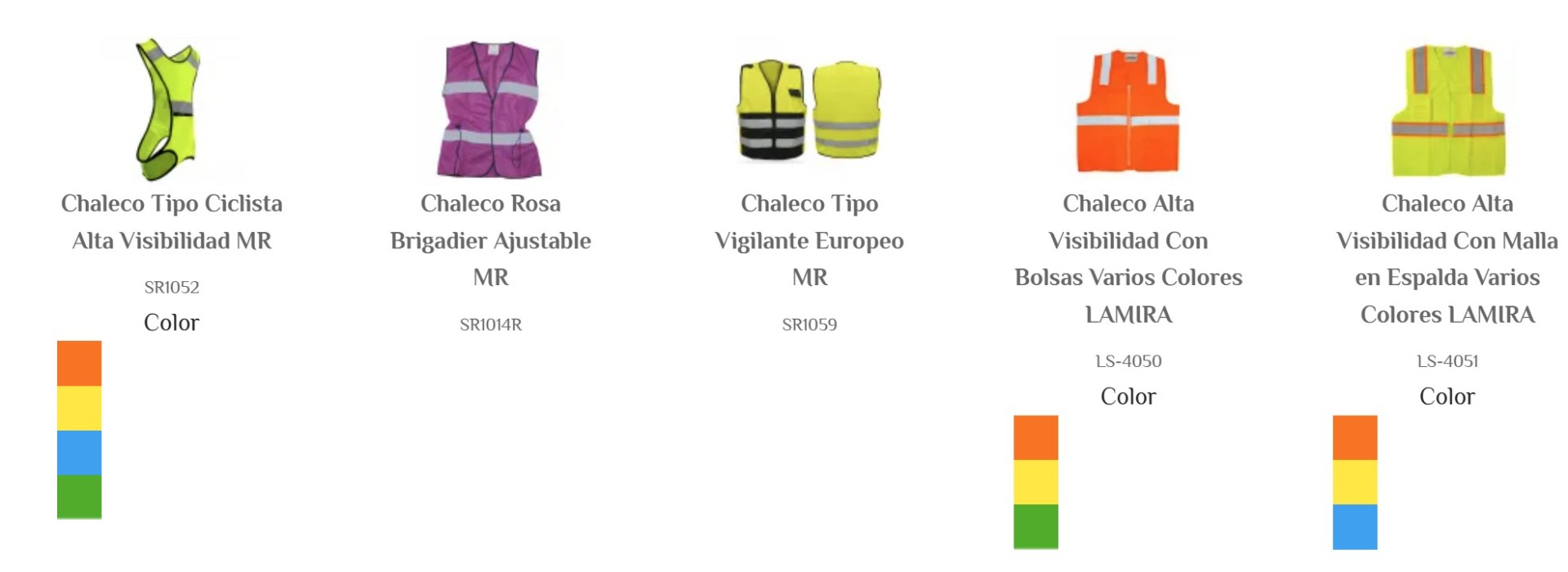
I placed colors instead of text, but its displaying vertical. Is there a way to display them horizontal so it would look more compact?
Please Log in or Create an account to join the conversation.
1 year 8 months ago #365652
by nicolas
Replied by nicolas on topic Image instead plain text for Downloads
Hi,
A bit of CSS should allow you to do that. I would need the URL of that page and that you allow for Dev tools to check the situation. Then, I could give you the CSS code to add for this.
A bit of CSS should allow you to do that. I would need the URL of that page and that you allow for Dev tools to check the situation. Then, I could give you the CSS code to add for this.
Please Log in or Create an account to join the conversation.
1 year 8 months ago - 1 year 8 months ago #365653
by koshi
Replied by koshi on topic Image instead plain text for Downloads
I dont know how to allow dev tools. Maybe it has something to do with jspeed plugin?
Oh i know what it was! Disabling right clicks! Done, you should be able now!
Oh i know what it was! Disabling right clicks! Done, you should be able now!
Last edit: 1 year 8 months ago by koshi.
Please Log in or Create an account to join the conversation.
1 year 8 months ago #365654
by nicolas
Replied by nicolas on topic Image instead plain text for Downloads
Hi,
Great. Can you also provide the URL of the page with that issue ? I couldn't find it on your website.
Great. Can you also provide the URL of the page with that issue ? I couldn't find it on your website.
Please Log in or Create an account to join the conversation.
1 year 8 months ago #365676
by koshi
Replied by koshi on topic Image instead plain text for Downloads
Please Log in or Create an account to join the conversation.
1 year 8 months ago #365677
by nicolas
Replied by nicolas on topic Image instead plain text for Downloads
Hi,
You want to add that CSS:
www.hikashop.com/support/documentation/1...ize-the-display.html
You want to add that CSS:
Code:
span.hikashop_product_characteristic_value_on_listing img {
display: inline;
}
Please Log in or Create an account to join the conversation.
1 year 8 months ago - 1 year 8 months ago #365679
by koshi
Replied by koshi on topic Image instead plain text for Downloads
Thank you, is it here where i should paste it?

Oh i found it!! Done, thank you!!
Oh i found it!! Done, thank you!!
Last edit: 1 year 8 months ago by koshi.
Please Log in or Create an account to join the conversation.
Time to create page: 0.117 seconds