

- Posts: 107
- Thank you received: 2
Breadcrumbs problem
1 year 2 months ago - 1 year 2 months ago #368211
by bw92116
Breadcrumbs problem was created by bw92116
-- url of the page with the problem -- :
goldfieldfireworks.com/index.php/our-fir...4-neon-morning-glory
-- HikaShop version -- : 6.0.0
-- Joomla version -- : 5.3.2
-- PHP version -- : 8.2.29
-- Browser(s) name and version -- : Firefox 128.13.0esr
I have 2 sites. On one of them, the breadcrumb module is not working correctly:
goldfieldfireworks.com/index.php/our-fir...ct/1817-black-hornet
On that page, you can see that the category is shown, but it is not clickable. I want the user to be able to click on the category in the breadcrumb, to see other products. Also, the name of the current product is not shown in the breadcrumbs.
By comparison, on my other site, the breadcrumbs work perfectly:
fireworksland.com/index.php/home/firewor...hard-core-pyro-shirt
You can see that the breadcrumb module shows the category as clickable, and the name of the product is included in the breadcrumbs.
How do I fix this so that the first site shows the category as clickable, and the name of the product is in the breadcrumb?
Thank you for your help.
-- HikaShop version -- : 6.0.0
-- Joomla version -- : 5.3.2
-- PHP version -- : 8.2.29
-- Browser(s) name and version -- : Firefox 128.13.0esr
I have 2 sites. On one of them, the breadcrumb module is not working correctly:
goldfieldfireworks.com/index.php/our-fir...ct/1817-black-hornet
On that page, you can see that the category is shown, but it is not clickable. I want the user to be able to click on the category in the breadcrumb, to see other products. Also, the name of the current product is not shown in the breadcrumbs.
By comparison, on my other site, the breadcrumbs work perfectly:
fireworksland.com/index.php/home/firewor...hard-core-pyro-shirt
You can see that the breadcrumb module shows the category as clickable, and the name of the product is included in the breadcrumbs.
How do I fix this so that the first site shows the category as clickable, and the name of the product is in the breadcrumb?
Thank you for your help.
Last edit: 1 year 2 months ago by bw92116.
Please Log in or Create an account to join the conversation.

1 year 2 months ago #368212
by nicolas
Replied by nicolas on topic Breadcrumbs problem
Hi,
I don't think the problem comes from HikaShop. HikaShop always provides the product name to the breadcrumbs system on the product page, and there is no way to change that.
However, there is a setting "Show Last" in the breacrumbs module of Joomla (when you edit it via the Joomla modules manager) which you can turn off to not display it.
So I think you have this setting turned off and you actually want to turn it on.
I don't think the problem comes from HikaShop. HikaShop always provides the product name to the breadcrumbs system on the product page, and there is no way to change that.
However, there is a setting "Show Last" in the breacrumbs module of Joomla (when you edit it via the Joomla modules manager) which you can turn off to not display it.
So I think you have this setting turned off and you actually want to turn it on.
Please Log in or Create an account to join the conversation.
4 months 1 week ago - 4 months 1 week ago #372366
by bw92116
Replied by bw92116 on topic Breadcrumbs problem
Thank you Nicolas.
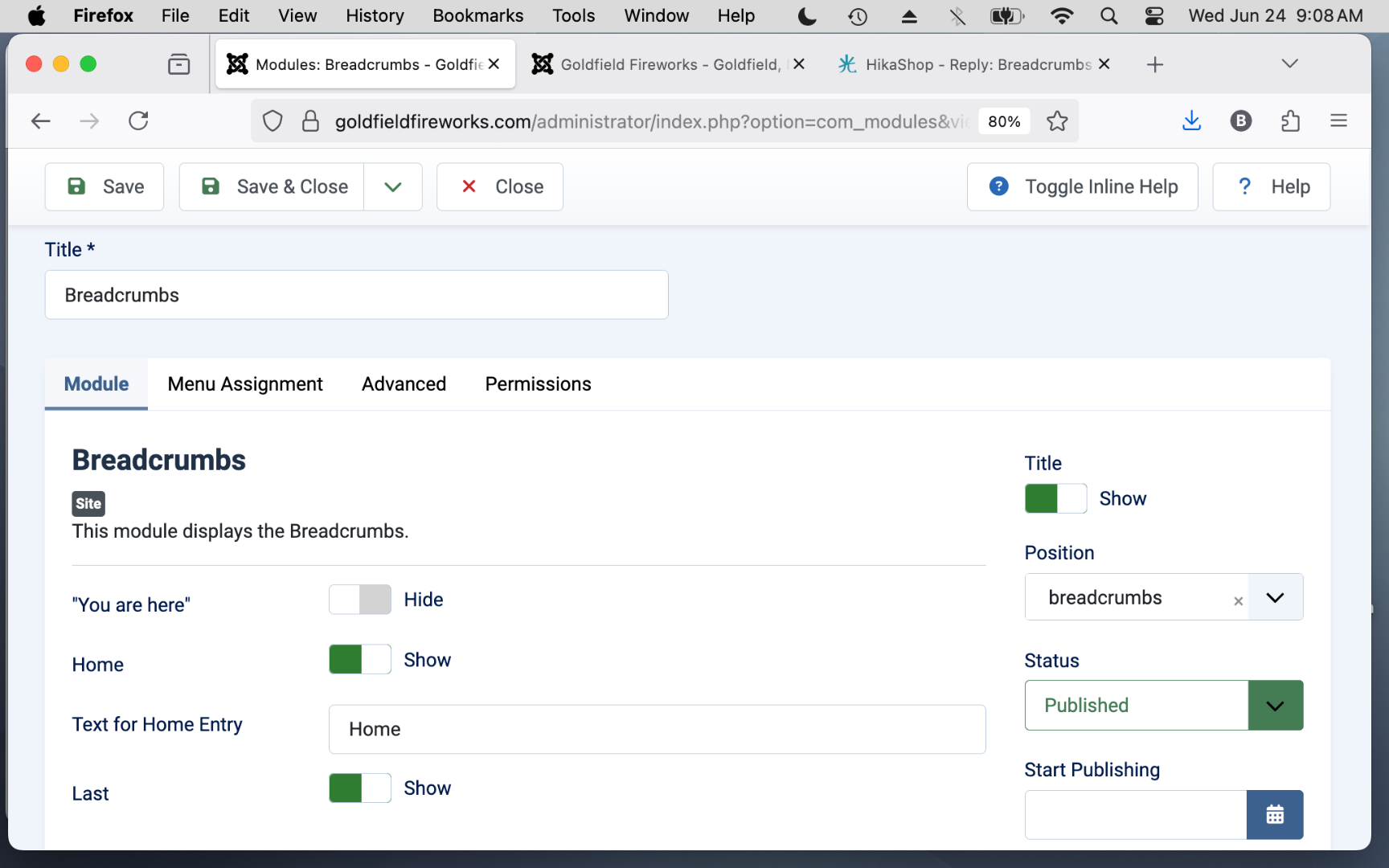
I am still having difficulty with the breadcrumbs issue. In the Joomla breadcrumbs module, "Last" is set to "Show," as seen in the screen shot below.
When a customer views the first product, the breadcrumbs show the correct product name. But for any product viewed after that, the breadcrumbs still show the previous product, not the current one. Something is not updating the breadcrumb info when the user goes to a different product.
Are you able to reproduce this by looking at my site?
goldfieldfireworks.com
Thank you for your help.
 to a different product.
I am still having difficulty with the breadcrumbs issue. In the Joomla breadcrumbs module, "Last" is set to "Show," as seen in the screen shot below.
When a customer views the first product, the breadcrumbs show the correct product name. But for any product viewed after that, the breadcrumbs still show the previous product, not the current one. Something is not updating the breadcrumb info when the user goes to a different product.
Are you able to reproduce this by looking at my site?
goldfieldfireworks.com
Thank you for your help.
Last edit: 4 months 1 week ago by bw92116.
Please Log in or Create an account to join the conversation.
4 months 1 week ago #372374
by nicolas
Replied by nicolas on topic Breadcrumbs problem
Hi,
Thank you, that's helpful and it points to caching rather than HikaShop itself.
On every product page, HikaShop rebuilds the breadcrumb with the current product. When it keeps showing the previous product instead, it means Joomla is serving a cached copy of the breadcrumbs module, so the new product name never reaches the page.
To fix it, edit your Breadcrumbs module (Content > Site Modules), open its Advanced tab, and set "Caching" to "No Caching", then save. That forces the breadcrumb to be rebuilt on each product page.
That is almost certainly the difference with your other site, where the module is not being cached. If it still happens after that, turn off the global cache to confirm (System > Global Configuration > System tab > Cache set to OFF) and check whether the "System - Page Cache" plugin is enabled, as that caches whole pages too.
Thank you, that's helpful and it points to caching rather than HikaShop itself.
On every product page, HikaShop rebuilds the breadcrumb with the current product. When it keeps showing the previous product instead, it means Joomla is serving a cached copy of the breadcrumbs module, so the new product name never reaches the page.
To fix it, edit your Breadcrumbs module (Content > Site Modules), open its Advanced tab, and set "Caching" to "No Caching", then save. That forces the breadcrumb to be rebuilt on each product page.
That is almost certainly the difference with your other site, where the module is not being cached. If it still happens after that, turn off the global cache to confirm (System > Global Configuration > System tab > Cache set to OFF) and check whether the "System - Page Cache" plugin is enabled, as that caches whole pages too.
The following user(s) said Thank You: bw92116
Please Log in or Create an account to join the conversation.
4 months 1 week ago #372389
by bw92116
Replied by bw92116 on topic Breadcrumbs problem
Nicolas,
Thank you for your help. I got the breadcrumbs to work correctly now. I compared the Breadcrumbs module between my 2 sites.
The only difference in the modules were the Ordering. On the site where it was working, the Ordering was set to "breadcrumbs." On the site which was not working, the Ordering was set to "all items shown." I changed that to "breadcrumbs" and it is now working correctly. Even with System - Cache set to "On (Conservative)" it is still working correctly.
So it was a Joomla issue, not a Hikashop issue. But I thank you again for taking your time to help me with this!
Bob
Thank you for your help. I got the breadcrumbs to work correctly now. I compared the Breadcrumbs module between my 2 sites.
The only difference in the modules were the Ordering. On the site where it was working, the Ordering was set to "breadcrumbs." On the site which was not working, the Ordering was set to "all items shown." I changed that to "breadcrumbs" and it is now working correctly. Even with System - Cache set to "On (Conservative)" it is still working correctly.
So it was a Joomla issue, not a Hikashop issue. But I thank you again for taking your time to help me with this!
Bob
The following user(s) said Thank You: nicolas
Please Log in or Create an account to join the conversation.
Time to create page: 0.067 seconds