

- Posts: 74
- Thank you received: 9
Registration form label is not full width
6 months 1 week ago - 6 months 1 week ago #371370
by Wella
Registration form label is not full width was created by Wella
-- HikaShop version -- : 6.3.0
-- Joomla version -- : 5.4.3
-- PHP version -- : 8.3.13
Hi,
I’ve noticed that the registration label is displayed half in width (see screenshot).
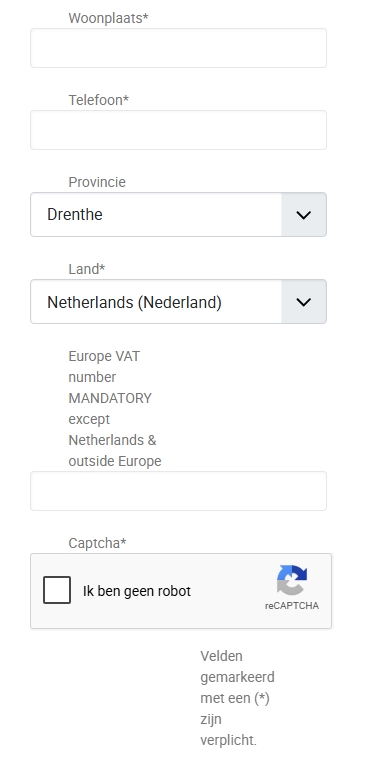
I have tried to search it (firebug) I can only influence it when the code below is off (highlighted). My problem is:
1. If this is the good method to change
2. If yes, where can I change it?
@media (min-width: 768px) {
.hkc-sm-4 {
grid-column: span 4;
--hk-span: 4;
}
Can someone please help me with this problem? What we like to have is Text goes to the left and displayed in 1 line (full width).
Regards,
Wella
-- Joomla version -- : 5.4.3
-- PHP version -- : 8.3.13
Hi,
I’ve noticed that the registration label is displayed half in width (see screenshot).
I have tried to search it (firebug) I can only influence it when the code below is off (highlighted). My problem is:
1. If this is the good method to change
2. If yes, where can I change it?
@media (min-width: 768px) {
.hkc-sm-4 {
grid-column: span 4;
--hk-span: 4;
}
Can someone please help me with this problem? What we like to have is Text goes to the left and displayed in 1 line (full width).
Regards,
Wella
Last edit: 6 months 1 week ago by Wella.
Please Log in or Create an account to join the conversation.

6 months 1 week ago #371371
by nicolas
Replied by nicolas on topic Registration form label is not full width
Hi,
I've checked your website and the issue comes from a CSS rule in your custom CSS file (`frontend_custom.css`) that limits the form width:
This constrains the registration form to 450px, which makes the labels (at 4/12 of that width = ~150px) too narrow for some Dutch labels like "E-mail bevestiging" or "Wachtwoord bevestigen" which then wrap to two lines.
You have two options:
1. Remove or increase the `max-width` on `.hkform-horizontal` in your custom CSS. For example, `max-width: 700px` or remove it entirely.
2. If you want to keep the narrow form but have labels on their own line above the inputs, add this CSS:
You can edit the custom CSS from the HikaShop backend via Display > Configuration > Custom CSS file.
I've checked your website and the issue comes from a CSS rule in your custom CSS file (`frontend_custom.css`) that limits the form width:
Code:
.hkform-horizontal {
max-width: 450px;
}
This constrains the registration form to 450px, which makes the labels (at 4/12 of that width = ~150px) too narrow for some Dutch labels like "E-mail bevestiging" or "Wachtwoord bevestigen" which then wrap to two lines.
You have two options:
1. Remove or increase the `max-width` on `.hkform-horizontal` in your custom CSS. For example, `max-width: 700px` or remove it entirely.
2. If you want to keep the narrow form but have labels on their own line above the inputs, add this CSS:
Code:
.hikashop_contentpane .hkform-group .hkcontrol-label.hkc-sm-4 {
grid-column: span 12;
text-align: left;
}
.hikashop_contentpane .hkform-group .hkc-sm-8 {
grid-column: span 12;
}
You can edit the custom CSS from the HikaShop backend via Display > Configuration > Custom CSS file.
Please Log in or Create an account to join the conversation.
6 months 1 week ago - 6 months 1 week ago #371440
by Wella
Replied by Wella on topic Registration form label is not full width
Hi Nicolas,
I removed the old code and place your new one. The length of most label and field looks good, except for the password field and dropdown fields:
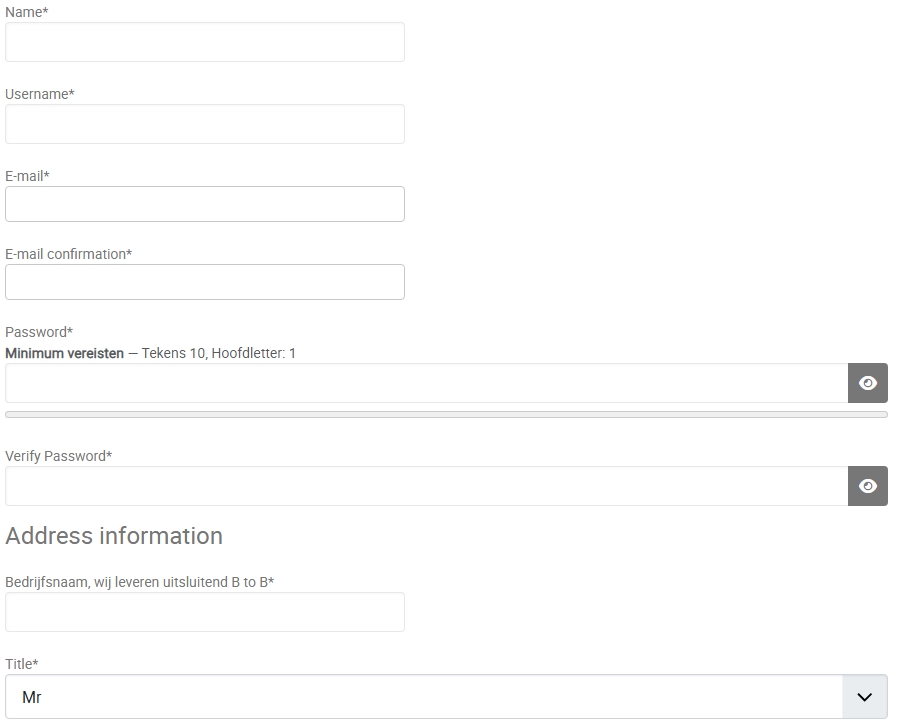
How can I change this?
Regards,
Wella
I removed the old code and place your new one. The length of most label and field looks good, except for the password field and dropdown fields:
How can I change this?
Regards,
Wella
Last edit: 6 months 1 week ago by Wella.
Please Log in or Create an account to join the conversation.
6 months 1 week ago #371441
by nicolas
Replied by nicolas on topic Registration form label is not full width
Hi,
The text inputs on your registration form have a `width: 400px` set by the template, but the password inputs and select dropdowns don't have that same constraint. That's why they stretch to full width.
Add this CSS to fix them:
The text inputs on your registration form have a `width: 400px` set by the template, but the password inputs and select dropdowns don't have that same constraint. That's why they stretch to full width.
Add this CSS to fix them:
Code:
.hkform-horizontal input[type="password"],
.hkform-horizontal select.form-select {
max-width: 400px;
}
Please Log in or Create an account to join the conversation.
6 months 1 week ago - 6 months 1 week ago #371451
by Wella
Replied by Wella on topic Registration form label is not full width
Hi Nicolas,
Almost there , the dropdown fileds looks a lot better but the password parts still show this:
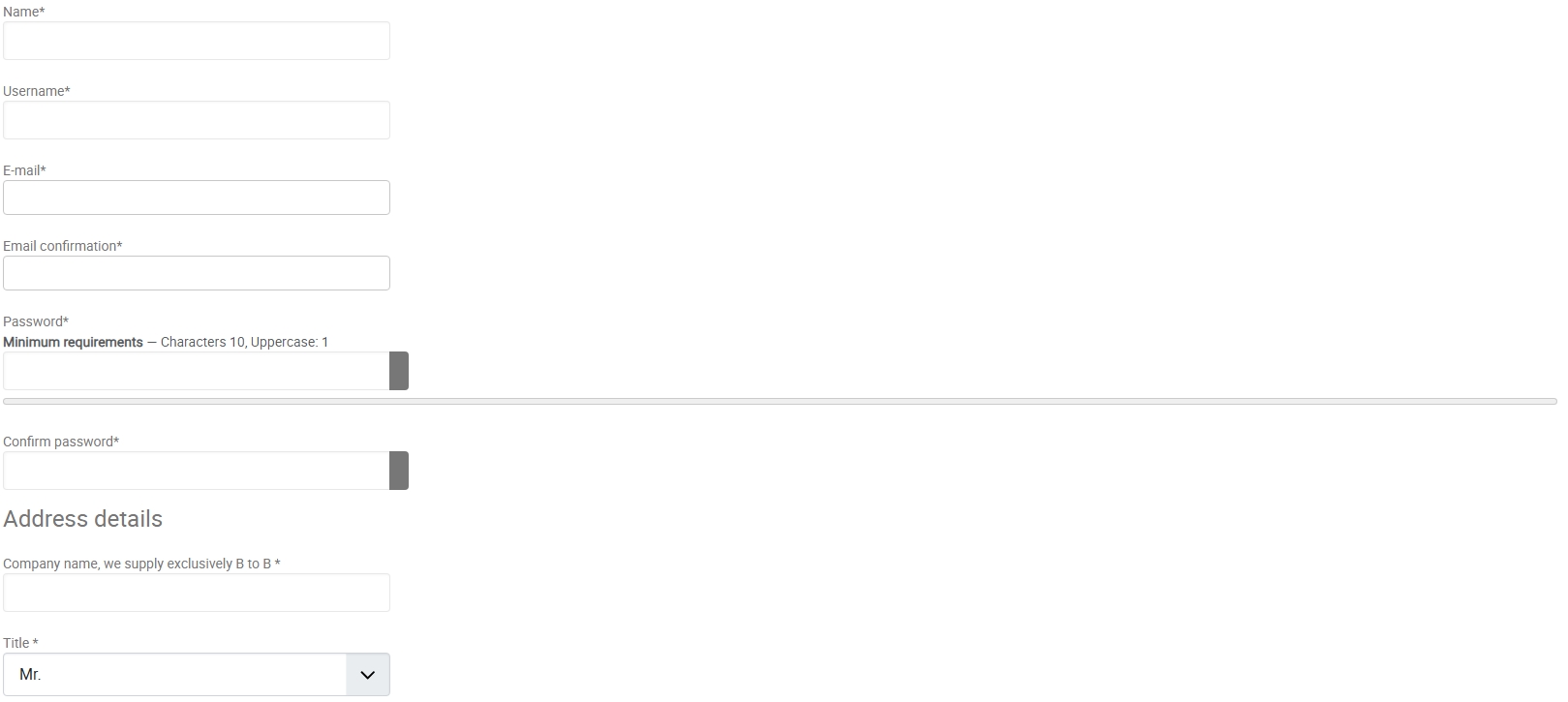
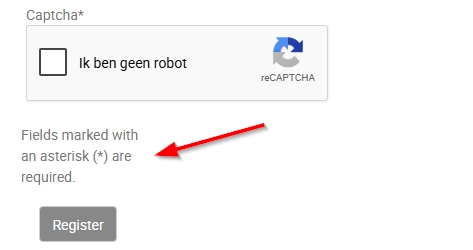
Captcha text:
Almost there
, the dropdown fileds looks a lot better but the password parts still show this:Captcha text:
Last edit: 6 months 1 week ago by Wella.
Please Log in or Create an account to join the conversation.
6 months 1 week ago - 6 months 1 week ago #371453
by nicolas
Replied by nicolas on topic Registration form label is not full width
Hi,
The password fields are rendered by Joomla using a wrapper div with the class "password-group", which contains the input, the show/hide toggle button, and the strength meter bar. Your current CSS targets the input directly, but the wrapper is what needs to be constrained.
Add:
This will constrain the entire password component including the toggle button and the strength meter bar.
For the "Fields marked with an asterisk (*) are required." text appearing too narrow, you can try adding:
The password fields are rendered by Joomla using a wrapper div with the class "password-group", which contains the input, the show/hide toggle button, and the strength meter bar. Your current CSS targets the input directly, but the wrapper is what needs to be constrained.
Add:
Code:
.hkform-horizontal .password-group {
max-width: 400px;
}
This will constrain the entire password component including the toggle button and the strength meter bar.
For the "Fields marked with an asterisk (*) are required." text appearing too narrow, you can try adding:
Code:
.hikashop_registration_required_info_line .hkc-sm-8 {
max-width: none;
}
Last edit: 6 months 1 week ago by nicolas.
Please Log in or Create an account to join the conversation.
6 months 6 days ago #371458
by Wella
Replied by Wella on topic Registration form label is not full width
Hi Nicolas,
The show/hide toggle button and the strength meter bar are looking good but the captcha part has no influence.
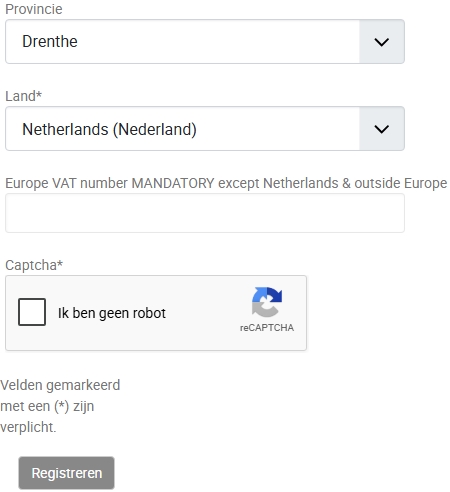
The show/hide toggle button and the strength meter bar are looking good but the captcha part has no influence.
Please Log in or Create an account to join the conversation.
6 months 6 days ago #371461
by nicolas
Replied by nicolas on topic Registration form label is not full width
Hi,
Try like this instead:
Try like this instead:
Code:
.hikashop_registration_required_info_line {
display: block !important;
}
The following user(s) said Thank You: Wella
Please Log in or Create an account to join the conversation.
6 months 4 days ago #371482
by Wella
Replied by Wella on topic Registration form label is not full width
Hi Nicolas,
Yes....This code works! :woohoo:
Thank you so much for your help and constant support.
Regards,
Wella
Yes....This code works! :woohoo:
Thank you so much for your help and constant support.
Regards,
Wella
The following user(s) said Thank You: nicolas
Please Log in or Create an account to join the conversation.
Time to create page: 0.167 seconds