

- Posts: 59
- Thank you received: 6
Problem editing custom fields in product page backend
1 month 1 week ago #373490
by Noe
Problem editing custom fields in product page backend was created by Noe
-- HikaShop version -- : 6.6.0
-- Joomla version -- : 5.4.6
-- PHP version -- : 8.2
-- Browser(s) name and version -- : Firefox
Hello,
I’ve added custom fields to my product’s pages templates in the view files. When I go to the product page in the backend and want to edit the custom fields, most of the time, it’s not possible as it looks like the page is still charging, only for these specific fields. So, lately, it is very rarely possible to edit these fields. The rest of the product page, like for example the description, appear properly and I can edit it.
Do you know what may be causing this problem and how to fix it ?
Thank you !
-- Joomla version -- : 5.4.6
-- PHP version -- : 8.2
-- Browser(s) name and version -- : Firefox
Hello,
I’ve added custom fields to my product’s pages templates in the view files. When I go to the product page in the backend and want to edit the custom fields, most of the time, it’s not possible as it looks like the page is still charging, only for these specific fields. So, lately, it is very rarely possible to edit these fields. The rest of the product page, like for example the description, appear properly and I can edit it.
Do you know what may be causing this problem and how to fix it ?
Thank you !
Please Log in or Create an account to join the conversation.

1 month 1 week ago #373494
by nicolas
Replied by nicolas on topic Problem editing custom fields in product page backend
Hello,
I tried to reproduce this on a HikaShop 6.6.0 with several custom fields of the "WYSIWYG" type displayed on the product edit page, with TinyMCE and with JCE, and the fields load and can be edited normally here. So it is probably something specific to your fields or to your site.
Could you give us more information:
- the type of these custom fields (text, textarea, WYSIWYG, image, file, ...) and the editor you use (TinyMCE, JCE, ...),
- a screenshot of the product edit page when the fields keep loading,
- the errors displayed in the console of your browser at that moment (F12 key, then the "Console" tab), if there are any.
Also, the view files you modified are used on the frontend product page, they shouldn't have any impact on the product edit page of the backend. Unless you also modified the view files of the backend product edit page ?
I tried to reproduce this on a HikaShop 6.6.0 with several custom fields of the "WYSIWYG" type displayed on the product edit page, with TinyMCE and with JCE, and the fields load and can be edited normally here. So it is probably something specific to your fields or to your site.
Could you give us more information:
- the type of these custom fields (text, textarea, WYSIWYG, image, file, ...) and the editor you use (TinyMCE, JCE, ...),
- a screenshot of the product edit page when the fields keep loading,
- the errors displayed in the console of your browser at that moment (F12 key, then the "Console" tab), if there are any.
Also, the view files you modified are used on the frontend product page, they shouldn't have any impact on the product edit page of the backend. Unless you also modified the view files of the backend product edit page ?
The following user(s) said Thank You: Noe
Please Log in or Create an account to join the conversation.
1 month 1 week ago #373524
by Noe
Replied by Noe on topic Problem editing custom fields in product page backend
Hello,
I’m using Tiny MCE editor. All of the fields are in charging mode most of the time which doesn’t permit editing, and sometimes, I don’t know why, it is possible to edit them, but it’s very rare.
I’ve got various types : A lot of them are WYSYWYG, but I also have custom text, text area, radio button (for the filter), single dropdown, text
No, I don’t think I modified the backend product edit page. I edited the pages in the « display/ views » section. I don’t think you can modify the backend for the product pages there anyway.
I remember there was an issue with one version of joomla 5 that didn’t allow for the editing of the articles, maybe it happened around end of last year/ beginning of this year. Could it be something that hasn’t been sorted out on the hikashop side related to that?
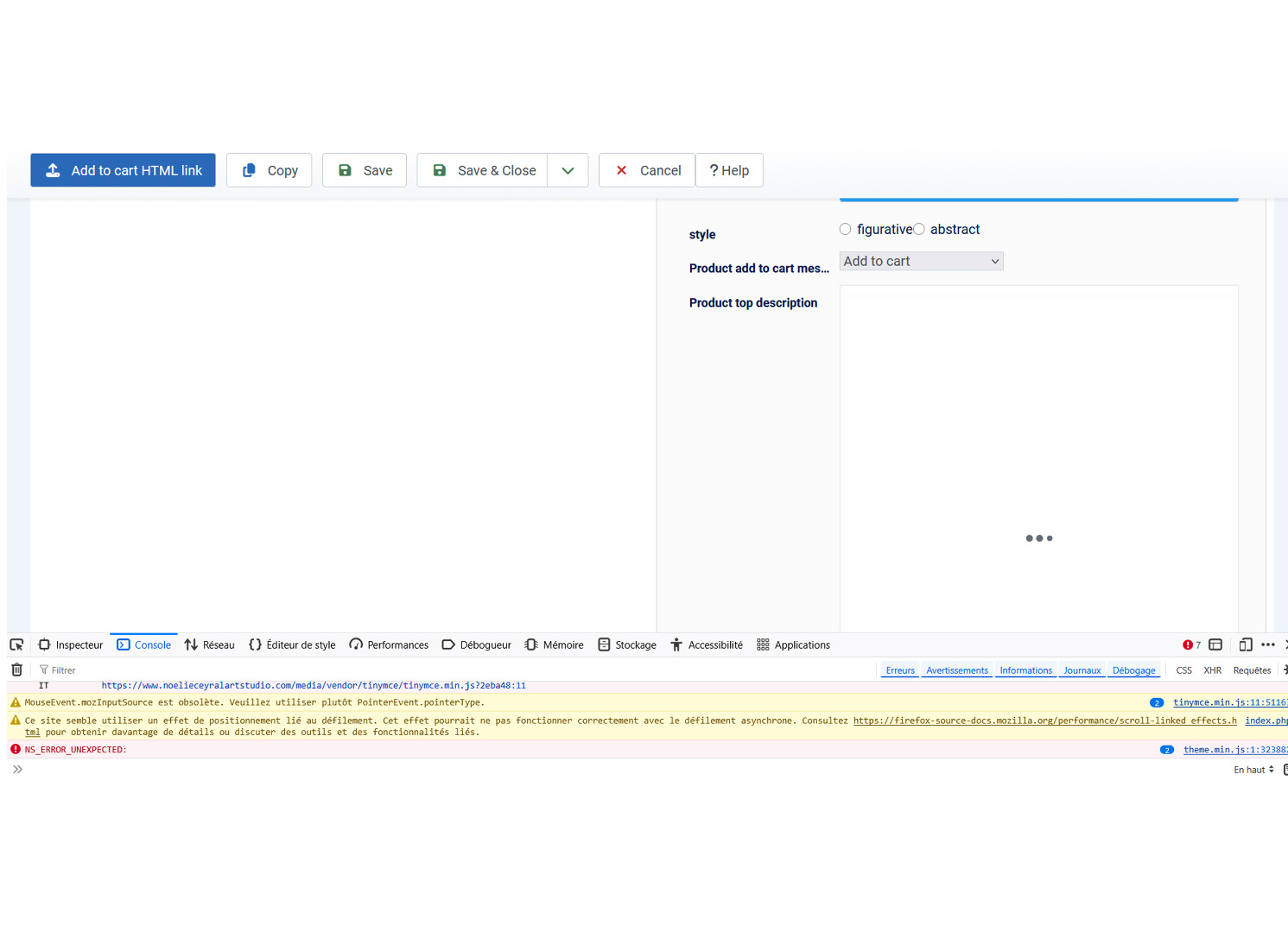
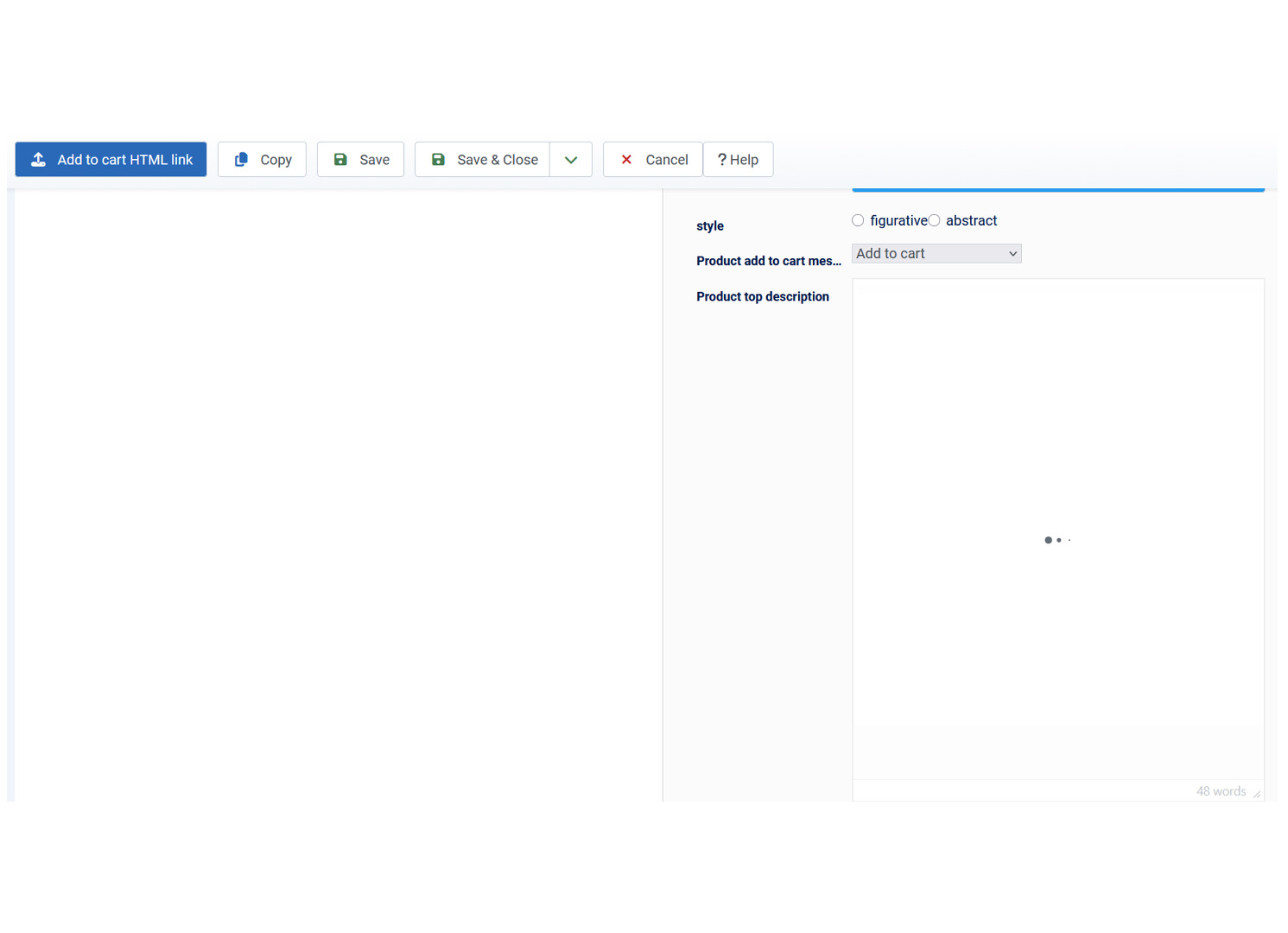
When it happens, there are 3 small dots in the custom fields’ field (the ones with the WYSYWYG type) that keep on appearing and disappearing and going from small to slightly bigger. I am including 2 images with a screen capture. One is for the console, not sure if this is what you needed. If not, please let me know how to find it.
Thank you !
I’m using Tiny MCE editor. All of the fields are in charging mode most of the time which doesn’t permit editing, and sometimes, I don’t know why, it is possible to edit them, but it’s very rare.
I’ve got various types : A lot of them are WYSYWYG, but I also have custom text, text area, radio button (for the filter), single dropdown, text
No, I don’t think I modified the backend product edit page. I edited the pages in the « display/ views » section. I don’t think you can modify the backend for the product pages there anyway.
I remember there was an issue with one version of joomla 5 that didn’t allow for the editing of the articles, maybe it happened around end of last year/ beginning of this year. Could it be something that hasn’t been sorted out on the hikashop side related to that?
When it happens, there are 3 small dots in the custom fields’ field (the ones with the WYSYWYG type) that keep on appearing and disappearing and going from small to slightly bigger. I am including 2 images with a screen capture. One is for the console, not sure if this is what you needed. If not, please let me know how to find it.
Thank you !
Please Log in or Create an account to join the conversation.
1 month 1 week ago #373526
by nicolas
Replied by nicolas on topic Problem editing custom fields in product page backend
Hello,
Thank you for the screenshots. I set up a test site with Joomla 5.4.6, HikaShop 6.6.0, TinyMCE and the same kinds of custom fields (several WYSIWYG, text, textarea, radio and single dropdown) and opened the product edit page many times in Firefox, and the editors always loaded there. The console shows an NS_ERROR_UNEXPECTED error coming from tinymce.min.js, so it looks like TinyMCE itself fails to start in Firefox (the 3 animated dots are TinyMCE's loading indicator), which then blocks the editors on the page. Since it works here with the same setup, and sometimes works on your site too, I think it comes from something specific to your browser or your site (a Firefox add-on, or another Joomla extension loading its own scripts on that page) rather than from the fields configuration.
Could you try the following:
- open the same product edit page with another browser (Chrome or Edge for example) and see if the fields load there,
- in Firefox, try in a private window, or with your Firefox add-ons disabled (add-ons like spell checkers or grammar tools which inject code into text editors are a frequent cause of this error with TinyMCE),
- also try clearing the cache of Firefox (Ctrl+F5 on the page).
If it works in another browser or without the add-ons, that will confirm it's a Firefox side issue. If it happens in all browsers, you could try disabling the third party system plugins of your site one by one in System > Plugins to see if one of them causes it. Also, please click on the small arrow on the left of the NS_ERROR_UNEXPECTED line in the console and send us a screenshot of the details it displays, it will tell us which part of the code triggers it.
About the Joomla 5 issue you remember, it was on Joomla's side and your Joomla 5.4.6 should already include its fix, so I don't think it's related.
Thank you for the screenshots. I set up a test site with Joomla 5.4.6, HikaShop 6.6.0, TinyMCE and the same kinds of custom fields (several WYSIWYG, text, textarea, radio and single dropdown) and opened the product edit page many times in Firefox, and the editors always loaded there. The console shows an NS_ERROR_UNEXPECTED error coming from tinymce.min.js, so it looks like TinyMCE itself fails to start in Firefox (the 3 animated dots are TinyMCE's loading indicator), which then blocks the editors on the page. Since it works here with the same setup, and sometimes works on your site too, I think it comes from something specific to your browser or your site (a Firefox add-on, or another Joomla extension loading its own scripts on that page) rather than from the fields configuration.
Could you try the following:
- open the same product edit page with another browser (Chrome or Edge for example) and see if the fields load there,
- in Firefox, try in a private window, or with your Firefox add-ons disabled (add-ons like spell checkers or grammar tools which inject code into text editors are a frequent cause of this error with TinyMCE),
- also try clearing the cache of Firefox (Ctrl+F5 on the page).
If it works in another browser or without the add-ons, that will confirm it's a Firefox side issue. If it happens in all browsers, you could try disabling the third party system plugins of your site one by one in System > Plugins to see if one of them causes it. Also, please click on the small arrow on the left of the NS_ERROR_UNEXPECTED line in the console and send us a screenshot of the details it displays, it will tell us which part of the code triggers it.
About the Joomla 5 issue you remember, it was on Joomla's side and your Joomla 5.4.6 should already include its fix, so I don't think it's related.
Please Log in or Create an account to join the conversation.
Time to create page: 0.064 seconds