

- Posts: 71
- Thank you received: 0
geolocation filling of address fields, country
13 years 1 month ago #117465
by triotech
geolocation filling of address fields, country was created by triotech
--
www.3cordyceps.com/My-Order/checkout/task-step/step-1.html
-- HikaShop version -- : 2.2.0 Business
-- Joomla version -- : 2.5.14
-- PHP version -- :
-- Browser(s) name and version -- : all
Hi, I have enabled the Geolocation plugin and it is correctly configured. At the moment, I have it getting the user currency and shipping rules (correctly too). However, I am using the Simple Registration and when the user gets to the address page of the checkout, they have to nominate the country to send it to, despite the geolocation plugin on the same page telling them the correct shipping (see image). I know the customer needs to be able to specify any country for an address, but why can't the Country field be pre-populated with their country and not the default (USA in my case) ?
Cheers, Nick
-- HikaShop version -- : 2.2.0 Business
-- Joomla version -- : 2.5.14
-- PHP version -- :
-- Browser(s) name and version -- : all
Hi, I have enabled the Geolocation plugin and it is correctly configured. At the moment, I have it getting the user currency and shipping rules (correctly too). However, I am using the Simple Registration and when the user gets to the address page of the checkout, they have to nominate the country to send it to, despite the geolocation plugin on the same page telling them the correct shipping (see image). I know the customer needs to be able to specify any country for an address, but why can't the Country field be pre-populated with their country and not the default (USA in my case) ?
Cheers, Nick
Please Log in or Create an account to join the conversation.

13 years 1 month ago #117548
by Xavier
Replied by Xavier on topic geolocation filling of address fields, country
Hi,
Thanks for the suggestion, the plugin was actually not allowing that.
So we will add that functionality tomorrow, because it's a little modification to made in the class "field".
Thanks for the suggestion, the plugin was actually not allowing that.
So we will add that functionality tomorrow, because it's a little modification to made in the class "field".
The following user(s) said Thank You: triotech
Please Log in or Create an account to join the conversation.
13 years 1 month ago - 13 years 1 month ago #117603
by triotech
Replied by triotech on topic geolocation filling of address fields, country
Thanks Xavier, can you please let me know either in this thread or directly when this ready and I look forward to testing it out. Would this be an update to the component , plugin or both ?
Cheers, Nick
Cheers, Nick
Last edit: 13 years 1 month ago by triotech. Reason: new info
Please Log in or Create an account to join the conversation.
13 years 1 month ago #117670
by Xavier
Replied by Xavier on topic geolocation filling of address fields, country
Hi,
In the file:
"administrator/components/com_hikashop/classes/field.php"
Thanks to replace the function "display()" of the class ""hikashopZone", by:
In the file:
"administrator/components/com_hikashop/classes/field.php"
Thanks to replace the function "display()" of the class ""hikashopZone", by:
Code:
function display($field, $value, $map, $inside, $options = '', $test = false, $allFields = null, $allValues = null){
// Set default zone depending on the geolocation plugin
$currentZoneId = hikashop_getZone()?hikashop_getZone():'';
if(!empty($currentZoneId)){
$zoneClass = hikashop_get('class.zone');
$currentZone = $zoneClass->getZoneParents($currentZoneId);
foreach($currentZone as $currentZoneInfos){
if(preg_match('/country/',$currentZoneInfos)){
$defaultCountry = $currentZoneInfos;
}
}
}
if($field->field_options['zone_type']=='country'){
$field->field_default = $defaultCountry;
$stateNamekey = str_replace('country','state',$field->field_namekey);
if(!empty($allFields)) {
foreach($allFields as &$f) {
if(!empty($f->field_options['zone_type']) && $f->field_options['zone_type'] == 'state') {
$stateNamekey = $f->field_namekey;
break;
}
}
}
$stateId = str_replace(
array('[',']',$field->field_namekey),
array('_','',$stateNamekey),
$map
);
$changeJs = 'window.hikashop.changeState(this,\''.$stateId.'\',\''.$field->field_url.'field_type='.$field->field_table.'&field_id='.$stateId.'&field_namekey='.$stateNamekey.'&namekey=\'+this.value);';
if(!empty($options) && stripos($options,'onchange="')!==false){
$options = preg_replace('#onchange="#i','onchange="'.$changeJs,$options);
}else{
$options = ' onchange="'.$changeJs.'"';
}
if($allFields == null || $allValues == null) {
$doc = JFactory::getDocument();
$js = 'window.addEvent(\'domready\', function() {
var el = document.getElementById(\''.$this->prefix.$field->field_namekey.$this->suffix.'\');
window.hikashop.changeState(el,\''.$stateId.'\',\''.$field->field_url.'field_type='.$field->field_table.'&field_id='.$stateId.'&field_namekey='.$stateNamekey.'&namekey=\'+el.value);
});';
$doc->addScriptDeclaration($js);
}
} elseif($field->field_options['zone_type']=='state') {
$stateId = str_replace(array('[',']'),array('_',''),$map);
$dropdown = '';
if($allFields != null) {
$country = null;
foreach($allFields as $f) {
if($f->field_type=='zone' && !empty($f->field_options['zone_type']) && $f->field_options['zone_type']=='country') {
$key = $f->field_namekey;
if(!empty($allValues->$key)) {
$country = $allValues->$key;
} else {
$country = $f->field_default;
}
break;
}
}
$country = '';
if(empty($country)) {
$address_country_field = $this->parent->get(14); //14 = id of country field
if(!empty($address_country_field) && $address_country_field->field_type=='zone' && !empty($address_country_field->field_options['zone_type']) && $address_country_field->field_options['zone_type']=='country' && !empty($address_country_field->field_default)) {
$country = $address_country_field->field_default;
}
}
if(isset($defaultCountry)){
$country = $defaultCountry;
}
if(!empty($country)) {
$countryType = hikashop_get('type.country');
$dropdown = $countryType->displayStateDropDown($country, $stateId, $map, '', $value);
}
}
return '<span id="'.$stateId.'_container">'.$dropdown.'</span>'.
'<input type="hidden" id="'.$stateId.'_default_value" name="'.$stateId.'_default_value" value="'.$value.'"/>';
}
return parent::display($field,$value,$map,$inside,$options,$test,$allFields,$allValues);
}
Please Log in or Create an account to join the conversation.
13 years 1 month ago #117677
by Xavier
Replied by Xavier on topic geolocation filling of address fields, country
I forgot a piece of code, in the function "display()" of the "hikashopDropdown" class, thanks to replace:
By:
Code:
$selected = ((int)$title->disabled && !$admin) ? 'disabled="disabled" ' : '';
$selected .= ((is_numeric($value) && is_numeric($oneValue) AND $oneValue == $value) || (is_string($value) && $oneValue === $value) || is_array($value) && in_array($oneValue,$value)) ? 'selected="selected" ' : '';
Code:
if(isset($field->field_default) && $oneValue === $field->field_default){
$selected = (is_string($field->field_default) && $oneValue === $field->field_default) || is_array($field->field_default) && in_array($oneValue,$field->field_default) ? 'selected="selected" ' : '';
}else{
$selected = ((int)$title->disabled && !$admin) ? 'disabled="disabled" ' : '';
$selected .= ((is_numeric($value) && is_numeric($oneValue) AND $oneValue == $value) || (is_string($value) && $oneValue === $value) || is_array($value) && in_array($oneValue,$value)) ? 'selected="selected" ' : '';
}
Please Log in or Create an account to join the conversation.
13 years 1 month ago #118477
by triotech
Replied by triotech on topic geolocation filling of address fields, country
Thanks for that, but it doesn't quite work. What I get is the United States still selected, but the State is now Auckland which IS a state/region of New Zealand, please see image. I have added both bits of code to the file.
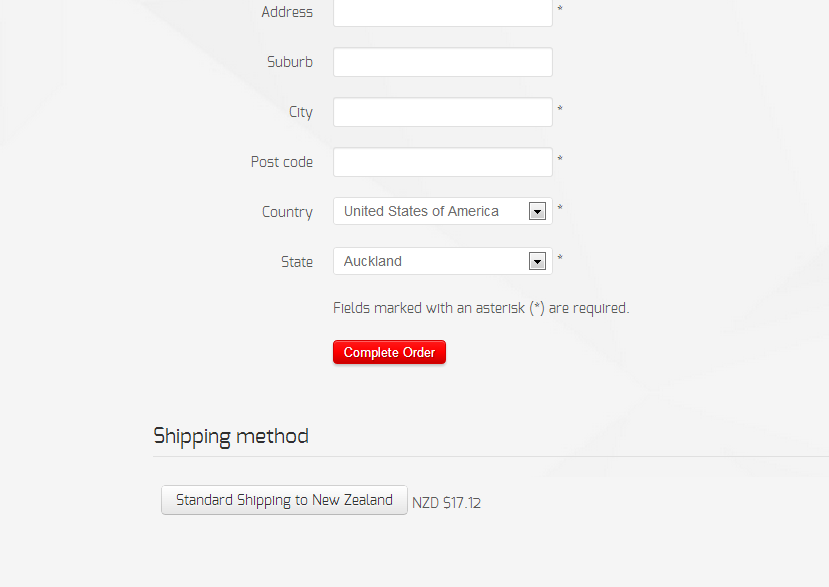
Cheers, Nick
Cheers, Nick
Please Log in or Create an account to join the conversation.
13 years 1 month ago #118489
by Xavier
Replied by Xavier on topic geolocation filling of address fields, country
Hi,
I made changes in the display function, of the class "hikashopDropdown", thanks to use that code:
I made changes in the display function, of the class "hikashopDropdown", thanks to use that code:
Code:
function display($field, $value, $map, $inside, $options = '', $test = false, $allFields = null, $allValues = null){
$string = '';
if(!empty($field->field_value) && !is_array($field->field_value)){
$field->field_value = $this->parent->explodeValues($field->field_value);
}
if(empty($field->field_value) || !count($field->field_value)){
return '<input type="hidden" name="'.$map.'" value="" />';
}
if($this->type == "multiple"){
$string.= '<input type="hidden" name="'.$map.'" value=" " />';
$map.='[]';
$arg = 'multiple="multiple"';
if(!empty($field->field_options['size'])) $arg .= ' size="'.intval($field->field_options['size']).'"';
}else{
$arg = 'size="1"';
if(is_string($value)&& empty($value) && !empty($field->field_value)){
$found = false;
$first = false;
foreach($field->field_value as $oneValue => $title){
if($first===false){
$first=$oneValue;
}
if($oneValue==$value){
$found = true;
break;
}
}
//set default value for IE
if(!$found){
$value = $first;
}
}
}
$string .= '<select id="'.$this->prefix.$field->field_namekey.$this->suffix.'" name="'.$map.'" '.$arg.$options.'>';
if(empty($field->field_value))
return $string.'</select>';
$app = JFactory::getApplication();
$admin = $app->isAdmin();
foreach($field->field_value as $oneValue => $title){
if(isset($field->field_default) && array_key_exists($field->field_default, $field->field_value)){
if($oneValue === $field->field_default){
$selected = (is_string($field->field_default) && $oneValue === $field->field_default) || is_array($field->field_default) && in_array($oneValue,$field->field_default) ? 'selected="selected" ' : '';
}else{
$selected = ((int)$title->disabled && !$admin) ? 'disabled="disabled" ' : '';
}
}else{
$selected = ((int)$title->disabled && !$admin) ? 'disabled="disabled" ' : '';
$selected .= ((is_numeric($value) && is_numeric($oneValue) AND $oneValue == $value) || (is_string($value) && $oneValue === $value) || is_array($value) && in_array($oneValue,$value)) ? 'selected="selected" ' : '';
}
$id = $this->prefix.$field->field_namekey.$this->suffix.'_'.$oneValue;
$string .= '<option value="'.$oneValue.'" id="'.$id.'" '.$selected.'>'.$this->trans($title->value).'</option>';
}
$string .= '</select>';
return $string;
}
Please Log in or Create an account to join the conversation.
13 years 1 month ago #118498
by triotech
Replied by triotech on topic geolocation filling of address fields, country
Yes, this now works just fine. Thanks !
Please Log in or Create an account to join the conversation.
10 years 7 months ago #231098
by mymall
Replied by mymall on topic geolocation filling of address fields, country
Sorry to open this thread again but am truing to achieve the same (populating Country, City and street from the Geolocatin Plugin)
I have hisashop 2.5.1, I changed the filed.php file as per the above, I enabled the plugin, select yes for Customers geolocation, but the country and city) still empty
Please advice what am missing
thanks
I have hisashop 2.5.1, I changed the filed.php file as per the above, I enabled the plugin, select yes for Customers geolocation, but the country and city) still empty
Please advice what am missing
thanks
Please Log in or Create an account to join the conversation.
10 years 7 months ago #231139
by Xavier
Replied by Xavier on topic geolocation filling of address fields, country
Hi,
This geolocation plugin does not allow to fill the state and country fields of the address.
It would require a custom plugin to allow that.
This geolocation plugin does not allow to fill the state and country fields of the address.
It would require a custom plugin to allow that.
Please Log in or Create an account to join the conversation.
Time to create page: 0.260 seconds