

- Posts: 214
- Thank you received: 1
Editing the Billing Address
13 years 3 months ago #117488
by matps
Editing the Billing Address was created by matps
Hi There,
I'm just wondering, if you look at the Billing address in the image I'm attaching, everything looks a little squashed.
I would like to change the layout a little (basically put a gap between the two addresses, move the town to it's own line etc), where abouts would I look? I'm in Views atm but I'm not sure what I'm looking for.
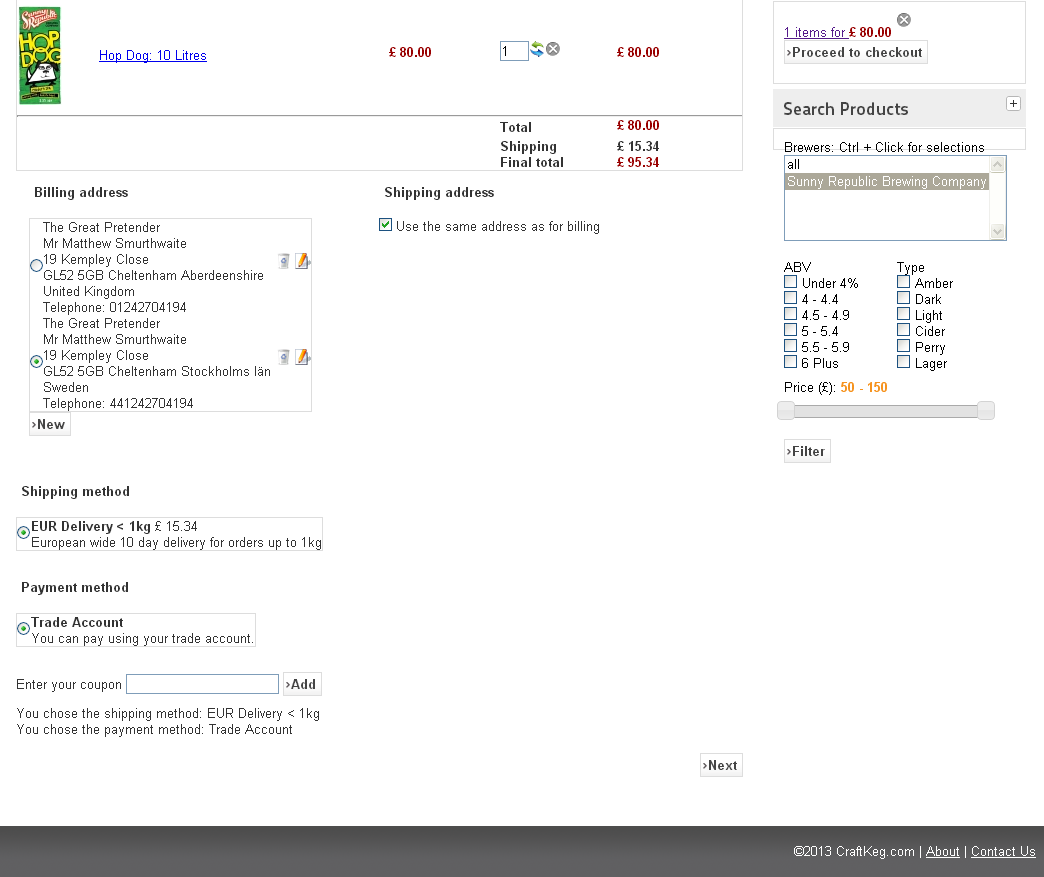
I'm just wondering, if you look at the Billing address in the image I'm attaching, everything looks a little squashed.
I would like to change the layout a little (basically put a gap between the two addresses, move the town to it's own line etc), where abouts would I look? I'm in Views atm but I'm not sure what I'm looking for.
Please Log in or Create an account to join the conversation.

Less
More
- Posts: 12953
- Thank you received: 1778
13 years 3 months ago #117496
by Mohamed Thelji
Replied by Mohamed Thelji on topic Editing the Billing Address
Hi,
I think that you'll probably be able to do that by using some CSS code or by editing your address and address_view file of your checkout view of your front-end template, through "Hikashop->Display->Views"
I think that you'll probably be able to do that by using some CSS code or by editing your address and address_view file of your checkout view of your front-end template, through "Hikashop->Display->Views"
The following user(s) said Thank You: matps
Please Log in or Create an account to join the conversation.
13 years 3 months ago #117500
by matps
Replied by matps on topic Editing the Billing Address
Thanks for the advice Mohamed, turns out what I was after was in address / address_template.php.
Please Log in or Create an account to join the conversation.
13 years 3 weeks ago #127583
by IanK
Replied by IanK on topic Editing the Billing Address
matps - what did you do in the file to edit the spacing, and where exactly did you find the file?
Thanks!
Thanks!
Please Log in or Create an account to join the conversation.

13 years 3 weeks ago #127604
by nicolas
Replied by nicolas on topic Editing the Billing Address
If you want to space out the elements in the address template, simply add spaces, line returns in it. Make sure that you're doing the change for all the address_template files. If you don't see the changes, it's maybe that you're not editing the correct one.
The following user(s) said Thank You: IanK
Please Log in or Create an account to join the conversation.
13 years 3 weeks ago #127623
by IanK
Replied by IanK on topic Editing the Billing Address
Thanks Nicolas, I worked out how to get the lines the way I want them. However I'd like to have a space after the telephone number, and I couldn't find out how to do this one.
Can I also ask where I should edit to get the 'Shipping Address' and 'Billing Address' legend colour changed from black to light blue, as in the Shipping Method and Payment method legend. Thanks!
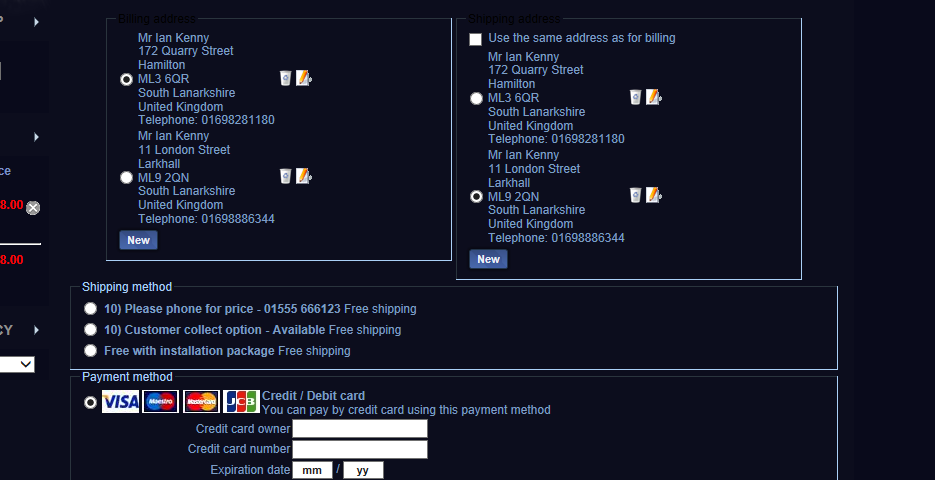
Can I also ask where I should edit to get the 'Shipping Address' and 'Billing Address' legend colour changed from black to light blue, as in the Shipping Method and Payment method legend. Thanks!
Please Log in or Create an account to join the conversation.

13 years 3 weeks ago #127636
by Jerome
Jerome - Obsidev.com
HikaMarket & HikaSerial developer / HikaShop core dev team.
Replied by Jerome on topic Editing the Billing Address
Hi,
That's not HikaShop which define it but your template. We do not specify colors in the HikaShop CSS because it's not his goal.
I will recommend you the customization documentation:
www.hikashop.com/support/integrated-docu...ize-the-display.html
Regards,
I think that if you are talking about adding some space between two addresses, the best will be to use some CSS.However I'd like to have a space after the telephone number
Same thing for the legend colors.I also ask where I should edit to get the 'Shipping Address' and 'Billing Address' legend colour changed from black to light blue
That's not HikaShop which define it but your template. We do not specify colors in the HikaShop CSS because it's not his goal.
I will recommend you the customization documentation:
www.hikashop.com/support/integrated-docu...ize-the-display.html
Regards,
Jerome - Obsidev.com
HikaMarket & HikaSerial developer / HikaShop core dev team.
Please Log in or Create an account to join the conversation.
12 years 9 months ago #139618
by IanK
Replied by IanK on topic Editing the Billing Address
I've tried to add for the above question the following css - but it makes no difference to the layout. Can you help?
.hikashop_checkout_billing_address_info {
padding-bottom: 20px !important;
}
.hikashop_checkout_billing_address_info {
padding-bottom: 20px !important;
}
Please Log in or Create an account to join the conversation.
Less
More
- Posts: 12953
- Thank you received: 1778
12 years 9 months ago #139636
by Mohamed Thelji
Replied by Mohamed Thelji on topic Editing the Billing Address
Hi,
Can you show me exactly what you want to do through some screenshots and give me a link to the page where you have your issue so that I can directly check your CSS code ?
Can you show me exactly what you want to do through some screenshots and give me a link to the page where you have your issue so that I can directly check your CSS code ?
Please Log in or Create an account to join the conversation.
12 years 9 months ago #139640
by IanK
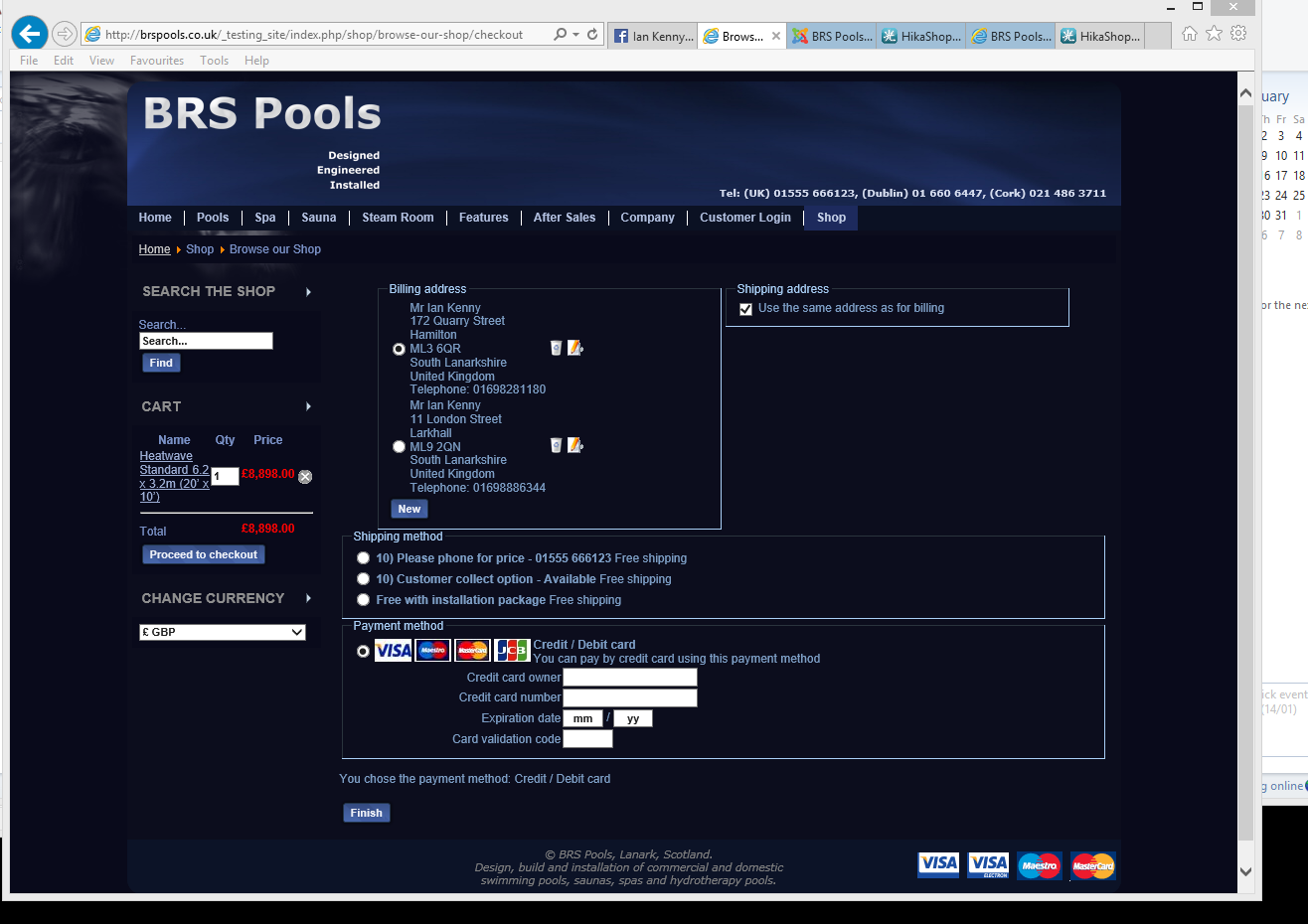
Mohamed,
You will notice that there are two possible billing addresses, and two possible shipping addresses. They are very close together, one above the other. What I would like to do is introduce a space between them, and I suspect the best way to do this is to add padding after the telephone number, which is what I was trying to do.
The page with the issue requires you to register, login and make a purchase, so to save you having to do this,
the direct link to the css file is www.brspools.co.uk/_testing_site/media/c...frontend_custom2.css
Replied by IanK on topic Editing the Billing Address
Mohamed,
You will notice that there are two possible billing addresses, and two possible shipping addresses. They are very close together, one above the other. What I would like to do is introduce a space between them, and I suspect the best way to do this is to add padding after the telephone number, which is what I was trying to do.
The page with the issue requires you to register, login and make a purchase, so to save you having to do this,
the direct link to the css file is www.brspools.co.uk/_testing_site/media/c...frontend_custom2.css
Please Log in or Create an account to join the conversation.

12 years 9 months ago #139659
by Xavier
Replied by Xavier on topic Editing the Billing Address
Hi,
You can use the following css property:
You can use the following css property:
Code:
.hikashop_checkout_billing_address tr td, .hikashop_checkout_shipping_address tr td{
padding-bottom: 20px !important;
}
Please Log in or Create an account to join the conversation.
12 years 9 months ago #139667
by IanK
Replied by IanK on topic Editing the Billing Address
Thanks for the reply Xavier, unfortunately this does not work 
Please Log in or Create an account to join the conversation.
Less
More
- Posts: 12953
- Thank you received: 1778
12 years 9 months ago #139855
by Mohamed Thelji
Replied by Mohamed Thelji on topic Editing the Billing Address
Hi,
I wanted a direct access to your website so that I can directly test what CSS code would be the best to do what you want to do ? Can you give me a link to your website and a test account ?
I wanted a direct access to your website so that I can directly test what CSS code would be the best to do what you want to do ? Can you give me a link to your website and a test account ?
Please Log in or Create an account to join the conversation.
12 years 9 months ago #139952
by IanK
Replied by IanK on topic Editing the Billing Address
I've sent you a PM Mohamed. (I think!)
Please Log in or Create an account to join the conversation.
Time to create page: 0.089 seconds