

- Posts: 32
- Thank you received: 1
Minimum Order Value for each location
13 years 2 months ago #121915
by shivali
Minimum Order Value for each location was created by shivali
Hi there,
I am working on a restaurant website with online ordering. I want to add the following features.
1. Give Delivery Zones (shipping locations) and Assign minimum Order value for each delivery zone.
2. If the customers order is less that the value assigned for his delivery zone, then the order cannot be processed and he gets a message on the check out screen that his order is less than the minimum order value for his location and as such cannot be delivered.
Please can you help me on how to go about doing this?
thanks.
Please Log in or Create an account to join the conversation.

Less
More
- Posts: 12953
- Thank you received: 1778
13 years 2 months ago #121928
by Mohamed Thelji
Replied by Mohamed Thelji on topic Minimum Order Value for each location
Hi,
The solution will only be to create a manual shipping method per delivery zone through "Hikashop->System->Shipping methods", and use the "Zone" and "Minimum price" options of each manual shipping method that you will have to create.
Hope this will help you.
The solution will only be to create a manual shipping method per delivery zone through "Hikashop->System->Shipping methods", and use the "Zone" and "Minimum price" options of each manual shipping method that you will have to create.
Hope this will help you.
Please Log in or Create an account to join the conversation.
13 years 2 months ago #121942
by shivali
Replied by shivali on topic Minimum Order Value for each location
Hi Mohamed,
By doing that, the customer will be charged the minimum shipping amount on top of his actual order right? What I understand from Shipping is that based on your location, there will be a charge to ship the product. in my case, to deliver the food. But this is not what I am looking at.
I want that if a customer places an ordering from a place X and his order value is less than lets say 50 USD, then the order will not be processed at all since the min order for delivery to place X is 60 USD. (Based on where a customer is placing an order, the minimum order amount value will differ. )
The customer should also not get an option to select the shipping method since it will just be one i.e. Home delivery. (it is a restaurant) The shipping method will automatically be detected based on the address he puts while registering.
thanks.
Please Log in or Create an account to join the conversation.
Less
More
- Posts: 12953
- Thank you received: 1778
13 years 2 months ago #121958
by Mohamed Thelji
To do it you'll just have to create shipping methods with different zone restrictions.
you should create shipping methods with different zone restrictions, so that your customer will have only 1 or 0 shipping method regarding his delivery address and his order value.
Replied by Mohamed Thelji on topic Minimum Order Value for each location
If your customer don't have any shipping method available for his zone because his order value is less than 60USD, he won't be able to complete his order.shivali wrote: I want that if a customer places an ordering from a place X and his order value is less than lets say 50 USD, then the order will not be processed at all since the min order for delivery to place X is 60 USD. (Based on where a customer is placing an order, the minimum order amount value will differ. )
To do it you'll just have to create shipping methods with different zone restrictions.
shivali wrote: The customer should also not get an option to select the shipping method since it will just be one i.e. Home delivery. (it is a restaurant) The shipping method will automatically be detected based on the address he puts while registering.
you should create shipping methods with different zone restrictions, so that your customer will have only 1 or 0 shipping method regarding his delivery address and his order value.
Please Log in or Create an account to join the conversation.
13 years 2 months ago #121989
by shivali
Replied by shivali on topic Minimum Order Value for each location
Hi Mohamed,
Thanks for your reply. Here is what I have done.
I have created a custom field (display >Custom field) called delivery area of "Field type" ZONE and selected the "Zone" as SHIPPING ZONE.
I have also created separate shipping methods (using hikashop manual shipping plugin) for each zone. Under the restrictions I have applied the respective shipping zones as Zones and I have also restricted the shipping method for each zone with a minimum order value.
However, after I do this, on the front end, when a customer places an order he is getting an option to select from all the shipping methods I have created at the backend. ie. all the shipping methods are visible! What I want is that he should just get the shipping method that I have defined for his delivery area.
To explain better, I have attached screenshots with my message. I can give you access to the back end of the site if it helps.
Thanks.
Please Log in or Create an account to join the conversation.

13 years 2 months ago #122044
by Jerome
Jerome - Obsidev.com
HikaMarket & HikaSerial developer / HikaShop core dev team.
Replied by Jerome on topic Minimum Order Value for each location
Hi,
I just see one shipping configuration. We can't see the two others, in order to understand why they are displayed if they shouldn't, the best is to see their configurations.
Regards,
I just see one shipping configuration. We can't see the two others, in order to understand why they are displayed if they shouldn't, the best is to see their configurations.
Regards,
Jerome - Obsidev.com
HikaMarket & HikaSerial developer / HikaShop core dev team.
Please Log in or Create an account to join the conversation.
13 years 2 months ago #122083
by shivali
Replied by shivali on topic Minimum Order Value for each location
Hello Jerome,
Please see attached. Thanks.
Shivali
Please see attached. Thanks.
Shivali
Please Log in or Create an account to join the conversation.
Less
More
- Posts: 12953
- Thank you received: 1778
13 years 2 months ago #122107
by Mohamed Thelji
Replied by Mohamed Thelji on topic Minimum Order Value for each location
Can you give me a link to your website for testing purpose ?
Please Log in or Create an account to join the conversation.
13 years 2 months ago #122112
by shivali
Replied by shivali on topic Minimum Order Value for each location
Hi there...here it is:
flames.ezeeapps.com/new2/hikashop-menu-f...gory/26-sides-salads
Please Log in or Create an account to join the conversation.
Less
More
- Posts: 12953
- Thank you received: 1778
13 years 2 months ago #122124
by Mohamed Thelji
Replied by Mohamed Thelji on topic Minimum Order Value for each location
Did you put an address action, before or through your shipping action's step ? if not can you do it and test it again, because you can't use your shipping zone restrictions if your customers can't add their delivery address.
Please Log in or Create an account to join the conversation.
13 years 2 months ago #122129
by shivali
Replied by shivali on topic Minimum Order Value for each location
Hi Mohamed,
How do I do that? Not sure how to put an address action. I put an address on the workflow step. Pls see attached screenshot. However I am guessing this is not what you mean.
Thanks.
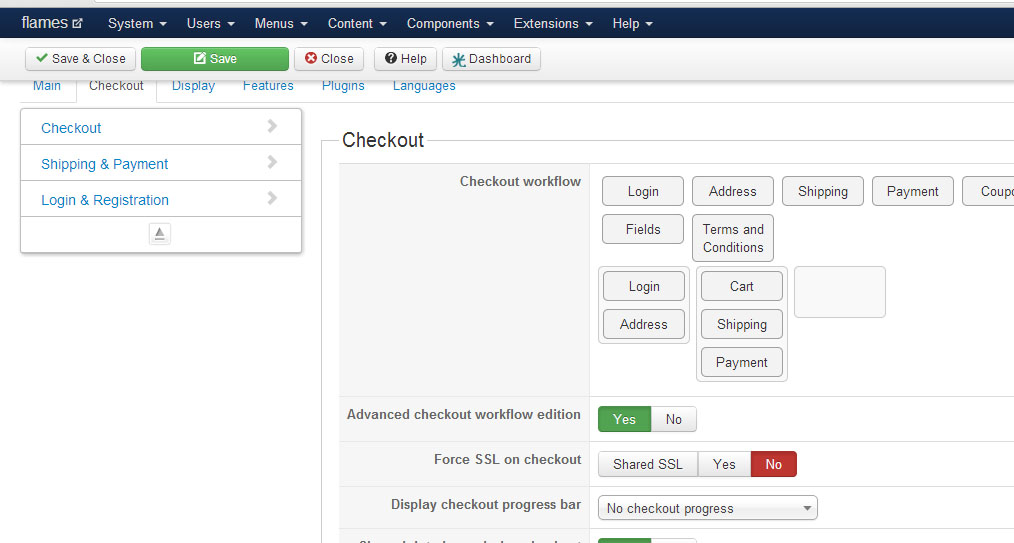
How do I do that? Not sure how to put an address action. I put an address on the workflow step. Pls see attached screenshot. However I am guessing this is not what you mean.
Thanks.
Please Log in or Create an account to join the conversation.
Less
More
- Posts: 12953
- Thank you received: 1778
13 years 2 months ago #122288
by Mohamed Thelji
Replied by Mohamed Thelji on topic Minimum Order Value for each location
I've dome some other tests through your website, and it seems to be working fine, if I order for less than 60USD, I'm not able to complete my order.
Also, you should download the last Hikashop versionthrough our website and install it again, because we made some fix regarding the display of shipping error messages.
Also, you should download the last Hikashop versionthrough our website and install it again, because we made some fix regarding the display of shipping error messages.
Please Log in or Create an account to join the conversation.
13 years 2 months ago #122637
by shivali
Replied by shivali on topic Minimum Order Value for each location
Hi Mohamed,
I have checked and double checked....but it is not working...What I want is based on the customers location selection (delivery zone) at the time of logging in, the shipping method displayed should also be that. What is happening as of now is that all the shipping methods defined at the backend are showing up on the front at the time of checkout. Let me be more clear. For eg: At the time of logging in, I have defined my delivery zone to be Dubai Marina....then the shipping method displayed at the time of checking out should also be the shipping for dubai marina...and not Dubai Marina, JBR & Jumeriah Lakes Towers. (these are the 3 shipping methods I have defined at the back for testing purposes). Pease help.
thanks.
Please Log in or Create an account to join the conversation.
Less
More
- Posts: 12953
- Thank you received: 1778
13 years 2 months ago #122670
by Mohamed Thelji
Replied by Mohamed Thelji on topic Minimum Order Value for each location
Ok, so can you give me a temporary back-end access for testing purpose through a private message ?
Please Log in or Create an account to join the conversation.
13 years 2 months ago #122685
by shivali
Replied by shivali on topic Minimum Order Value for each location
Hi,
I have sent you the details in a private message. Thanks.
Shivali
I have sent you the details in a private message. Thanks.
Shivali
Please Log in or Create an account to join the conversation.
Less
More
- Posts: 12953
- Thank you received: 1778
13 years 2 months ago #122717
by Mohamed Thelji
Replied by Mohamed Thelji on topic Minimum Order Value for each location
Hi,
The problem was coming from your custom fields configuration, so now your restrictions should work.
The problem was coming from your custom fields configuration, so now your restrictions should work.
The following user(s) said Thank You: shivali
Please Log in or Create an account to join the conversation.
13 years 2 months ago #122754
by shivali
Replied by shivali on topic Minimum Order Value for each location
Thank you!! tested and it works! Can you pls let me know what exact configuration was wrong so that I do not repeat it again.
Cheers
Shivali
Cheers
Shivali
Please Log in or Create an account to join the conversation.
Less
More
- Posts: 12953
- Thank you received: 1778
13 years 2 months ago #122861
by Mohamed Thelji
Replied by Mohamed Thelji on topic Minimum Order Value for each location
Hi,
The problem was coming from that fact that :
- you have changed the type of your "address_state" and "address_country" custom field
- you didn't used them through your address form but your used a single dropdown for the country, and the "adress_state2" for the state.
Regarding the state/country selection, you HAVE to use the "address_state" and "address_country" custom field and to don't change their type.
Please Log in or Create an account to join the conversation.
Time to create page: 0.139 seconds