
- Posts: 214
- Thank you received: 7
Error 1064 on checkout
- conticreative
-
 Topic Author
- Offline
Less
More
13 years 2 months ago #123473
by conticreative
Error 1064 on checkout was created by conticreative
-- url of the page with the problem -- :
dadshotsauce.net
-- HikaShop version -- :2.2.1 Essential
-- Joomla version -- : 3.1.5
-- PHP version -- :5.3
-- Browser(s) name and version -- : Chrome
-- Error-message(debug-mod must be tuned on) -- :
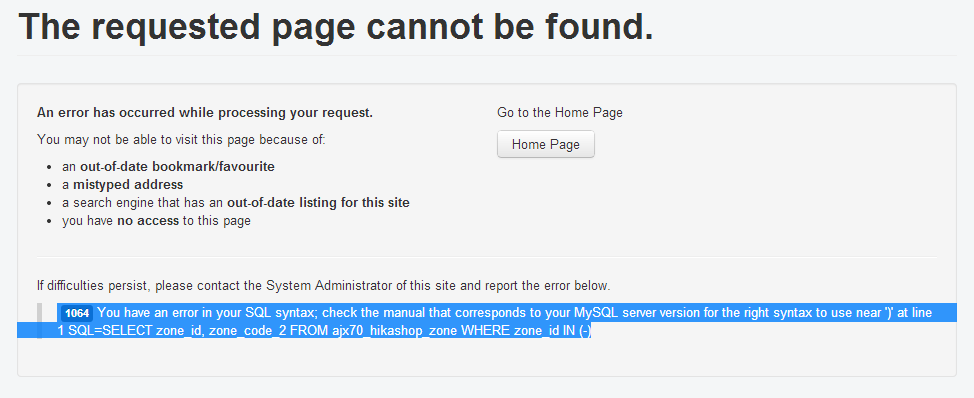
1064 You have an error in your SQL syntax; check the manual that corresponds to your MySQL server version for the right syntax to use near ')' at line 1 SQL=SELECT zone_id, zone_code_2 FROM ajx70_hikashop_zone WHERE zone_id IN (-)
I reached the error above twice. The first time I was testing the UPS shipping plugin, which was showing me a "no shipper" notice.
However, after I registered that error went away and instead a message about (I paraphrase) a "Wrongly configured or no warehouse" showed up.
In the backend I deleted the warehouse from the UPS plugin, which in fact appears not to be a necessary feature and I went to refresh the checkout page in the front end. Upon refreshing I got this "Page not found" with the error below.
I went to the home page again, and added another product but when I clicked on "Checkout" again I received the same error page.
After I deleted both products from the cart and I added a new product I clicked on checkout and it worked fine, except for the fact that I still get a "No shipping method found" even though my UPS plugin seems to be properly configured.
I am not sure if this is a big deal, but I noticed the page is also [pretty badly formatted. Is there a way to redirect to a better 404/error page than this? It's missing most of the CSS.
-- HikaShop version -- :2.2.1 Essential
-- Joomla version -- : 3.1.5
-- PHP version -- :5.3
-- Browser(s) name and version -- : Chrome
-- Error-message(debug-mod must be tuned on) -- :
1064 You have an error in your SQL syntax; check the manual that corresponds to your MySQL server version for the right syntax to use near ')' at line 1 SQL=SELECT zone_id, zone_code_2 FROM ajx70_hikashop_zone WHERE zone_id IN (-)
I reached the error above twice. The first time I was testing the UPS shipping plugin, which was showing me a "no shipper" notice.
However, after I registered that error went away and instead a message about (I paraphrase) a "Wrongly configured or no warehouse" showed up.
In the backend I deleted the warehouse from the UPS plugin, which in fact appears not to be a necessary feature and I went to refresh the checkout page in the front end. Upon refreshing I got this "Page not found" with the error below.
I went to the home page again, and added another product but when I clicked on "Checkout" again I received the same error page.
After I deleted both products from the cart and I added a new product I clicked on checkout and it worked fine, except for the fact that I still get a "No shipping method found" even though my UPS plugin seems to be properly configured.
I am not sure if this is a big deal, but I noticed the page is also [pretty badly formatted. Is there a way to redirect to a better 404/error page than this? It's missing most of the CSS.
Please Log in or Create an account to join the conversation.

13 years 2 months ago #123477
by Jerome
Jerome - Obsidev.com
HikaMarket & HikaSerial developer / HikaShop core dev team.
Replied by Jerome on topic Error 1064 on checkout
Hi,
The error is due to a wrong configuration of the UPS warehouses. You have to specify a country.
It looks like there is no "zone id" but a dash instead.
Please provide a screenshot of your UPS configuration.
Regards,
The error is due to a wrong configuration of the UPS warehouses. You have to specify a country.
It looks like there is no "zone id" but a dash instead.
Please provide a screenshot of your UPS configuration.
Regards,
Jerome - Obsidev.com
HikaMarket & HikaSerial developer / HikaShop core dev team.
Please Log in or Create an account to join the conversation.
- conticreative
-
Topic Author
- Offline
Less
More
- Posts: 214
- Thank you received: 7
13 years 2 months ago #123481
by conticreative
Replied by conticreative on topic Error 1064 on checkout
Thank you for looking ionto this. My biggest issue is that the UPS plugin is giving me a
Message
No shipping method found
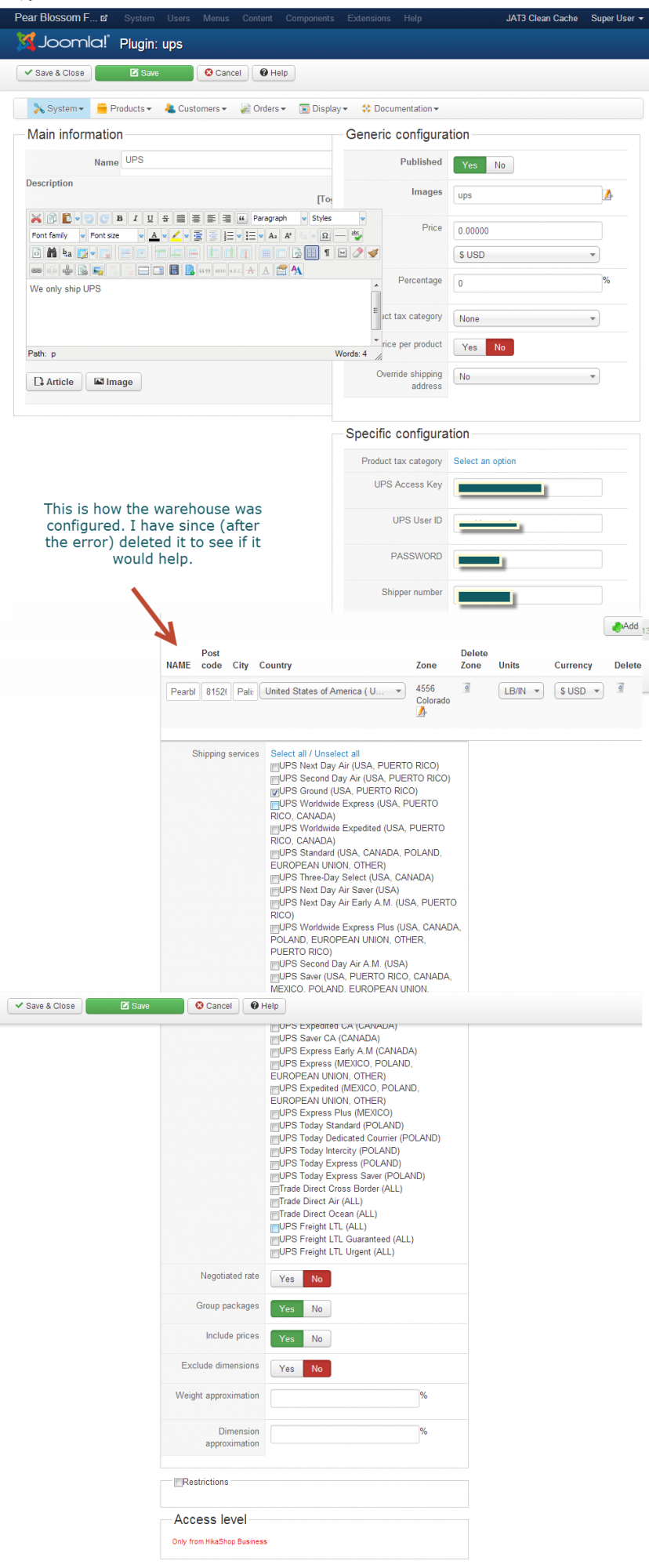
Whenever I checkout something. Here is a screenshot of the UPS plugin before I deleted the warehouse (which I can add again easily)
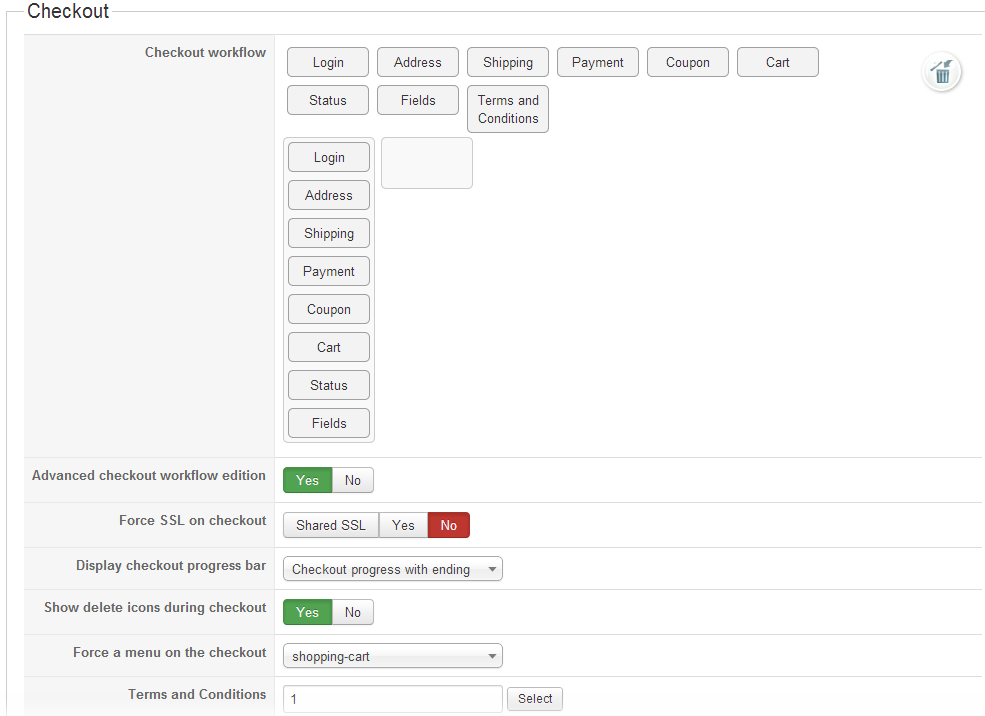
Below itr is a screenshot of my checkout preferences
Here is the checkout screenshot.
Message
No shipping method found
Whenever I checkout something. Here is a screenshot of the UPS plugin before I deleted the warehouse (which I can add again easily)
Below itr is a screenshot of my checkout preferences
Here is the checkout screenshot.
Please Log in or Create an account to join the conversation.

13 years 2 months ago #123483
by nicolas
Replied by nicolas on topic Error 1064 on checkout
You limited your warehouse to only the colorado. So the warehouse won't be available to people with an address outside colorado and thus that's why you get that error on the checkout. Remove the zone restriction on the warehouse and it should help.
Please Log in or Create an account to join the conversation.
- conticreative
-
Topic Author
- Offline
Less
More
- Posts: 214
- Thank you received: 7
13 years 2 months ago - 13 years 2 months ago #123496
by conticreative
Replied by conticreative on topic Error 1064 on checkout
Makes sense. So I entered the warehouse again (as shown in the screenshot) but in the Zone I added all 50 states (for now, then I'll add Canada and any other zone necessary).
Unfortunately, now the error message has changed to:
Message
No available warehouse found for your location
At the very least, is this a message from UPS? Neither my client or I have any clue what it's meant by "Warehouse". I have assumed it is their Shipping location.
I added the info again and in the "zone" I have opened up the zone editor, selected "states" and then USA and I selected all 57 and pressed OK.
However, here it looks like only Alaska is chosen. That's why I picked Colorado before. What do I have to chose as a warehouse zone? I tried nothing and it still gave me the same error.
This is what it looks like when I choose all the 57 options and click "OK":
The relative error is:
Message
No available warehouse found for your location
This is what it looks like without a zone at all:

And its relative error is:
Message
No shipping method found
But I noticed in the "Zone" popup that there is a class of zones called "Shipping Zones. In my case it's empty. Is that what I am missing?
PS: I am on my way to see a doctor, so I'll get back to this tomorrow or Monday. But I need to make this UPS plugin work one way or another. Thank you
Unfortunately, now the error message has changed to:
Message
No available warehouse found for your location
At the very least, is this a message from UPS? Neither my client or I have any clue what it's meant by "Warehouse". I have assumed it is their Shipping location.
I added the info again and in the "zone" I have opened up the zone editor, selected "states" and then USA and I selected all 57 and pressed OK.
However, here it looks like only Alaska is chosen. That's why I picked Colorado before. What do I have to chose as a warehouse zone? I tried nothing and it still gave me the same error.
This is what it looks like when I choose all the 57 options and click "OK":
The relative error is:
Message
No available warehouse found for your location
This is what it looks like without a zone at all:
And its relative error is:
Message
No shipping method found
But I noticed in the "Zone" popup that there is a class of zones called "Shipping Zones. In my case it's empty. Is that what I am missing?
PS: I am on my way to see a doctor, so I'll get back to this tomorrow or Monday. But I need to make this UPS plugin work one way or another. Thank you
Last edit: 13 years 2 months ago by conticreative.
Please Log in or Create an account to join the conversation.
13 years 2 months ago #123500
by nicolas
Replied by nicolas on topic Error 1064 on checkout
There is no need to enter a zone for a warehouse. In fact, you shouldn't if you only have one warehouse (one location from where you ship your goods). It's only useful when you have several warehouses, for example one in France for Europe shipping, one in the US for North America shipping, etc.
So leaving the zone parameter empty is good. If you still have an issue after that, it means that there is something else not configured properly. For example, if you're trying while you didn't enter yet your user address. The plugin requires the destination address to be able to calculate the shipping fees.
So leaving the zone parameter empty is good. If you still have an issue after that, it means that there is something else not configured properly. For example, if you're trying while you didn't enter yet your user address. The plugin requires the destination address to be able to calculate the shipping fees.
Please Log in or Create an account to join the conversation.
- conticreative
-
Topic Author
- Offline
Less
More
- Posts: 214
- Thank you received: 7
13 years 2 months ago - 13 years 2 months ago #123511
by conticreative
Replied by conticreative on topic Error 1064 on checkout
We'll, then that means something else is happening because without a warehouse specified I get the old
Message
No shipping method found
I am sure that:
1) I have an address
2) The product diomensions are specified as is the weight
3) The UPS plugin has been filled as best I could, but I took most opf the data not from my clieent,rather I logged into their account.
This is what the error looks like without the warehouse specified:
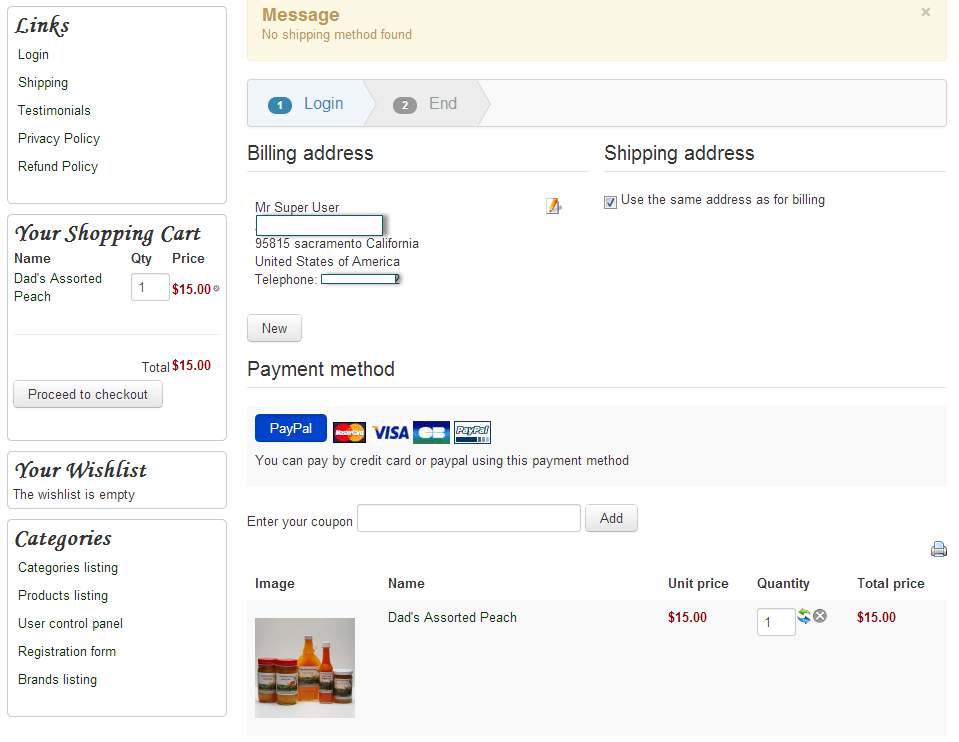
Message
No shipping method found
I am sure that:
1) I have an address
2) The product diomensions are specified as is the weight
3) The UPS plugin has been filled as best I could, but I took most opf the data not from my clieent,rather I logged into their account.
This is what the error looks like without the warehouse specified:
Last edit: 13 years 2 months ago by conticreative.
Please Log in or Create an account to join the conversation.
13 years 2 months ago #123574
by Jerome
Jerome - Obsidev.com
HikaMarket & HikaSerial developer / HikaShop core dev team.
Replied by Jerome on topic Error 1064 on checkout
Hi,
If HikaShop tells you that there is no shipping methods, it means that there is no valid shipping methods.
It is possible that the UPS plugins does not return anything, due to some restrictions, not valid address or no data received from the UPS API.
If there is no warehouse specified, I guess that UPS can't provide you any price because it does not know from where the products will be shipped.
Regards,
Jerome - Obsidev.com
HikaMarket & HikaSerial developer / HikaShop core dev team.
Please Log in or Create an account to join the conversation.
- conticreative
-
Topic Author
- Offline
Less
More
- Posts: 214
- Thank you received: 7
13 years 2 months ago #123621
by conticreative
Replied by conticreative on topic Error 1064 on checkout
Actually, the UPS plugin is active and the reason there is no warehouse specified is because we have already tried with a warehouse and that produced another error.
If you read the previous posts, there is a list of all the things I tried, including what the other moderator suggested. One of the last things he suggested I tried was to take out the Warehouse completely to see what the results were. My last post was a report on that test I performed.
What would be interesting to know for me is to take screenshots of all the areas in hikashop where there could be an error in setting up the UPS plugin. I'll be happy to take screeshots and publish them so you guys can tell me what I may be doing wrong.
Thank you.
Please Log in or Create an account to join the conversation.

13 years 2 months ago #123739
by Xavier
Replied by Xavier on topic Error 1064 on checkout
Hi,
Thanks to set again some warehouses, and give us a screenshot of the error returned.
Thanks to set again some warehouses, and give us a screenshot of the error returned.
Please Log in or Create an account to join the conversation.
13 years 1 month ago #125578
by IamJim
I also have the error. And confirming..was this ever resolved please?
No shipping method found
All UPS data correct, if I select "M" for dimensions, UPS tells me incorrect.. If I use "inches" I get this error.
Replied by IamJim on topic Error 1064 on checkout
Xavier wrote: Hi,
Thanks to set again some warehouses, and give us a screenshot of the error returned.
I also have the error. And confirming..was this ever resolved please?
No shipping method found
All UPS data correct, if I select "M" for dimensions, UPS tells me incorrect.. If I use "inches" I get this error.
Please Log in or Create an account to join the conversation.
13 years 1 month ago #125581
by nicolas
Replied by nicolas on topic Error 1064 on checkout
Which error ?
The 1064 error means that the warehouse of your plugin is not configured properly.
Please do a screenshot of the configuration so that we can see what you did in that case.
The 1064 error means that the warehouse of your plugin is not configured properly.
Please do a screenshot of the configuration so that we can see what you did in that case.
Please Log in or Create an account to join the conversation.
13 years 1 month ago #125585
by IamJim
Replied by IamJim on topic Error 1064 on checkout
How do I get the screen shot in the message? I have tried to "paste" and it does not populate here:
Using CTRL > PrintScreen I works going to email fine.
Using CTRL > PrintScreen I works going to email fine.
Please Log in or Create an account to join the conversation.
13 years 1 month ago #125587
by nicolas
Replied by nicolas on topic Error 1064 on checkout
You need to save the image with paint and then use the upload button when creating a post.
www.take-a-screenshot.org/
www.take-a-screenshot.org/
Please Log in or Create an account to join the conversation.
13 years 1 month ago #125603
by IamJim
Replied by IamJim on topic Error 1064 on checkout
OK, I figured that I guess.. I just saw others had done it...and other BB systems allow it...this one must not. Normally I would have just used Irfanview (but I do not have it installed yet on this laptop.
Please stand by...but I do have an update.
I found The client had made a mistake in Product, For "VOLUME" he had "Feet" instead of inches !!
Just letting others know, that is could be a cause also...I mean UPS does Not allow "FT" for measurements
1) The cart zone is United States of America > PA is and he was able to then SELECT the various UPS Methods Properly
2) I am in Illinois, but I still see the error... Do I have to add every single state of the United States?
Please Log in or Create an account to join the conversation.
13 years 1 month ago #125604
by nicolas
Replied by nicolas on topic Error 1064 on checkout
If it works for some addresses and not others isn't definitely that the warehouse/shipping plugin is not configured properly. You don't need several warehouses. Just configure one and don't set any zone restriction, as explained in the UPS plugin documentation.
Please Log in or Create an account to join the conversation.
13 years 1 month ago - 13 years 1 month ago #125606
by IamJim
Replied by IamJim on topic Error 1064 on checkout
I will go look for Zone Restriction as you mention..
Here is Screenshot...sorry for delay, had to install program
Attched
?? www.hikashop.com/support/documentation/9...ipping-ups-form.html ??
Zone Restriction? The word "zone" is not on that page
Here is Screenshot...sorry for delay, had to install program
Attched
?? www.hikashop.com/support/documentation/9...ipping-ups-form.html ??
Zone Restriction? The word "zone" is not on that page
Last edit: 13 years 1 month ago by IamJim.
Please Log in or Create an account to join the conversation.
13 years 1 month ago #125609
by nicolas
Replied by nicolas on topic Error 1064 on checkout
I can see the word zone on that page... Several times...
And I can see that you set the zone of your warehouse in your screenshot, while I said that you should leave it empty.
Please remove it.
And I can see that you set the zone of your warehouse in your screenshot, while I said that you should leave it empty.
Please remove it.
Please Log in or Create an account to join the conversation.
13 years 1 month ago #125613
by IamJim
Replied by IamJim on topic Error 1064 on checkout
1) Zone from Screenshot removed
2) Cart = No available warehouse found for your location
3) Zone, sorry... I must not set Focus for Edit>Find [on page]
4) re: don't set any zone restriction, as explained in the UPS plugin documentation
5) The word > restriction is non-existent on that page as well as > zone restriction
2) Cart = No available warehouse found for your location
3) Zone, sorry... I must not set Focus for Edit>Find [on page]
4) re: don't set any zone restriction, as explained in the UPS plugin documentation
5) The word > restriction is non-existent on that page as well as > zone restriction
Please Log in or Create an account to join the conversation.
13 years 1 month ago #125616
by nicolas
Replied by nicolas on topic Error 1064 on checkout
Please make sure that you selected the USA and not the USA minor islands in the country of your warehouse.
If that is ok and that the zone of the warehouse is removed it should definitely not display that warehouse not found error.
If that is ok and that the zone of the warehouse is removed it should definitely not display that warehouse not found error.
Please Log in or Create an account to join the conversation.
Time to create page: 0.143 seconds