
- Posts: 64
- Thank you received: 1
Edit layout bank information
- jarnodesign
-
 Topic Author
- Offline
Less
More
13 years 2 weeks ago - 13 years 2 weeks ago #124420
by jarnodesign
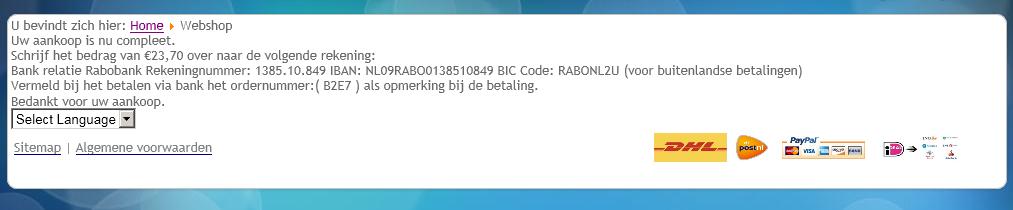
-- url of the page with the problem -- : www.erdoverlichting.nl
-- HikaShop version -- : 2.0
-- Joomla version -- : 3.1
-- PHP version -- : x.x.x
-- Browser(s) name and version -- : Firefox
When I use bank as payment method, I would like to edit the information. In the backend I use some spaces, so it look nice. But on the fontend (see image) it has no layout. How toe design / edit this layout only some enters would me enough.?
Edit layout bank information was created by jarnodesign
-- url of the page with the problem -- : www.erdoverlichting.nl
-- HikaShop version -- : 2.0
-- Joomla version -- : 3.1
-- PHP version -- : x.x.x
-- Browser(s) name and version -- : Firefox
When I use bank as payment method, I would like to edit the information. In the backend I use some spaces, so it look nice. But on the fontend (see image) it has no layout. How toe design / edit this layout only some enters would me enough.?
Last edit: 13 years 2 weeks ago by jarnodesign.
Please Log in or Create an account to join the conversation.

13 years 2 weeks ago #124449
by Jerome
Jerome - Obsidev.com
HikaMarket & HikaSerial developer / HikaShop core dev team.
Replied by Jerome on topic Edit layout bank information
Hi,
The best is to put some HTML content in order to customize the display (using "<br/>" to insert a new line, etc).
Regards,
The best is to put some HTML content in order to customize the display (using "<br/>" to insert a new line, etc).
Regards,
Jerome - Obsidev.com
HikaMarket & HikaSerial developer / HikaShop core dev team.
Please Log in or Create an account to join the conversation.
- jarnodesign
-
Topic Author
- Offline
Less
More
- Posts: 64
- Thank you received: 1
13 years 2 weeks ago - 13 years 2 weeks ago #124536
by jarnodesign
Replied by jarnodesign on topic Edit layout bank information
Thanks Jerome! That was the solution 
The first and last sentence are very close to the rest of the page and are made by hikashop. How to give them an enter? I mean the first a enter before the sentence and the last after the sentence.
Regards Jarno
The first and last sentence are very close to the rest of the page and are made by hikashop. How to give them an enter? I mean the first a enter before the sentence and the last after the sentence.
Regards Jarno
Last edit: 13 years 2 weeks ago by jarnodesign.
Please Log in or Create an account to join the conversation.
13 years 2 weeks ago - 13 years 2 weeks ago #124551
by Jerome
Jerome - Obsidev.com
HikaMarket & HikaSerial developer / HikaShop core dev team.
Replied by Jerome on topic Edit layout bank information
Hi,
Thanks
Can you give me an example ? Like that I have some difficulties to see what you mean.jarnodesign wrote: The first and last sentence are very close to the rest of the page and are made by hikashop. How to give them an enter? I mean the first a enter before the sentence and the last after the sentence.
Thanks
Jerome - Obsidev.com
HikaMarket & HikaSerial developer / HikaShop core dev team.
Last edit: 13 years 2 weeks ago by Jerome.
Please Log in or Create an account to join the conversation.
- jarnodesign
-
Topic Author
- Offline
Less
More
- Posts: 64
- Thank you received: 1
13 years 2 weeks ago #124560
by jarnodesign
Replied by jarnodesign on topic Edit layout bank information
How and where to edit the first and last sentece of the image? These are made by hikashop?
Please Log in or Create an account to join the conversation.
13 years 2 weeks ago #124561
by Jerome
Jerome - Obsidev.com
HikaMarket & HikaSerial developer / HikaShop core dev team.
Replied by Jerome on topic Edit layout bank information
Hi,
Ok, I see.
They are translations for sure
It is also the view "check_end" of the hikashoppayment check plugin.
You can override this view by putting the view file (check_end.php) in the folder "templates/your_frontend_template/hikashoppayment/check/"
Regards,
Ok, I see.
They are translations for sure
It is also the view "check_end" of the hikashoppayment check plugin.
You can override this view by putting the view file (check_end.php) in the folder "templates/your_frontend_template/hikashoppayment/check/"
Regards,
Jerome - Obsidev.com
HikaMarket & HikaSerial developer / HikaShop core dev team.
Please Log in or Create an account to join the conversation.
- jarnodesign
-
Topic Author
- Offline
Less
More
- Posts: 64
- Thank you received: 1
13 years 2 weeks ago #124607
by jarnodesign
Replied by jarnodesign on topic Edit layout bank information
Thanks! It's Dutch
Please Log in or Create an account to join the conversation.
Time to create page: 0.224 seconds