
- Posts: 172
- Thank you received: 2
items in the basket
- rockettboost
-
 Topic Author
- Offline
Less
More
13 years 1 month ago - 13 years 1 month ago #126815
by rockettboost
items in the basket was created by rockettboost
how to make a product that is added to the cart (on the checkout page) was not a link to him?
or redirect it to another page ?
hika create mysite/component/hikashop/product/1-one page
but i need to redirect this link on product page.
or redirect it to another page ?
hika create mysite/component/hikashop/product/1-one page
but i need to redirect this link on product page.
Last edit: 13 years 1 month ago by rockettboost.
Please Log in or Create an account to join the conversation.

13 years 1 month ago #126979
by Jerome
Jerome - Obsidev.com
HikaMarket & HikaSerial developer / HikaShop core dev team.
Replied by Jerome on topic items in the basket
Hi,
The link " mysite/component/hikashop/product/1-one-page " is the link to the HikaShop product page for this product.
If you don't want to display it, you have to edit the view "checkout | cart" in order to change how the products are displayed in this checkout cart.
Regards,
The link " mysite/component/hikashop/product/1-one-page " is the link to the HikaShop product page for this product.
If you don't want to display it, you have to edit the view "checkout | cart" in order to change how the products are displayed in this checkout cart.
Regards,
Jerome - Obsidev.com
HikaMarket & HikaSerial developer / HikaShop core dev team.
Please Log in or Create an account to join the conversation.
- rockettboost
-
Topic Author
- Offline
Less
More
- Posts: 172
- Thank you received: 2
13 years 1 month ago #126985
by rockettboost
Replied by rockettboost on topic items in the basket
and how to redirect the user to the page where the button "add to cart"?
Please Log in or Create an account to join the conversation.
13 years 1 month ago #127135
by Jerome
Jerome - Obsidev.com
HikaMarket & HikaSerial developer / HikaShop core dev team.
Replied by Jerome on topic items in the basket
Hi,
Can you make an understandable question please ?
Something that we can understand in order to give you an answer.
Thanks
Can you make an understandable question please ?
Something that we can understand in order to give you an answer.
Thanks
Jerome - Obsidev.com
HikaMarket & HikaSerial developer / HikaShop core dev team.
Please Log in or Create an account to join the conversation.
- rockettboost
-
Topic Author
- Offline
Less
More
- Posts: 172
- Thank you received: 2
13 years 1 month ago - 13 years 1 month ago #127136
by rockettboost
Replied by rockettboost on topic items in the basket
ok , sorry )
I have a page with the product, i add the "buy button" to this page.
i need the link of the product in the basket redirects me to the page with the product, where the "buy button" is situated.
but not to the page that creates hikashop .
how can i do this
I have a page with the product, i add the "buy button" to this page.
i need the link of the product in the basket redirects me to the page with the product, where the "buy button" is situated.
but not to the page that creates hikashop .
how can i do this
Last edit: 13 years 1 month ago by rockettboost.
Please Log in or Create an account to join the conversation.
- rockettboost
-
Topic Author
- Offline
Less
More
- Posts: 172
- Thank you received: 2
13 years 1 month ago - 13 years 1 month ago #127231
by rockettboost
Replied by rockettboost on topic items in the basket
I add a button like this

Last edit: 13 years 1 month ago by rockettboost.
Please Log in or Create an account to join the conversation.
- rockettboost
-
Topic Author
- Offline
Less
More
- Posts: 172
- Thank you received: 2
13 years 1 month ago #127317
by rockettboost
Replied by rockettboost on topic items in the basket
any idea ?
Please Log in or Create an account to join the conversation.
- rockettboost
-
Topic Author
- Offline
Less
More
- Posts: 172
- Thank you received: 2
13 years 1 month ago #127388
by rockettboost
Replied by rockettboost on topic items in the basket
Jerome, I wrote lucidly?
sorry for my english i use google translate
sorry for my english i use google translate
Please Log in or Create an account to join the conversation.
13 years 1 month ago #127444
by Jerome
Jerome - Obsidev.com
HikaMarket & HikaSerial developer / HikaShop core dev team.
Replied by Jerome on topic items in the basket
Hi,
Please note that each time you reply to your own message, you loose your position in the queue.
So more you replied, more you have to wait until we arrived to your message.
So, you use the "product insert tag" plugin.
This plugin creates an "add to cart" button thanks to the view "product | add_to_cart_listing".
Now, I need some information :
- A screenshot of your HikaShop configuration (section: Main > Cart)
- A link to your store and more precisely : the page where there is your special "add to cart"
For your screenshot, please log-in in your backend in English. It will help use to read your configuration
Regards,
Jerome - Obsidev.com
HikaMarket & HikaSerial developer / HikaShop core dev team.
Please Log in or Create an account to join the conversation.
- rockettboost
-
Topic Author
- Offline
Less
More
- Posts: 172
- Thank you received: 2
13 years 1 month ago - 13 years 1 month ago #127479
by rockettboost
Replied by rockettboost on topic items in the basket
Hello friend !
i use localhost .
here are a few screens
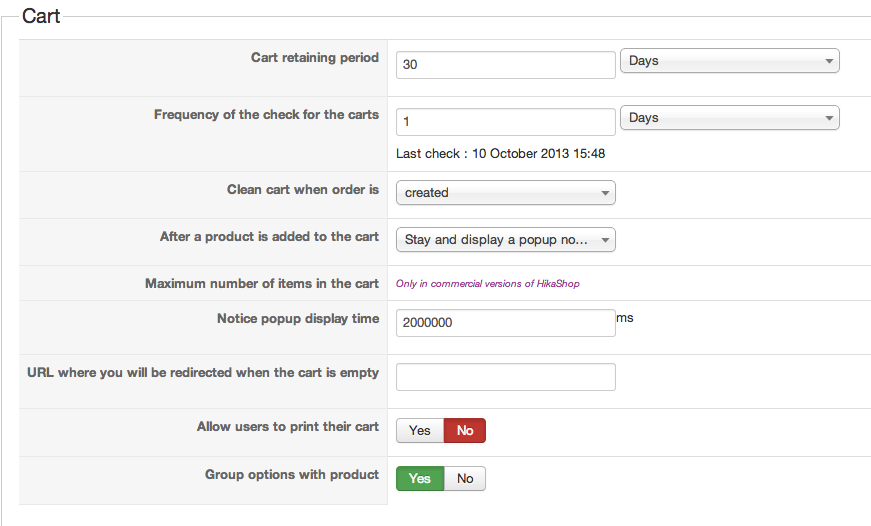
this is the page with ''product insert tag''
http://localhost:8888/demo/trenings/actors
i need the link of the product in the basket redirects me to my page
http://localhost:8888/demo/trenings/actors
but not to this page
http://localhost:8888/demo/component/hikashop/product/1-actors
i use localhost .
here are a few screens
this is the page with ''product insert tag''
http://localhost:8888/demo/trenings/actors
i need the link of the product in the basket redirects me to my page
http://localhost:8888/demo/trenings/actors
but not to this page
http://localhost:8888/demo/component/hikashop/product/1-actors
Last edit: 13 years 1 month ago by rockettboost.
Please Log in or Create an account to join the conversation.

13 years 1 month ago #127488
by Xavier
Replied by Xavier on topic items in the basket
Hi,
This will require some modifications in the view "checkout / cart" via the menu Display > Views.
Edit the part where the product name is displayed to change the link, and set the desired link.
The code line is:
And the code to change is:
You can try something like:
This will require some modifications in the view "checkout / cart" via the menu Display > Views.
Edit the part where the product name is displayed to change the link, and set the desired link.
The code line is:
Code:
<?php if(@$defaultParams['link_to_product_page']){ ?><a href="<?php echo hikashop_completeLink('product&task=show&cid='.$row->product_id.'&name='.$row->alias.$url_itemid);?>" ><?php } ?>
Code:
<?php echo hikashop_completeLink('product&task=show&cid='.$row->product_id.'&name='.$row->alias.$url_itemid);?>
You can try something like:
Code:
<?php echo JUri::base().'trenings/'.$row->product_name; ?>
The following user(s) said Thank You: rockettboost
Please Log in or Create an account to join the conversation.
- rockettboost
-
Topic Author
- Offline
Less
More
- Posts: 172
- Thank you received: 2
13 years 1 month ago - 13 years 1 month ago #127544
by rockettboost
Replied by rockettboost on topic items in the basket
hello, xavier this code doesn't work .
Last edit: 13 years 1 month ago by rockettboost.
Please Log in or Create an account to join the conversation.

13 years 1 month ago #127766
by nicolas
Replied by nicolas on topic items in the basket
Why does it not work ? Are you sure you're editing the correct file ?
Please Log in or Create an account to join the conversation.
- rockettboost
-
Topic Author
- Offline
Less
More
- Posts: 172
- Thank you received: 2
13 years 1 month ago - 13 years 1 month ago #127817
by rockettboost
Replied by rockettboost on topic items in the basket
I replace the code
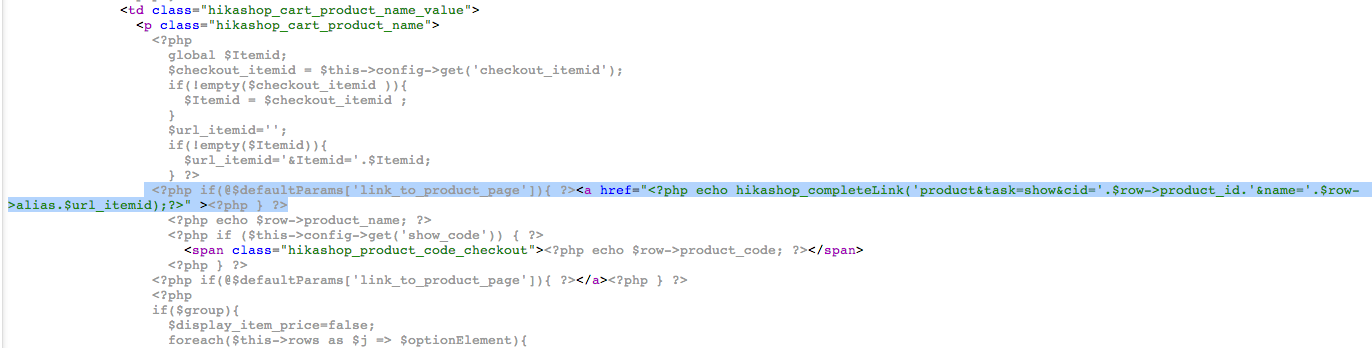
for this

and that's what happens
for this
and that's what happens
Last edit: 13 years 1 month ago by rockettboost.
Please Log in or Create an account to join the conversation.
13 years 1 month ago #127893
by Jerome
Jerome - Obsidev.com
HikaMarket & HikaSerial developer / HikaShop core dev team.
Replied by Jerome on topic items in the basket
Hi,
You misunderstood what Xavier wrote.
The code line is:
And the code to change is:
You can try something like:
It means you have to try this code
Please read carefully and if you don't understand, just tell it ; There is no problem.
Saying that "the code isn't working" is not something helpful for us, so it become more difficult to help you.
Regards,
You misunderstood what Xavier wrote.
The code line is:
Code:
<?php if(@$defaultParams['link_to_product_page']){ ?><a href="<?php echo hikashop_completeLink('product&task=show&cid='.$row->product_id.'&name='.$row->alias.$url_itemid);?>" ><?php } ?>
Code:
<?php echo hikashop_completeLink('product&task=show&cid='.$row->product_id.'&name='.$row->alias.$url_itemid);?>
Code:
<?php echo JUri::base().'trenings/'.$row->product_name; ?>
It means you have to try this code
Code:
<?php if(@$defaultParams['link_to_product_page']){ ?><a href="<?php echo JUri::base().'trenings/'.$row->product_name; ?>" ><?php } ?>
Please read carefully and if you don't understand, just tell it ; There is no problem.
Saying that "the code isn't working" is not something helpful for us, so it become more difficult to help you.
Regards,
Jerome - Obsidev.com
HikaMarket & HikaSerial developer / HikaShop core dev team.
The following user(s) said Thank You: rockettboost
Please Log in or Create an account to join the conversation.
- rockettboost
-
Topic Author
- Offline
Less
More
- Posts: 172
- Thank you received: 2
13 years 1 month ago - 13 years 1 month ago #127900
by rockettboost
Replied by rockettboost on topic items in the basket
Hi Jerome , i try this code . but nothing (
error 404
http://localhost:8888/demo/trenings/%D0%9A%D1%83%D1%80%D1%81%D1%8B%20%D1%82%D0%B5%D0%BB%D0%B5%D0%B2%D0%B5%D0%B4%D1%83%D1%89%D0%B8%D1%85
maybe it's because I have a product name on Russian, and the alias of the page on English?
after insert your code
P.S ''thanks , you corrected me"
Code:
<?php if(@$defaultParams['link_to_product_page']){ ?><a href="<?php echo JUri::base().'trenings/'.$row->product_name; ?>" ><?php } ?>
error 404
http://localhost:8888/demo/trenings/%D0%9A%D1%83%D1%80%D1%81%D1%8B%20%D1%82%D0%B5%D0%BB%D0%B5%D0%B2%D0%B5%D0%B4%D1%83%D1%89%D0%B8%D1%85
maybe it's because I have a product name on Russian, and the alias of the page on English?
after insert your code
P.S ''thanks , you corrected me"
Last edit: 13 years 1 month ago by rockettboost.
Please Log in or Create an account to join the conversation.
- rockettboost
-
Topic Author
- Offline
Less
More
- Posts: 172
- Thank you received: 2
13 years 1 month ago #127906
by rockettboost
Replied by rockettboost on topic items in the basket
I found a reason
when the product name on the same language as the page name - it works fine .
but my " product insert tags " used not only in the "trainings" category .
i use " product insert tags " in another categories :
demo/mainpage/product1 ,
demo/contacts/product2
demo/trenings/radio/product3,
demo/lessons/audio/product4
etc.
how to implement it ?
Please Log in or Create an account to join the conversation.
13 years 1 month ago #128089
by Xavier
Replied by Xavier on topic items in the basket
Hi,
You can use "$row->product_alias" instead of "$row->product_name".
To have a link to other categories, you can use the custom fields (business edition).
Create a custom field in the table product, named for example "link", and then in the product edition page (backend hikashop) set the desired link to the product, it should look like: "mainpage/product1"
Then in the previous view, use the code:
Code:
<?php if(@$defaultParams['link_to_product_page']){ ?><a href="<?php echo JUri::base().$row->link; ?>" ><?php } ?>
The following user(s) said Thank You: rockettboost
Please Log in or Create an account to join the conversation.
- rockettboost
-
Topic Author
- Offline
Less
More
- Posts: 172
- Thank you received: 2
13 years 1 month ago #128144
by rockettboost
Replied by rockettboost on topic items in the basket
product_alias - work fine !!!
thx for your help guys )
thx for your help guys )
Please Log in or Create an account to join the conversation.
Time to create page: 0.119 seconds