

- Posts: 3
- Thank you received: 0
Checkout products not in layout
13 years 1 month ago - 13 years 1 month ago #128747
by dndcarni
Checkout products not in layout was created by dndcarni
-- url of the page with the problem -- :
dndcarnival.cloudaccess.net/checkoutpage.html
-- HikaShop version -- : 2.2.2
-- Joomla version -- : 3.1.5
-- Browser(s) name and version -- : Chrome
So I'm very new to Hikashop and eCommerce in general, been figuring out this extension fairly well so far though.
I've run into a problem I cant seem to fix or find documentation on.
Whenever you have something in the cart and you go to the checkout page,some of the information is displayed outside of my layout, like it is floating to the right.
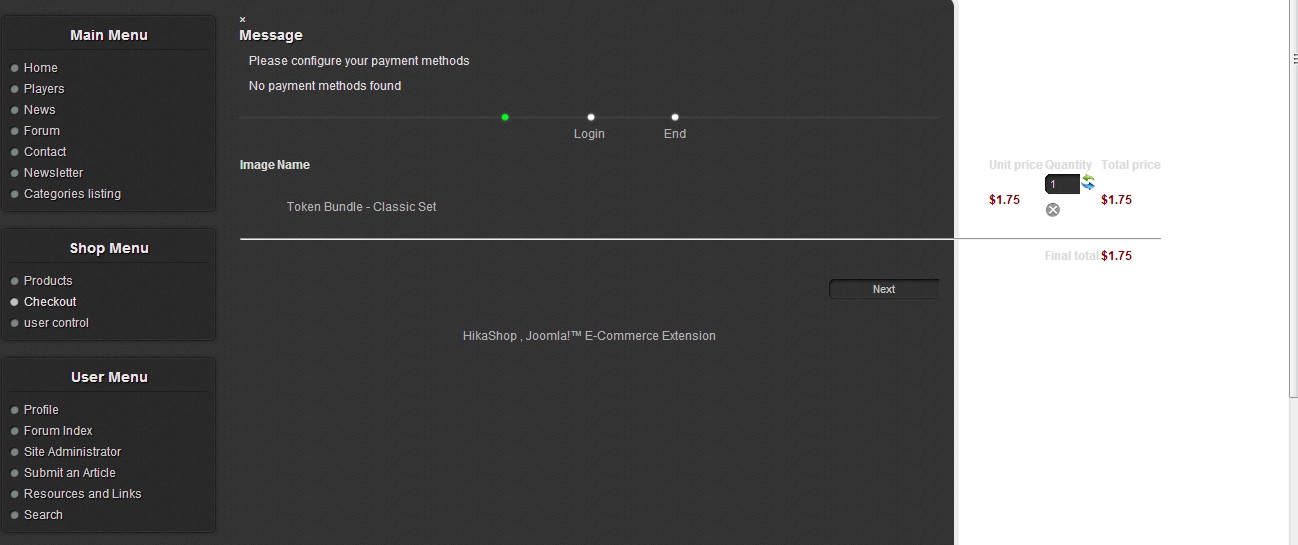
Any help would be appreciated.
-- HikaShop version -- : 2.2.2
-- Joomla version -- : 3.1.5
-- Browser(s) name and version -- : Chrome
So I'm very new to Hikashop and eCommerce in general, been figuring out this extension fairly well so far though.
I've run into a problem I cant seem to fix or find documentation on.
Whenever you have something in the cart and you go to the checkout page,some of the information is displayed outside of my layout, like it is floating to the right.
Any help would be appreciated.
Last edit: 13 years 1 month ago by dndcarni.
Please Log in or Create an account to join the conversation.

Less
More
- Posts: 12953
- Thank you received: 1778
13 years 1 month ago #128794
by Mohamed Thelji
Replied by Mohamed Thelji on topic Checkout products not in layout
Hi,
I think that using some CSS code like this will probably do the job :
I think that using some CSS code like this will probably do the job :
Code:
.hikashop_cart_product_name{
width:10px!important;
}
The following user(s) said Thank You: dndcarni
Please Log in or Create an account to join the conversation.
13 years 1 month ago - 13 years 1 month ago #128916
by dndcarni
Replied by dndcarni on topic Checkout products not in layout
Thank you!
Although Im not totally sure where i should place this code?
should i find a certain plugin theme plugin, or put in the CSS section or another part of the configuration settings?
I did find this in the 'frontend_custom.css' :
I changed the "width:40%;" to "width:10px!important;"
but after saving it and refreshing my page, there didnt seem to be a change.
I seemed to have found what could be the problelm when inspecting the elements with chrome.
in the elements bar i found this:
in the browser window the inspect element popup for the above(bottom) line declares this:
it is indeed too wide.
The width should be 700px, but i cant seem to find the correlating table or a place in the CSS to fix it.
Although Im not totally sure where i should place this code?
should i find a certain plugin theme plugin, or put in the CSS section or another part of the configuration settings?
I did find this in the 'frontend_custom.css' :
Code:
#hikashop_cart .hikashop_cart_product_name a{
font-weight:bold;
}
.hikashop_cart_product_name_value{
width:40%;
}
.hikashop_cart_title{
font-weight: bold;
}
I changed the "width:40%;" to "width:10px!important;"
but after saving it and refreshing my page, there didnt seem to be a change.
I seemed to have found what could be the problelm when inspecting the elements with chrome.
in the elements bar i found this:
Code:
<div id=" hikashop_checkout_cart" class="hikashop_checkout_cart">
<table class="table table-striped table-hover" width="100%">...</table>
in the browser window the inspect element popup for the above(bottom) line declares this:
Code:
table.table.table-striped.table-hover 949px 172px
it is indeed too wide.
The width should be 700px, but i cant seem to find the correlating table or a place in the CSS to fix it.
Last edit: 13 years 1 month ago by dndcarni. Reason: More Info
Please Log in or Create an account to join the conversation.
13 years 1 month ago #128925
by dndcarni
Replied by dndcarni on topic Checkout products not in layout
I figured it out, using your code.
sorry I'm not at all experienced with using code. but i found where i just needed to add the complete lines you gave me and it worked like a charm.
Thanks again!
sorry I'm not at all experienced with using code. but i found where i just needed to add the complete lines you gave me and it worked like a charm.
Thanks again!
Please Log in or Create an account to join the conversation.
Time to create page: 0.068 seconds