
- Posts: 279
- Thank you received: 1
Cannot get taxes to work
- trogladyte
-
 Topic Author
- Offline
Less
More
12 years 11 months ago - 12 years 11 months ago #129417
by trogladyte
Cannot get taxes to work was created by trogladyte
NVM - I figured it out. Documentation could be enhanced by adding images to aid working through this.
Last edit: 12 years 11 months ago by trogladyte.
Please Log in or Create an account to join the conversation.
- trogladyte
-
Topic Author
- Offline
Less
More
- Posts: 279
- Thank you received: 1
12 years 11 months ago - 12 years 11 months ago #129424
by trogladyte
Replied by trogladyte on topic Cannot get taxes to work
NVM the NVM - it's still not working. 
1 product category - default
1 taxable zone - California @ 9.25% - everywhere else 0% (what default is set at)
I finally managed to get the 2 tax zones set up (documentation really wasn't helpful), but now it shows tax all the time, regardless of what address is typed in.
I'm totally at a loss. Can someone please help - I'm sure I'm doing something wrong, but I cannot figure it out how to make this work.
EDIT: When you get to checkout, with no address entered (I'm using guest checkout) even though the state says Alabama, the cart shows CA Tax (my label for California tax). Once you enter the full address, which is other than California the tax disappears. I need it to, by default, NOT show tax until a CA address is entered.
1 product category - default
1 taxable zone - California @ 9.25% - everywhere else 0% (what default is set at)
I finally managed to get the 2 tax zones set up (documentation really wasn't helpful), but now it shows tax all the time, regardless of what address is typed in.
I'm totally at a loss. Can someone please help - I'm sure I'm doing something wrong, but I cannot figure it out how to make this work.
EDIT: When you get to checkout, with no address entered (I'm using guest checkout) even though the state says Alabama, the cart shows CA Tax (my label for California tax). Once you enter the full address, which is other than California the tax disappears. I need it to, by default, NOT show tax until a CA address is entered.
Last edit: 12 years 11 months ago by trogladyte.
Please Log in or Create an account to join the conversation.

12 years 11 months ago #129426
by Jerome
Jerome - Obsidev.com
HikaMarket & HikaSerial developer / HikaShop core dev team.
Replied by Jerome on topic Cannot get taxes to work
Hi,
NVM the NVM okay but, there is nothing explaining your problem or any specific question.
It will be difficult to help you if you don't give us more details
Regards,
NVM the NVM okay but, there is nothing explaining your problem or any specific question.
It will be difficult to help you if you don't give us more details
Regards,
Jerome - Obsidev.com
HikaMarket & HikaSerial developer / HikaShop core dev team.
Please Log in or Create an account to join the conversation.
- trogladyte
-
Topic Author
- Offline
Less
More
- Posts: 279
- Thank you received: 1
12 years 11 months ago #129431
by trogladyte
Replied by trogladyte on topic Cannot get taxes to work
Yes, quite right Jerome. Realised how poor my post was after doing it so went back and added the edit.
Basically, I now have the taxes working correctly IF an address is entered. However, I have the default state as Alabama, which has no tax (only California has tax). When a guest hits the address entry screen only Alabama and United States of America show as completed. Even so, there is still tax shown against the purchase. I want the address entry screen NEVER to show tax. Once the address is entered, if it's CA, then tax should show. If somewhere, anywhere, else, tax should not show. As I said, ONCE you enter an address it works correctly. I just want the pre-address entry to show no tax.
URL http:digitalguarddog.com/dd_dev
HS - 2.2.2 Essentials
joomla 2.5.14
Basically, I now have the taxes working correctly IF an address is entered. However, I have the default state as Alabama, which has no tax (only California has tax). When a guest hits the address entry screen only Alabama and United States of America show as completed. Even so, there is still tax shown against the purchase. I want the address entry screen NEVER to show tax. Once the address is entered, if it's CA, then tax should show. If somewhere, anywhere, else, tax should not show. As I said, ONCE you enter an address it works correctly. I just want the pre-address entry to show no tax.
URL http:digitalguarddog.com/dd_dev
HS - 2.2.2 Essentials
joomla 2.5.14
Please Log in or Create an account to join the conversation.

12 years 11 months ago #129621
by nicolas
Replied by nicolas on topic Cannot get taxes to work
Hi,
I checked your website but no tax display before I enter my address. So I looks like it's already working like you want...
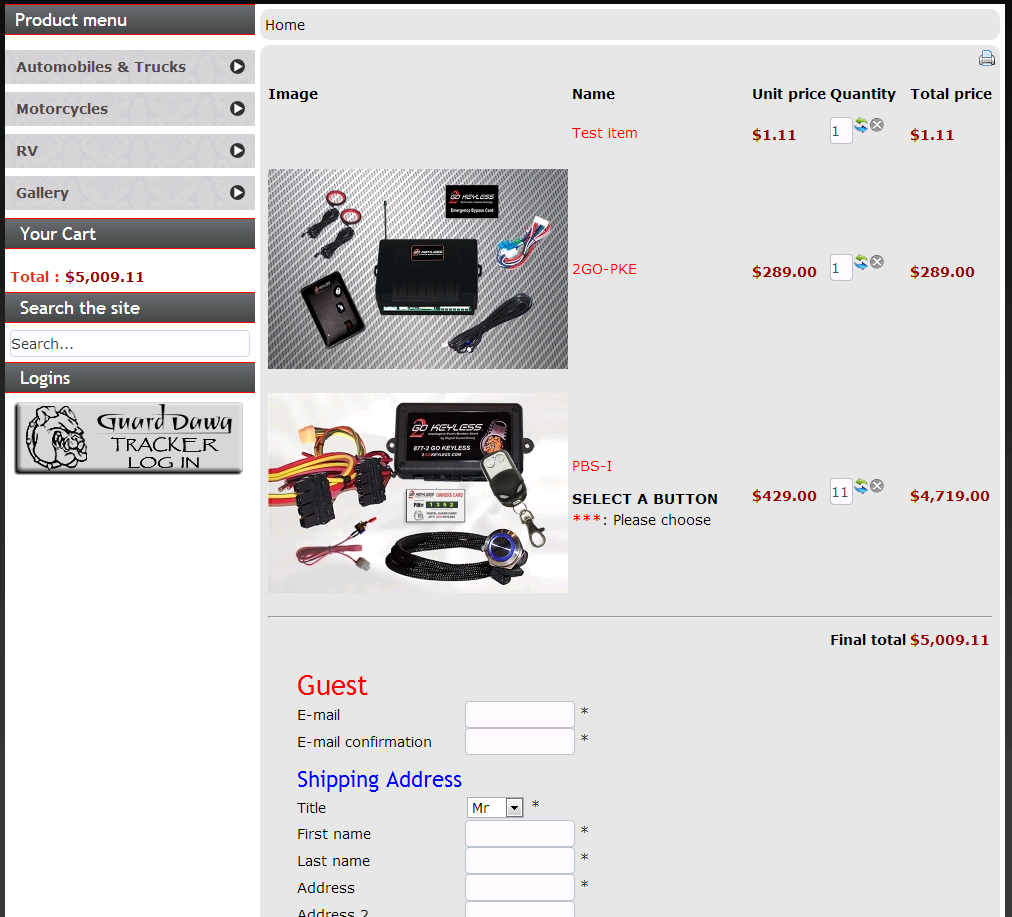
I checked your website but no tax display before I enter my address. So I looks like it's already working like you want...
Please Log in or Create an account to join the conversation.
- trogladyte
-
Topic Author
- Offline
Less
More
- Posts: 279
- Thank you received: 1
12 years 11 months ago #129723
by trogladyte
Replied by trogladyte on topic Cannot get taxes to work
Yes Nicolas it is. I'm embarrassed to say that I think Chrome has caught me out again! It has a very annoying way of handling cache so that F5 or even Ctrl-F5 doesn't always refresh as you might expect! :blush:
Please Log in or Create an account to join the conversation.
Time to create page: 0.168 seconds