
- Posts: 45
- Thank you received: 0
click shipping method = checkout
- luc.geysen@gmail.com
-
 Topic Author
- Offline
Less
More
13 years 2 weeks ago #132276
by luc.geysen@gmail.com
click shipping method = checkout was created by luc.geysen@gmail.com
-- url of the page with the problem -- :
www.feeenenridders.be
-- HikaShop version -- : 2.2.2
-- Joomla version -- : 1.5
-- PHP version -- : x.x.x
-- Browser(s) name and version -- : safari 6.1
-- Error-message(debug-mod must be tuned on) -- : Error_message
Hi,
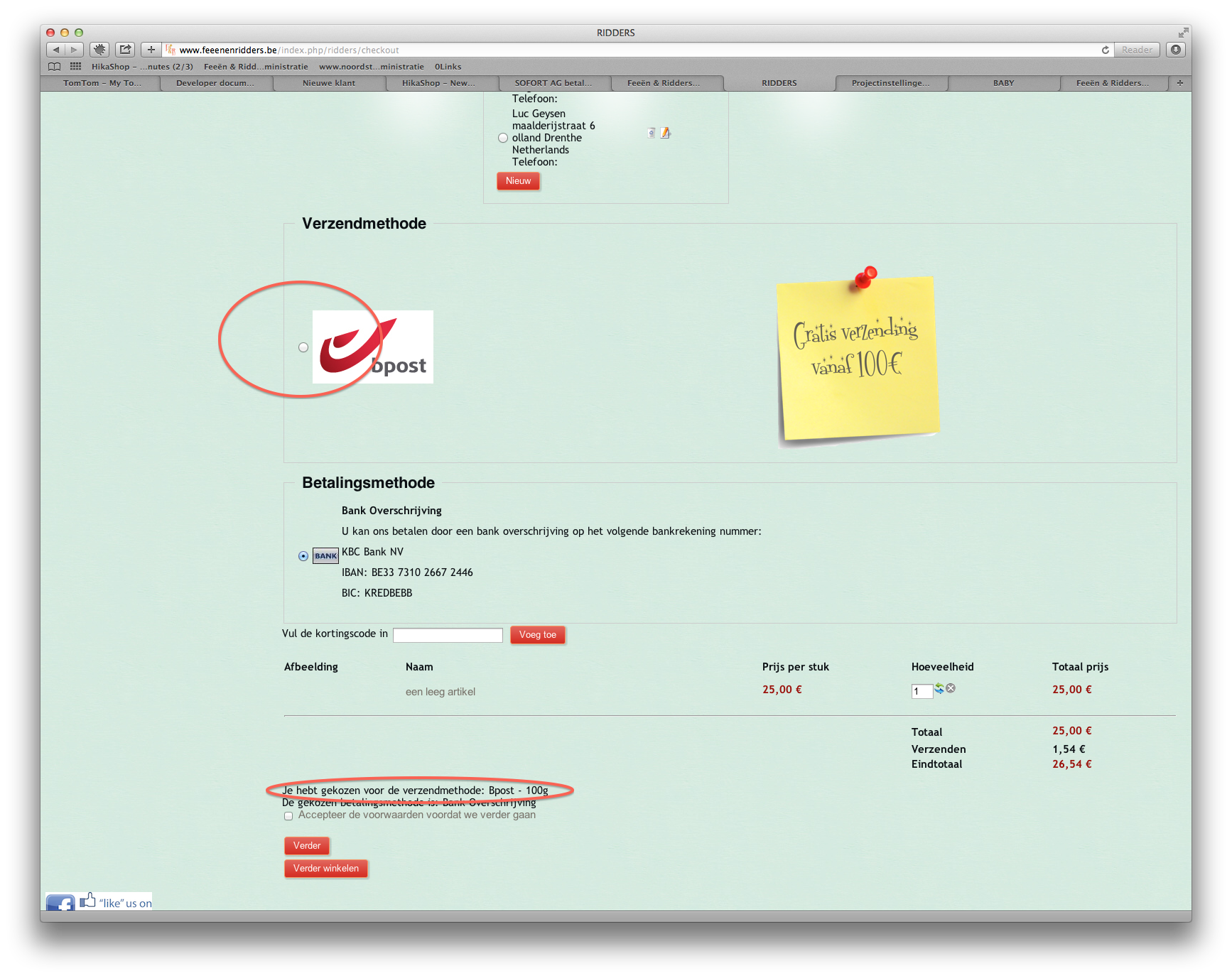
If I want to buy an article of the shop and go to the shopping cart in order to finish my shopping I get the opportunity to select the shipping and payment method. The shipping method is not selected although at the bottom of the page you can find the information that I selected a shipping method (see screen1). When I click the button before the shipping method the page reacts as I am clicking on the submit button. Any idea what is going wrong? I got this new behavior since I upgraded from 2.0.0 to version 2.2.2.
Wbr, Luc
-- HikaShop version -- : 2.2.2
-- Joomla version -- : 1.5
-- PHP version -- : x.x.x
-- Browser(s) name and version -- : safari 6.1
-- Error-message(debug-mod must be tuned on) -- : Error_message
Hi,
If I want to buy an article of the shop and go to the shopping cart in order to finish my shopping I get the opportunity to select the shipping and payment method. The shipping method is not selected although at the bottom of the page you can find the information that I selected a shipping method (see screen1). When I click the button before the shipping method the page reacts as I am clicking on the submit button. Any idea what is going wrong? I got this new behavior since I upgraded from 2.0.0 to version 2.2.2.
Wbr, Luc
Please Log in or Create an account to join the conversation.

13 years 2 weeks ago #132337
by Jerome
Jerome - Obsidev.com
HikaMarket & HikaSerial developer / HikaShop core dev team.
Replied by Jerome on topic click shipping method = checkout
Hi,
The best is to activate the option to (pre)select automatically the shipping method : Auto select default shipping and payment methods
www.hikashop.com/support/documentation/5...ml#checkout_shipping
Regards,
The best is to activate the option to (pre)select automatically the shipping method : Auto select default shipping and payment methods
www.hikashop.com/support/documentation/5...ml#checkout_shipping
Regards,
Jerome - Obsidev.com
HikaMarket & HikaSerial developer / HikaShop core dev team.
Please Log in or Create an account to join the conversation.
- luc.geysen@gmail.com
-
Topic Author
- Offline
Less
More
- Posts: 45
- Thank you received: 0
13 years 1 week ago #133130
by luc.geysen@gmail.com
Replied by luc.geysen@gmail.com on topic click shipping method = checkout
Hi,
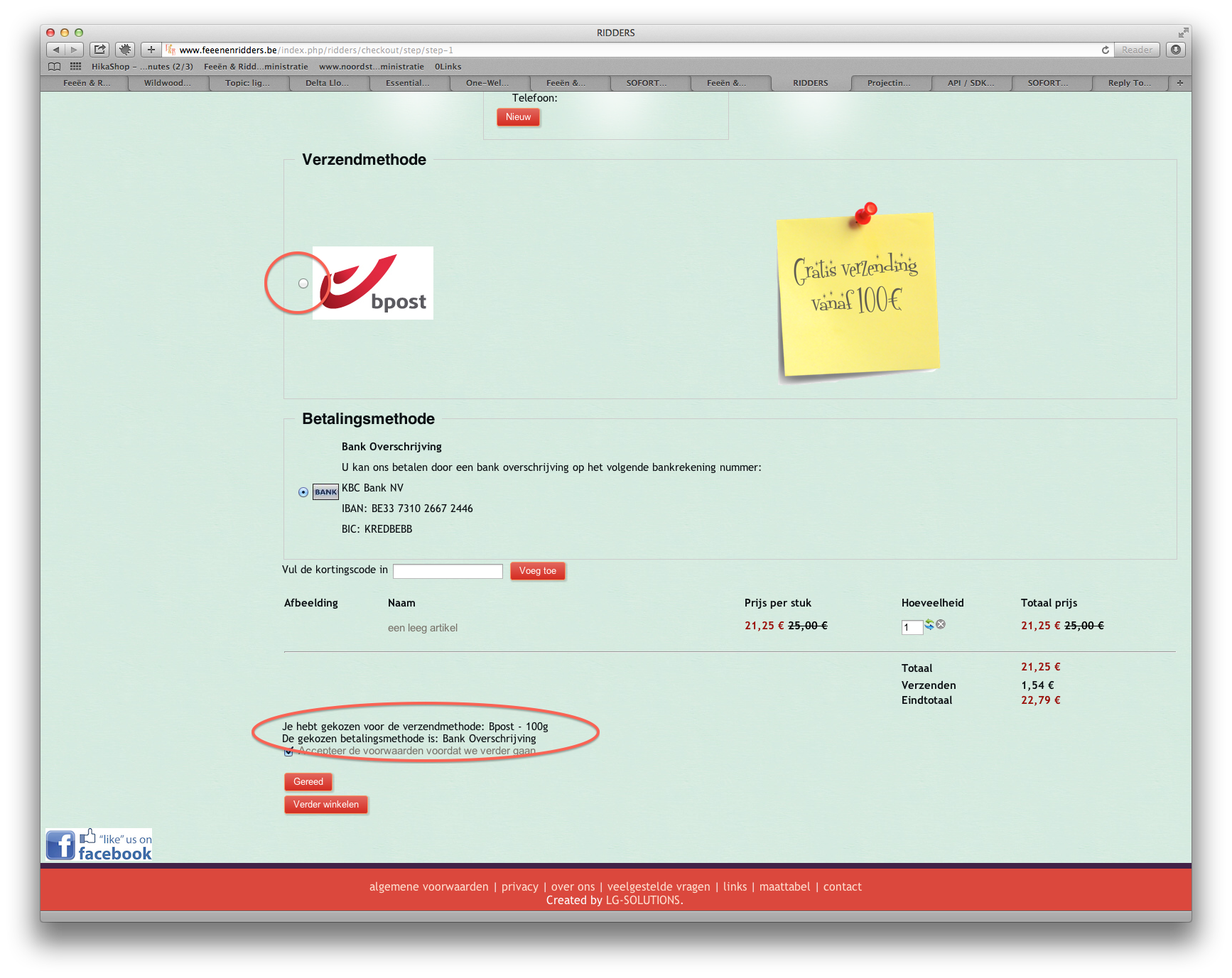
I did what you told me, but…. Now when I go to my shopping cart, I select the shipping method (in attached screenshot only one available), I select the payment method, I select the agree with conditions and press 'next' button. Then the shipping method will be unselected again and it has to be selected again before we can go further with the payment. There is no indication that the problem is that the shipping method is not selected. Please have a look at this!
Wbr, Luc
I did what you told me, but…. Now when I go to my shopping cart, I select the shipping method (in attached screenshot only one available), I select the payment method, I select the agree with conditions and press 'next' button. Then the shipping method will be unselected again and it has to be selected again before we can go further with the payment. There is no indication that the problem is that the shipping method is not selected. Please have a look at this!
Wbr, Luc
Please Log in or Create an account to join the conversation.

13 years 1 week ago #133170
by nicolas
Replied by nicolas on topic click shipping method = checkout
When I go to your checkout for the first time, the shipping and payment methods are still not pre selected. Are you sure that you turned on that option because it doesn't seem that it's the case as far as I can see on your checkout.
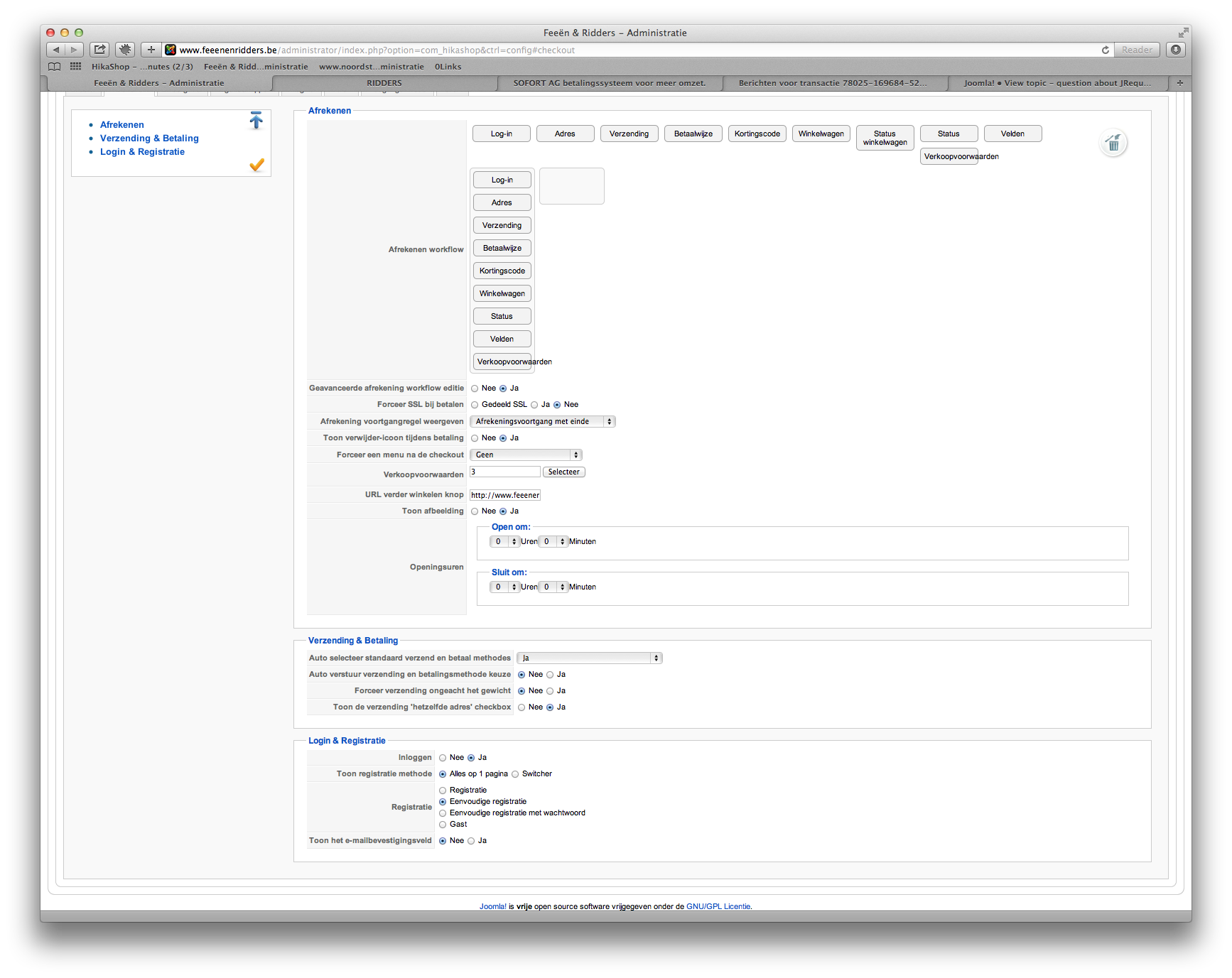
Please provide a screenshot of the Checkout tab of the configuration.
Please provide a screenshot of the Checkout tab of the configuration.
Please Log in or Create an account to join the conversation.
- luc.geysen@gmail.com
-
Topic Author
- Offline
Less
More
- Posts: 45
- Thank you received: 0
13 years 1 week ago #133380
by luc.geysen@gmail.com
Replied by luc.geysen@gmail.com on topic click shipping method = checkout
If I put the Auto select default shipping and payment methods to yes or to no, both settings generate same problem!
Please Log in or Create an account to join the conversation.

Less
More
- Posts: 12953
- Thank you received: 1778
13 years 1 week ago #133507
by Mohamed Thelji
Replied by Mohamed Thelji on topic click shipping method = checkout
Ok, And did you do some modifications through the "shipping" file of your "checkout" view of your front-end template, via "Hikashop->Display->Views" ?
Please Log in or Create an account to join the conversation.
- luc.geysen@gmail.com
-
Topic Author
- Offline
Less
More
- Posts: 45
- Thank you received: 0
13 years 6 days ago #133616
by luc.geysen@gmail.com
Replied by luc.geysen@gmail.com on topic click shipping method = checkout
Here's my shipping file, can you compare to the actual one?
Wbr, Luc
Wbr, Luc
This attachment is hidden for guests.
Please log in or register to see it.
Please log in or register to see it.
Please Log in or Create an account to join the conversation.
Less
More
- Posts: 12953
- Thank you received: 1778
13 years 6 days ago #133654
by Mohamed Thelji
Replied by Mohamed Thelji on topic click shipping method = checkout
The best way to see if you've done some modifications through your view's file is to do it through "Hikashop->Display->Views", and check if you have a "trash/delete" icon in the same line as your view's file.
Please Log in or Create an account to join the conversation.
- luc.geysen@gmail.com
-
Topic Author
- Offline
Less
More
- Posts: 45
- Thank you received: 0
13 years 6 days ago #133656
by luc.geysen@gmail.com
Replied by luc.geysen@gmail.com on topic click shipping method = checkout
Yes, there is this icon in the same line, so I did modifications. Do you want me to just remove without having a look to the modifications?
Please Log in or Create an account to join the conversation.
Less
More
- Posts: 12953
- Thank you received: 1778
13 years 6 days ago #133715
by Mohamed Thelji
Replied by Mohamed Thelji on topic click shipping method = checkout
I just wanted you to :
- Save your changes through a text file
- Revert your changes by using the "delete" icon
- Test it again
So that we can see if the problem is really coming from your modifications or not.
- Save your changes through a text file
- Revert your changes by using the "delete" icon
- Test it again
So that we can see if the problem is really coming from your modifications or not.
The following user(s) said Thank You: luc.geysen@gmail.com
Please Log in or Create an account to join the conversation.
Time to create page: 0.078 seconds