

- Posts: 31
- Thank you received: 0
Checkout Screen & Checkout process bar
13 years 6 days ago #133631
by soethiha
Checkout Screen & Checkout process bar was created by soethiha
Hi
Below is my Checkout Screen and as you guys see look ugly (super)
So
- I want to change "Buyer Information" instead of Guest.
- I want to tidy out Address information as you see Label and Textbox are not rendered properly.
- My Checkout progress bar is showing as irrelevant
Actually my checkout flow is
1) Getting the Buyer Information
2) Choosing the Shipping Method
3) Choosing the Payment Method
4) View Cart
5) Confirmation and Payment
6) Successful
So, how do I fixed and tidy out those thing, please be advice me.
Many Thanks for quickly response.

-- url of the page with the problem -- : casite-547449.cloudaccess.net/hikashop-m...shop_payment_methods
-- HikaShop version -- : 222
-- Joomla version -- : 3.2
-- Browser(s) name and version -- : Chrome,FireFox,IE
Below is my Checkout Screen and as you guys see look ugly (super)
So
- I want to change "Buyer Information" instead of Guest.
- I want to tidy out Address information as you see Label and Textbox are not rendered properly.
- My Checkout progress bar is showing as irrelevant
Actually my checkout flow is
1) Getting the Buyer Information
2) Choosing the Shipping Method
3) Choosing the Payment Method
4) View Cart
5) Confirmation and Payment
6) Successful
So, how do I fixed and tidy out those thing, please be advice me.
Many Thanks for quickly response.
-- url of the page with the problem -- : casite-547449.cloudaccess.net/hikashop-m...shop_payment_methods
-- HikaShop version -- : 222
-- Joomla version -- : 3.2
-- Browser(s) name and version -- : Chrome,FireFox,IE
Please Log in or Create an account to join the conversation.

13 years 6 days ago #133677
by Xavier
Replied by Xavier on topic Checkout Screen & Checkout process bar
Hi,
Thanks to give us a screenshot of your checkout workflow configuration in Configuration > Checkout.
To change "Guest" to "Buyer Information" you have to do a translation override:
www.hikashop.com/support/faq.html#tran
Thanks to give us a screenshot of your checkout workflow configuration in Configuration > Checkout.
To change "Guest" to "Buyer Information" you have to do a translation override:
www.hikashop.com/support/faq.html#tran
The following user(s) said Thank You: soethiha
Please Log in or Create an account to join the conversation.
13 years 3 days ago #133938
by soethiha
Replied by soethiha on topic Checkout Screen & Checkout process bar
Thank You Xavier, You support is solve a lot of problem for me, only left to tidy out the checkout screen, could you please help me ?
Please Log in or Create an account to join the conversation.

13 years 3 days ago #133943
by nicolas
Replied by nicolas on topic Checkout Screen & Checkout process bar
Sure. What else do you want to know regarding the checkout screen ?
Please Log in or Create an account to join the conversation.
13 years 3 days ago - 13 years 3 days ago #133950
by soethiha

Browser : Chrome, Firefox, IE
HikaShop Version 222
Joomla 3.2
Replied by soethiha on topic Checkout Screen & Checkout process bar
nicolas wrote: Sure. What else do you want to know regarding the checkout screen ?
Browser : Chrome, Firefox, IE
HikaShop Version 222
Joomla 3.2
Last edit: 13 years 3 days ago by soethiha.
Please Log in or Create an account to join the conversation.

Less
More
- Posts: 12953
- Thank you received: 1778
13 years 3 days ago #133975
by Mohamed Thelji
Replied by Mohamed Thelji on topic Checkout Screen & Checkout process bar
Hi,
Using some CSS code like this will probably solve your issue :
Using some CSS code like this will probably solve your issue :
Code:
#hikashop_checkout_login_right_part input {
display: inline-block !important;
}
Please Log in or Create an account to join the conversation.
13 years 2 days ago #134060
by soethiha
WHERE can I go and check for this CSS file ?
Replied by soethiha on topic Checkout Screen & Checkout process bar
Mohamed Thelji wrote: Hi,
Using some CSS code like this will probably solve your issue :Code:#hikashop_checkout_login_right_part input { display: inline-block !important; }
WHERE can I go and check for this CSS file ?
Please Log in or Create an account to join the conversation.
Less
More
- Posts: 12953
- Thank you received: 1778
13 years 2 days ago #134135
by Mohamed Thelji
Replied by Mohamed Thelji on topic Checkout Screen & Checkout process bar
Hi,
As it's said on the documentation , you'll find your CSS file through : "Hikashop->System->Configuration->Display->'Front-end CSS File'"
As it's said on the documentation , you'll find your CSS file through : "Hikashop->System->Configuration->Display->'Front-end CSS File'"
Please Log in or Create an account to join the conversation.
12 years 11 months ago #134536
by soethiha
Replied by soethiha on topic Checkout Screen & Checkout process bar
Thanks for your advice however still I can't find this part till now.
Could you please pinpoint like in this post you advice to me.
www.hikashop.com/forum/install-update/86...-problem.html#134528
Could you please pinpoint like in this post you advice to me.
www.hikashop.com/forum/install-update/86...-problem.html#134528
Please Log in or Create an account to join the conversation.
Less
More
- Posts: 12953
- Thank you received: 1778
12 years 11 months ago #134560
by Mohamed Thelji
Replied by Mohamed Thelji on topic Checkout Screen & Checkout process bar
Using this code :
through your Hikashop
CSS
file ("Hikashop->System->Configuration->Display->'Front-end CSS File'") will change the display of your registration form like this :
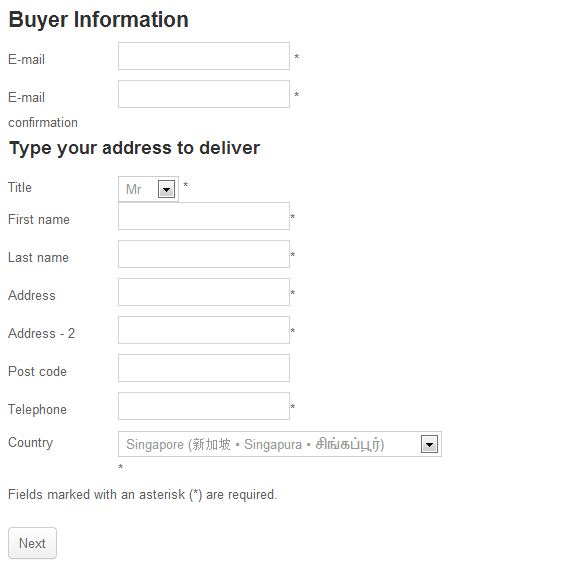
If it's not what you wanted to do, can you give me more information ? .
Code:
#hikashop_checkout_login_right_part input {
display: inline-block !important;
}
If it's not what you wanted to do, can you give me more information ?
.
The following user(s) said Thank You: soethiha
Please Log in or Create an account to join the conversation.
12 years 11 months ago #134692
by soethiha
Replied by soethiha on topic Checkout Screen & Checkout process bar
Thanks Man, It's work
Please Log in or Create an account to join the conversation.
Time to create page: 0.096 seconds