

- Posts: 47
- Thank you received: 1
move product code in cart
12 years 11 months ago #135655
by word
move product code in cart was created by word
Hello- I have 2 questions:
1. How can I move the product code below the options in the cart? I am editing the view checkout/cart and I got the code below the name using the <br /> tag, but I would like it to be below the options, in this case the shirt size. (see picture)
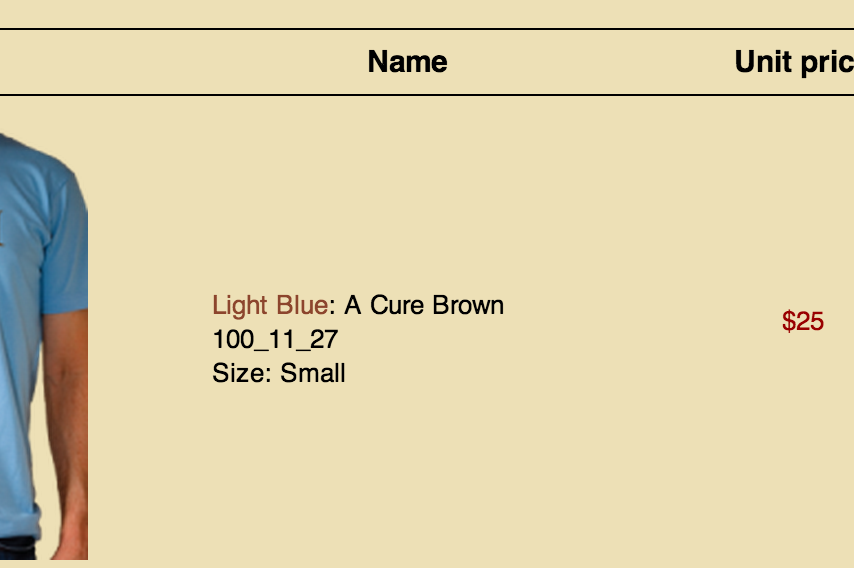
2. Is there any way to override the template link color for hikashop? In the picture, the "light blue" product name is the link, but I would like it to be black, and the links elsewhere in the site to follow the brown template color.
Thanks in advance and thanks for all your help so far.
1. How can I move the product code below the options in the cart? I am editing the view checkout/cart and I got the code below the name using the <br /> tag, but I would like it to be below the options, in this case the shirt size. (see picture)
2. Is there any way to override the template link color for hikashop? In the picture, the "light blue" product name is the link, but I would like it to be black, and the links elsewhere in the site to follow the brown template color.
Thanks in advance and thanks for all your help so far.
Please Log in or Create an account to join the conversation.
12 years 11 months ago - 12 years 11 months ago #135656
by word
Replied by word on topic move product code in cart
Ok, I figured out question #1.
Still remains #2 about the link
and now #3- How can I add the text "Item Code:" before the code?
Thanks
Still remains #2 about the link
and now #3- How can I add the text "Item Code:" before the code?
Thanks
Last edit: 12 years 11 months ago by word.
Please Log in or Create an account to join the conversation.

Less
More
- Posts: 12953
- Thank you received: 1778
12 years 11 months ago - 12 years 11 months ago #135706
by Mohamed Thelji
Replied by Mohamed Thelji on topic move product code in cart
Hi,
2. Sure, you'll be able to do that by using some CSS code.
3. The solution will be to edit the "show_default" file, of the "product" view, of your front-end template, through "Hikashop->Display->Views", and change these lines :
By :
2. Sure, you'll be able to do that by using some CSS code.
3. The solution will be to edit the "show_default" file, of the "product" view, of your front-end template, through "Hikashop->Display->Views", and change these lines :
Code:
<span id="hikashop_product_code_main" class="hikashop_product_code_main">
<?php
echo $this->element->product_code;
?>
</span>
Code:
<span id="hikashop_product_code_main" class="hikashop_product_code_main">
<?php
echo 'Item Code: ' . $this->element->product_code;
?>
</span>
Last edit: 12 years 11 months ago by Mohamed Thelji.
Please Log in or Create an account to join the conversation.
12 years 11 months ago #135788
by word
Replied by word on topic move product code in cart
Thanks Mohamed. I was looking to put the item code line in the cart, not the product page. So I applied the line to the checkout/cart view instead of the show/default, but it worked otherwise.
Thanks for your help.
Thanks for your help.
Please Log in or Create an account to join the conversation.
11 years 8 months ago - 11 years 8 months ago #191025
by cobi
Replied by cobi on topic move product code in cart
Hey mohamed,
it's been a while since this post. i got the same problem as "word" here. I'm using your code above but there are no changes to the product site. I also was reaing an other post from you to put a break <br/> between item code and productname, but nothing happend. what do wrong?
sorry i'm working lokal on my shop, so here are the code from product / show_.php :
Attached a screenshot to see the site and the elements i was talking about
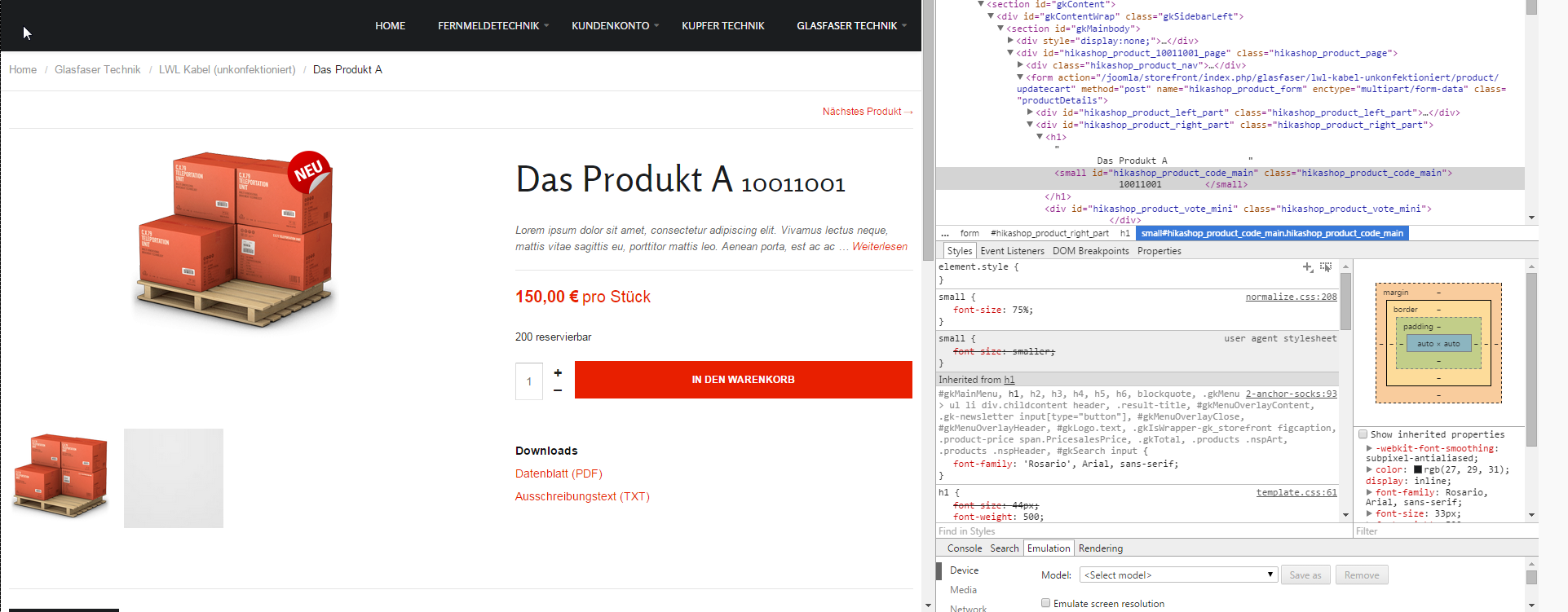
I'm using Joomla 3.3.6 and hikashop 2.3.5. maybe there are some updates of hikashop why this is not working for me???
Thx for you support
Regards
Cobi
it's been a while since this post. i got the same problem as "word" here. I'm using your code above but there are no changes to the product site. I also was reaing an other post from you to put a break <br/> between item code and productname, but nothing happend. what do wrong?
sorry i'm working lokal on my shop, so here are the code from product / show_.php :
Code:
<?php
/**
* @package HikaShop for Joomla!
* @version 2.3.5
* @author hikashop.com
* @copyright (C) 2010-2015 HIKARI SOFTWARE. All rights reserved.
* @license GNU/GPLv3 http://www.gnu.org/licenses/gpl-3.0.html
*/
defined('_JEXEC') or die('Restricted access');
?><div id="hikashop_product_top_part" class="hikashop_product_top_part">
<?php if(!empty($this->element->extraData->topBegin)) { echo implode("\r\n",$this->element->extraData->topBegin); } ?>
<h1>
<span id="hikashop_product_name_main" class="hikashop_product_name_main">
<?php
if (hikashop_getCID('product_id')!=$this->element->product_id && isset ($this->element->main->product_name))
echo $this->element->main->product_name;
else
echo $this->element->product_name;
?>
</span>
<?php if ($this->config->get('show_code')) { ?>
<span id="hikashop_product_code_main" class="hikashop_product_code_main">
<?php
echo 'Item Code: ' . $this->element->product_code;
?>
</span>
<?php } ?>
</h1>
<?php if(!empty($this->element->extraData->topEnd)) { echo implode("\r\n",$this->element->extraData->topEnd); } ?>
... and so on
Attached a screenshot to see the site and the elements i was talking about
I'm using Joomla 3.3.6 and hikashop 2.3.5. maybe there are some updates of hikashop why this is not working for me???
Thx for you support
Regards
Cobi
Last edit: 11 years 8 months ago by cobi.
Please Log in or Create an account to join the conversation.

11 years 8 months ago #191030
by Xavier
Replied by Xavier on topic move product code in cart
Hi,

There is "product / show" or "product / show_default" for example.
If the view name is correct, so just a mistake in your post, please be sure that you are editing the view in the correct template.
Is that the real name of the view you are editing ? If it is, the issue is there, we don't have views called like thatproduct / show_.php
There is "product / show" or "product / show_default" for example.
If the view name is correct, so just a mistake in your post, please be sure that you are editing the view in the correct template.
Please Log in or Create an account to join the conversation.
11 years 8 months ago #191179
by cobi
Replied by cobi on topic move product code in cart
Hey Xavier,
sorry, this was my fault. you are right i missed typing the correct file description. I was editing the file show_default in the correct template (in my case it is a template called storefront), as you can see on the screeshots attached.
so any idea what could be the problem?
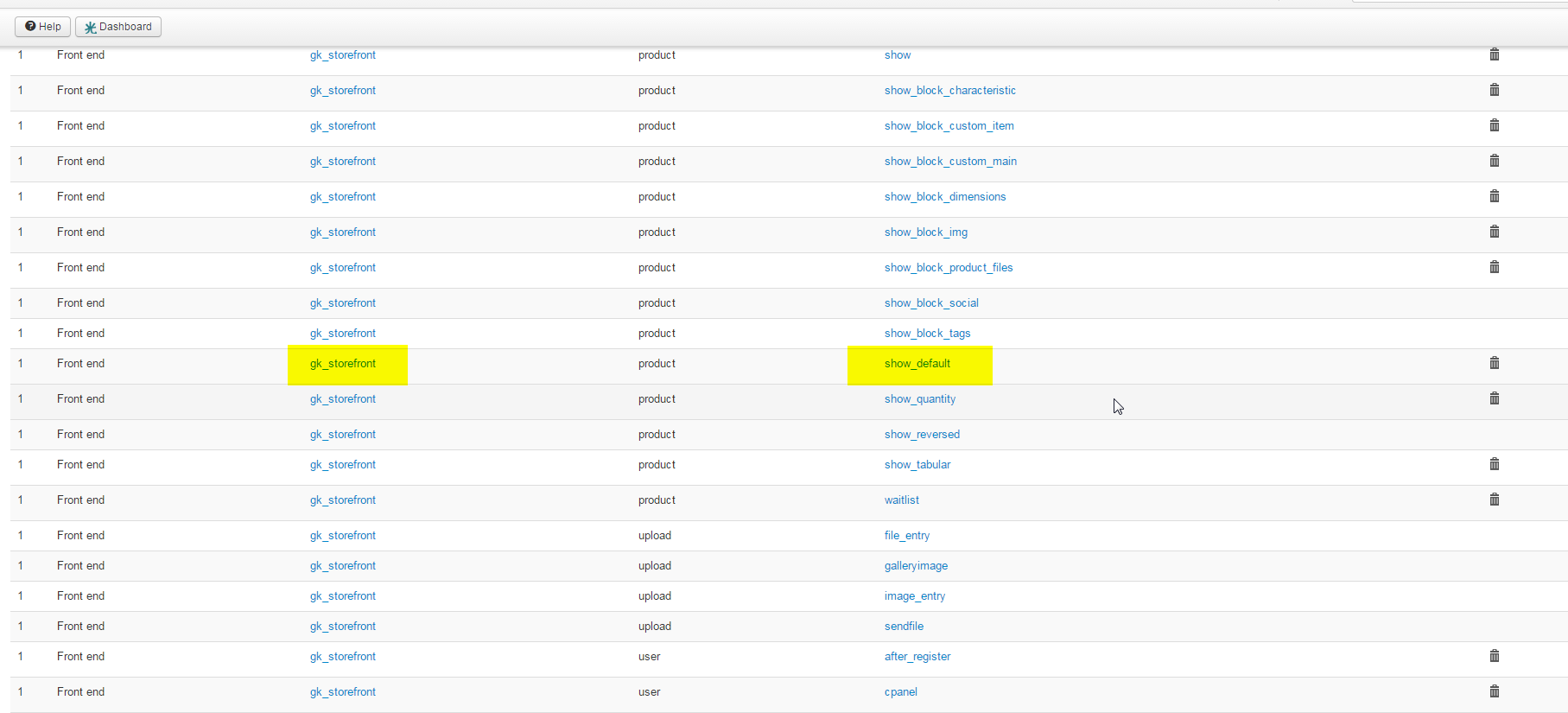
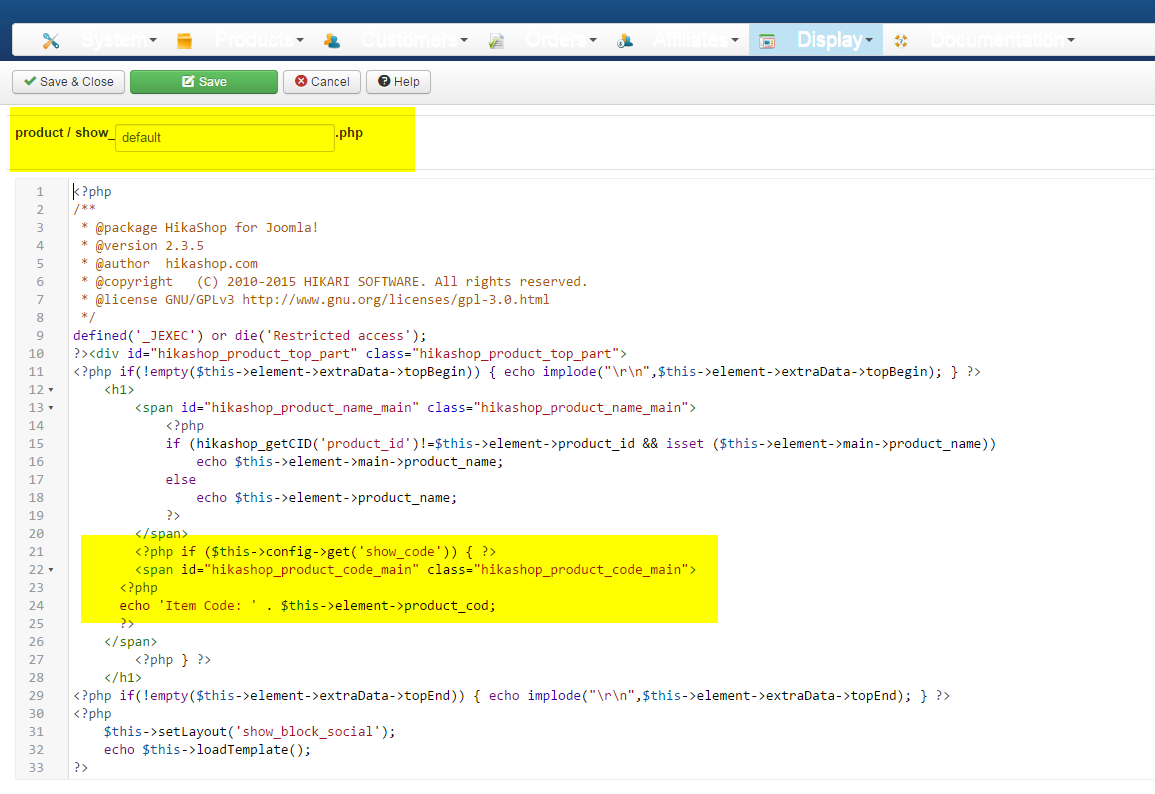
sorry, this was my fault. you are right i missed typing the correct file description. I was editing the file show_default in the correct template (in my case it is a template called storefront), as you can see on the screeshots attached.
so any idea what could be the problem?
Please Log in or Create an account to join the conversation.
11 years 8 months ago #191181
by Xavier
Replied by Xavier on topic move product code in cart
Hi,
This is maybe a cache issue. Please try to disable the cache in Joomla settings and Joomla cache plugin, then clear it.
If you don't have any cache, even in the template, so I don't really see why it's not working as expected, everything seems to be correct. If the template is the good one, and you are using the view "show_default" in the settings, so...
ps: in the last screenshot you forgot the "e" in the code "$this->element->product_code;
This is maybe a cache issue. Please try to disable the cache in Joomla settings and Joomla cache plugin, then clear it.
If you don't have any cache, even in the template, so I don't really see why it's not working as expected, everything seems to be correct. If the template is the good one, and you are using the view "show_default" in the settings, so...
ps: in the last screenshot you forgot the "e" in the code "$this->element->product_code;
Please Log in or Create an account to join the conversation.
11 years 8 months ago #191278
by cobi
Replied by cobi on topic move product code in cart
hey xavier,
thx for your support. unfortunately ist can't be the cache, because the cache is not enabled in my case.
thank you als for the advice withe "e". this happend because i tried so i can see if something get broken on the website, so i can see that i'm working on the right code. but nothing happens
Maybe you get another idea, let me know, I will appreciate it.
regards
cobi
thx for your support. unfortunately ist can't be the cache, because the cache is not enabled in my case.
thank you als for the advice withe "e". this happend because i tried so i can see if something get broken on the website, so i can see that i'm working on the right code. but nothing happens
Maybe you get another idea, let me know, I will appreciate it.
regards
cobi
Please Log in or Create an account to join the conversation.
11 years 8 months ago #191334
by cobi
Replied by cobi on topic move product code in cart
hey xavier,
i delete a necessary code in my "show_default" just to see if something gets broken to be sure that I'm in the right file. but nothing happens. So now I'm sure that there have to be an other file that setup this view.
Any idea where or how I can find that file?
this drives my crazy
i delete a necessary code in my "show_default" just to see if something gets broken to be sure that I'm in the right file. but nothing happens. So now I'm sure that there have to be an other file that setup this view.
Any idea where or how I can find that file?
this drives my crazy
Please Log in or Create an account to join the conversation.
11 years 8 months ago - 11 years 8 months ago #191283
by Xavier
Replied by Xavier on topic move product code in cart
Hi,
Please try to do the modifications directly in the folder "templates/your_template/html/com_hikashop/product/show_default.php".
If that's not working, so I have no more ideas, or I am missing a simple thing.
Are you sure that you are using the view "show_default" and not a custom one or the show_reversed or show_tabular one ?
Once your website will be online we will be able to help you directly by having a backend access.
Please try to do the modifications directly in the folder "templates/your_template/html/com_hikashop/product/show_default.php".
If that's not working, so I have no more ideas, or I am missing a simple thing.
Are you sure that you are using the view "show_default" and not a custom one or the show_reversed or show_tabular one ?
Once your website will be online we will be able to help you directly by having a backend access.
Last edit: 11 years 8 months ago by Xavier.
Please Log in or Create an account to join the conversation.
11 years 8 months ago #191936
by cobi
Replied by cobi on topic move product code in cart
hey xavier,
thx again for your support. yes im sure that I'm on the right show_default. now I was exactly walking to the root as you told me in your post before, everything inside the file was fine, but I changed something just to figure out if somethings happens - but nothing changed!
So I go a step further and deleted the hole show_default.php and guess what happens? Yeah right! NOTHING - everything is like before, nothing changed. So for me it's clear, there must be an other file that depends on the view, maybe it comes from the template that I'm using?
So if you please have a look on the demo site of the developer so you may get an idea of what could be the probleme? Here is the Demo Site: demo.gavick.com/joomla25/storefront/
the only probleme is, in the demo they don't show up the item code bye default, but maybe you can find it out anyhow ( I pray)
thx so much for staying on my site to get this thing done
best wishes
cobi
thx again for your support. yes im sure that I'm on the right show_default. now I was exactly walking to the root as you told me in your post before, everything inside the file was fine, but I changed something just to figure out if somethings happens - but nothing changed!
So I go a step further and deleted the hole show_default.php and guess what happens? Yeah right! NOTHING - everything is like before, nothing changed. So for me it's clear, there must be an other file that depends on the view, maybe it comes from the template that I'm using?
So if you please have a look on the demo site of the developer so you may get an idea of what could be the probleme? Here is the Demo Site: demo.gavick.com/joomla25/storefront/
the only probleme is, in the demo they don't show up the item code bye default, but maybe you can find it out anyhow ( I pray)
thx so much for staying on my site to get this thing done
best wishes
cobi
Please Log in or Create an account to join the conversation.
11 years 8 months ago #191950
by Xavier
Replied by Xavier on topic move product code in cart
Hi,
It seems that the view used is the "show_tabular" one and not the "show_default" one.
You can check the settings in the HikaShop configuration, or in the menu/module settings directly.
It seems that the view used is the "show_tabular" one and not the "show_default" one.
You can check the settings in the HikaShop configuration, or in the menu/module settings directly.
The following user(s) said Thank You: cobi
Please Log in or Create an account to join the conversation.
11 years 8 months ago #192086
by cobi
Replied by cobi on topic move product code in cart
Hey Xavier,
you rock!!!! That was the problem. Now everything works fine for me. You made my day
Thank you so much supporting me!
See you maybe in the next post I've made
you rock!!!! That was the problem. Now everything works fine for me. You made my day
Thank you so much supporting me!
See you maybe in the next post I've made
Please Log in or Create an account to join the conversation.
8 years 3 weeks ago #299318
by mad-q
Replied by mad-q on topic move product code in cart
HI All
Bringing this one back from the dead.
Currently, in my cart, it shows the product name and product code without a space between the two
Brake shoe return spring4110-26
www.draganfly.co.uk
Coudl you please point me in the direction of this simple fix.
Cheers
Iain
Bringing this one back from the dead.
Currently, in my cart, it shows the product name and product code without a space between the two
Brake shoe return spring4110-26
www.draganfly.co.uk
Coudl you please point me in the direction of this simple fix.
Cheers
Iain
Please Log in or Create an account to join the conversation.
8 years 3 weeks ago #299335
by mad-q
Replied by mad-q on topic move product code in cart
HI, some other small thing has appeared, after updating to Version 4 all of the Fav Icons has stopped working front end and back.
Such as edit order, edit quantity in shopping basket etc.
Cheers
Iain
Such as edit order, edit quantity in shopping basket etc.
Cheers
Iain
Please Log in or Create an account to join the conversation.

8 years 3 weeks ago #299337
by nicolas
Replied by nicolas on topic move product code in cart
Hi,
You're apparently missing the fonts for the icons. Normally the file www.draganfly.co.uk/media/com_hikashop/w...nts/fa-solid-900.ttf should be accessible but it returns an error on your website.
This indicates that during the update Joomla was not able to add that media/com_hikashop/webfonts folder and the necessary files in it. So please make sure that the access rights in the media/com_hikashop/ folder allows for Joomla to create folders and then download the install package of the 4.0.0 on our website and install it on yours. That will add the necessary files.
Regarding the product code on the cart, it's just a CSS issue. You can add such CSS to avoid that:
hikashop_product_code_checkout{ margin-left: 5px; }
You're apparently missing the fonts for the icons. Normally the file www.draganfly.co.uk/media/com_hikashop/w...nts/fa-solid-900.ttf should be accessible but it returns an error on your website.
This indicates that during the update Joomla was not able to add that media/com_hikashop/webfonts folder and the necessary files in it. So please make sure that the access rights in the media/com_hikashop/ folder allows for Joomla to create folders and then download the install package of the 4.0.0 on our website and install it on yours. That will add the necessary files.
Regarding the product code on the cart, it's just a CSS issue. You can add such CSS to avoid that:
hikashop_product_code_checkout{ margin-left: 5px; }
Please Log in or Create an account to join the conversation.
Time to create page: 0.111 seconds