

- Posts: 2
- Thank you received: 0
Tax Issues
12 years 10 months ago #136293
by ETR2012
Tax Issues was created by ETR2012
-- url of the page with the problem -- :
energytrainingresources.com/component/hikashop/checkout
-- HikaShop version -- : HikaShop Business 2.2.3, Joomla!™
-- Joomla version -- : Joomla! 2.5.6
-- PHP version -- : 5.2
-- Browser(s) name and version -- : Chrome
I have all of the tax categories set up correctly, but am unable to see the tax being added to anyone address in Texas. I can't figure out why its not working correctly! HELP!
Willing to give login info if someone can help me!
Kelli
-- HikaShop version -- : HikaShop Business 2.2.3, Joomla!™
-- Joomla version -- : Joomla! 2.5.6
-- PHP version -- : 5.2
-- Browser(s) name and version -- : Chrome
I have all of the tax categories set up correctly, but am unable to see the tax being added to anyone address in Texas. I can't figure out why its not working correctly! HELP!
Willing to give login info if someone can help me!
Kelli
Please Log in or Create an account to join the conversation.

12 years 10 months ago #136313
by nicolas
Replied by nicolas on topic Tax Issues
Hi,
It means that your taxes are not setup properly. Please provide a screenshot of your tax rules listing and of a product edition page and we'll be able to tell you if you did something wrong.
It means that your taxes are not setup properly. Please provide a screenshot of your tax rules listing and of a product edition page and we'll be able to tell you if you did something wrong.
Please Log in or Create an account to join the conversation.

12 years 10 months ago - 12 years 10 months ago #136735
by blondie63
Replied by blondie63 on topic Tax Issues
Taxes configuration is very kinky.. 
I see Taxes Categories and Rates so i think that the logic is: one tax category can have many tax rates
So i've created one Tax Category -> IVA (VAT for other contries)
Then i've created two rates 4% and 22% into IVA
But on Product config i can choose the Product tax category but not the Rates !!!
Why i need so? In italy Oil has 4% and Wine 22%
What's wrong ?
I see Taxes Categories and Rates so i think that the logic is: one tax category can have many tax rates
So i've created one Tax Category -> IVA (VAT for other contries)
Then i've created two rates 4% and 22% into IVA
But on Product config i can choose the Product tax category but not the Rates !!!
Why i need so? In italy Oil has 4% and Wine 22%
What's wrong ?
Last edit: 12 years 10 months ago by blondie63.
Please Log in or Create an account to join the conversation.
12 years 10 months ago #136771
by nicolas
Replied by nicolas on topic Tax Issues
You're almost there 
One tax category can have different tax rates indeed.
In your tax categories you would have for example "oil" and "wine".
Then, in your tax rates you would have 4% and 22%.
And finally, in your tax rules, you would have two tax rules, one for italy, oil at 4% and a second one for italy, wine at 22%.
That's why you don't need to select tax rates in your products since the tax rates are retrieved automatically based on the tax category of the product, the tax rules and the location of the user.
Sometimes, you can have different tax rates for the same tax category for different regions. For example, oil might be taxed at 4% in Roma but at 6% in Milano and in that case you would till select "oil" in your products but the system would select either 4% or 6% based on the location of the user.
One tax category can have different tax rates indeed.
In your tax categories you would have for example "oil" and "wine".
Then, in your tax rates you would have 4% and 22%.
And finally, in your tax rules, you would have two tax rules, one for italy, oil at 4% and a second one for italy, wine at 22%.
That's why you don't need to select tax rates in your products since the tax rates are retrieved automatically based on the tax category of the product, the tax rules and the location of the user.
Sometimes, you can have different tax rates for the same tax category for different regions. For example, oil might be taxed at 4% in Roma but at 6% in Milano and in that case you would till select "oil" in your products but the system would select either 4% or 6% based on the location of the user.
Please Log in or Create an account to join the conversation.
12 years 10 months ago - 12 years 10 months ago #137400
by Svendsen
Replied by Svendsen on topic Tax Issues
We have a problem rounding off prices when using characteristics and vat at 6% and buy more than one of each product.
This causes paypal payments to fail and as the payment fail the serials will not be sent.
Using:
Joomla 2.5.17
HikaShop Business: 2.2.3
See attached images.
Any help appreciated.
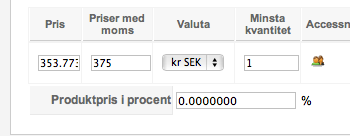
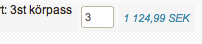
I find the problem.
After i turn off HikaShop tax calculations override plugin the problem was gone.
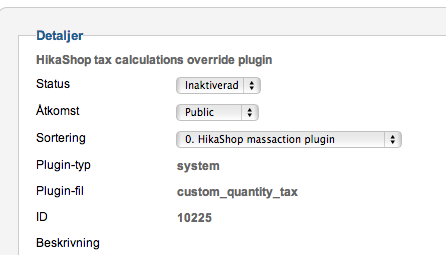
But thanks anyway
This causes paypal payments to fail and as the payment fail the serials will not be sent.
Using:
Joomla 2.5.17
HikaShop Business: 2.2.3
See attached images.
Any help appreciated.
I find the problem.
After i turn off HikaShop tax calculations override plugin the problem was gone.
But thanks anyway
Last edit: 12 years 10 months ago by Svendsen.
Please Log in or Create an account to join the conversation.
Time to create page: 0.072 seconds