

- Posts: 100
- Thank you received: 1
CHECKOUT ADDRESS CSS
12 years 9 months ago #136761
by PubSite
CHECKOUT ADDRESS CSS was created by PubSite
Hi,
I've tried to fix this issue with the CSS in checkout page but I couldn't find the responding tag. can you help me out? I want to have the billing address first and then the shipping address. What tag should I edit?and how?
Thanks
I've tried to fix this issue with the CSS in checkout page but I couldn't find the responding tag. can you help me out? I want to have the billing address first and then the shipping address. What tag should I edit?and how?
Thanks
Please Log in or Create an account to join the conversation.

12 years 9 months ago #136794
by nicolas
Replied by nicolas on topic CHECKOUT ADDRESS CSS
The following user(s) said Thank You: PubSite
Please Log in or Create an account to join the conversation.
12 years 9 months ago #137247
by PubSite
Replied by PubSite on topic CHECKOUT ADDRESS CSS
Thanks! That solved my problem completely, now there's a new problem. When I add multiple addresses in billing and shipping, they are so close to one another. as you can see in this screenshot:
www.dropbox.com/s/pxh0euye67uen2d/Screen...12-19%2021.42.47.png
how can I set a border or line between them or somehow make it clear that these are two separate addresses?
how can I set a border or line between them or somehow make it clear that these are two separate addresses?
Please Log in or Create an account to join the conversation.

12 years 9 months ago - 12 years 9 months ago #137256
by lionel75
Replied by lionel75 on topic CHECKOUT ADDRESS CSS
hi
How can i set space .... ( border margin padding, :after !!! <br/> )
use browser debugger to see witch html tag element define the edge of each adress box ( surround box ) .
Add to the class attaxch to the element
a margin bottom for the top adress
a margin top for the bottom adress
a border can have color
margin have no color is locate outside border
padding have no color is locate inside border around content text
collapse can occur for border /margin in some cas ( block sibliing adjacent block )
give access to the webpage is the best way if someone want to help you : what you see by rendering CS browser don't show how it is implemented ( html and css code ) !
Hope this ll help you !!
How can i set space .... ( border margin padding, :after !!! <br/> )
use browser debugger to see witch html tag element define the edge of each adress box ( surround box ) .
Add to the class attaxch to the element
a margin bottom for the top adress
a margin top for the bottom adress
a border can have color
margin have no color is locate outside border
padding have no color is locate inside border around content text
collapse can occur for border /margin in some cas ( block sibliing adjacent block )
give access to the webpage is the best way if someone want to help you : what you see by rendering CS browser don't show how it is implemented ( html and css code ) !
Hope this ll help you !!
Last edit: 12 years 9 months ago by lionel75.
The following user(s) said Thank You: nicolas
Please Log in or Create an account to join the conversation.
12 years 9 months ago #137298
by PubSite
Replied by PubSite on topic CHECKOUT ADDRESS CSS
It has no link since it's a work only registered users can do. You can go to
www.222publications.com/newcatalog
to see the site and do whatever you want to do to find those tags because I couldn't. Thanks
Please Log in or Create an account to join the conversation.

12 years 9 months ago #137324
by Xavier
Replied by Xavier on topic CHECKOUT ADDRESS CSS
Hi,
You can use:
to add space between two addresses, and a border at the bottom/
You can use:
Code:
.hikashop_checkout_address_left_part tr{ margin-bottom: 10px !important; border-bottom: solid 1px #ccc !important;}
The following user(s) said Thank You: PubSite
Please Log in or Create an account to join the conversation.
12 years 9 months ago #137406
by PubSite
Replied by PubSite on topic CHECKOUT ADDRESS CSS
Thank you so much XAVIER
Please Log in or Create an account to join the conversation.
12 years 9 months ago #137409
by PubSite
Replied by PubSite on topic CHECKOUT ADDRESS CSS
I did as you said but nothing changed. I refreshed the page even with SHIFT held down... but this is what I see:
www.dropbox.com/s/o68rhenorvm1x42/Screen...12-20%2019.07.13.png
www.dropbox.com/s/60emomdgemstlqk/Screen...12-20%2019.07.19.png
www.dropbox.com/s/o68rhenorvm1x42/Screen...12-20%2019.07.13.png
www.dropbox.com/s/60emomdgemstlqk/Screen...12-20%2019.07.19.png
Please Log in or Create an account to join the conversation.
12 years 9 months ago - 12 years 9 months ago #137420
by lionel75
Replied by lionel75 on topic CHECKOUT ADDRESS CSS
Hi
I send you a private mesage ( make error not refer to second image / problem ) .
the image have been remove from your dropbox account ( the one refer to space problem !!! )
does your problem have been resolve ?
could you annotate comment : add text arrow ...to show where the problem is locate in you capture screen ? .
This problem must be easy to resolve ...
regard's
I send you a private mesage ( make error not refer to second image / problem ) .
the image have been remove from your dropbox account ( the one refer to space problem !!! )
does your problem have been resolve ?
could you annotate comment : add text arrow ...to show where the problem is locate in you capture screen ? .
This problem must be easy to resolve ...
regard's
Last edit: 12 years 9 months ago by lionel75.
Please Log in or Create an account to join the conversation.
12 years 9 months ago #138141
by nicolas
Replied by nicolas on topic CHECKOUT ADDRESS CSS
Hi,
You should also add that css:
You should also add that css:
Code:
.hikashop_checkout_address_right_part tr{ margin-bottom: 10px !important; border-bottom: solid 1px #ccc !important;}
The following user(s) said Thank You: PubSite
Please Log in or Create an account to join the conversation.
12 years 9 months ago #138143
by PubSite
Replied by PubSite on topic CHECKOUT ADDRESS CSS
thanks.. and by the way what can I do to have a BLANK ADDRESS INFORMATION box when someone wants to add a secondary address for their SHIPPING? when I remove the tick, there's a new popup which is great, but it has my billing address in it and I have to delete fields one by one.. is there a way to have a blank address form? because the people who want to have other addresses for shipping, want to have new addresses.. thanks
Please Log in or Create an account to join the conversation.
12 years 9 months ago #138144
by PubSite
Replied by PubSite on topic CHECKOUT ADDRESS CSS
and by the way, the code you gave me, just like the code you gave me the other time, isn't working.. I don't know what's the problem..
SCREENSHOT after code : www.dropbox.com/s/cxkarfzm73wxrww/Screen...12-31%2014.39.27.png
and SCREENSHOT of how I've entered the code in CSS : www.dropbox.com/s/7endb47zl30lyrw/Screen...12-31%2014.40.26.png
SCREENSHOT after code : www.dropbox.com/s/cxkarfzm73wxrww/Screen...12-31%2014.39.27.png
and SCREENSHOT of how I've entered the code in CSS : www.dropbox.com/s/7endb47zl30lyrw/Screen...12-31%2014.40.26.png
Please Log in or Create an account to join the conversation.
12 years 9 months ago #138145
by nicolas
Replied by nicolas on topic CHECKOUT ADDRESS CSS
That's to help them fill their other address.
When you purchase something and want to shipping it somewhere else than your main address, there is a high probability that you'll ship to another address in the same city/country and/or to the same name. So HikaShop prefills the fields so that the user just has to change what's different instead of having to retype some of the information.
When you purchase something and want to shipping it somewhere else than your main address, there is a high probability that you'll ship to another address in the same city/country and/or to the same name. So HikaShop prefills the fields so that the user just has to change what's different instead of having to retype some of the information.
The following user(s) said Thank You: PubSite
Please Log in or Create an account to join the conversation.
12 years 9 months ago #138146
by PubSite
Replied by PubSite on topic CHECKOUT ADDRESS CSS
I know this is a great feature but the site owner has asked me for what I requested. Is there a way to remove this autofill?
Please Log in or Create an account to join the conversation.
12 years 9 months ago #138148
by nicolas
Replied by nicolas on topic CHECKOUT ADDRESS CSS
1.
Then add that CSS too:
2.
Then add this code:
after
in the file "form" of the view "address" via the menu Display>views.
But the best would be to explain him that it's not a good idea for him as it reduces the user experience and thus his potential sales...
Then add that CSS too:
Code:
.hikashop_checkout_address_right_part tr {
display: block;
}
2.
Then add this code:
Code:
if(JRequest::getInt('makenew')) $this->address->$fieldName='';
Code:
foreach($this->extraFields['address'] as $fieldName => $oneExtraField) {
But the best would be to explain him that it's not a good idea for him as it reduces the user experience and thus his potential sales...
The following user(s) said Thank You: PubSite
Please Log in or Create an account to join the conversation.
12 years 8 months ago #142190
by SarahW
Replied by SarahW on topic CHECKOUT ADDRESS CSS
I am having the same problem regarding spacing between the checkout addresses, and have tried adding the code shown earlier in this thread to the CSS without success. I guess that my template is overriding the Hikashop CSS, and I've spent hours trying to work out what I need to change but I'm totally stumped. If anyone can help, I'd be very grateful.
This is the site: HappenStance Press
This is the site: HappenStance Press
Please Log in or Create an account to join the conversation.
12 years 8 months ago #142227
by nicolas
Replied by nicolas on topic CHECKOUT ADDRESS CSS
I don't see any problem with your addresses selection interface. Could you to a screenshot and explain what is the exact problem ? What do you want to move where ?
Please Log in or Create an account to join the conversation.
12 years 8 months ago #142288
by SarahW
Replied by SarahW on topic CHECKOUT ADDRESS CSS
Apologies, Nicolas. Of course I should have included a screenshot. :oops: Here it is:
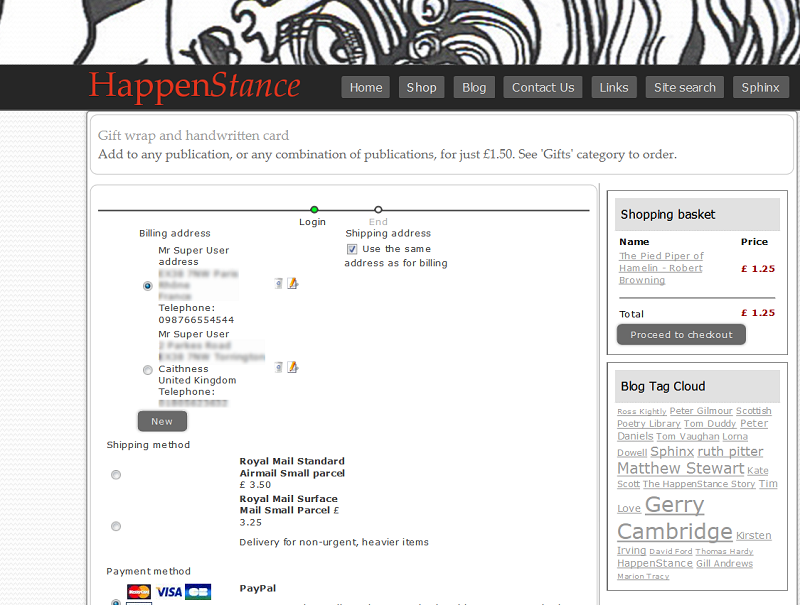
My problem is that when there are multiple addresses to choose from, there is no space between the addresses.
My problem is that when there are multiple addresses to choose from, there is no space between the addresses.
Please Log in or Create an account to join the conversation.

12 years 8 months ago #142302
by Eliot
Replied by Eliot on topic CHECKOUT ADDRESS CSS
Hi there,
You can try to add the following css to your frontend css file:
It might not be the most elegant way but it should work
You can try to add the following css to your frontend css file:
Code:
.hikashop_checkout_billing_address_info{
display: block;
margin-top: 10px;
}
It might not be the most elegant way but it should work
The following user(s) said Thank You: SarahW
Please Log in or Create an account to join the conversation.
12 years 8 months ago #142325
by SarahW
Replied by SarahW on topic CHECKOUT ADDRESS CSS
Brilliant - it worked! Many thanks for that, Eliot
Please Log in or Create an account to join the conversation.
Time to create page: 0.358 seconds