

- Posts: 53
- Thank you received: 0
New Button in Billing address - no display
12 years 9 months ago - 12 years 9 months ago #141604
by oharris
New Button in Billing address - no display was created by oharris
-- url of the page with the problem -- :
2014conference.icac.org.jm
-- HikaShop version -- : 2.2.3
-- Joomla version -- : 2.5
-- PHP version -- : x.x.x
-- Browser(s) name and version -- : XXXXX x.x.x
-- Error-message(debug-mod must be tuned on) -- : Error_message
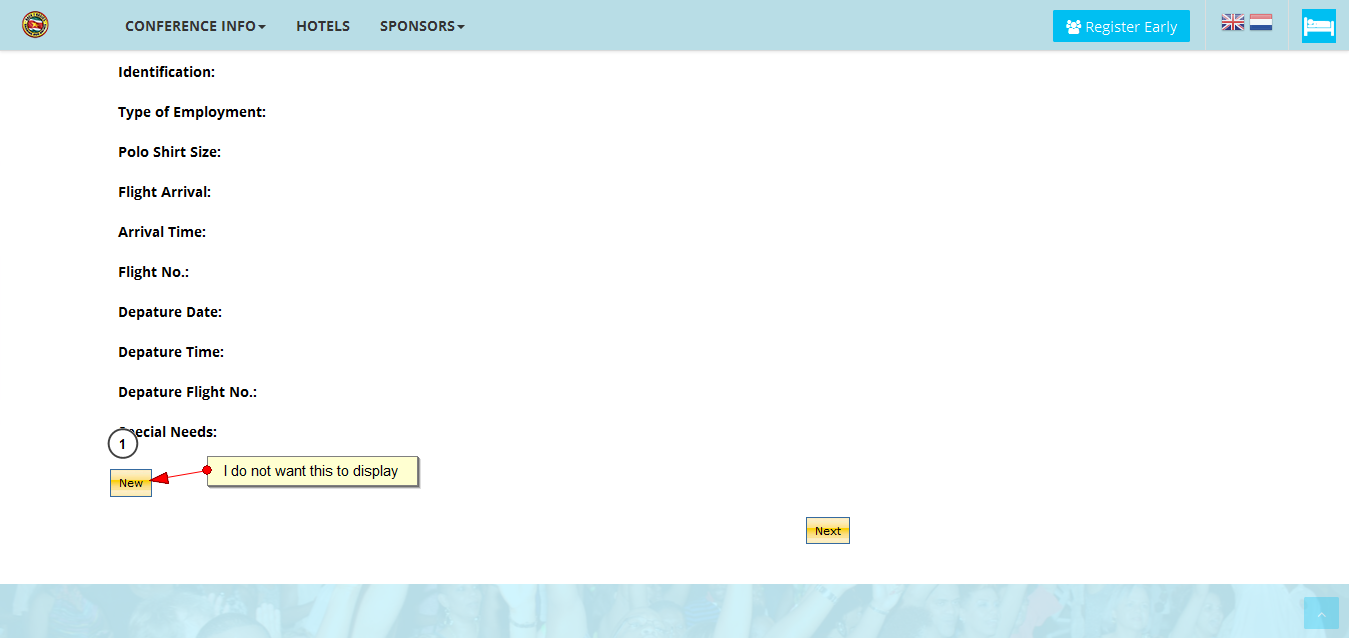
After completing the registration form in the checkout process, I click next which takes me to a confirmation page entitled "Billing Address". At the end of that form is a New button. How can I get rid of or cause that New button not to show? See attached example.
-- HikaShop version -- : 2.2.3
-- Joomla version -- : 2.5
-- PHP version -- : x.x.x
-- Browser(s) name and version -- : XXXXX x.x.x
-- Error-message(debug-mod must be tuned on) -- : Error_message
After completing the registration form in the checkout process, I click next which takes me to a confirmation page entitled "Billing Address". At the end of that form is a New button. How can I get rid of or cause that New button not to show? See attached example.
Last edit: 12 years 9 months ago by oharris.
Please Log in or Create an account to join the conversation.

12 years 9 months ago #141649
by Eliot
Replied by Eliot on topic New Button in Billing address - no display
Hi there,
You should have a look at our documentation about display customization: www.hikashop.com/support/documentation/i...ize-the-display.html
In this case, adding this to your css file might do the job:
You should have a look at our documentation about display customization: www.hikashop.com/support/documentation/i...ize-the-display.html
In this case, adding this to your css file might do the job:
Code:
.hikashop_cart_input_button{
display: none;
}
Please Log in or Create an account to join the conversation.
12 years 9 months ago #141937
by oharris
Replied by oharris on topic New Button in Billing address - no display
I did add code, but it does not seem to work. The new button is still there on checkout. Could you say in which css I should put it?
Please Log in or Create an account to join the conversation.

12 years 9 months ago #142042
by nicolas
Replied by nicolas on topic New Button in Billing address - no display
You should add that CSS instead in the CSS file fo HikaShop :
#hikashop_checkout_billing_address_new[display:none; }
www.hikashop.com/support/support/documen...ize-the-display.html
#hikashop_checkout_billing_address_new[display:none; }
www.hikashop.com/support/support/documen...ize-the-display.html
Please Log in or Create an account to join the conversation.
12 years 9 months ago #142551
by oharris
Replied by oharris on topic New Button in Billing address - no display
I have added both of the codes to the frontend_custom1.css, however the "New" button is still on the page when I am checking out. Please help. The site is ready to be launched to the public, this week.
Please Log in or Create an account to join the conversation.
12 years 9 months ago #142615
by Eliot
Replied by Eliot on topic New Button in Billing address - no display
If you had look at the link we gave you twice, you could have find the answer in less than 5 minutes.
Here is the right css:
It took me 2 minutes:
- Find the page of your website
- Right click on the button -> inspect element
- spot the id: "hikashop_register_form_button"
Here is the right css:
Code:
#hikashop_register_form_button{ display: none; }
It took me 2 minutes:
- Find the page of your website
- Right click on the button -> inspect element
- spot the id: "hikashop_register_form_button"
Please Log in or Create an account to join the conversation.
12 years 9 months ago #142852
by oharris
Replied by oharris on topic New Button in Billing address - no display
Thanks for the verbal abuse (LOL) Eliot but that did not work either (afterall the class of the button is hikashop_checkout_billing_address_new). But not to worry. I found an alternate fix of some sort. I went to Display > Views. In that section I selected my Front End template > Checkout > Address_view (.php).
I found the class and took it out.
I found the class and took it out.
Please Log in or Create an account to join the conversation.
Time to create page: 0.064 seconds