

- Posts: 254
- Thank you received: 2
Address popup is not working correctly
12 years 8 months ago #141609
by bigfoot
Address popup is not working correctly was created by bigfoot
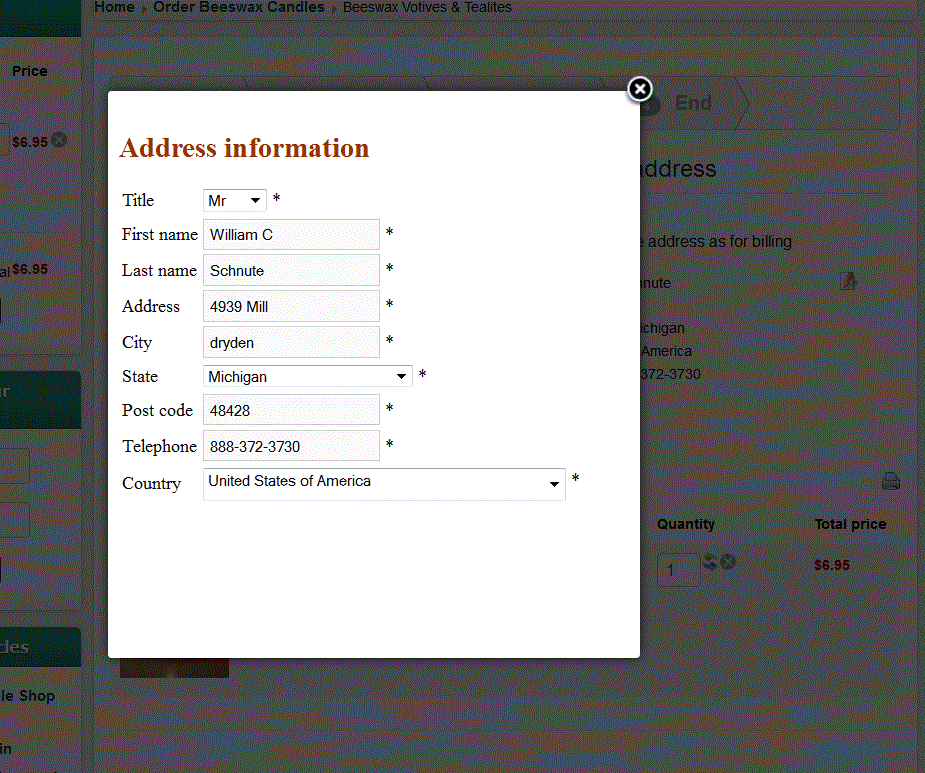
After entering address and going to next page, If I want to change the ship to address, the popup always comes up perfect, but there is no “ok” or “submit” or anything on the pop up to make the program accept it. How do I fix this? I think is was working in the past.
Please Log in or Create an account to join the conversation.

Less
More
- Posts: 12953
- Thank you received: 1778
12 years 8 months ago - 12 years 8 months ago #141647
by Mohamed Thelji
Replied by Mohamed Thelji on topic Address popup is not working correctly
Hi,
Did you done some modifications through the files of the "address" view of your front-end template through "Hikashop->Display->Views" ? If yes, can you remove your changes and test it again (don't forget to save them through a text file for example).
Did you done some modifications through the files of the "address" view of your front-end template through "Hikashop->Display->Views" ? If yes, can you remove your changes and test it again (don't forget to save them through a text file for example).
Last edit: 12 years 8 months ago by Mohamed Thelji.
Please Log in or Create an account to join the conversation.
12 years 8 months ago #141687
by bigfoot
Replied by bigfoot on topic Address popup is not working correctly
I checked and have made no changes to the "address" view of the front-end template. I have removed all shipping plug in"s and payment plugin's and re-loaded a fresh copy of hikashop with no change.
You can try this page:
www.beeswaxcandleshop.com/Beeswax-Decora...nes-frog-prince.html
You can try this page:
www.beeswaxcandleshop.com/Beeswax-Decora...nes-frog-prince.html
Please Log in or Create an account to join the conversation.

12 years 8 months ago #141716
by nicolas
Replied by nicolas on topic Address popup is not working correctly
There is no way that the button is not displayed by HikaShop. Either the button's code
has been removed in the file "form" of the view "address" via the menu Display>Views, or the code around altered, or the cart helper's displayButton function has been modified, or there is a system plugin which removes the HTML of the button on your website.
Code:
echo $this->cart->displayButton(JText::_('OK'),'ok',$this->params,hikashop_completeLink('address&task=save'),'if(hikashopCheckChangeForm(\'address\',\'hikashop_address_form\')) document.forms[\'hikashop_address_form\'].submit(); return false;');
Please Log in or Create an account to join the conversation.
12 years 8 months ago - 12 years 8 months ago #141803
by bigfoot
Replied by bigfoot on topic Address popup is not working correctly
I checked the address form & it looks ok.
What or where is the cart helper's displayButton?
How cand I check for a system plug in? I have been searching, but cannot find any. Is there a generic Joomla one? I disabled JCE editor and it did not change.
Also - Sometimes I get a "<" on the bottom left of the popup - does this mean anything?
What or where is the cart helper's displayButton?
How cand I check for a system plug in? I have been searching, but cannot find any. Is there a generic Joomla one? I disabled JCE editor and it did not change.
Also - Sometimes I get a "<" on the bottom left of the popup - does this mean anything?
Last edit: 12 years 8 months ago by bigfoot. Reason: more info
Please Log in or Create an account to join the conversation.

12 years 8 months ago #141985
by Jerome
Jerome - Obsidev.com
HikaMarket & HikaSerial developer / HikaShop core dev team.
Replied by Jerome on topic Address popup is not working correctly
Hi,
The cart helper's displayButton is, In the HikaShop cart helper.
If you have a "<" on the bottom left, it means that you have insert the character "<" during your view override/modification.
It could be a "<<?" or something like that.
Regards,
The cart helper's displayButton is, In the HikaShop cart helper.
Code:
$cartHelper = hikashop_get('helper.cart');
If you have a "<" on the bottom left, it means that you have insert the character "<" during your view override/modification.
It could be a "<<?" or something like that.
Regards,
Jerome - Obsidev.com
HikaMarket & HikaSerial developer / HikaShop core dev team.
Please Log in or Create an account to join the conversation.
12 years 8 months ago #142202
by bigfoot
Replied by bigfoot on topic Address popup is not working correctly
Sorry guys - I am lost!
Is the cart help one of the "views"? What am I looking for? I looked in the various cart views.
The only modifications I have made was changing the word "guest" to something else in the "login" view.
Is the cart help one of the "views"? What am I looking for? I looked in the various cart views.
The only modifications I have made was changing the word "guest" to something else in the "login" view.
Please Log in or Create an account to join the conversation.
12 years 8 months ago #142223
by nicolas
Replied by nicolas on topic Address popup is not working correctly
The cart helper is in the file administrator/components/com_hikashop/helpers/cart.php
Maybe there's another extension messing with the HTML of the page ?
Maybe there's another extension messing with the HTML of the page ?
Please Log in or Create an account to join the conversation.
12 years 7 months ago #144669
by bigfoot
Replied by bigfoot on topic Address popup is not working correctly
I installed a backup copy of this site in a backup subfolder. I have been busy trying to delete things to make the popup work - unsuccessful so far. I turned on the debug system and copied what came up in the popup if it means anything. (attachment below) The site is a backup and cannot be hurt - in case I could get anyone to look at it.
Does the attachment have any useful info.
This attachment is hidden for guests.
Please log in or register to see it.
Please log in or register to see it.
Does the attachment have any useful info.
Please Log in or Create an account to join the conversation.

12 years 7 months ago #145729
by Eliot
Replied by Eliot on topic Address popup is not working correctly
Hi there,
No error notable on this attachment.
But I just tried on your site and the popup seems to load fine. Do you still have an issue on this?
No error notable on this attachment.
But I just tried on your site and the popup seems to load fine. Do you still have an issue on this?
Please Log in or Create an account to join the conversation.
12 years 7 months ago #145806
by bigfoot
Replied by bigfoot on topic Address popup is not working correctly
I just tried firefox and exploder and yes the popup will come up - but no way to change anything - no "enter', "ok' or anything.
Please Log in or Create an account to join the conversation.

12 years 7 months ago #145865
by Xavier
Replied by Xavier on topic Address popup is not working correctly
Hi,
I see that you have the version 2.2.3 of HikaShop, I suggest to try to update.
It can probably solve this problem.
I see that you have the version 2.2.3 of HikaShop, I suggest to try to update.
It can probably solve this problem.
Please Log in or Create an account to join the conversation.
12 years 6 months ago #147811
by bigfoot
Replied by bigfoot on topic Address popup is not working correctly
I up-graded Hika to latest version.
I still cannot get the popup to work showing “OK” or something to make the program accept it. If a customer wants to ship to another address, or worse, makes a mistake in entering their own address, THERE IS NO WAY FOR THEM TO CHANGE IT – other than wait a few days.
Should I change the settings so it does not retain the cart for long? Is there a “work around” for this issue?
New problem – The last few orders people complained that when they tried to check out using “authorize net”, pay pal kept coming up, interfering with finishing their order. One order went through as a Pay Pal order with no payment. The next one went through as both authorize and pay pal (no payment on the paypal) (2 orders – separate numbers). I just tried a test order from my computer and it went through fine.
I still cannot get the popup to work showing “OK” or something to make the program accept it. If a customer wants to ship to another address, or worse, makes a mistake in entering their own address, THERE IS NO WAY FOR THEM TO CHANGE IT – other than wait a few days.
Should I change the settings so it does not retain the cart for long? Is there a “work around” for this issue?
New problem – The last few orders people complained that when they tried to check out using “authorize net”, pay pal kept coming up, interfering with finishing their order. One order went through as a Pay Pal order with no payment. The next one went through as both authorize and pay pal (no payment on the paypal) (2 orders – separate numbers). I just tried a test order from my computer and it went through fine.
Please Log in or Create an account to join the conversation.
12 years 6 months ago #148087
by Jerome
Jerome - Obsidev.com
HikaMarket & HikaSerial developer / HikaShop core dev team.
Replied by Jerome on topic Address popup is not working correctly
Hi,
Please, one problem in the same time.
Otherwise you can create another thread but it won't be a good idea to manage several different problems in the same time.
Popup - Like explained in an older post, the problem come from an override.
Updating HikaShop won't remove the override so the problem will persists.
But with HikaShop 2.3.0, you can use the two new address selector layout.
You can test the "List" or the "Dropdown list" modes.
Regards,
Please, one problem in the same time.
Otherwise you can create another thread but it won't be a good idea to manage several different problems in the same time.
Popup - Like explained in an older post, the problem come from an override.
Updating HikaShop won't remove the override so the problem will persists.
But with HikaShop 2.3.0, you can use the two new address selector layout.
You can test the "List" or the "Dropdown list" modes.
Regards,
Jerome - Obsidev.com
HikaMarket & HikaSerial developer / HikaShop core dev team.
Please Log in or Create an account to join the conversation.
12 years 4 months ago #156190
by bigfoot
Replied by bigfoot on topic Address popup is not working correctly
Hello - I still have not resolved this "Ship to another address" problem and it is becoming very troublesome for our customers.
I cannot make any of the “ship to another address” selections work.
The “dropdown” selector will give a “403error” when I change the shipping address.
The “list” selector - both have checked box selected and I cannot change it. – If I change the shipping address the billing changes to same thing whether the customer wants it or not.
The “popup” selector – opens nice popup box, but there is no “submit” button or anything to make it work.
I have left it in the “dropdown” selector so you can see the 403 error. Go to any page
www.beeswaxcandleshop.com/Beeswax-Hand-D...ax-tapers-pairs.html
put something in cart and try to change address - using the edit button, you can change ship address - but both addresss change. When I use the drop down box and enter a new address and select the check mark I get a 403 error.
I need to make at least one of the 3 styles to work.
I cannot make any of the “ship to another address” selections work.
The “dropdown” selector will give a “403error” when I change the shipping address.
The “list” selector - both have checked box selected and I cannot change it. – If I change the shipping address the billing changes to same thing whether the customer wants it or not.
The “popup” selector – opens nice popup box, but there is no “submit” button or anything to make it work.
I have left it in the “dropdown” selector so you can see the 403 error. Go to any page
www.beeswaxcandleshop.com/Beeswax-Hand-D...ax-tapers-pairs.html
put something in cart and try to change address - using the edit button, you can change ship address - but both addresss change. When I use the drop down box and enter a new address and select the check mark I get a 403 error.
I need to make at least one of the 3 styles to work.
Please Log in or Create an account to join the conversation.
12 years 4 months ago #156208
by nicolas
Replied by nicolas on topic Address popup is not working correctly
Hi,
Regarding the issues with the dropdown/list selectors, updating HikaShop to the 2.3.1 might help as we added several fixes to that new feature since the 2.3.0
Regarding the popup not displaying the submit, either your template is overriding the view or a system plugin/template option is removing it. Because there is no way that HikaShop is not displaying that button.
Check the folder templates/YOUR_TEMPLATE/html/com_hikashop/address/ for any view override and if so try to rename the folder in order to deactivate the override.
If there are no override, then I would recommend to check the different system plugins/template options (try to enable/disable them one by one and see if that helps after each one).
Regarding the issues with the dropdown/list selectors, updating HikaShop to the 2.3.1 might help as we added several fixes to that new feature since the 2.3.0
Regarding the popup not displaying the submit, either your template is overriding the view or a system plugin/template option is removing it. Because there is no way that HikaShop is not displaying that button.
Check the folder templates/YOUR_TEMPLATE/html/com_hikashop/address/ for any view override and if so try to rename the folder in order to deactivate the override.
If there are no override, then I would recommend to check the different system plugins/template options (try to enable/disable them one by one and see if that helps after each one).
Please Log in or Create an account to join the conversation.
12 years 4 months ago #156583
by bigfoot
Replied by bigfoot on topic Address popup is not working correctly
Thank you for your help. I created a test site with akeeba backup and copied my site to it. I did eventually find a plugin called "seo renderer' that was causing the problem. I now remember that this same plugin was causing an issue on our other site with the same template.
Popup works fine now.
Popup works fine now.
Please Log in or Create an account to join the conversation.
Time to create page: 0.338 seconds