

- Posts: 81
- Thank you received: 0
Product code display only in shopping cart
12 years 7 months ago #152242
by bordia
Product code display only in shopping cart was created by bordia
Hi,
is it possible to have the product code only display in the shopping cart?
best regards...
is it possible to have the product code only display in the shopping cart?
best regards...
Please Log in or Create an account to join the conversation.

12 years 7 months ago #152269
by Xavier
Replied by Xavier on topic Product code display only in shopping cart
Hi,
Yes you have to set the options for the product code to "no" and edit the view "product / cart" to remove the if condition around the display of the php code.
hikashop.com/support/support/documentati...ize-the-display.html
Yes you have to set the options for the product code to "no" and edit the view "product / cart" to remove the if condition around the display of the php code.
hikashop.com/support/support/documentati...ize-the-display.html
Please Log in or Create an account to join the conversation.
12 years 7 months ago #153094
by bordia
Replied by bordia on topic Product code display only in shopping cart
Do you mean that I should remove line 278?
<?php if ($this->config->get ('show_code')) { ?>
<span class="hikashop_product_code_cart""><?php echo $row->product_code; ?></span>
<?php } ?>
<?php if ($this->config->get ('show_code')) { ?>
<span class="hikashop_product_code_cart""><?php echo $row->product_code; ?></span>
<?php } ?>
Please Log in or Create an account to join the conversation.

Less
More
- Posts: 12953
- Thank you received: 1778
12 years 7 months ago #153102
by Mohamed Thelji
Replied by Mohamed Thelji on topic Product code display only in shopping cart
The solution will be to change that lines :
By :
Code:
<?php if ($this->config->get('show_code')) { ?>
<span class="hikashop_product_code_cart"><?php echo $row->product_code; ?></span>
<?php } ?>
Code:
<span class="hikashop_product_code_cart"><?php echo $row->product_code; ?></span>
Please Log in or Create an account to join the conversation.
12 years 7 months ago #153230
by bordia
Replied by bordia on topic Product code display only in shopping cart
Hi,
I have the line as you described changed. It was still the product code does not appear in your cart as well as on the invoice and purchase order.
I have the line as you described changed. It was still the product code does not appear in your cart as well as on the invoice and purchase order.
Please Log in or Create an account to join the conversation.
Less
More
- Posts: 12953
- Thank you received: 1778
12 years 7 months ago #153258
by Mohamed Thelji
Replied by Mohamed Thelji on topic Product code display only in shopping cart
1. Can you check that you edited the "cart" file of the "product" view of the GOOD front-end template that you are currently using through "Hikashop->Display->Views" ?
2. Also, can you check that you don't have any CSS code which is hiding your product code ?
Thanks.
2. Also, can you check that you don't have any CSS code which is hiding your product code ?
Thanks.
Please Log in or Create an account to join the conversation.
12 years 7 months ago #153514
by bordia
Replied by bordia on topic Product code display only in shopping cart
Hi,
yes I have the php file changed from frontend template what I use. The CSS code is not set to default but to old. But there was nothing changed and since then has been the template of this page over extensions is uploaded.
Best regards
yes I have the php file changed from frontend template what I use. The CSS code is not set to default but to old. But there was nothing changed and since then has been the template of this page over extensions is uploaded.
Best regards
Please Log in or Create an account to join the conversation.
12 years 7 months ago #153517
by Xavier
Replied by Xavier on topic Product code display only in shopping cart
Hi,
The code given should display the product code in the cart module.
To have the product code too in the invoice you have to edit the views "order / show" (frontend template), "order / invoice" (backend template), etc.
The code given should display the product code in the cart module.
To have the product code too in the invoice you have to edit the views "order / show" (frontend template), "order / invoice" (backend template), etc.
Please Log in or Create an account to join the conversation.
12 years 7 months ago #153674
by bordia
Replied by bordia on topic Product code display only in shopping cart
Hi,
I have the display of the product code in the configuration reactivated. So that is the product code shown on the invoice.
My question is, how do I get the product code does not appear in the Product category.
In the picture marked in red.
Best regards
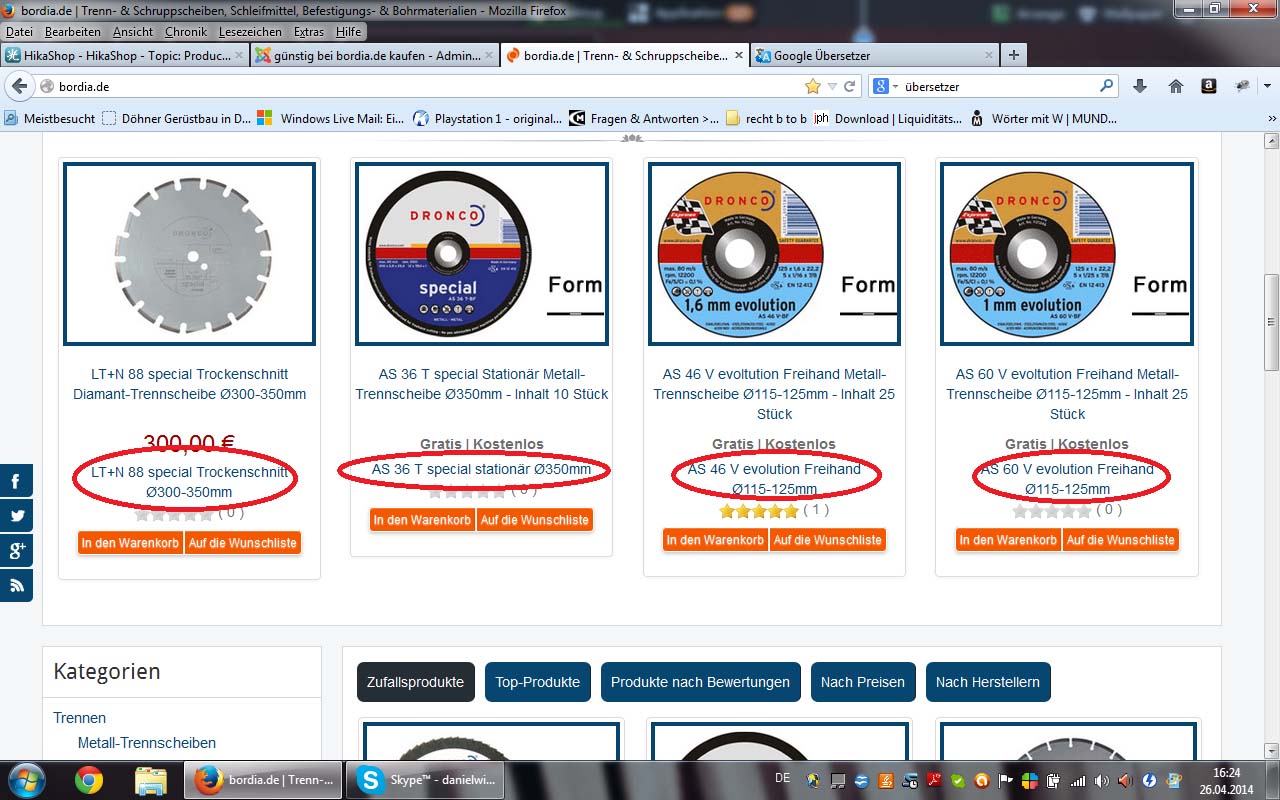
I have the display of the product code in the configuration reactivated. So that is the product code shown on the invoice.
My question is, how do I get the product code does not appear in the Product category.
In the picture marked in red.
Best regards
Please Log in or Create an account to join the conversation.
12 years 7 months ago #153807
by Xavier
Replied by Xavier on topic Product code display only in shopping cart
Hi,
You have to edit the view "product / listing_img_title" and remove the product code part.
You have to edit the view "product / listing_img_title" and remove the product code part.
Code:
<!-- PRODUCT CODE -->
<span class='hikashop_product_code_list'>
<?php if ($this->config->get('show_code')) { ?>
<?php if($this->params->get('link_to_product_page',1)){ ?>
<a href="<?php echo $link;?>">
<?php }
echo $this->row->product_code;
if($this->params->get('link_to_product_page',1)){ ?>
</a>
<?php } ?>
<?php } ?>
</span>
<!-- EO PRODUCT CODE -->
Please Log in or Create an account to join the conversation.
12 years 6 months ago #154576
by bordia
Replied by bordia on topic Product code display only in shopping cart
Thank you very much! The way I want it.

Please Log in or Create an account to join the conversation.
Time to create page: 0.077 seconds