

- Posts: 80
- Thank you received: 0
size of address fields & position of the asterisks
12 years 7 months ago #152858
by leonora
size of address fields & position of the asterisks was created by leonora
-- url of the page with the problem -- :
mywebsite.com/mypage
-- HikaShop version -- : essential
-- Joomla version -- : 3.2
-- PHP version -- : x.x.x
-- Browser(s) name and version -- : XXXXX x.x.x
-- Error-message(debug-mod must be tuned on) -- : Error_message
Hi,
In the checkout, in the register form the size of the address_fields is more little than the size of the fields of the login form.
Also, the asteriks are far of the boxes of the address_fields.
I attached the screenshot
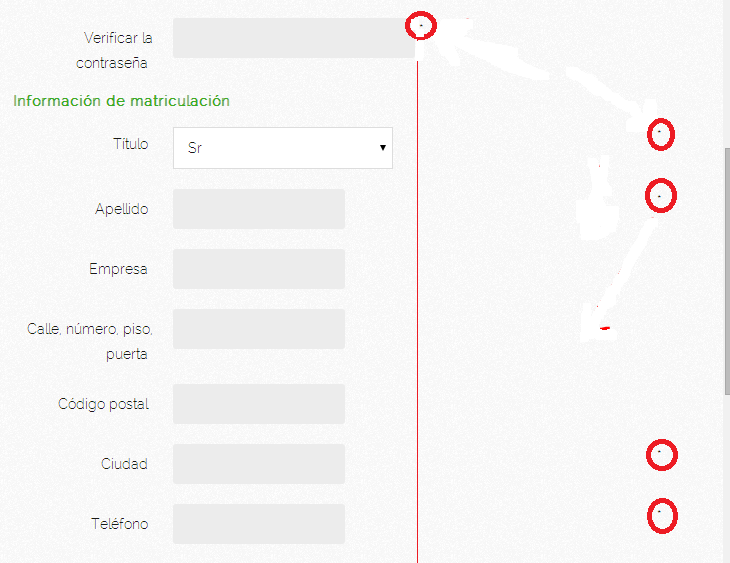
How could I solve it?
Thanks in advance!
Leonora.
-- HikaShop version -- : essential
-- Joomla version -- : 3.2
-- PHP version -- : x.x.x
-- Browser(s) name and version -- : XXXXX x.x.x
-- Error-message(debug-mod must be tuned on) -- : Error_message
Hi,
In the checkout, in the register form the size of the address_fields is more little than the size of the fields of the login form.
Also, the asteriks are far of the boxes of the address_fields.
I attached the screenshot
How could I solve it?
Thanks in advance!
Leonora.
Please Log in or Create an account to join the conversation.

12 years 7 months ago #152861
by nicolas
Replied by nicolas on topic size of address fields & position of the asterisks
Hi,
This depends on the CSS of your template. Please provide a link to that page so that we can analyze the CSS on the page.
This depends on the CSS of your template. Please provide a link to that page so that we can analyze the CSS on the page.
Please Log in or Create an account to join the conversation.
12 years 7 months ago - 12 years 7 months ago #152892
by lionel75
Replied by lionel75 on topic size of address fields & position of the asterisks
Hi
the url of the site in the html code is mywebsite.com/mypage . It is strange that so many user in HKS forum give a wrong url that goes to website.1and1.com/#top ? Is it so difficult to give the rigth url of a website ? is it a new way to have backlink for SEO or anything else ?
I really not understand how this could occur , we are all "developper" and know how a browser work ?
regard's
Last edit: 12 years 7 months ago by lionel75.
Please Log in or Create an account to join the conversation.
12 years 7 months ago #152902
by leonora
Replied by leonora on topic size of address fields & position of the asterisks
Thanks (again), Nicolas
My url:
escolatur.com/clon/administrator/index.p...m_hikashop&ctrl=view
Best regards
Leonora
My url:
escolatur.com/clon/administrator/index.p...m_hikashop&ctrl=view
Best regards
Leonora
Please Log in or Create an account to join the conversation.
12 years 7 months ago #152912
by nicolas
Replied by nicolas on topic size of address fields & position of the asterisks
Hi,
I do see the stars next to each field properly. See:
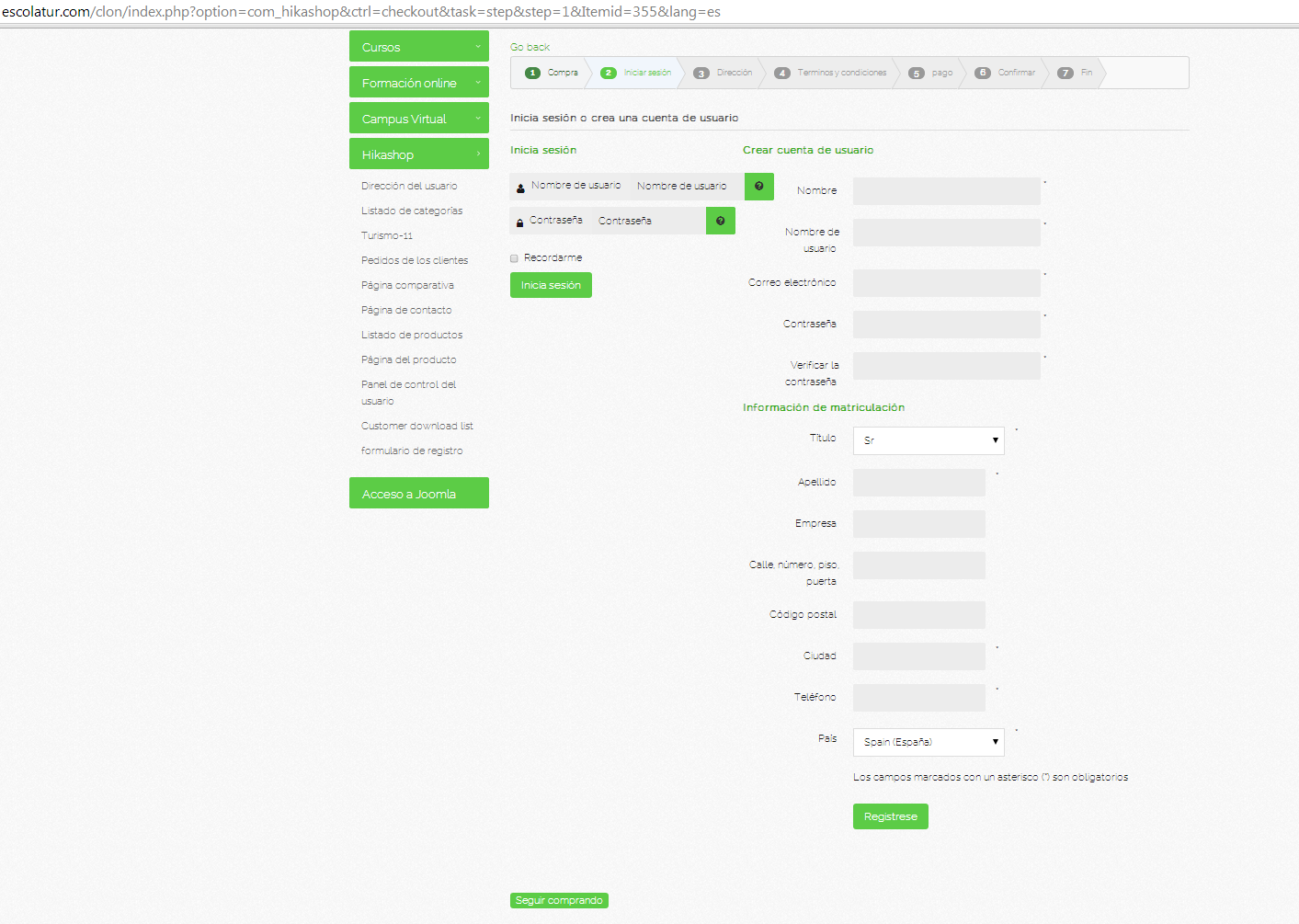
I do see the stars next to each field properly. See:
Please Log in or Create an account to join the conversation.
12 years 7 months ago #152913
by leonora
Replied by leonora on topic size of address fields & position of the asterisks
Yes, I could change the alignment of asterisks
But the size of the inputs in the address fields are smaller than the input user fields from the group above.
How can I do the input address fields bigger?
Thanks in advance!
Leonora
But the size of the inputs in the address fields are smaller than the input user fields from the group above.
How can I do the input address fields bigger?
Thanks in advance!
Leonora
Please Log in or Create an account to join the conversation.
12 years 7 months ago #152914
by nicolas
Replied by nicolas on topic size of address fields & position of the asterisks
You can add such CSS in the frontend CSS file of HikaShop via the Display tab of the configuration:
#hikashop_checkout_login_right_part input{ width: 252px !important; }
#hikashop_checkout_login_right_part input{ width: 252px !important; }
Please Log in or Create an account to join the conversation.
12 years 7 months ago #152953
by leonora
Replied by leonora on topic size of address fields & position of the asterisks
Perfect!
Thanks again, Nicolas.
Your advice is excellent!
Regards
Leonora
Thanks again, Nicolas.
Your advice is excellent!
Regards
Leonora
Please Log in or Create an account to join the conversation.
Time to create page: 0.067 seconds