

- Posts: 80
- Thank you received: 0
Terms and conditions with error 404
12 years 5 months ago #160209
by leonora
Terms and conditions with error 404 was created by leonora
-- url of the page with the problem -- :
escolatur.com/clon
-- HikaShop version -- : business
-- Joomla version -- : 3.1
-- PHP version -- : x.x.x
-- Browser(s) name and version -- : XXXXX x.x.x
-- Error-message(debug-mod must be tuned on) -- : Error 404
Hi,
When I set the friendly URL, the article with the terms and conditions doesnt run. It shows a 404 Error.
But, if the Url is not friendly this article is showed right.
Could you help me, please?
Thanks in advance.
Leonora.
-- HikaShop version -- : business
-- Joomla version -- : 3.1
-- PHP version -- : x.x.x
-- Browser(s) name and version -- : XXXXX x.x.x
-- Error-message(debug-mod must be tuned on) -- : Error 404
Hi,
When I set the friendly URL, the article with the terms and conditions doesnt run. It shows a 404 Error.
But, if the Url is not friendly this article is showed right.
Could you help me, please?
Thanks in advance.
Leonora.
Please Log in or Create an account to join the conversation.
12 years 4 months ago #160273
by leonora
Replied by leonora on topic Terms and conditions with error 404
Hi,
I solved it by changing the htaccess file.
Best regards
Leonora
I solved it by changing the htaccess file.
Best regards
Leonora
Please Log in or Create an account to join the conversation.
12 years 4 months ago #160423
by leonora
Replied by leonora on topic Again: Terms and conditions with error 404
Hi:
The 2nd step on checkout. would have to show the "Terms and conditions" article but its link is wrong.
Recently, when I changed the htaccess file the link run ok, but now an 404Errors appears nowly Only when the friendly URL's are enabled.
The link is escolatur.com/clon/index.php?option=com_...1&Itemid=327&lang=es
I have asked for a solution to my hosting, but they believe that is a bug of hikashop.
Please, give me any solution.
Thanks in advance!
Leonora
The 2nd step on checkout. would have to show the "Terms and conditions" article but its link is wrong.
Recently, when I changed the htaccess file the link run ok, but now an 404Errors appears nowly Only when the friendly URL's are enabled.
The link is escolatur.com/clon/index.php?option=com_...1&Itemid=327&lang=es
I have asked for a solution to my hosting, but they believe that is a bug of hikashop.
Please, give me any solution.
Thanks in advance!
Leonora
Please Log in or Create an account to join the conversation.

12 years 4 months ago #160487
by nicolas
Replied by nicolas on topic Again: Terms and conditions with error 404
Hi,
It's probably because the URL of the popup doesn't have an Itemid. In some cases, the SEF system of Joomla doesn't like that.
Edit the line:
of the file "terms" of the view "checkout" via the menu Display>Views for your frontend template and add the parameter &Itemid=XXX where XXX is the id of a menu item displaying a joomla article and that should help avoid the 404 error for the T&C popup.
It's probably because the URL of the popup doesn't have an Itemid. In some cases, the SEF system of Joomla doesn't like that.
Edit the line:
Code:
JRoute::_('index.php?option=com_content&view=article&id='.$terms_article.'&tmpl=component'),
Please Log in or Create an account to join the conversation.
12 years 4 months ago #163341
by leonora
Replied by leonora on topic Again: Terms and conditions with error 404
Thanks, it runs!
Please Log in or Create an account to join the conversation.
Less
More
- Posts: 10
- Thank you received: 0
10 years 7 months ago #235183
by christie83
Replied by christie83 on topic Again: Terms and conditions with error 404
Hi. I have this same issue. I have done exactly what Nicolas said to do, but it's still showing up with the 404 dialogue box.
-- url of the page with the problem -- www.inarihealthandwellness.com
-- HikaShop version -- : Starter: 2.6.1
-- Joomla version -- : 3.3.6
-- PHP version -- : x.x.x
-- Browser(s) name and version -- : XXXXX x.x.x
-- Error-message(debug-mod must be tuned on) -- : Error 404
-- url of the page with the problem -- www.inarihealthandwellness.com
-- HikaShop version -- : Starter: 2.6.1
-- Joomla version -- : 3.3.6
-- PHP version -- : x.x.x
-- Browser(s) name and version -- : XXXXX x.x.x
-- Error-message(debug-mod must be tuned on) -- : Error 404
Please Log in or Create an account to join the conversation.
10 years 7 months ago - 10 years 7 months ago #235216
by Philip
Replied by Philip on topic Again: Terms and conditions with error 404
Hello,
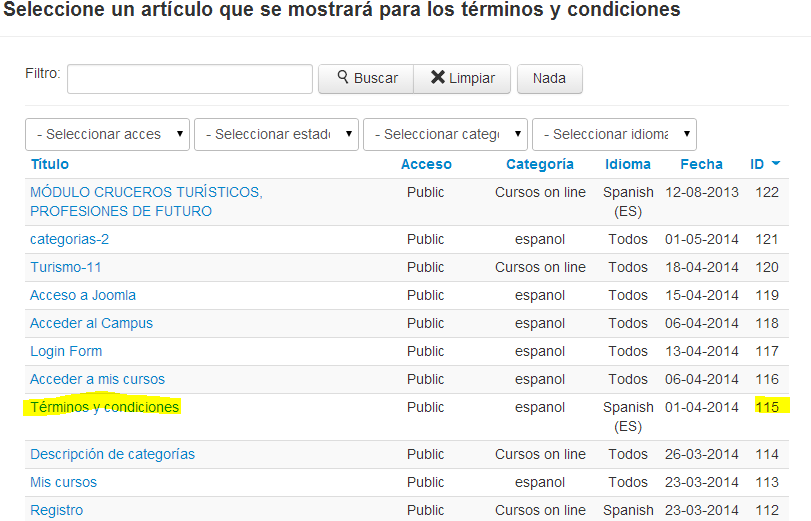
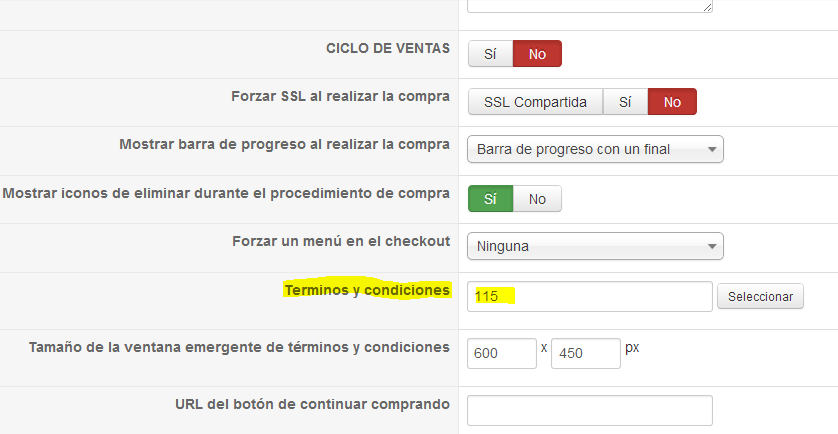
Can you make screenshot of your configuration, especially your checkout, in Components => HikaShop => Configuration in Checkout tab AND the article (your terms and conditions) ?
Awaiting news from you,
Regards,
Can you make screenshot of your configuration, especially your checkout, in Components => HikaShop => Configuration in Checkout tab AND the article (your terms and conditions) ?
Awaiting news from you,
Regards,
Last edit: 10 years 7 months ago by Philip.
Please Log in or Create an account to join the conversation.
Less
More
- Posts: 10
- Thank you received: 0
10 years 7 months ago #235294
by christie83
Replied by christie83 on topic Again: Terms and conditions with error 404
Thanks Philip. Here are the screenshots.
Please Log in or Create an account to join the conversation.

10 years 7 months ago #235314
by Xavier
Replied by Xavier on topic Again: Terms and conditions with error 404
Hi,
The issue is that in the view that you edited, the link is not correct.
You are forcing the id of the article, and using the option value, so the id is no "3939" instead of "39" that's why it can't load the content.
So in your edition you have to remove "39" from the url.
The issue is that in the view that you edited, the link is not correct.
You are forcing the id of the article, and using the option value, so the id is no "3939" instead of "39" that's why it can't load the content.
So in your edition you have to remove "39" from the url.
Please Log in or Create an account to join the conversation.
Less
More
- Posts: 10
- Thank you received: 0
10 years 7 months ago #235442
by christie83
Replied by christie83 on topic Again: Terms and conditions with error 404
Ok, so I have attached screenshots. Without the customisation, the browser code (inspect element) shows correctly, but when I add the article ID to the checkout / terms.php, the browser code shows 3939. Both options, I am still getting 404 error.
Please Log in or Create an account to join the conversation.
10 years 7 months ago - 10 years 7 months ago #235455
by Philip
Replied by Philip on topic Again: Terms and conditions with error 404
Hello,
If nothing is solved, despite fact all was said, difficult to have another idea, so next step!
Can you pass us via our "Contact us" form (add this topic Url in your message as a link please) access references for frontend and backend, we will be able to process some tests.
Awaiting news from you.
Regards,
If nothing is solved, despite fact all was said, difficult to have another idea, so next step!
Can you pass us via our "Contact us" form (add this topic Url in your message as a link please) access references for frontend and backend, we will be able to process some tests.
Awaiting news from you.
Regards,
Last edit: 10 years 7 months ago by Philip.
Please Log in or Create an account to join the conversation.
10 years 7 months ago - 10 years 7 months ago #235655
by Philip
Replied by Philip on topic Again: Terms and conditions with error 404
Hello,
I found and fix your terms & condition issue.
To explain what I have done in Display -> Views and your terms in checkout view I replace the line :
JRoute::_('index.php?option=com_content&view=article&id=39'.$terms_article.'&tmpl=component')
By
JRoute::_('index.php?option=com_content&view=article&id=X'.$terms_article.'&tmpl=component&itemid=39'
And I set a category for your Terms & Condition Article (without this that won't works)
Hope this will fit your needs,
Regards,
I found and fix your terms & condition issue.
To explain what I have done in Display -> Views and your terms in checkout view I replace the line :
JRoute::_('index.php?option=com_content&view=article&id=39'.$terms_article.'&tmpl=component')
By
JRoute::_('index.php?option=com_content&view=article&id=X'.$terms_article.'&tmpl=component&itemid=39'
And I set a category for your Terms & Condition Article (without this that won't works)
Hope this will fit your needs,
Regards,
Last edit: 10 years 7 months ago by Philip.
The following user(s) said Thank You: christie83
Please Log in or Create an account to join the conversation.
Less
More
- Posts: 10
- Thank you received: 0
10 years 7 months ago #235760
by christie83
Replied by christie83 on topic Again: Terms and conditions with error 404
Thank you so much Philip 
Please Log in or Create an account to join the conversation.
Time to create page: 0.096 seconds