

- Posts: 7
- Thank you received: 1
Design checkout page
12 years 5 months ago - 12 years 5 months ago #161612
by haimerlc
Design checkout page was created by haimerlc
Hello!
I dont find a way to design my checkout / adress page like this sample i found in the web.
Could someone give me a hint how to design the page like the sample attached.
I have attached my current "not nice" checkout page where the Login is before/above the registration fields. I would have the Login fields left side and the Registration fields right, on the same height beginning......
Thanks in advance!
Best regards,
Chris
-- HikaShop version -- : 2.3.1 Business
-- Joomla version -- : 2.5
Last edit: 12 years 5 months ago by haimerlc.
Please Log in or Create an account to join the conversation.

12 years 5 months ago #161614
by Xavier
Replied by Xavier on topic Design checkout page
Hi,
Here is a tutorial which explain how to customize the display:
hikashop.com/support/support/documentati...ize-the-display.html
With this tutorial and some html, css knowledges, there is no more secret on the customization
Here is a tutorial which explain how to customize the display:
hikashop.com/support/support/documentati...ize-the-display.html
With this tutorial and some html, css knowledges, there is no more secret on the customization
Please Log in or Create an account to join the conversation.
12 years 5 months ago #161740
by haimerlc
Replied by haimerlc on topic Design checkout page
ok,
Thanks for your replay. So i looked at checkout / login.php and found this code. As i understand this, it should work in that way i would like it. Login and Registration side by side. but at the Moment in my shop Login and Registration are shown one above the other. i dont know why?
<div id="hikashop_checkout_login" class="hikashop_checkout_login row-fluid">
<?php
if($display_login) {
?>
<div id="hikashop_checkout_login_left_part" class="hikashop_checkout_login_left_part span4">
<fieldset class="input">
<h2><?php echo JText::_('HIKA_LOGIN');?></h2>
<?php echo $this->loadTemplate('form'); ?>
</fieldset>
</div>
<?php } ?>
<div id="hikashop_checkout_login_right_part" class="hikashop_checkout_login_right_part span8">
<fieldset class="input">
<h2><?php
if($this->registration[2]) {
echo JText::_('GUEST');
} else {
echo JText::_('HIKA_REGISTRATION');
}
?></h2>
<?php
Please Log in or Create an account to join the conversation.
12 years 5 months ago #161752
by haimerlc
Replied by haimerlc on topic Design checkout page
@update
i use another solution now, i use the Switch for "Login" and "Registration" - so only one sections shown. - still like it better
the only Thing i would prefere is to make the "Registration" radiobutton active by Default, not the "Login" radiobutton. i m seaching a while but i cant find the correct place to do this.
could someone give me a short code peace for activation the Registration radiobutton by Default.
thanks
Chris
Please Log in or Create an account to join the conversation.
12 years 5 months ago #161806
by Xavier
Replied by Xavier on topic Design checkout page
Hi,
The two columns are potentially due to your template which is overriding some properties.
For example, if it is adding margin on the elements so the width is maybe too high to keep the elements one next to the other one.
So you have potentially to reduce the element's width with a property like:
To change the default selected value, you have to edit the view "chekout / login" and change the value of the variable "$defaultSelection" to "0".
The two columns are potentially due to your template which is overriding some properties.
For example, if it is adding margin on the elements so the width is maybe too high to keep the elements one next to the other one.
So you have potentially to reduce the element's width with a property like:
Code:
.hikashop_checkout_login_left_part{width: 30% !important;}
.hikashop_checkout_login_right_part{width: 60% !important;}
To change the default selected value, you have to edit the view "chekout / login" and change the value of the variable "$defaultSelection" to "0".
Please Log in or Create an account to join the conversation.
12 years 5 months ago #162005
by haimerlc
Replied by haimerlc on topic Design checkout page
Hi!
I have changed "checkout / Login" - the variable "$defaultSelection" to "0". (line 16)
But the default Button which is always first checked is the "Login" Button, but not the "Register" Button - nothing has changed....
I have changed "checkout / Login" - the variable "$defaultSelection" to "0". (line 16)
But the default Button which is always first checked is the "Login" Button, but not the "Register" Button - nothing has changed....
Please Log in or Create an account to join the conversation.

12 years 5 months ago #162041
by nicolas
Replied by nicolas on topic Design checkout page
Hi,
Can you provide a link to the page so that we can analyze the CSS on your website please ?
Can you provide a link to the page so that we can analyze the CSS on your website please ?
Please Log in or Create an account to join the conversation.
12 years 5 months ago #162168
by haimerlc
Hi!
The site is www.fast-report.biz
Thanks
Replied by haimerlc on topic Design checkout page
nicolas wrote: Hi,
Can you provide a link to the page so that we can analyze the CSS on your website please ?
Hi!
The site is www.fast-report.biz
Thanks
Please Log in or Create an account to join the conversation.
12 years 5 months ago #162236
by nicolas
Replied by nicolas on topic Design checkout page
So you need also to add such code in the checkout/login view :
Code:
<?php
$js ="
var radioBtn = document.getElementById('data[register][registration_method]1');
radioBtn.checked = true;
displayRegistration(radioBtn);";
$doc = JFactory::getDocument();
$doc->addScriptDeclaration($js);
?>
Please Log in or Create an account to join the conversation.
12 years 3 months ago #167659
by marietek
Replied by marietek on topic Design checkout page
Hello
I will enjoy to have a swith in the checkout page in my website like you did.
Can you give me the code and the place where I can put it ?
Have a nice day
marietek
I will enjoy to have a swith in the checkout page in my website like you did.
Can you give me the code and the place where I can put it ?
Have a nice day
marietek
Please Log in or Create an account to join the conversation.
12 years 3 months ago #167700
by haimerlc
Replied by haimerlc on topic Design checkout page
Hi!
I m sorry, but actually i dont realy know what you mean? I will you give anything which can help you....!
Regards,
Chris
I m sorry, but actually i dont realy know what you mean? I will you give anything which can help you....!
Regards,
Chris
The following user(s) said Thank You: Jerome
Please Log in or Create an account to join the conversation.
12 years 3 months ago - 12 years 3 months ago #167738
by marietek
Replied by marietek on topic Design checkout page
Sorry for my "poor" message! I was too much in the subject of the topic!
I put you 2 attachment files where you can see
- what I have ( checkout2 in french) and
- what I would like to have (checkout1 in german)....
And I am no able to write php alone, just copy...
Have a nice day
Marietek
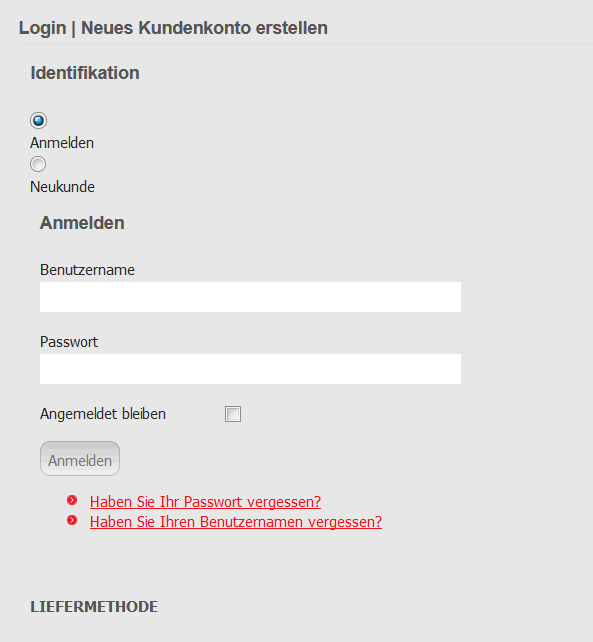
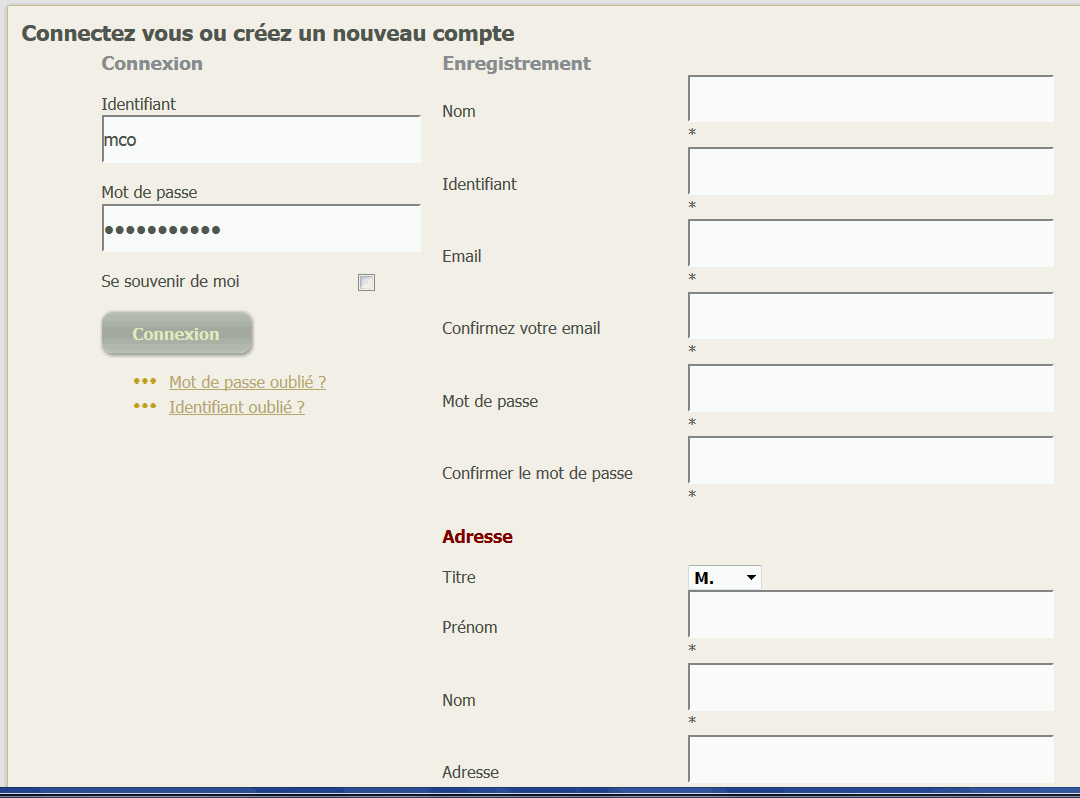
I put you 2 attachment files where you can see
- what I have ( checkout2 in french) and
- what I would like to have (checkout1 in german)....
And I am no able to write php alone, just copy...
Have a nice day
Marietek
Last edit: 12 years 3 months ago by marietek. Reason: wrong explications!
Please Log in or Create an account to join the conversation.

12 years 3 months ago #167745
by Jerome
Jerome - Obsidev.com
HikaMarket & HikaSerial developer / HikaShop core dev team.
Replied by Jerome on topic Design checkout page
Hi,
It is done thanks to option "Display method for registration" in the HikaShop configuration (tab "checkout").
But this option is only available in commercial edition of HikaShop (essential / business).
www.hikashop.com/support/support/documen....html#checkout_login
Regards
It is done thanks to option "Display method for registration" in the HikaShop configuration (tab "checkout").
But this option is only available in commercial edition of HikaShop (essential / business).
www.hikashop.com/support/support/documen....html#checkout_login
Regards
Jerome - Obsidev.com
HikaMarket & HikaSerial developer / HikaShop core dev team.
Please Log in or Create an account to join the conversation.
Time to create page: 0.083 seconds