

- Posts: 2
- Thank you received: 0
Headers for Shipping and Payment Method
12 years 2 months ago #167994
by flodog
Headers for Shipping and Payment Method was created by flodog
-- url of the page with the problem -- :
www.frogfuel.co.uk
-- HikaShop version -- : 2.3.2
-- Joomla version -- : 3.2.3
-- PHP version -- : 5.3.29
-- Browser(s) name and version -- : Chrome
Hi,
Hopefully this is a quite a simple fix.
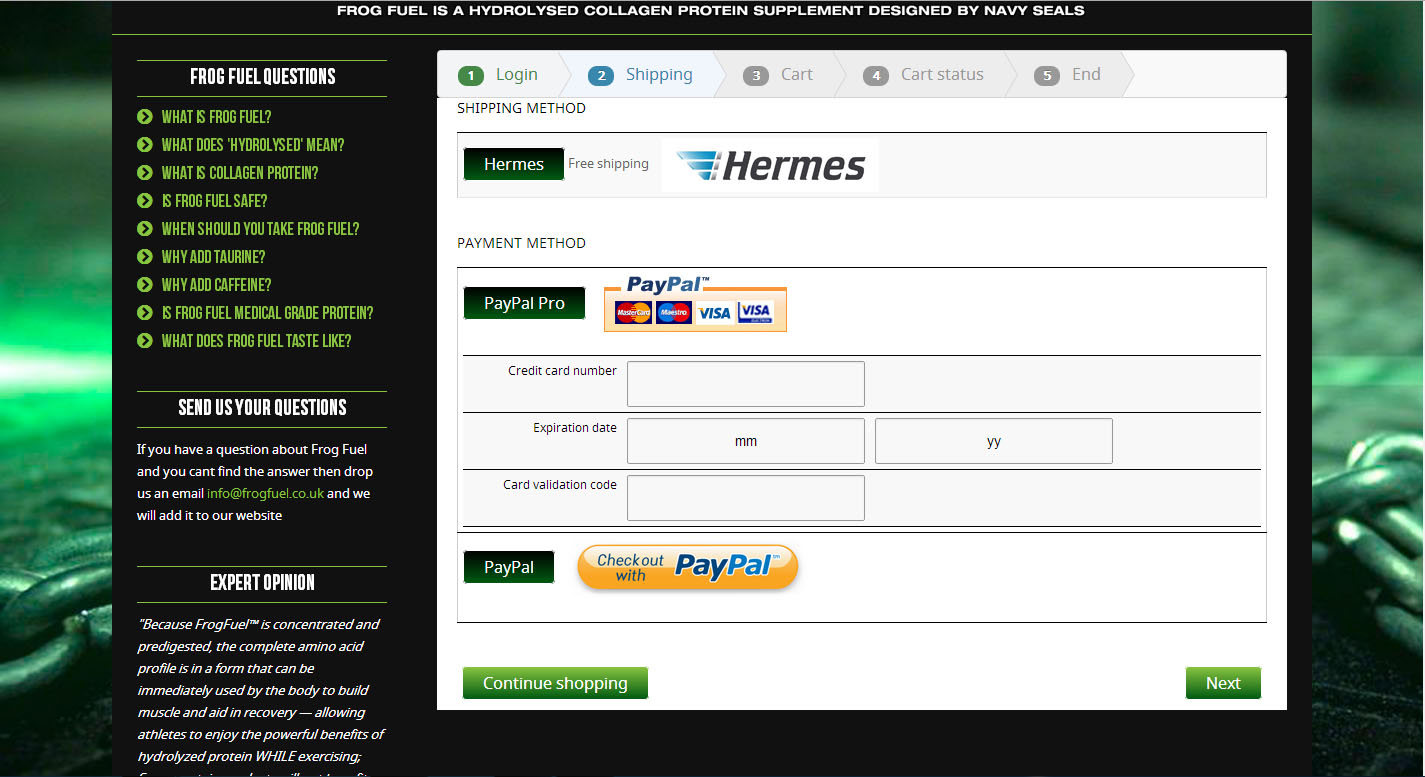
On my shipping/payment method screen I want to have to the plain css buttons replaced by the images that I currently have next to them.
So rather than a button saying Hermes I want the Hermes Logo there instead and the same for PayPal Pro.
PayPal is slightly more difficult as this image also needs to be clickable so the customer goes to their PayPal.
I have attached a screenshot of this page which should hopefully help you understand a bit better.
Thanks
-- HikaShop version -- : 2.3.2
-- Joomla version -- : 3.2.3
-- PHP version -- : 5.3.29
-- Browser(s) name and version -- : Chrome
Hi,
Hopefully this is a quite a simple fix.
On my shipping/payment method screen I want to have to the plain css buttons replaced by the images that I currently have next to them.
So rather than a button saying Hermes I want the Hermes Logo there instead and the same for PayPal Pro.
PayPal is slightly more difficult as this image also needs to be clickable so the customer goes to their PayPal.
I have attached a screenshot of this page which should hopefully help you understand a bit better.
Thanks
Please Log in or Create an account to join the conversation.

12 years 2 months ago #167998
by Xavier
Replied by Xavier on topic Headers for Shipping and Payment Method
Hi,
That can potentially be done thanks to some css like:
You can us the browser console to find the correct "for" attribute in order to apply the correct image on it.
Here is some documentation:
hikashop.com/support/support/documentati...ize-the-display.html
That can potentially be done thanks to some css like:
Code:
label[for="radio_paypal_1"]{
background-image: url('/j33/media/com_hikashop/images/payment/PayPal.jpg') !important;
color: transparent;
border: none;
}
You can us the browser console to find the correct "for" attribute in order to apply the correct image on it.
Here is some documentation:
hikashop.com/support/support/documentati...ize-the-display.html
The following user(s) said Thank You: flodog
Please Log in or Create an account to join the conversation.
12 years 2 months ago #168106
by flodog
Replied by flodog on topic Headers for Shipping and Payment Method
Hi
Thank you for your response,
Once you pointed me in the right direction I kicked myself how simple it was -
label.btn.btn-radio[for="radio_paypal_2"}
{
CSS HERE
}
Thanks
Thank you for your response,
Once you pointed me in the right direction I kicked myself how simple it was -
label.btn.btn-radio[for="radio_paypal_2"}
{
CSS HERE
}
Thanks
Please Log in or Create an account to join the conversation.
Time to create page: 0.185 seconds