
- Posts: 32
- Thank you received: 1
Changing payment method continues checkout.
- loginsecure
-
 Topic Author
- Offline
Less
More
12 years 1 month ago #173336
by loginsecure
Changing payment method continues checkout. was created by loginsecure
-- HikaShop version -- : 2.3.3
-- Joomla version -- : 3.3.4
-- PHP version -- : 5.3.28
-- Browser(s) name and version -- : All major browsers
-- Error-message(debug-mod must be tuned on) -- : No error message
Dear users, contributers and developers,
Not logged in!
On checkout it automatically selects the first payment method(Sofort). This is correct but when we change it to the second(bank transfer) it still says at the bottom of the window: You choose the payment method: Sofort.
While it should have said Bank Transfer.
This works on other websites but not on this one??? The problem becomes worse when a user is logged in!
Logged in!
When logged in you can change the payment method but than it immediately continues the order process. So basically when you change the payment method it automatically clicks on finish. Which is offcourse wrong because now the user is no longer able to enter coupon codes or choose another method.
All help will be greatly appreciated.
Thanks in advance.
-- Joomla version -- : 3.3.4
-- PHP version -- : 5.3.28
-- Browser(s) name and version -- : All major browsers
-- Error-message(debug-mod must be tuned on) -- : No error message
Dear users, contributers and developers,
Not logged in!
On checkout it automatically selects the first payment method(Sofort). This is correct but when we change it to the second(bank transfer) it still says at the bottom of the window: You choose the payment method: Sofort.
While it should have said Bank Transfer.
This works on other websites but not on this one??? The problem becomes worse when a user is logged in!
Logged in!
When logged in you can change the payment method but than it immediately continues the order process. So basically when you change the payment method it automatically clicks on finish. Which is offcourse wrong because now the user is no longer able to enter coupon codes or choose another method.
All help will be greatly appreciated.
Thanks in advance.
Please Log in or Create an account to join the conversation.

12 years 1 month ago #173346
by Jerome
Jerome - Obsidev.com
HikaMarket & HikaSerial developer / HikaShop core dev team.
Replied by Jerome on topic Changing payment method continues checkout.
Hi,
Please provide a screenshot of your checkout workflow.
Deactivating the option "Auto submit shipping and payment methods selection" in your HikaShop configuration might help you.
Regards,
Please provide a screenshot of your checkout workflow.
Deactivating the option "Auto submit shipping and payment methods selection" in your HikaShop configuration might help you.
Regards,
Jerome - Obsidev.com
HikaMarket & HikaSerial developer / HikaShop core dev team.
Please Log in or Create an account to join the conversation.
- loginsecure
-
Topic Author
- Offline
Less
More
- Posts: 32
- Thank you received: 1
12 years 1 month ago #173493
by loginsecure
Replied by loginsecure on topic Changing payment method continues checkout.
Dear Jerome,
Thank you for helping. I have looked and the option was already deactivated. In the attachment you can find the screenshot of the workflow.
Let me know if you need more info or login credentials.
Thanks.
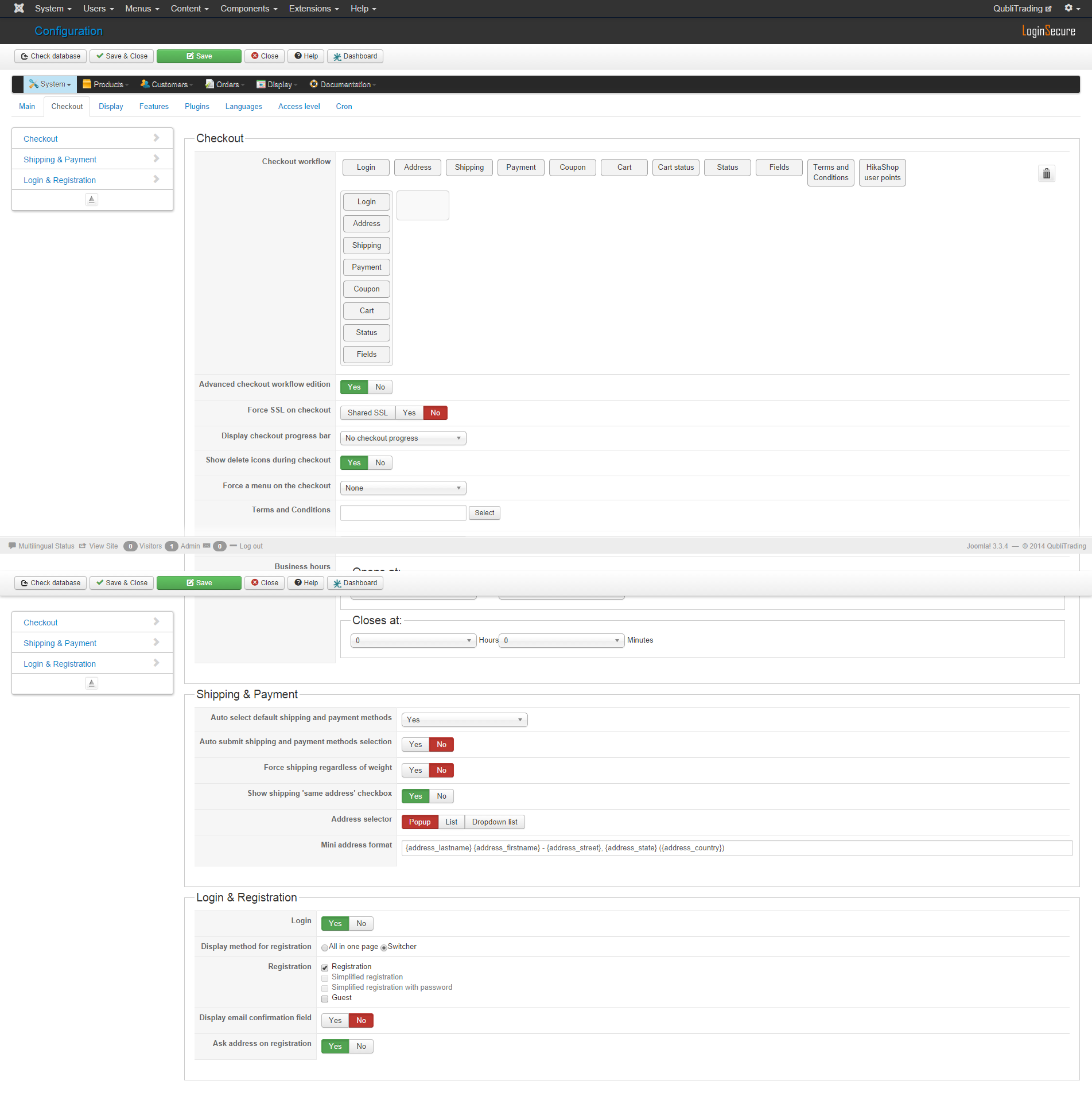
Thank you for helping. I have looked and the option was already deactivated. In the attachment you can find the screenshot of the workflow.
Let me know if you need more info or login credentials.
Thanks.
Please Log in or Create an account to join the conversation.

12 years 1 month ago #173536
by Xavier
Replied by Xavier on topic Changing payment method continues checkout.
Hi,
Do you have edited any views related on the checkout ? Like "payment" ?
If it is, please backup your view and reset it by clicking on the dustbin in the views listing via the Display > Views menu.
Do you have edited any views related on the checkout ? Like "payment" ?
If it is, please backup your view and reset it by clicking on the dustbin in the views listing via the Display > Views menu.
Please Log in or Create an account to join the conversation.
- loginsecure
-
Topic Author
- Offline
Less
More
- Posts: 32
- Thank you received: 1
12 years 1 month ago - 12 years 1 month ago #173578
by loginsecure
Replied by loginsecure on topic Changing payment method continues checkout.
Hello Xavier,
The following views are edited.
Front end product listing_div
Front end product show_default
I believe none of those are involved with the checkout.
Thank you for helping.
By activating the "Auto submit shipping and payment methods selection" the Not logged in problem is fixed. When not registered and thus not logged in it is now changing the payment method on the bottom of the page. Off course the problem when logged in still exist. It still continues which is obvious because it says "Auto submit" So this is not going to work.
Looking further in the configuration I tried the following.
Deactivated "Auto submit shipping and payment methods selection"
Auto select default shipping and payment methods "If only one method exists"
When a user is now logged in or not it wont show on the bottom what type of payment method he/she has chosen. So there will be no confusion about that. After clicking on finish the right details are shown on the order and/or invoice. I am really glad that these options exist. But this is not how we want the shop to work.
I now wanted to say that we want it to work as on the Demo Hikashop site. But there is exactly the same problem just add a product to the cart and go to checkout when you change the bank transfer method to payjunction it wont reload and update the "you have chosen ... payment method" but when you select western union it does reload and update.
Very strange....
Anyway I hope that you guys know why and how this is possible. Thank you very much for all the help I am receiving.
The following views are edited.
Front end product listing_div
Front end product show_default
I believe none of those are involved with the checkout.
Thank you for helping.
By activating the "Auto submit shipping and payment methods selection" the Not logged in problem is fixed. When not registered and thus not logged in it is now changing the payment method on the bottom of the page. Off course the problem when logged in still exist. It still continues which is obvious because it says "Auto submit" So this is not going to work.
Looking further in the configuration I tried the following.
Deactivated "Auto submit shipping and payment methods selection"
Auto select default shipping and payment methods "If only one method exists"
When a user is now logged in or not it wont show on the bottom what type of payment method he/she has chosen. So there will be no confusion about that. After clicking on finish the right details are shown on the order and/or invoice. I am really glad that these options exist. But this is not how we want the shop to work.
I now wanted to say that we want it to work as on the Demo Hikashop site. But there is exactly the same problem just add a product to the cart and go to checkout when you change the bank transfer method to payjunction it wont reload and update the "you have chosen ... payment method" but when you select western union it does reload and update.
Very strange....
Anyway I hope that you guys know why and how this is possible. Thank you very much for all the help I am receiving.
Last edit: 12 years 1 month ago by loginsecure. Reason: A lot more information and a 'Quick Fix' solution.
Please Log in or Create an account to join the conversation.
12 years 1 month ago #173792
by Jerome
Jerome - Obsidev.com
HikaMarket & HikaSerial developer / HikaShop core dev team.
Replied by Jerome on topic Changing payment method continues checkout.
Hi,
The situation you describe, I think the best will be to change your checkout workflow in order to "split" your checkout in different steps.
So first the customer will processed the login, then choose his address, etc.
After that, depending the payment method, the refresh is needed or not. Some plugin are asking details like the credit card. So when the user enter his credit card, the first time he validate, we display the same page but with the "credit card details".
The user can check the information he entered (even if the full card details are not written) and validate.
So depending the payment method, it requires one or two steps for the plugin.
Regards,
The situation you describe, I think the best will be to change your checkout workflow in order to "split" your checkout in different steps.
So first the customer will processed the login, then choose his address, etc.
After that, depending the payment method, the refresh is needed or not. Some plugin are asking details like the credit card. So when the user enter his credit card, the first time he validate, we display the same page but with the "credit card details".
The user can check the information he entered (even if the full card details are not written) and validate.
So depending the payment method, it requires one or two steps for the plugin.
Regards,
Jerome - Obsidev.com
HikaMarket & HikaSerial developer / HikaShop core dev team.
Please Log in or Create an account to join the conversation.
Time to create page: 0.083 seconds