

- Posts: 8
- Thank you received: 0
Some problem with vat
12 years 2 weeks ago #175399
by nikita777
Some problem with vat was created by nikita777
-- HikaShop version -- : 2.3.3.
-- Joomla version -- : 2.5.24
Hi,
I have some problems with VAT and checkout.
For example:
Italy VAT = 22%
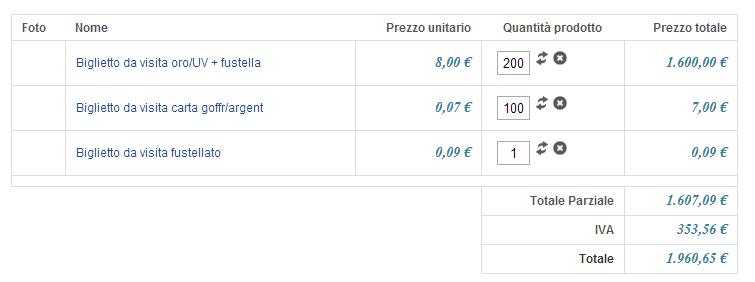
if the price of product is 0,09 cents and I buy 100 pieces...
the final price is € 9 and the VAT is € 1,62...
but...
in the checkout the VAT results € 2.
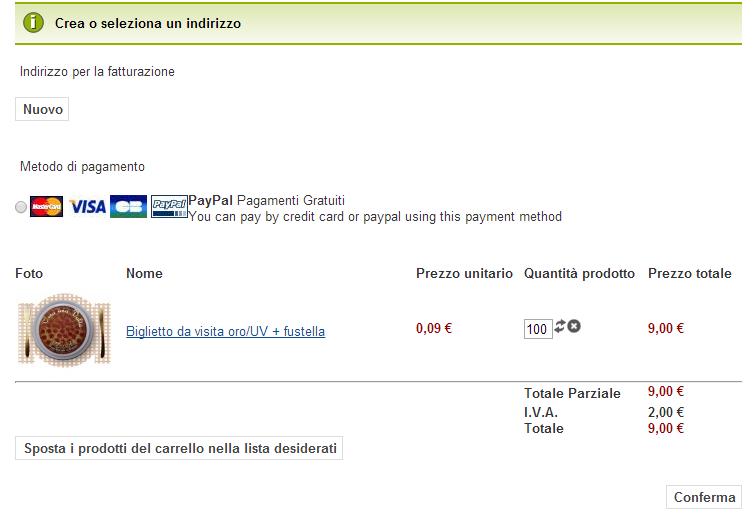
How do I do?
Can someone help me?
Thanks
Mimmo
-- Joomla version -- : 2.5.24
Hi,
I have some problems with VAT and checkout.
For example:
Italy VAT = 22%
if the price of product is 0,09 cents and I buy 100 pieces...
the final price is € 9 and the VAT is € 1,62...
but...
in the checkout the VAT results € 2.
How do I do?
Can someone help me?
Thanks
Mimmo
Please Log in or Create an account to join the conversation.

12 years 2 weeks ago #175401
by Xavier
Replied by Xavier on topic Some problem with vat
Hi,
Please turn off the option "Round prices during calculations" in Configuration > Main > Taxes.
Please turn off the option "Round prices during calculations" in Configuration > Main > Taxes.
Please Log in or Create an account to join the conversation.
12 years 2 weeks ago #175488
by nikita777
Replied by nikita777 on topic Some problem with vat
Hi,
I did how you said but now there is another problem...
The total price is wrong:
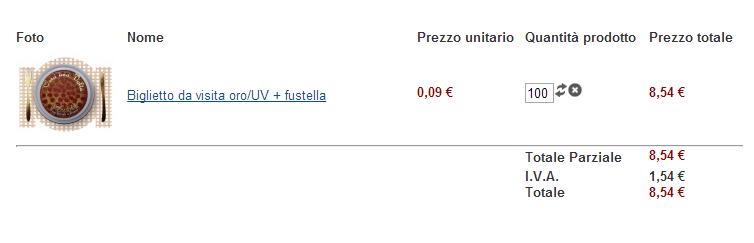
I think because when I decide the prices in the administration
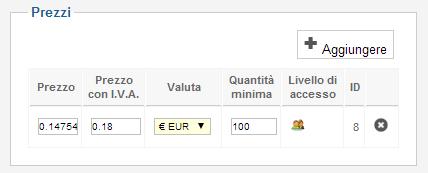
after saved hikashop change the prices
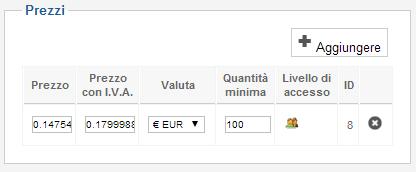
It's possible the calculation of taxes on the total of prices?
It's possible to delete taxes in the checkout?
Thanks for your attention
I did how you said but now there is another problem...
The total price is wrong:
I think because when I decide the prices in the administration
after saved hikashop change the prices
It's possible the calculation of taxes on the total of prices?
It's possible to delete taxes in the checkout?
Thanks for your attention
Please Log in or Create an account to join the conversation.

12 years 2 weeks ago #175507
by nicolas
Replied by nicolas on topic Some problem with vat
Hi,
If you turn off the rounding on the calculations, then the system bases itself on the price without tax before rounding. So if you have 0.0854 as the price with tax in your product, that's what the system will use and not round it to 0.09 for the total calculation.
If you turn on the rounding, then the system will round everything before the calculations and 22% of tax on 0.09 is 0.02 whih is why you get 2€ of tax for 100 elements.
There is no other setting to calculate the taxes differently.
What you can do is to turn on the rounding in order to get the correct total, and then override the different views via the menu Display>Views in order to change the display of the taxes and recalculate it yourself the way you want.
For example, for the checkout, it's the file "cart" of the view "checkout" that you want to edit and add the line:
$tax->tax_amount = $this->full_total->prices[0]->price_value_with_tax *0.22/1.22;
before the ilne:
echo $this->currencyHelper->format($tax->tax_amount,$this->full_total->prices[0]->price_currency_id);
And it will display the amount you want.
If you turn off the rounding on the calculations, then the system bases itself on the price without tax before rounding. So if you have 0.0854 as the price with tax in your product, that's what the system will use and not round it to 0.09 for the total calculation.
If you turn on the rounding, then the system will round everything before the calculations and 22% of tax on 0.09 is 0.02 whih is why you get 2€ of tax for 100 elements.
There is no other setting to calculate the taxes differently.
What you can do is to turn on the rounding in order to get the correct total, and then override the different views via the menu Display>Views in order to change the display of the taxes and recalculate it yourself the way you want.
For example, for the checkout, it's the file "cart" of the view "checkout" that you want to edit and add the line:
$tax->tax_amount = $this->full_total->prices[0]->price_value_with_tax *0.22/1.22;
before the ilne:
echo $this->currencyHelper->format($tax->tax_amount,$this->full_total->prices[0]->price_currency_id);
And it will display the amount you want.
Please Log in or Create an account to join the conversation.
12 years 2 weeks ago #175621
by nikita777
Replied by nikita777 on topic Some problem with vat
Hi,
I turned on the rounding taxes and edit the file "cart".
But nothing is changed.
Maybe I have to do something still?
Thanks
I turned on the rounding taxes and edit the file "cart".
But nothing is changed.
Maybe I have to do something still?
Thanks
Please Log in or Create an account to join the conversation.
12 years 2 weeks ago #175628
by nicolas
Replied by nicolas on topic Some problem with vat
Hi,
Then it means that either you're not editing the correct view file, or you're editing it for another template that the template you're using on your frontend. Please check on that.
Then it means that either you're not editing the correct view file, or you're editing it for another template that the template you're using on your frontend. Please check on that.
Please Log in or Create an account to join the conversation.
12 years 2 weeks ago #175691
by nikita777
Replied by nikita777 on topic Some problem with vat
Hi Nicolas,
sorry... I follow your advice...but ... does not work...
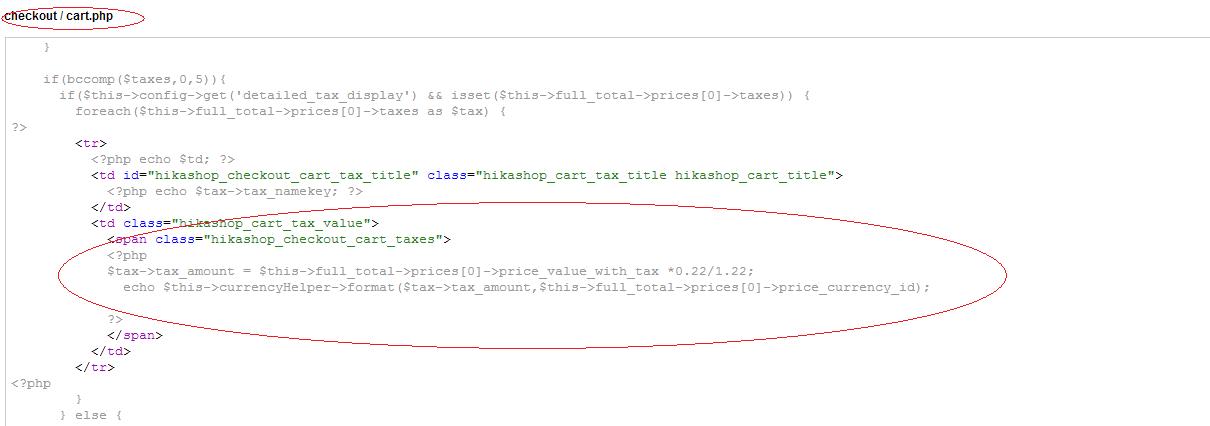
If you like I give you the password so you can go in the administration page.
Thanks
sorry... I follow your advice...but ... does not work...
If you like I give you the password so you can go in the administration page.
Thanks
Please Log in or Create an account to join the conversation.

12 years 2 weeks ago #175743
by Jerome
Jerome - Obsidev.com
HikaMarket & HikaSerial developer / HikaShop core dev team.
Replied by Jerome on topic Some problem with vat
Hi,
You're editing the right view but, are you editing the right view for the right front-end template like Nicolas asked you in his last message ?
www.hikashop.com/support/support/documen...ize-the-display.html
Regards,
You're editing the right view but, are you editing the right view for the right front-end template like Nicolas asked you in his last message ?
www.hikashop.com/support/support/documen...ize-the-display.html
Regards,
Jerome - Obsidev.com
HikaMarket & HikaSerial developer / HikaShop core dev team.
Please Log in or Create an account to join the conversation.
12 years 2 weeks ago #175792
by nikita777
Replied by nikita777 on topic Some problem with vat
Hi Jerome,
yes... I did so...but...I don't understand why don't work...
this is my template:
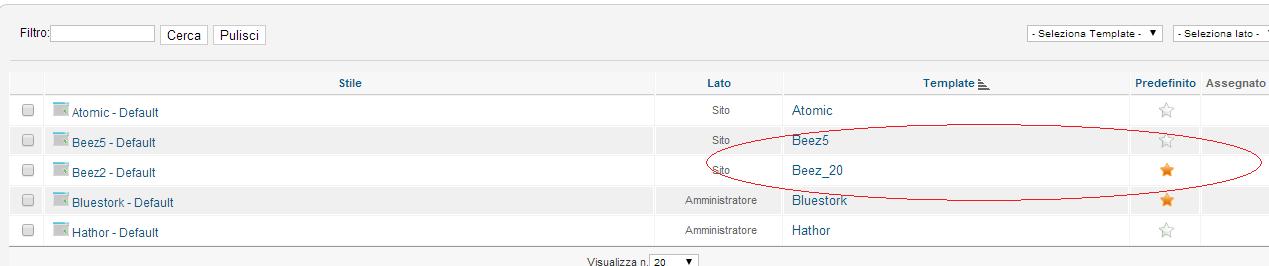
this is the file that I edited:
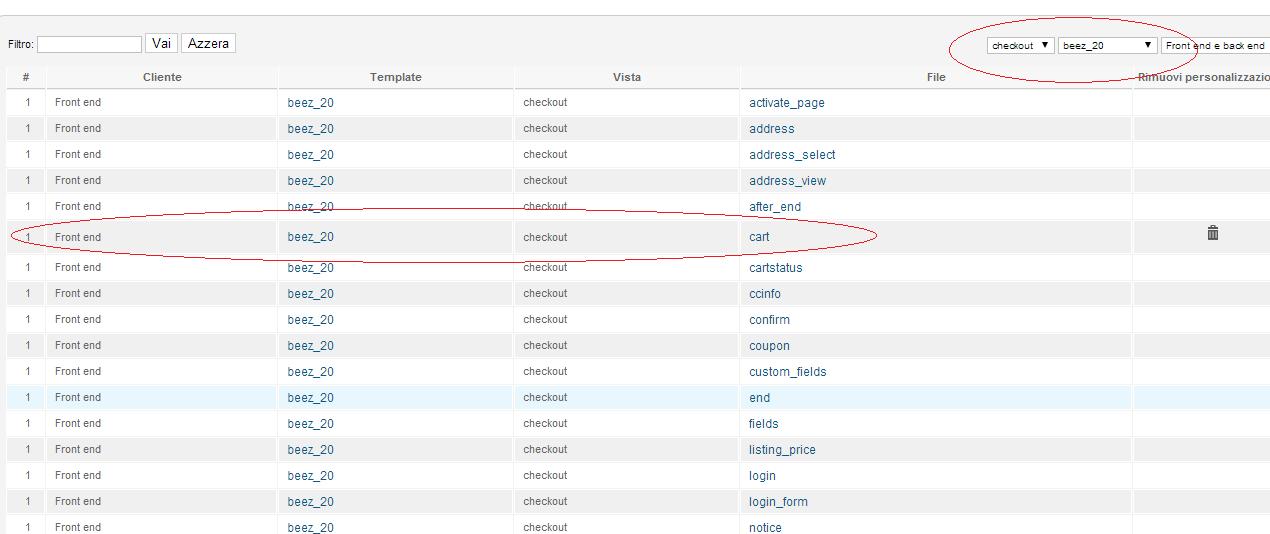
maybe I have to uninstall hikashop and later I have to install the new version?
Thanks
yes... I did so...but...I don't understand why don't work...
this is my template:
this is the file that I edited:
maybe I have to uninstall hikashop and later I have to install the new version?
Thanks
Please Log in or Create an account to join the conversation.

Less
More
- Posts: 12953
- Thank you received: 1778
12 years 1 week ago #175994
by Mohamed Thelji
Replied by Mohamed Thelji on topic Some problem with vat
Hello,
Thanks.
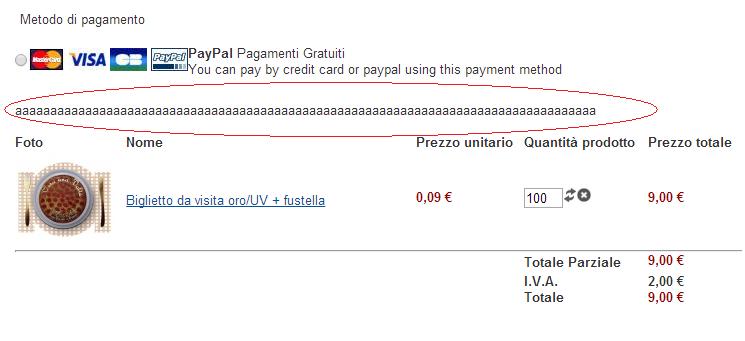
If you're editing the good file of the good view of the good front-end template via "Hikashop->Display->Views" can you write a text at the beginning of your file and tell me if that text is displayed on the front-end ?I turned on the rounding taxes and edit the file "cart".
But nothing is changed.
Maybe I have to do something still?
Thanks.
Please Log in or Create an account to join the conversation.
12 years 1 week ago #176029
by nikita777
Replied by nikita777 on topic Some problem with vat
yes...
I did
the text is displayed on the front-end
You can see the image:
Thanks
I did
the text is displayed on the front-end
You can see the image:
Thanks
Please Log in or Create an account to join the conversation.
12 years 1 week ago #176073
by nikita777
Replied by nikita777 on topic Some problem with vat
Hi everybody,
I have installed hikashop in a new website and I tryed to work.
All is ok!
On the old website I don't have uninstalled the old version and maybe the new version don't work good.
Thanks for your patience.
Problem resolved.
I have installed hikashop in a new website and I tryed to work.
All is ok!
On the old website I don't have uninstalled the old version and maybe the new version don't work good.
Thanks for your patience.
Problem resolved.
Please Log in or Create an account to join the conversation.
Time to create page: 0.198 seconds