

- Posts: 4
- Thank you received: 0
Error in Code ?
11 years 9 months ago #186063
by andy_x
Error in Code ? was created by andy_x
-- HikaShop version -- : 2.5.3
-- Joomla version -- : 3.1.1
-- PHP version -- : 5.3.29
Hello,
i was lloking for the reason why this fields (please look at form.PNG)
are not the same style as above, can anyone tell me why or where i can change this ?
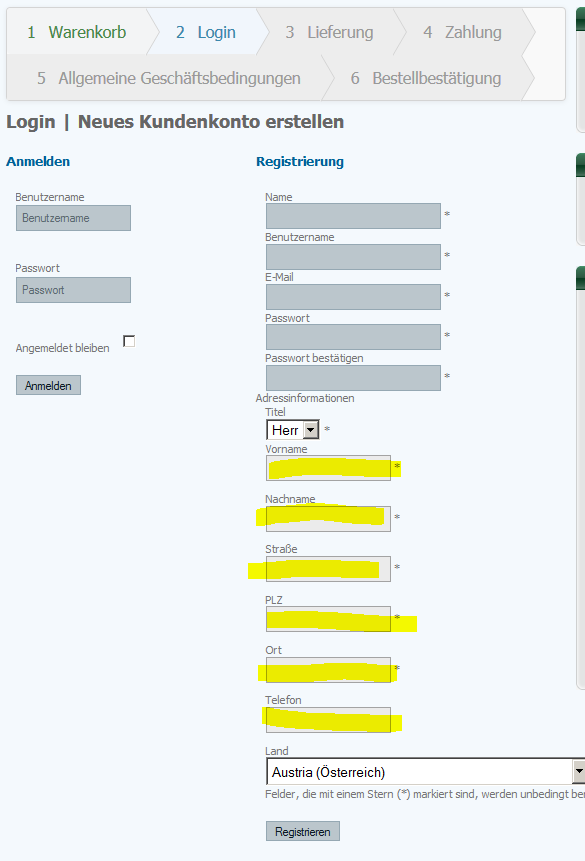
and while i was searching i fonud this part of the code, is this an error (because of the red lines)
or is this Ok ?
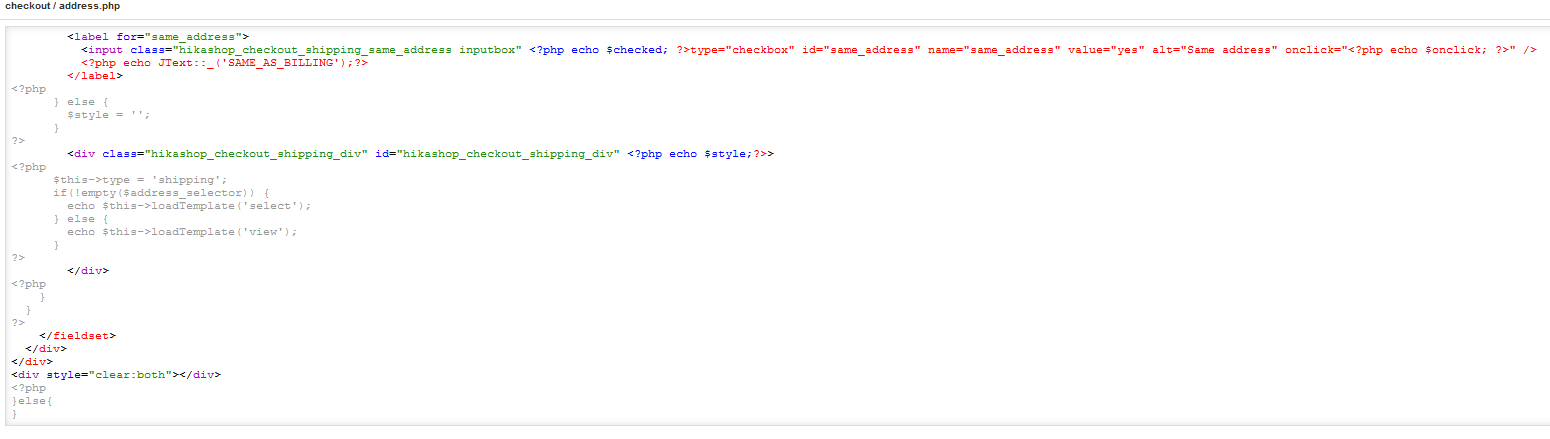
please help
-- Joomla version -- : 3.1.1
-- PHP version -- : 5.3.29
Hello,
i was lloking for the reason why this fields (please look at form.PNG)
are not the same style as above, can anyone tell me why or where i can change this ?
and while i was searching i fonud this part of the code, is this an error (because of the red lines)
or is this Ok ?
please help
Please Log in or Create an account to join the conversation.

11 years 9 months ago #186081
by lousyfool
Need help with customisations of layouts, style or other site development? PM me!
(Don't forget to turn on "E-mail notification of new messages" )
Replied by lousyfool on topic Error in Code ?
Hi,
First of all, the use of different colours in your browser console are usually used for you to easily identify different types of code. The rest depends on which browser console you're using - refer to its "user's manual". So, nope, red does not mean "error" here.
Then, there's slightly different HTML in use for the different sections of the form, which your present CSS is applying different values for - eventually coming from CSS of your template. We out here can't say more without seeing your site (link?), but you should be able to use your browser console for analysing the present CSS, too.
Just in case, here is some documentation on how to deal with it: www.hikashop.com/support/support/documen...the-display.html#css
Finally, please double-check your HikaShop version... it seems you're light years ahead of everyone else...
First of all, the use of different colours in your browser console are usually used for you to easily identify different types of code. The rest depends on which browser console you're using - refer to its "user's manual". So, nope, red does not mean "error" here.
Then, there's slightly different HTML in use for the different sections of the form, which your present CSS is applying different values for - eventually coming from CSS of your template. We out here can't say more without seeing your site (link?), but you should be able to use your browser console for analysing the present CSS, too.
Just in case, here is some documentation on how to deal with it: www.hikashop.com/support/support/documen...the-display.html#css
Finally, please double-check your HikaShop version... it seems you're light years ahead of everyone else...
Need help with customisations of layouts, style or other site development? PM me!
(Don't forget to turn on "E-mail notification of new messages" )
Please Log in or Create an account to join the conversation.
11 years 9 months ago #186100
by andy_x
Replied by andy_x on topic Error in Code ?
Hi,
thanks for your reply, my Hikashop Business version is 2.3.5
and it´s running on www.phonedoc.at
Browser Version is Firefox 34.0.5
kind regards
Andy
thanks for your reply, my Hikashop Business version is 2.3.5
and it´s running on www.phonedoc.at
Browser Version is Firefox 34.0.5
kind regards
Andy
Please Log in or Create an account to join the conversation.
11 years 9 months ago - 11 years 9 months ago #186102
by lousyfool
Need help with customisations of layouts, style or other site development? PM me!
(Don't forget to turn on "E-mail notification of new messages" )
Replied by lousyfool on topic Error in Code ?
Thanks,
As already indicated, it's your template.css applying different background colours to different types of <input> tags.
For the widths, the (Joomla) form fields for the first part (username, password, etc) have size attributes set, while the (HikaShop) address form fields do not have this.
All of this can be corrected and standardised with custom CSS. I've given you already a link to the relevant part of the documentation here on the site, and since you're using Firefox anyway, I encourage you to install and use Firebug to even better see and analyse present CSS, as well as simulate CSS changes and amendments.
As already indicated, it's your template.css applying different background colours to different types of <input> tags.
For the widths, the (Joomla) form fields for the first part (username, password, etc) have size attributes set, while the (HikaShop) address form fields do not have this.
All of this can be corrected and standardised with custom CSS. I've given you already a link to the relevant part of the documentation here on the site, and since you're using Firefox anyway, I encourage you to install and use Firebug to even better see and analyse present CSS, as well as simulate CSS changes and amendments.
Need help with customisations of layouts, style or other site development? PM me!
(Don't forget to turn on "E-mail notification of new messages" )
Last edit: 11 years 9 months ago by lousyfool. Reason: typo
The following user(s) said Thank You: andy_x
Please Log in or Create an account to join the conversation.

11 years 9 months ago #186104
by nicolas
Replied by nicolas on topic Error in Code ?
Hi,
I couldn't find any product listing on your website so I wasn't able to access your checkout. But as lousyfool said, this comes from the CSS of your template so you should contact your template provider for help.
I couldn't find any product listing on your website so I wasn't able to access your checkout. But as lousyfool said, this comes from the CSS of your template so you should contact your template provider for help.
Please Log in or Create an account to join the conversation.
Time to create page: 0.064 seconds