

- Posts: 26
- Thank you received: 0
where to find code displaying cart summary?
11 years 9 months ago #188821
by valerun
where to find code displaying cart summary? was created by valerun
-- url of the page with the problem -- :
emotorwerks.com/products/online-store/ca...ev-charging-stations
-- HikaShop version -- : 2.2.3
-- Joomla version -- : 2.5
-- PHP version -- : 5.4
Hi,
we are hunting down all the strange formatting we see in our default hika install (not sure why things look so bad in default...).
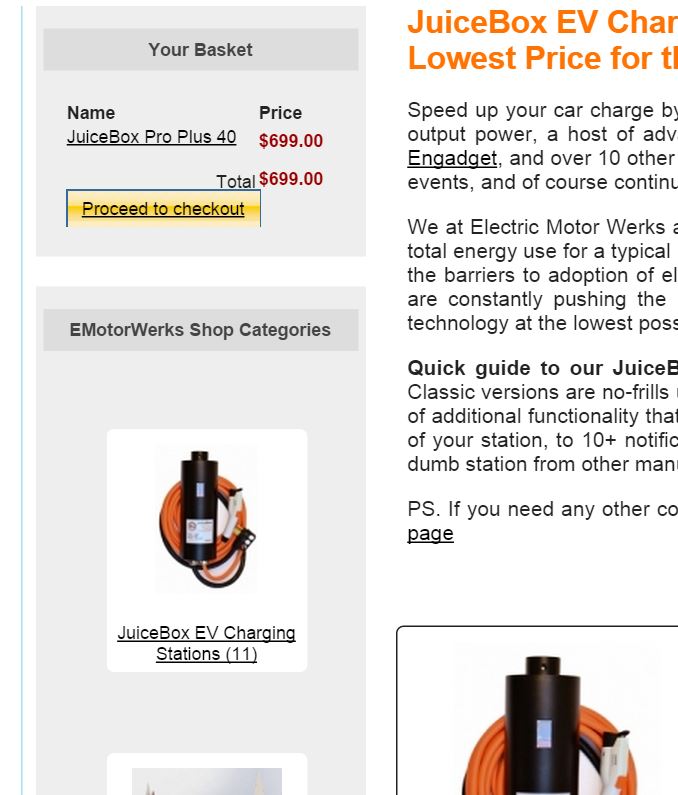
One of the areas is the 'Your Basket' area we have on the top left of our store view. I am attaching a screenshot to demonstrate the alignment issues.
I think we can fix if we know where to edit the code.
Can you pls give us the reference file name / location?
Thanks,
Val
-- HikaShop version -- : 2.2.3
-- Joomla version -- : 2.5
-- PHP version -- : 5.4
Hi,
we are hunting down all the strange formatting we see in our default hika install (not sure why things look so bad in default...).
One of the areas is the 'Your Basket' area we have on the top left of our store view. I am attaching a screenshot to demonstrate the alignment issues.
I think we can fix if we know where to edit the code.
Can you pls give us the reference file name / location?
Thanks,
Val
Please Log in or Create an account to join the conversation.

11 years 9 months ago #188834
by nicolas
Replied by nicolas on topic where to find code displaying cart summary?
Hi,
The default CSS in HikaShop 2.2.3 was indeed not so great, especially for CSS buttons. Thankfully we improved it greatly since then.
There is no need to change any PHP/HTML code. Just some CSS customization will do if you don't want to update your HikaShop.
Here is a tutorial explaining how to customize the CSS:
www.hikashop.com/support/support/documen...ize-the-display.html
In your case such CSS would help:
.hikashop_cart_module .hikashop_cart_button{
margin-top: 10px;
display: block;
width: 110px;
}
.hikashop_cart_module .hikashop_cart_product_custom_item_fields{ display:none; }
.hikashop_cart_module hikashop_cart_product_custom_item_fields{ margin-bottom:px !important; }
The default CSS in HikaShop 2.2.3 was indeed not so great, especially for CSS buttons. Thankfully we improved it greatly since then.
There is no need to change any PHP/HTML code. Just some CSS customization will do if you don't want to update your HikaShop.
Here is a tutorial explaining how to customize the CSS:
www.hikashop.com/support/support/documen...ize-the-display.html
In your case such CSS would help:
.hikashop_cart_module .hikashop_cart_button{
margin-top: 10px;
display: block;
width: 110px;
}
.hikashop_cart_module .hikashop_cart_product_custom_item_fields{ display:none; }
.hikashop_cart_module hikashop_cart_product_custom_item_fields{ margin-bottom:px !important; }
Please Log in or Create an account to join the conversation.
Time to create page: 0.053 seconds