

- Posts: 12
- Thank you received: 0
Price in Shipping Method field
11 years 9 months ago #189158
by Kwallace
Price in Shipping Method field was created by Kwallace
Hi,
My shipping methods are drop-off sites/ pickup sites.
In the checkout screen under "Shipping method", there the price is paced in the front and end of the shipping site. It's a bit repetitive for me . Can I remove one or both price from this location.
Thanks
Please Log in or Create an account to join the conversation.
11 years 9 months ago #189166
by Kwallace
Replied by Kwallace on topic Price in Shipping Method field
Correction: I should have said "fee" not price.
Please Log in or Create an account to join the conversation.

11 years 9 months ago #189160
by Jerome
Jerome - Obsidev.com
HikaMarket & HikaSerial developer / HikaShop core dev team.
Replied by Jerome on topic Price in Shipping Method field
Hi,
I am sorry but I don't understand your question.
Please provide a screenshot to illustrate your request.
Regards,
Jerome - Obsidev.com
HikaMarket & HikaSerial developer / HikaShop core dev team.
Please Log in or Create an account to join the conversation.
11 years 9 months ago #189259
by Kwallace
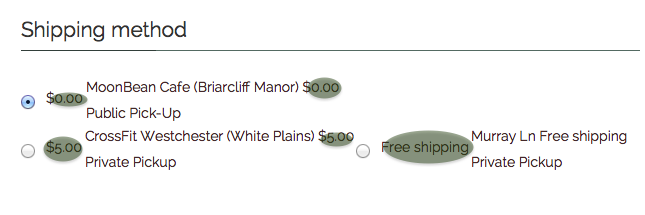
I highlighted the info I want removed.
I hope this helps.
Thanks you
Replied by Kwallace on topic Price in Shipping Method field
I highlighted the info I want removed.
I hope this helps.
Thanks you
Please Log in or Create an account to join the conversation.

11 years 9 months ago #189266
by Xavier
Replied by Xavier on topic Price in Shipping Method field
Hi,
To remove the prices in the shipping method selection part, you will have to edit the view "checkout / listing" and add $price_text = ''; after all the $price_text definitions.
www.hikashop.com/support/support/documen...ize-the-display.html
Please Log in or Create an account to join the conversation.
11 years 9 months ago #189526
by Kwallace
Replied by Kwallace on topic Price in Shipping Method field
I couldn't find the view "checkout / listing" area to edit. can you please provide a little for detail?
Please Log in or Create an account to join the conversation.

11 years 9 months ago #189531
by nicolas
Replied by nicolas on topic Price in Shipping Method field
Hi,
Xavier wanted to write "checkout / shipping" and not "checkout / listing".
You'll find the code he is talking about there.
Please Log in or Create an account to join the conversation.
11 years 9 months ago #189617
by Kwallace
Replied by Kwallace on topic Price in Shipping Method field
Ok, found it.
Now, not sure what you mean by this:
add $price_text = ''; after all the $price_text definitions.
Can you give me an example of what I'm suppose to change?
Thanks
Please Log in or Create an account to join the conversation.

Less
More
- Posts: 12953
- Thank you received: 1778
11 years 9 months ago #189644
by Mohamed Thelji
Replied by Mohamed Thelji on topic Price in Shipping Method field
You'll just have to change these lines :
By :
Code:
$price_text .= '</span> ';
$price_text .= JText::_('PRICE_END');
Code:
$price_text .= '</span> ';
$price_text .= JText::_('PRICE_END');
$price_text = '';
Please Log in or Create an account to join the conversation.
11 years 9 months ago #189822
by Kwallace
Replied by Kwallace on topic Price in Shipping Method field
Hi,
I made the changes (lines 172 -175)and I'm still having the same problem . Any other thoughts on how to fix my issue?
Please Log in or Create an account to join the conversation.
Less
More
- Posts: 12953
- Thank you received: 1778
11 years 9 months ago #189833
by Mohamed Thelji
Replied by Mohamed Thelji on topic Price in Shipping Method field
It's working for me so you're probably editing the wrong file or the file of the wrong template, note that you can also just use some CSS code to hide what you don't want to be displayed by using the "display : none" property.
Please Log in or Create an account to join the conversation.
11 years 9 months ago #189915
by Kwallace
Replied by Kwallace on topic Price in Shipping Method field
I've attached screen shots of the steps I took.
1) before screen shot of what I want to change
2) the file I edited
3) before shot of edited section
4) after shot of change
5) After screen shot of what was suppose to change (as you can see there was no change)
Please let me know what I did wrong.
Thank you
Please Log in or Create an account to join the conversation.
11 years 9 months ago #190013
by nicolas
Replied by nicolas on topic Price in Shipping Method field
Hi,
I can see that you did your change in the the view file for the protostar template. Are you using that template on your website ? If not, then it would explain why it didn't work. Make sure that you edit the view file for the correct template.
Please Log in or Create an account to join the conversation.
11 years 9 months ago #190016
by Kwallace
Replied by Kwallace on topic Price in Shipping Method field
It's strange,I'm not sure why it isn't working. I made the changes to the correct template (sorry i sent the wrong screen shot.)
Are these the only lines that needs to be changed :
$price_text .= '</span> ';
$price_text .= JText::_('PRICE_END');
By :
$price_text .= '</span> ';
$price_text .= JText::_('PRICE_END');
$price_text = '';
Please Log in or Create an account to join the conversation.
Less
More
- Posts: 12953
- Thank you received: 1778
11 years 9 months ago #190045
by Mohamed Thelji
Replied by Mohamed Thelji on topic Price in Shipping Method field
Yes, and it worked on my end, note that you can also do what you want by using some CSS code maybe :
www.hikashop.com/support/documentation/1...the-display.html#css
Please Log in or Create an account to join the conversation.
11 years 9 months ago #190090
by Kwallace
Replied by Kwallace on topic Price in Shipping Method field
Ok. This is all new to me . I wouldn't know where to start using CSS code.
Can someone please send me a copy of the edited file they are using that works? or is it possible for someone to look/make the changes for me?
Thanks,
Please Log in or Create an account to join the conversation.
11 years 9 months ago #190094
by Kwallace
Replied by Kwallace on topic Price in Shipping Method field
I found the problem. If I add a shipping fee, then the changes you suggested works. My issue was I had no fee and it showed "Free shipping" ("free shipping" was what i wanted to get rid off). So, I had to add a fee for it to not report it (if that makes sense).
Thanks again for the assistance.
Please Log in or Create an account to join the conversation.
Time to create page: 0.105 seconds