

- Posts: 122
- Thank you received: 0
Expansion in countries covered by HikaShop
11 years 9 months ago #189461
by optimized
Expansion in countries covered by HikaShop was created by optimized
-- HikaShop version -- : 2.3.5
-- Joomla version -- : 3.3.6
-- PHP version -- : 5.4
We successfully launched in Panama last year and are now expanding to the rest of Latin America.
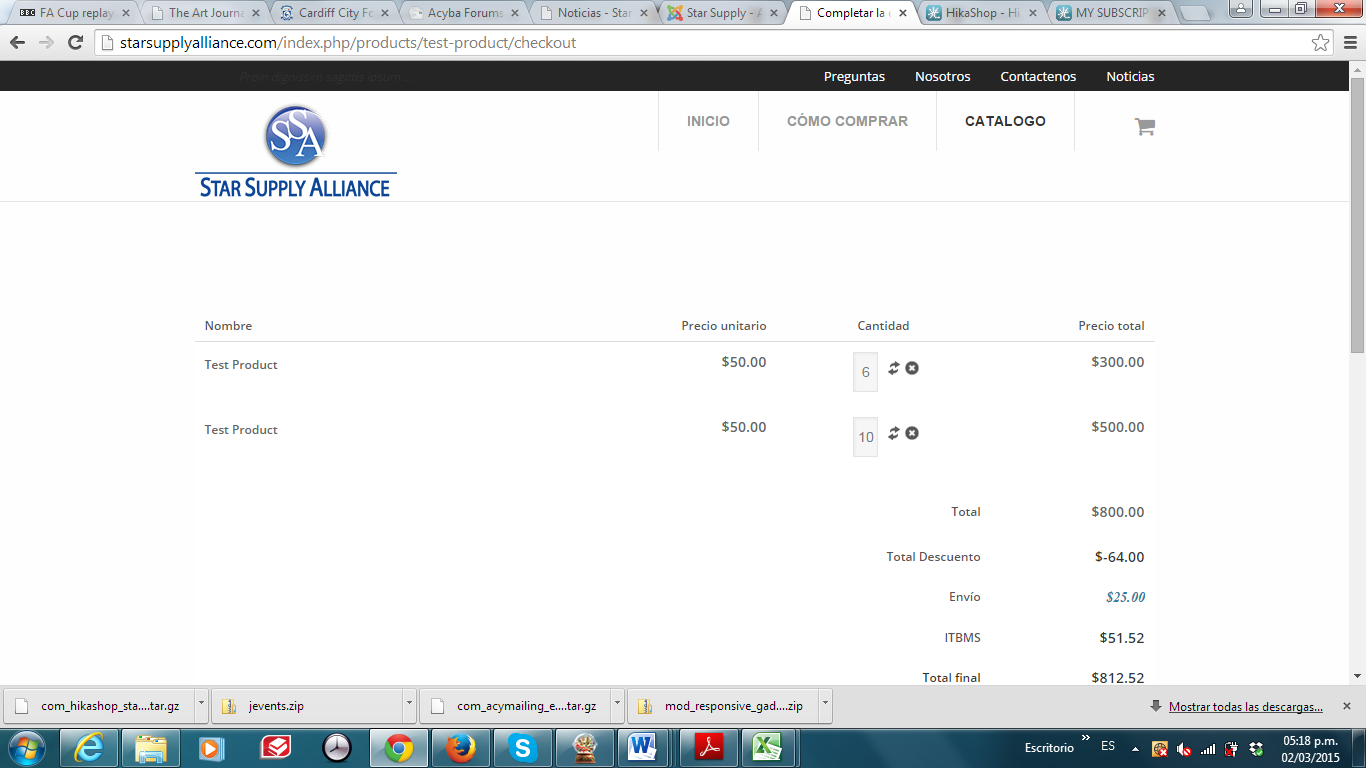
However, as shown in the attached screen shot, the tax (ITBMS) and shipping (Entrega) are being shown for Pamama before we know where the buyer resides (these amounts are taken off) when the country is entered later in the process)
How do we stop the tax and shipping appearing before the country is entered?
Thanks,
Mike
-- Joomla version -- : 3.3.6
-- PHP version -- : 5.4
We successfully launched in Panama last year and are now expanding to the rest of Latin America.
However, as shown in the attached screen shot, the tax (ITBMS) and shipping (Entrega) are being shown for Pamama before we know where the buyer resides (these amounts are taken off) when the country is entered later in the process)
How do we stop the tax and shipping appearing before the country is entered?
Thanks,
Mike
Please Log in or Create an account to join the conversation.

11 years 9 months ago #189495
by Xavier
Replied by Xavier on topic Expansion in countries covered by HikaShop
Hi,
By default HikaShop take the "Main tax zone" option value in Configuration > Main > Taxes for the taxes calculation.
So you just have to set another main tax zone for this option to not have the taxes loaded until the customer is registered.
By default HikaShop take the "Main tax zone" option value in Configuration > Main > Taxes for the taxes calculation.
So you just have to set another main tax zone for this option to not have the taxes loaded until the customer is registered.
Please Log in or Create an account to join the conversation.
11 years 9 months ago #189567
by optimized
Replied by optimized on topic Expansion in countries covered by HikaShop
Thanks for the reply,
As we now do not have just one country - is it possible not to have a 'main tax zone' ?
Regards,
Mike
As we now do not have just one country - is it possible not to have a 'main tax zone' ?
Regards,
Mike
Please Log in or Create an account to join the conversation.
11 years 9 months ago #189571
by Xavier
Replied by Xavier on topic Expansion in countries covered by HikaShop
Hi,
If you set a not used country as main tax zone it will have the same effect than not setting a main tax zone in your case.
And no it is not possible to let this option empty.
If you set a not used country as main tax zone it will have the same effect than not setting a main tax zone in your case.
And no it is not possible to let this option empty.
Please Log in or Create an account to join the conversation.
11 years 9 months ago #189676
by optimized
Replied by optimized on topic Expansion in countries covered by HikaShop
Thanks,
In the order process, is it possible to ask the purchaser for their address details before showing the order information with Panama as the default ?
In this way the correct tax and shipping can be shown at all times.
Regards,
Mike
In the order process, is it possible to ask the purchaser for their address details before showing the order information with Panama as the default ?
In this way the correct tax and shipping can be shown at all times.
Regards,
Mike
Please Log in or Create an account to join the conversation.

11 years 9 months ago #189691
by nicolas
Replied by nicolas on topic Expansion in countries covered by HikaShop
Yes. You can change your "checkout workflow" option of the HikaShop configuration for that:
www.hikashop.com/support/support/documen...eckout-workflow.html
www.hikashop.com/support/support/documen...eckout-workflow.html
Please Log in or Create an account to join the conversation.
11 years 9 months ago #189936
by optimized
Replied by optimized on topic Expansion in countries covered by HikaShop
Hi Nicolas,
Thanks for the link.
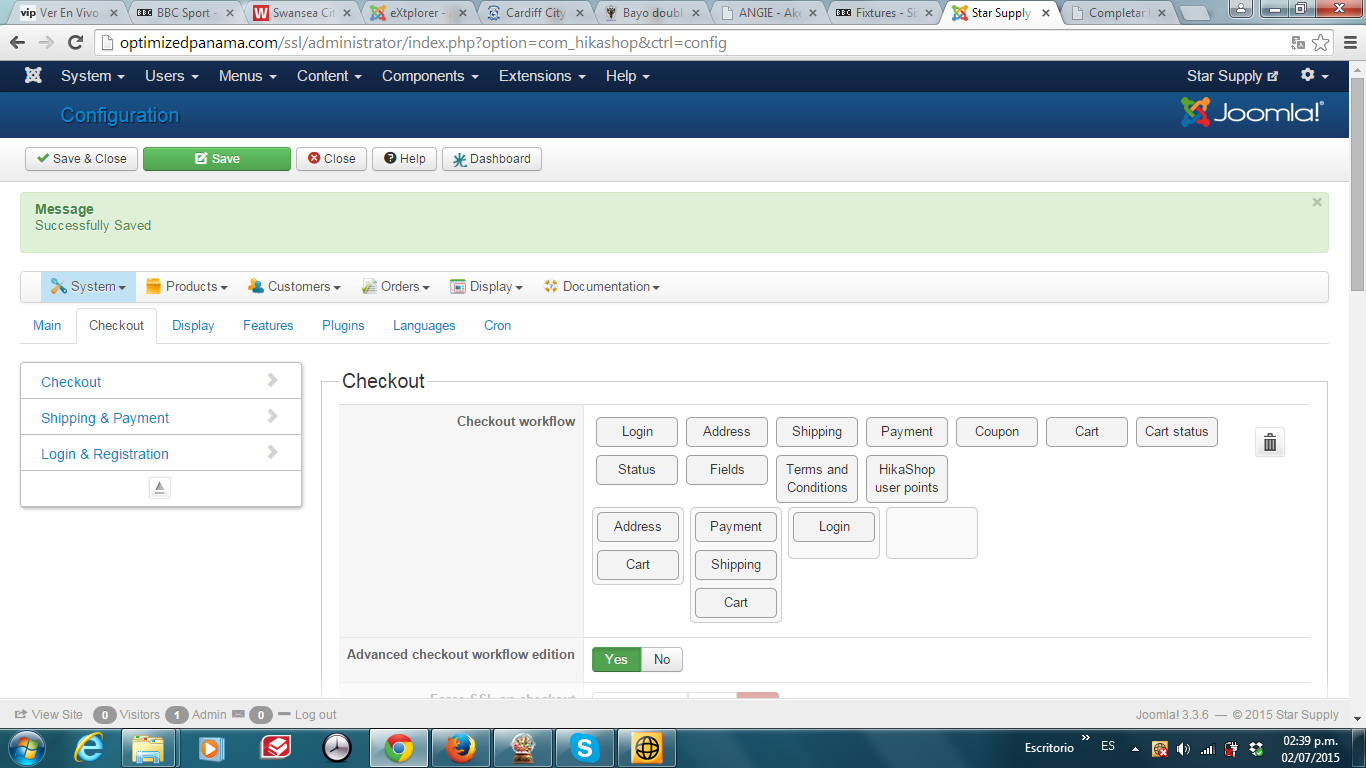
I have now changed the setup to the attached but I still get a page with the Cart before I see the address step.
How can we eliminate this Cart as it is showing the default country calculations before we know the country of delivery?
Thanks,
Mike
Thanks for the link.
I have now changed the setup to the attached but I still get a page with the Cart before I see the address step.
How can we eliminate this Cart as it is showing the default country calculations before we know the country of delivery?
Thanks,
Mike
Please Log in or Create an account to join the conversation.
11 years 9 months ago #189943
by nicolas
Replied by nicolas on topic Expansion in countries covered by HikaShop
Hi,
Remove the "Cart" view from below the "Address" view in that case.
Remove the "Cart" view from below the "Address" view in that case.
Please Log in or Create an account to join the conversation.
11 years 9 months ago #189979
by optimized
Replied by optimized on topic Expansion in countries covered by HikaShop
Hello Nicolas,
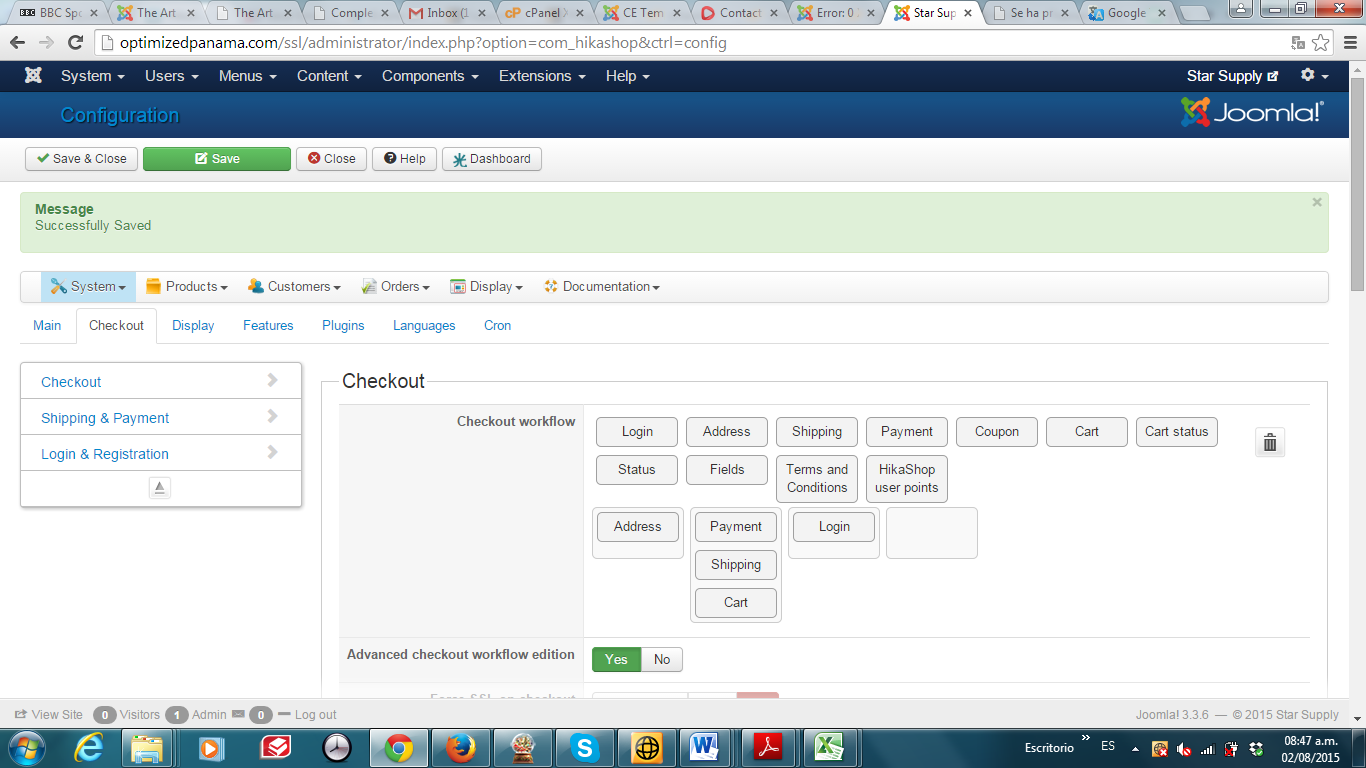
By removing cart from under address I get the error This webpage has a redirect loop and the checkout does not display.
Please see the attached screen shot for the configuration that is causing this error
Regards,
Mike
By removing cart from under address I get the error This webpage has a redirect loop and the checkout does not display.
Please see the attached screen shot for the configuration that is causing this error
Regards,
Mike
Please Log in or Create an account to join the conversation.
11 years 9 months ago #189982
by nicolas
Replied by nicolas on topic Expansion in countries covered by HikaShop
Move the login view in the same step as the address view.
It's not normal to have it after as you need to be logged in/registered/guest before seeing the address selection screen.
It's probably why the system is not behaving properly.
It's not normal to have it after as you need to be logged in/registered/guest before seeing the address selection screen.
It's probably why the system is not behaving properly.
Please Log in or Create an account to join the conversation.
Time to create page: 0.072 seconds