

- Posts: 52
- Thank you received: 1
Problem with "Terns and Conditions" popup window
11 years 7 months ago #191307
by xatzopou
Problem with "Terns and Conditions" popup window was created by xatzopou
-- url of the page with the problem -- :
noelbyepsilon.com/noel2/index.php/en/pro...checkout/step/step-1
-- HikaShop version -- : HikaShop Business: 2.3.5
-- Joomla version -- : 3.3.6
-- Browser(s) name and version -- : All Browsers
Hello,
Try to buy something from noelbyepsilon.com/noel2/index.php/en/products and then "Proceed to checkout".
Add your info data and proceed to Checkout page's Step 2 (Cart status).
Now, if you click the "Please accept the Terms and Conditions before proceeding" link you will notice that there is no popup window and the related article is shown on the bottom's left.
I know that it has something to do with my template but I can't figure out.
The Terms & Conditions popup size is set to 633 x 480 (Backend -> Hikashop -> System -> Configuration -> Checkout)
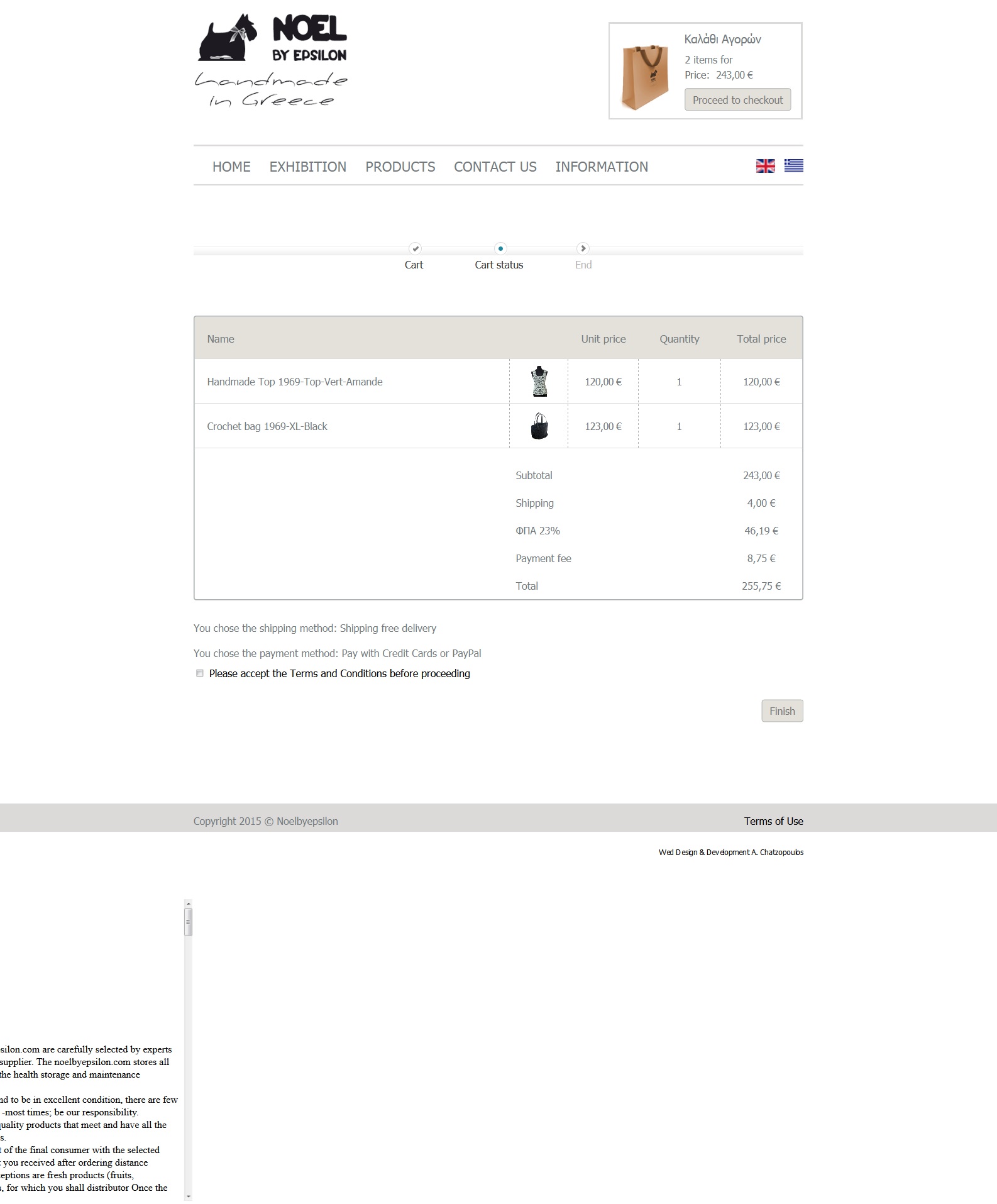
-- HikaShop version -- : HikaShop Business: 2.3.5
-- Joomla version -- : 3.3.6
-- Browser(s) name and version -- : All Browsers
Hello,
Try to buy something from noelbyepsilon.com/noel2/index.php/en/products and then "Proceed to checkout".
Add your info data and proceed to Checkout page's Step 2 (Cart status).
Now, if you click the "Please accept the Terms and Conditions before proceeding" link you will notice that there is no popup window and the related article is shown on the bottom's left.
I know that it has something to do with my template but I can't figure out.
The Terms & Conditions popup size is set to 633 x 480 (Backend -> Hikashop -> System -> Configuration -> Checkout)
Please Log in or Create an account to join the conversation.

11 years 7 months ago #191325
by Jerome
Jerome - Obsidev.com
HikaMarket & HikaSerial developer / HikaShop core dev team.
Replied by Jerome on topic Problem with "Terns and Conditions" popup window
Hi,
Change your popup mode in your HikaShop configuration (tab "display")
www.hikashop.com/support/support/documen...html#display_general
Regards,
Change your popup mode in your HikaShop configuration (tab "display")
www.hikashop.com/support/support/documen...html#display_general
Regards,
Jerome - Obsidev.com
HikaMarket & HikaSerial developer / HikaShop core dev team.
The following user(s) said Thank You: xatzopou
Please Log in or Create an account to join the conversation.
Time to create page: 0.167 seconds