
- Posts: 217
- Thank you received: 4
Add back button before next button on checkout
- FilipHradil
-
 Topic Author
- Offline
Less
More
11 years 9 months ago #191564
by FilipHradil
Add back button before next button on checkout was created by FilipHradil
-- HikaShop version -- : 2.3.5
Hello,
I am trying to add back button to my second step on checkout.
I am trying as hell but I have alway back button after next button.
I need to have back button before next.
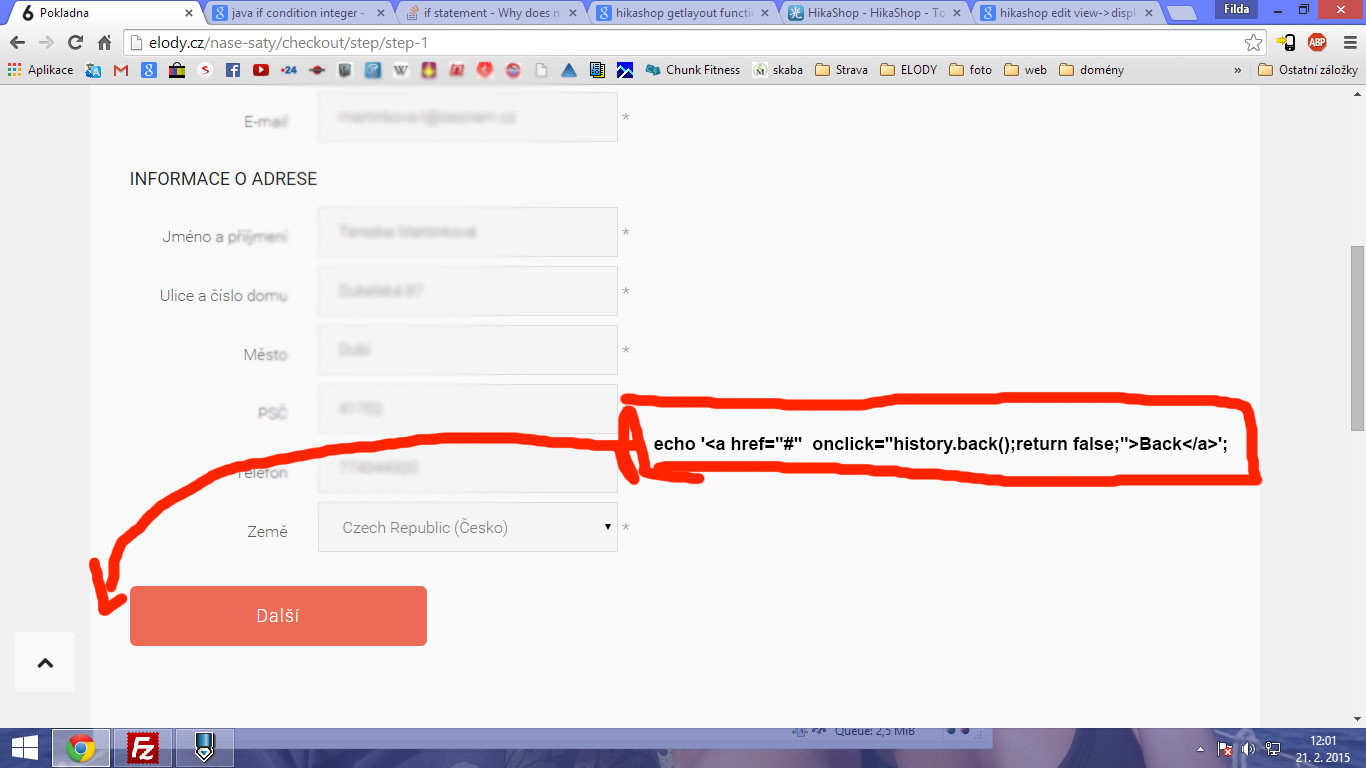
Can anybody help me, please?
Thanks in advance
Hello,
I am trying to add back button to my second step on checkout.
I am trying as hell but I have alway back button after next button.
I need to have back button before next.
Can anybody help me, please?
Thanks in advance
Please Log in or Create an account to join the conversation.

11 years 9 months ago #191570
by lousyfool
Need help with customisations of layouts, style or other site development? PM me!
(Don't forget to turn on "E-mail notification of new messages" )
Replied by lousyfool on topic Add back button before next button on checkout
Hi,
It's not 100% clear, but it reads as if your only problem is for the button to show before the "next" button (= to the left of it).
Other than making sure that the code for the "Back" button is inserted before the one for the "Next" button, please check your CSS: there might be some float involved causing you issues with the button locations.
If I misunderstood your post, please excuse and try again...
Need help with customisations of layouts, style or other site development? PM me!
(Don't forget to turn on "E-mail notification of new messages" )
Please Log in or Create an account to join the conversation.
- FilipHradil
-
Topic Author
- Offline
Less
More
- Posts: 217
- Thank you received: 4
11 years 9 months ago - 11 years 9 months ago #191571
by FilipHradil
Replied by FilipHradil on topic Add back button before next button on checkout
Hello,
thanks for your reply but I don't understand it as well.
Basicaly I need just this.
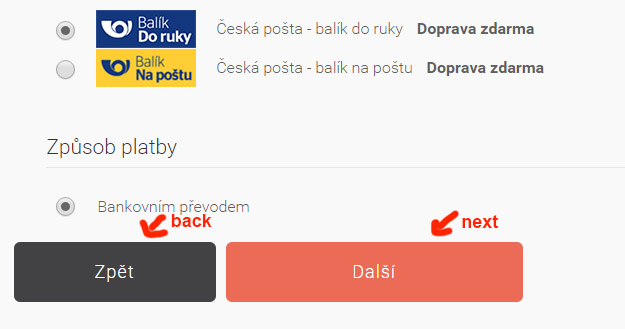
Its working on 1st step page (shipping and payment) and on page with adress fields it doesn't. I guess its due to container in which all adress fields are and there is also next button.
Thanks in advance
Filip
thanks for your reply but I don't understand it as well.
Basicaly I need just this.
Its working on 1st step page (shipping and payment) and on page with adress fields it doesn't. I guess its due to container in which all adress fields are and there is also next button.
Thanks in advance
Filip
Last edit: 11 years 9 months ago by FilipHradil.
Please Log in or Create an account to join the conversation.
11 years 9 months ago #191573
by lousyfool
Need help with customisations of layouts, style or other site development? PM me!
(Don't forget to turn on "E-mail notification of new messages" )
Replied by lousyfool on topic Add back button before next button on checkout
I guess you're adding your "Back" button in the "checkout / step" view in the section
Not sure what you've done so far, but note that there are "if / else" conditions, which could require you to add your button code to more than only one of them.
Code:
if($this->nextButton)
{
Not sure what you've done so far, but note that there are "if / else" conditions, which could require you to add your button code to more than only one of them.
Need help with customisations of layouts, style or other site development? PM me!
(Don't forget to turn on "E-mail notification of new messages" )
Please Log in or Create an account to join the conversation.
- FilipHradil
-
Topic Author
- Offline
Less
More
- Posts: 217
- Thank you received: 4
11 years 9 months ago #191574
by FilipHradil
Replied by FilipHradil on topic Add back button before next button on checkout
If i put my code in this block if($this->nextButton) the back button isn't only on page with adress fields (sing in).
Maybe becasue it isn't next button but its registration / sign in button?
Maybe becasue it isn't next button but its registration / sign in button?
Please Log in or Create an account to join the conversation.

11 years 9 months ago #191566
by Jerome
Jerome - Obsidev.com
HikaMarket & HikaSerial developer / HikaShop core dev team.
Replied by Jerome on topic Add back button before next button on checkout
Hi,
Please see the configuration of the checkout for the setting "continue shopping"
www.hikashop.com/support/support/documen...ml#checkout_checkout
Regards,
Please see the configuration of the checkout for the setting "continue shopping"
www.hikashop.com/support/support/documen...ml#checkout_checkout
Regards,
Jerome - Obsidev.com
HikaMarket & HikaSerial developer / HikaShop core dev team.
Please Log in or Create an account to join the conversation.
- FilipHradil
-
Topic Author
- Offline
Less
More
- Posts: 217
- Thank you received: 4
11 years 9 months ago #191692
by FilipHradil
Replied by FilipHradil on topic Add back button before next button on checkout
Hello,
thanks but it has same effect on login page.
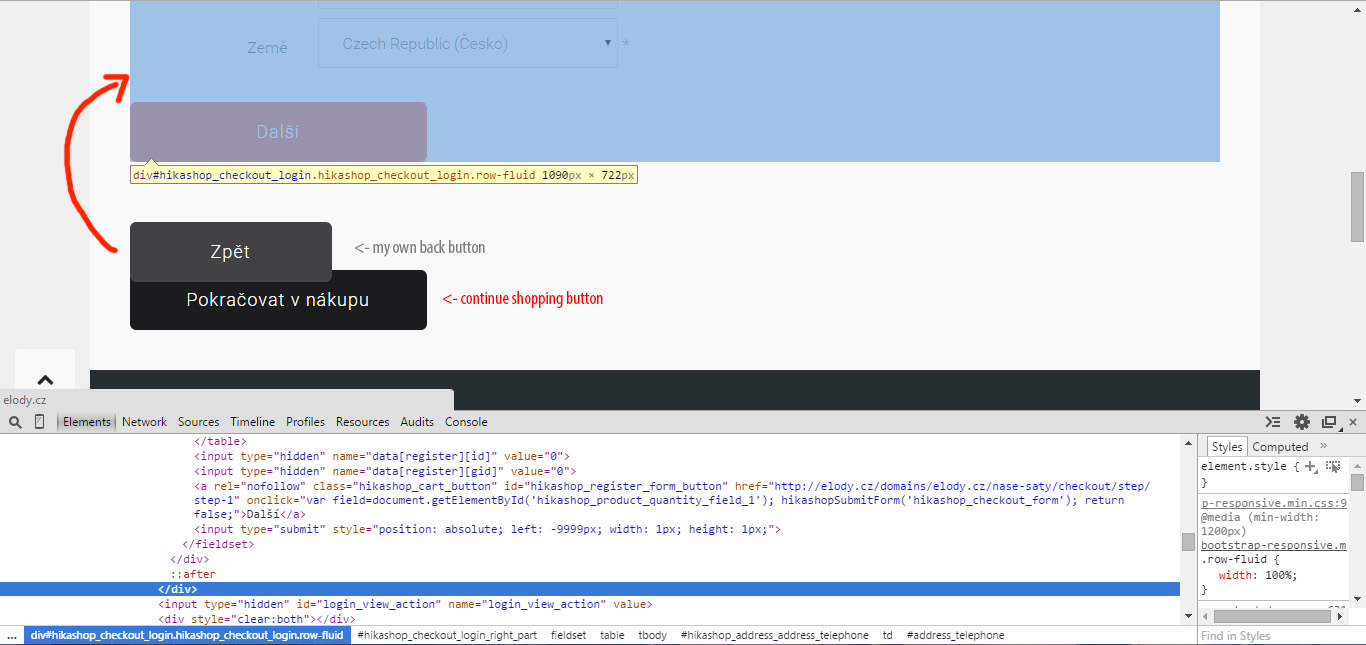
I need to put back button in selected DIV before next button.
Filip
thanks but it has same effect on login page.
I need to put back button in selected DIV before next button.
Filip
Please Log in or Create an account to join the conversation.

11 years 9 months ago #191695
by nicolas
Replied by nicolas on topic Add back button before next button on checkout
Hi,
In that case, you need to put your button code in the file "registration" of the view "user" before the line:
echo $this->cartClass->displayButton($registerButtonName,'register',$this->params,hikashop_currentUrl(),' hikashopSubmitForm(\''.$this->form_name.'\'); return false;','id="hikashop_register_form_button"');
Please Log in or Create an account to join the conversation.
- FilipHradil
-
Topic Author
- Offline
Less
More
- Posts: 217
- Thank you received: 4
11 years 9 months ago #191762
by FilipHradil
Replied by FilipHradil on topic Add back button before next button on checkout
Thank you very much. You are great!
Please Log in or Create an account to join the conversation.
Time to create page: 0.072 seconds