

- Posts: 33
- Thank you received: 0
Add a edit and remove buttton in my cart
11 years 8 months ago - 11 years 8 months ago #192598
by YESSIR
Add a edit and remove buttton in my cart was created by YESSIR
-- HikaShop version -- : 2.3.5
-- Joomla version -- : 2.5.27
-- Browser(s) name and version -- : Google chrome
Hi,
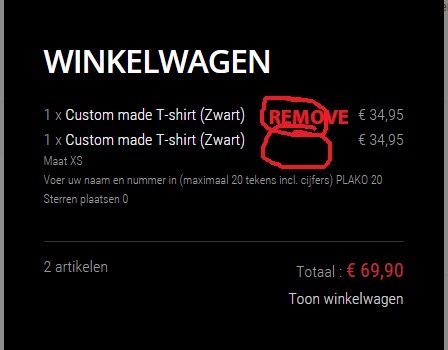
I have view questions... I want to know how to add a remove button in my cart. and where I can change the name ''my cart''.
Like the example in attachement.
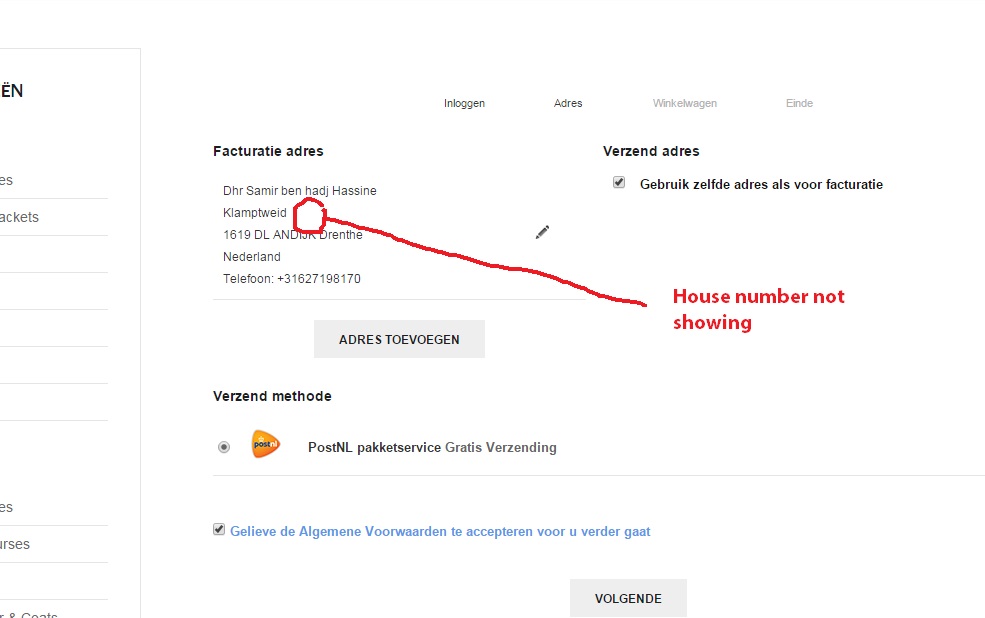
And I added ''housenumber'' customfield but it dont show at adres? how to solve this?
-- Joomla version -- : 2.5.27
-- Browser(s) name and version -- : Google chrome
Hi,
I have view questions... I want to know how to add a remove button in my cart. and where I can change the name ''my cart''.
Like the example in attachement.
And I added ''housenumber'' customfield but it dont show at adres? how to solve this?
Last edit: 11 years 8 months ago by YESSIR.
Please Log in or Create an account to join the conversation.

11 years 8 months ago #192608
by lousyfool
Need help with customisations of layouts, style or other site development? PM me!
(Don't forget to turn on "E-mail notification of new messages" )
Replied by lousyfool on topic Add a edit and remove buttton in my cart
Hi,
1. In the backend of your cart module, set the option "Show delete icons in the cart" to "Yes".
2. Study this tutorial: www.hikashop.com/support/support/documen...-display.html#layout
Then edit the view "address / address_template" and insert the tag for your new custom field behind {address_street}, separated by a space.
Need help with customisations of layouts, style or other site development? PM me!
(Don't forget to turn on "E-mail notification of new messages" )
Please Log in or Create an account to join the conversation.
11 years 8 months ago #192614
by YESSIR
Replied by YESSIR on topic Add a edit and remove buttton in my cart
1. In the backend of your cart module, set the option "Show delete icons in the cart" to "Yes".
It already is on yes. but only for the check out
It already is on yes. but only for the check out
Please Log in or Create an account to join the conversation.
11 years 8 months ago #192615
by lousyfool
Since you've been showing what looks like a (mini) cart module, you obviously need to go into the settings of that particular module.
Need help with customisations of layouts, style or other site development? PM me!
(Don't forget to turn on "E-mail notification of new messages" )
Replied by lousyfool on topic Add a edit and remove buttton in my cart
YESSIR wrote: It already is on yes. but only for the check out
Since you've been showing what looks like a (mini) cart module, you obviously need to go into the settings of that particular module.
Need help with customisations of layouts, style or other site development? PM me!
(Don't forget to turn on "E-mail notification of new messages" )
Please Log in or Create an account to join the conversation.
11 years 8 months ago - 11 years 8 months ago #192617
by YESSIR
Replied by YESSIR on topic Add a edit and remove buttton in my cart
How can I change ''Your Acccount"' and ''CART'' to my own language?
Last edit: 11 years 8 months ago by YESSIR.
Please Log in or Create an account to join the conversation.
11 years 8 months ago #192654
by lousyfool
Need help with customisations of layouts, style or other site development? PM me!
(Don't forget to turn on "E-mail notification of new messages" )
Replied by lousyfool on topic Add a edit and remove buttton in my cart
Good that there is documentation... for this: "
How to modify translations for my precise case?
"
And pretty much everything else ...
And pretty much everything else ...
Need help with customisations of layouts, style or other site development? PM me!
(Don't forget to turn on "E-mail notification of new messages" )
Please Log in or Create an account to join the conversation.
Time to create page: 0.074 seconds