

- Posts: 20
- Thank you received: 1
Default Registration View Not Working
11 years 6 months ago #194913
by cbaugher
Default Registration View Not Working was created by cbaugher
-- HikaShop version -- : 2.4.0
-- Joomla version -- : 3.4.0
-- PHP version -- : 5.5.17
-- Browser(s) name and version -- : Firefox 36.0.1
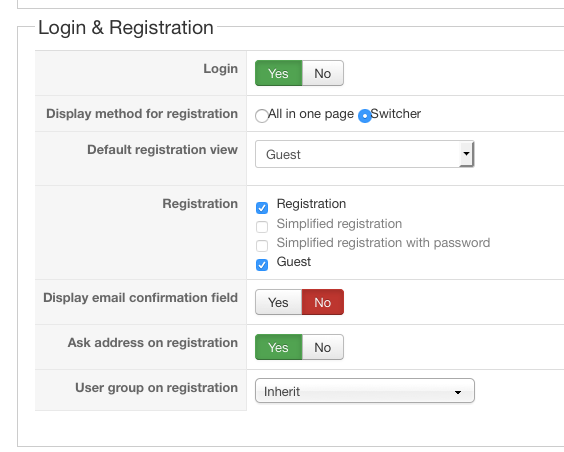
I have set the Default registration view in the configuration to guest (see attachment), yet when I go to checkout the default is still Login. I have tried three different templates, including the Protostar and get the same results.Am I missing something?
-- Joomla version -- : 3.4.0
-- PHP version -- : 5.5.17
-- Browser(s) name and version -- : Firefox 36.0.1
I have set the Default registration view in the configuration to guest (see attachment), yet when I go to checkout the default is still Login. I have tried three different templates, including the Protostar and get the same results.Am I missing something?
Please Log in or Create an account to join the conversation.

11 years 6 months ago #194929
by Xavier
Replied by Xavier on topic Default Registration View Not Working
Hi,
I tried to reproduce the issue on my end thanks to your screenshot.
But using the same parameters than yours is working fine, I have the guest form displayed by default.
Don't you have any view edition/override of the view "checkout / login" ?
I tried to reproduce the issue on my end thanks to your screenshot.
But using the same parameters than yours is working fine, I have the guest form displayed by default.
Don't you have any view edition/override of the view "checkout / login" ?
Please Log in or Create an account to join the conversation.
11 years 6 months ago #195170
by cbaugher
Replied by cbaugher on topic Default Registration View Not Working
I installed a brand new Joomla 3.4 website and installed Hikashop 2.4 and created one product and the guest registration is still not coming up on the Protostar template. This means that nothing could have been interfering or overriding the settings. The Guest radio button is selected but the login form is displayed.
Please Log in or Create an account to join the conversation.
11 years 6 months ago #195183
by Xavier
Replied by Xavier on topic Default Registration View Not Working
Hi,
This code seems to be missing from your view "checkout / login":
Please add it just before:
If the code is already present, please change the value from switcher to all in one page, save and change it back to switcher in Configuration > Checkout > Login & Registration.
This code seems to be missing from your view "checkout / login":
Code:
$js = "window.hikashop.ready( function(){displayRegistration(window.document.getElementById('data_register_registration_method".$defaultSelection."'));});";
$doc = JFactory::getDocument();
$doc->addScriptDeclaration("\n<!--\n".$js."\n//-->\n");
Please add it just before:
Code:
echo JHTML::_('hikaselect.radiolist', $values, 'data[register][registration_method]', ' onchange="displayRegistration(this)"', 'value', 'text', $defaultSelection, false, false, true );
If the code is already present, please change the value from switcher to all in one page, save and change it back to switcher in Configuration > Checkout > Login & Registration.
Please Log in or Create an account to join the conversation.
11 years 6 months ago #195379
by cbaugher
Replied by cbaugher on topic Default Registration View Not Working
The code was present so I changed the configuration like you asked and that did not work. Even when I set the default to registration it still comes up with the login form.
Please Log in or Create an account to join the conversation.

Less
More
- Posts: 12953
- Thank you received: 1778
11 years 5 months ago #197904
by Mohamed Thelji
Replied by Mohamed Thelji on topic Default Registration View Not Working
Hello,
Sorry for the late reply, I also tested it on my end and it worked fine, can you give us a temporary back-end access so that we can directly test it on your website ?
Thanks.
Sorry for the late reply, I also tested it on my end and it worked fine, can you give us a temporary back-end access so that we can directly test it on your website ?
Thanks.
Please Log in or Create an account to join the conversation.

11 years 5 months ago #199067
by dennis3m
Replied by dennis3m on topic Default Registration View Not Working
Hello:
Mine also seems to be the same case. I added the codes to the Checkout > Login page, but it is still not working.
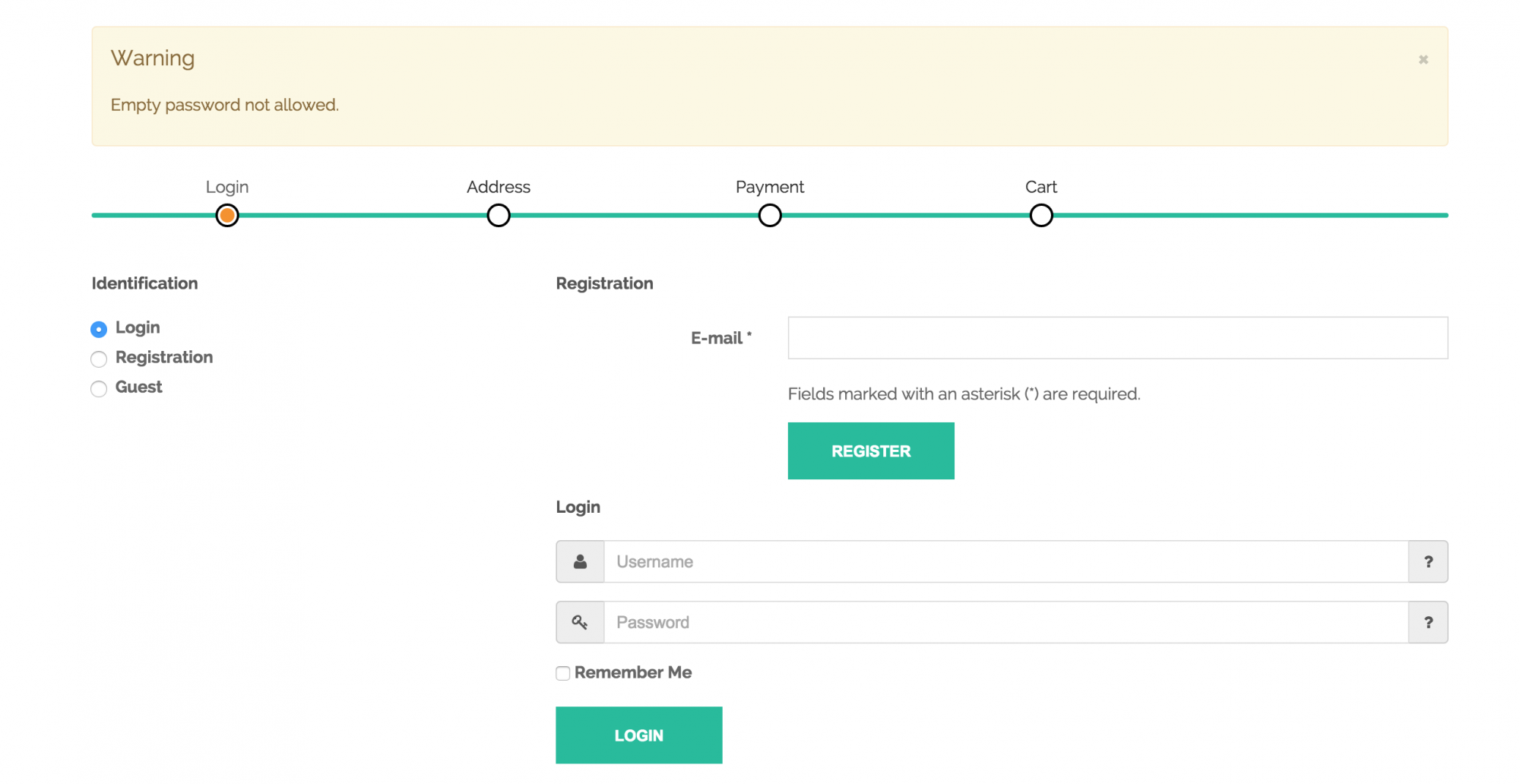
Because the switcher isn't hiding any elements from this page, users misses the switcher and instead directly tries to register, but end up with a 'empty password not allowed message'.
I would also like to know, is there anyway to allow users to continue on with the checkout after they register? Currently, it insist for the user to check their email box for an confirmation email...which is a delay and barrier to customers when they order. Anyway to allow them to finish there order without first confirming email during registration?
Mine also seems to be the same case. I added the codes to the Checkout > Login page, but it is still not working.
Because the switcher isn't hiding any elements from this page, users misses the switcher and instead directly tries to register, but end up with a 'empty password not allowed message'.
I would also like to know, is there anyway to allow users to continue on with the checkout after they register? Currently, it insist for the user to check their email box for an confirmation email...which is a delay and barrier to customers when they order. Anyway to allow them to finish there order without first confirming email during registration?
Please Log in or Create an account to join the conversation.

11 years 5 months ago #199073
by nicolas
Replied by nicolas on topic Default Registration View Not Working
@dennis3m
Your issue is different.
From what I can see the issue is with the CSS of your template preventing HikaShop from hiding the different pieces of the interface.
Without looking at the page I wouldn't be able to say exactly what CSS to change or add to fix that.
If you don't want the activation system for registrations, then just turn it off in the options of the Joomla user manager.
Your issue is different.
From what I can see the issue is with the CSS of your template preventing HikaShop from hiding the different pieces of the interface.
Without looking at the page I wouldn't be able to say exactly what CSS to change or add to fix that.
If you don't want the activation system for registrations, then just turn it off in the options of the Joomla user manager.
Please Log in or Create an account to join the conversation.
11 years 5 months ago #199168
by dennis3m
Replied by dennis3m on topic Default Registration View Not Working
Hi Nicolas:
No wonder adding that piece of code to the View file didn't do anything. I have sent you a private message with our backend login. Hopefully you could provide some guidelines of how we could make it work right.
You are correct on the activation. In Joomla, I went to System > Global Configuration > User Manager and was able to change the 'New User Account Activation' to 'None'; That removed the registration requirement. Yay, thanks!
No wonder adding that piece of code to the View file didn't do anything. I have sent you a private message with our backend login. Hopefully you could provide some guidelines of how we could make it work right.
You are correct on the activation. In Joomla, I went to System > Global Configuration > User Manager and was able to change the 'New User Account Activation' to 'None'; That removed the registration requirement. Yay, thanks!
Please Log in or Create an account to join the conversation.
11 years 5 months ago #199252
by nicolas
Replied by nicolas on topic Default Registration View Not Working
Hi,
Your template is missing the CSS:
Add it and it will then work properly.
Your template is missing the CSS:
Code:
.hikashop_hidden_checkout{
display:none;
}
Please Log in or Create an account to join the conversation.
11 years 5 months ago #199255
by cbaugher
Replied by cbaugher on topic Default Registration View Not Working
I just private messaged you access to my development website.
Please Log in or Create an account to join the conversation.
Less
More
- Posts: 12953
- Thank you received: 1778
11 years 5 months ago - 11 years 5 months ago #199451
by Mohamed Thelji
Replied by Mohamed Thelji on topic Default Registration View Not Working
Hello,
We've made a fix regarding that issue, can you edit the "login" file of the "checkout" view of your front-end template via "Hikashop->Display->Views" and change that line :
By :
and test it again ?
Thanks.
We've made a fix regarding that issue, can you edit the "login" file of the "checkout" view of your front-end template via "Hikashop->Display->Views" and change that line :
Code:
$js = "window.hikashop.ready( function(){displayRegistration(window.document.getElementById('data_register_registration_method".$defaultSelection."'));});";
Code:
$js = "
window.hikashop.ready( function(){
var currentRegistrationSelection = window.document.getElementById('data_register_registration_method".$defaultSelection."');
if(!currentRegistrationSelection) currentRegistrationSelection = window.document.getElementById('data[register][registration_method]".$defaultSelection."');
displayRegistration(currentRegistrationSelection);
});";
Thanks.
Last edit: 11 years 5 months ago by Mohamed Thelji.
Please Log in or Create an account to join the conversation.
11 years 5 months ago #199464
by cbaugher
Replied by cbaugher on topic Default Registration View Not Working
Thank you very much that fixed it! But I had to change that code in the core file as well. And when I download the newest Hikashop just now I saw that that change had not been made there either.
Please Log in or Create an account to join the conversation.
Less
More
- Posts: 12953
- Thank you received: 1778
11 years 5 months ago #199468
by Mohamed Thelji
Replied by Mohamed Thelji on topic Default Registration View Not Working
Thanks for your feedback, note that we'll add it through the next Hikashop package  .
.
. Please Log in or Create an account to join the conversation.

11 years 3 months ago #205421
by penyo311
Kyle with a
Replied by penyo311 on topic Default Registration View Not Working
I have the latest HikaShop version and now when a user goes to register they are not sent out the form to make a username etc
I don't understand why everytime a new version comes out something breaks.
I don't understand why everytime a new version comes out something breaks.
Kyle with a
Please Log in or Create an account to join the conversation.

11 years 3 months ago #205551
by Jerome
Jerome - Obsidev.com
HikaMarket & HikaSerial developer / HikaShop core dev team.
Replied by Jerome on topic Default Registration View Not Working
Hi,
I don't think that is linked with the update.
Regards,
I don't think that is linked with the update.
Regards,
Jerome - Obsidev.com
HikaMarket & HikaSerial developer / HikaShop core dev team.
Please Log in or Create an account to join the conversation.
Time to create page: 0.273 seconds