

- Posts: 3
- Thank you received: 0
404 Error on Pressing the Add to Cart Button
11 years 7 months ago - 11 years 7 months ago #197283
by lockg
404 Error on Pressing the Add to Cart Button was created by lockg
-- url of the page with the problem -- :
locky.eu.pn/index.php/hikashop-menu-for-categories-listing
-- HikaShop version -- : 2.4.0
-- Joomla version -- : 3.3.6
-- Error-message(debug-mod must be tuned on) -- : 404 - Category not found
I have read several of the forum threads but cannot find one that quite seems to match my issue.
I have installed a Test Joomla Site and installed the Purity III template.
I have not configured the site in any other way other than then installing the Hikashop Extension
I have done some basic configuration of Hikashop via the install wizard and config options, but have not changed anything significant (I believe)
I can get a Category or Product display form the Menu and I have a Cart module showing. When I click on the Add to cart option I get the above 404 message, the url is showing as :
locky.eu.pn/index.php/hikashop-menu-for-...g/product/updatecart
at this point having been:
locky.eu.pn/index.php/hikashop-menu-for-categories-listing#
If you hover on the button
I have tried changing the value of "Force a menu on checkout" to other values and also None as I saw that mentioned in several threads here.
I am completely confused as to what could be causing this I would have thought this would be "out of the box" functionality
I have created a Payment method of Bank Transfer & PayPal but I do not believe the lack of a hipping method is causing this?
I notice that when I click on the item itself it also Generates a 404 error, Despite the JCE edited page for the product having an Image and some text.
When I look at the demo site here:
demo.hikashop.com/index.php/en/hikashop/...div/category/15-cars
Hovering on the Add to Cart gives this:
demo.hikashop.com/index.php/en/hikashop/...v/product/updatecart
rather than the url ending in # I have above.
Eventually I would like to have our Products page look similar to the cars config but I need to get the Cart working first otherwise this Extension is a dead end.
Any help appreciated
-- HikaShop version -- : 2.4.0
-- Joomla version -- : 3.3.6
-- Error-message(debug-mod must be tuned on) -- : 404 - Category not found
You may not be able to visit this page because of:
1.an out-of-date bookmark/favourite
2.a search engine that has an out-of-date listing for this site
3.a mistyped address
4.you have no access to this page
5.The requested resource was not found.
6.An error has occurred while processing your request.
Please try one of the following pages: Home Page
If difficulties persist, please contact the System Administrator of this site and report the error below..
Category not found
I have read several of the forum threads but cannot find one that quite seems to match my issue.
I have installed a Test Joomla Site and installed the Purity III template.
I have not configured the site in any other way other than then installing the Hikashop Extension
I have done some basic configuration of Hikashop via the install wizard and config options, but have not changed anything significant (I believe)
I can get a Category or Product display form the Menu and I have a Cart module showing. When I click on the Add to cart option I get the above 404 message, the url is showing as :
locky.eu.pn/index.php/hikashop-menu-for-...g/product/updatecart
at this point having been:
locky.eu.pn/index.php/hikashop-menu-for-categories-listing#
If you hover on the button
I have tried changing the value of "Force a menu on checkout" to other values and also None as I saw that mentioned in several threads here.
I am completely confused as to what could be causing this I would have thought this would be "out of the box" functionality
I have created a Payment method of Bank Transfer & PayPal but I do not believe the lack of a hipping method is causing this?
I notice that when I click on the item itself it also Generates a 404 error, Despite the JCE edited page for the product having an Image and some text.
When I look at the demo site here:
demo.hikashop.com/index.php/en/hikashop/...div/category/15-cars
Hovering on the Add to Cart gives this:
demo.hikashop.com/index.php/en/hikashop/...v/product/updatecart
rather than the url ending in # I have above.
Eventually I would like to have our Products page look similar to the cars config but I need to get the Cart working first otherwise this Extension is a dead end.
Any help appreciated
Last edit: 11 years 7 months ago by Jerome. Reason: formatting
Please Log in or Create an account to join the conversation.

11 years 7 months ago #197377
by Jerome
Jerome - Obsidev.com
HikaMarket & HikaSerial developer / HikaShop core dev team.
Replied by Jerome on topic 404 Error on Pressing the Add to Cart Button
Hi,
Do you have a SEF extension installed ?
Would it be possible to have more details about your SEF configuration (Joomla and HikaShop) ?
Regards,
Do you have a SEF extension installed ?
Would it be possible to have more details about your SEF configuration (Joomla and HikaShop) ?
Regards,
Jerome - Obsidev.com
HikaMarket & HikaSerial developer / HikaShop core dev team.
Please Log in or Create an account to join the conversation.
11 years 7 months ago #197397
by lockg
Replied by lockg on topic 404 Error on Pressing the Add to Cart Button
The Site has just been setup for testing.
It is a Vanila Joomla site with no significant changes then a Purity III Theme installed and HikaShop
For site:
Search Engine Friendly URLs Yes
Use URL rewriting No
Adds Suffix to URL No
Unicode Aliases No
Include Site Name in Page Titles No
For Hikashop I assume you mean this settings (Features SEF Url options)
Simplified breadcrumbs Yes
Remove products and categories id in URLs No
Alias automatic filling Yes
Category SEF name Category
Product SEF name Product
Checkout SEF name Checkout
Force canonical URLs on listings Use canonical URL if specified
Automatic product keywords and metadescription filling No
Thanks
Graham
Please Log in or Create an account to join the conversation.
11 years 7 months ago #197448
by lockg
Replied by lockg on topic 404 Error on Pressing the Add to Cart Button
I have been looking at this some more and it appears that the Theme / Joomla install did not work 100%.
I have tried a different hosting provider and all appears to be working now.
I have tried a different hosting provider and all appears to be working now.
Please Log in or Create an account to join the conversation.
11 years 2 weeks ago #220293
by terryt
Replied by terryt on topic 404 Error on Pressing the Add to Cart Button
I got a 404 when I had alias as 'checkout' but when I added a dash to the alias it worked. 'cart-checkout'
Please Log in or Create an account to join the conversation.
Less
More
- Posts: 1
- Thank you received: 0
11 years 5 days ago #221674
by matshudeni
Replied by matshudeni on topic 404 Error on Pressing the Add to Cart Button
Good Day,
I get a similar message as in the original forum topic. I cannot follow how the issue was resolved. Could you help.
See attached the type of error message.
I use Joomla! 3.4.5
Browser is Chrome
Hikashop 2.6.0
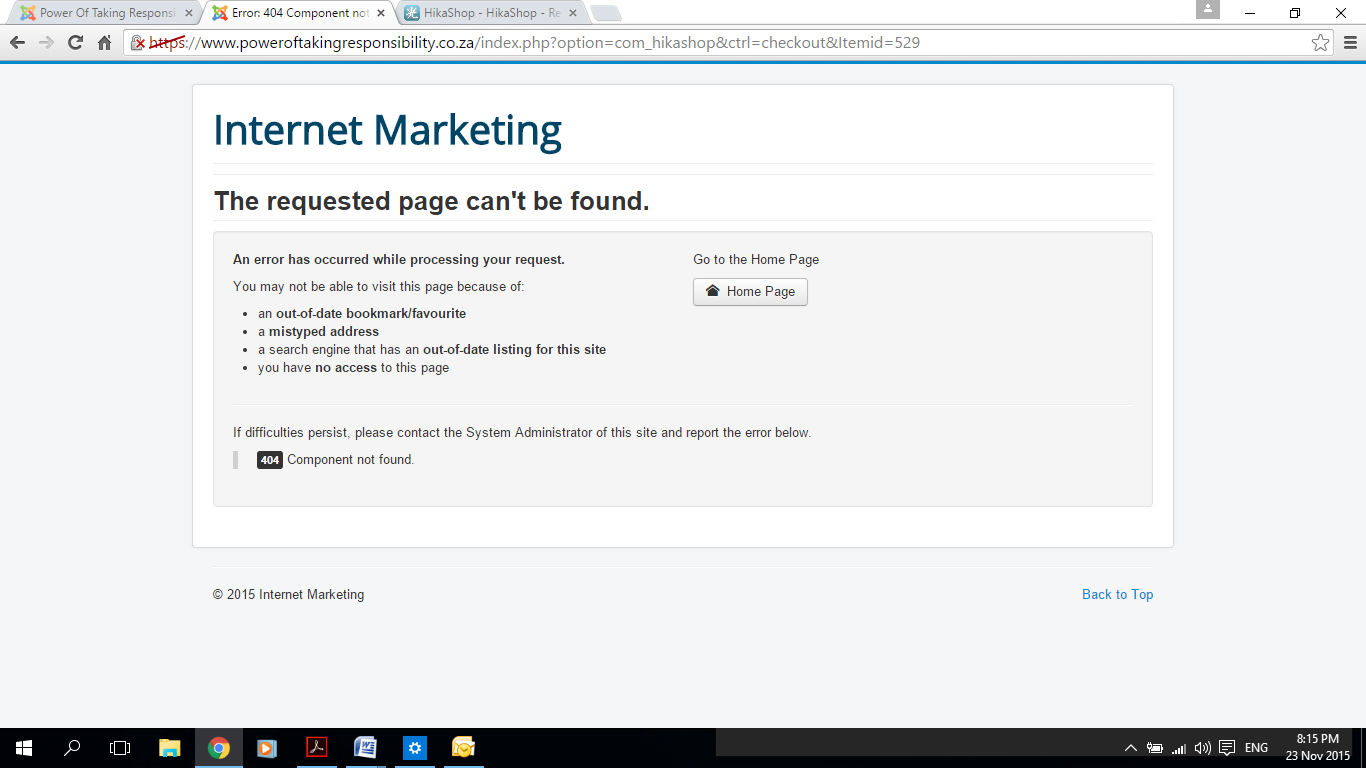
I get a similar message as in the original forum topic. I cannot follow how the issue was resolved. Could you help.
See attached the type of error message.
I use Joomla! 3.4.5
Browser is Chrome
Hikashop 2.6.0
Please Log in or Create an account to join the conversation.

11 years 5 days ago #221699
by nicolas
Replied by nicolas on topic 404 Error on Pressing the Add to Cart Button
Hi,
The error you're having is actually different from the one on this thread. Yours is "component not found" and not "category not found", so it's normal the solutions don't work.
It's either because you've deleted HikaShop from your website, or because the menu item with the id 529 points to a component which doesn't exist. So please check the settings of that menu via the Joomla menu manager.
Please Log in or Create an account to join the conversation.
Time to create page: 0.070 seconds