
- Posts: 11
- Thank you received: 0
Modify Registration Custom Fields Position
- mlevin@cfisa.org
-
 Topic Author
- Offline
Less
More
11 years 2 months ago #211478
by mlevin@cfisa.org
Modify Registration Custom Fields Position was created by mlevin@cfisa.org
-- HikaShop version -- : 5.0
-- Joomla version -- : 3.4.3
-- PHP version -- : 5.4.21
-- Browser(s) name and version -- : FF 39.0.3
i'd like to have my custom fields come before the registration form fields on the checkout page
right now i have the simplified option set up with just email and password. my custom fields are first name and last name which i'd like come before the email and password fields.
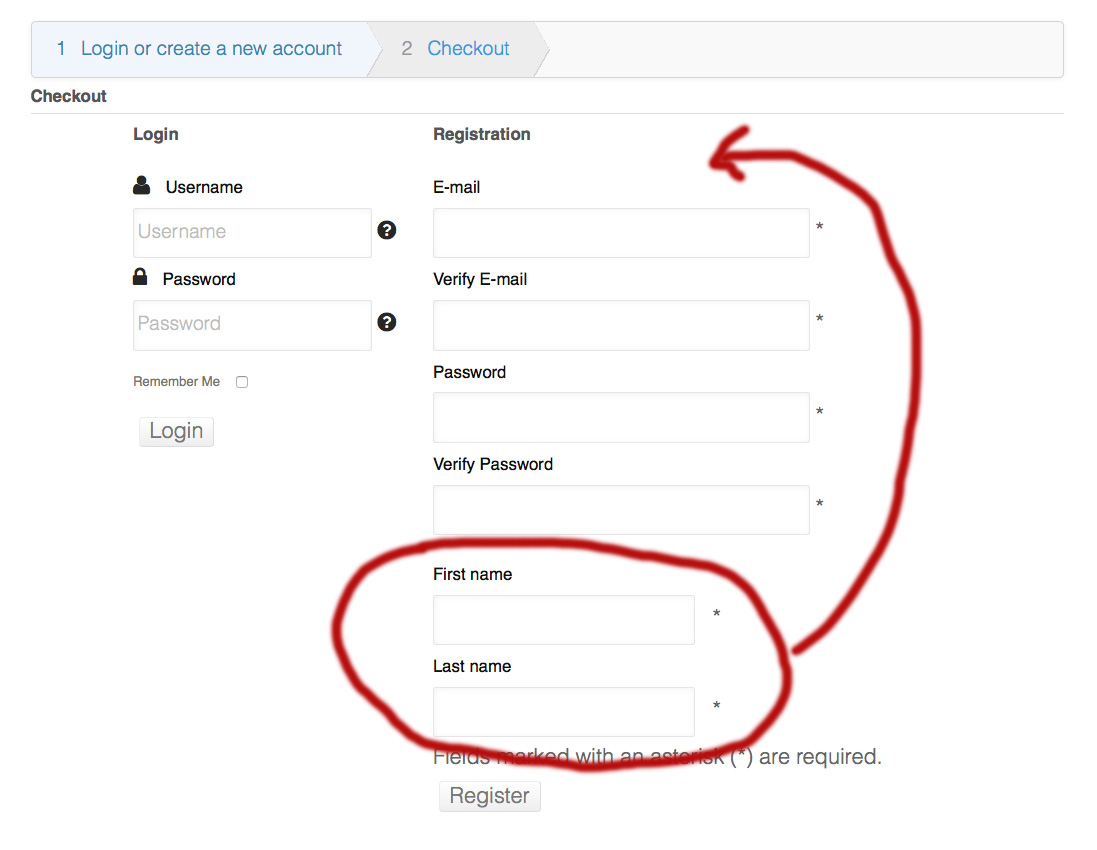
i've tried editing the following with no luck and broken forms
Display > User > registration
Display > User > registration_bootstrap
Display > User > form
Can anyone point me in the right direction?
-- Joomla version -- : 3.4.3
-- PHP version -- : 5.4.21
-- Browser(s) name and version -- : FF 39.0.3
i'd like to have my custom fields come before the registration form fields on the checkout page
right now i have the simplified option set up with just email and password. my custom fields are first name and last name which i'd like come before the email and password fields.
i've tried editing the following with no luck and broken forms
Display > User > registration
Display > User > registration_bootstrap
Display > User > form
Can anyone point me in the right direction?
Please Log in or Create an account to join the conversation.

11 years 2 months ago #211485
by nicolas
Replied by nicolas on topic Modify Registration Custom Fields Position
Hi,
It's indeed the registration and/or registration_bootstrap view files that you need to edit.
I don't know if these custom fields are address fields or user fields.
Supposing that these are address fields, you want to remove the code:
$this->type = 'address';
echo $this->loadTemplate();
in these view files, and add instead the code:
$this->setLayout('custom_fields');
$this->type = 'address';
echo $this->loadTemplate();
just before:
if(!$this->simplified_registration) {
It's indeed the registration and/or registration_bootstrap view files that you need to edit.
I don't know if these custom fields are address fields or user fields.
Supposing that these are address fields, you want to remove the code:
$this->type = 'address';
echo $this->loadTemplate();
in these view files, and add instead the code:
$this->setLayout('custom_fields');
$this->type = 'address';
echo $this->loadTemplate();
just before:
if(!$this->simplified_registration) {
Please Log in or Create an account to join the conversation.
- mlevin@cfisa.org
-
Topic Author
- Offline
Less
More
- Posts: 11
- Thank you received: 0
11 years 2 months ago - 11 years 2 months ago #211558
by mlevin@cfisa.org
Replied by mlevin@cfisa.org on topic Modify Registration Custom Fields Position
Thanks for the quick response nicolas.
I've tried moving the code you mentioned above line 22 which is - if(!$this->simplified_registration){ ?>
but it breaks the form. see below
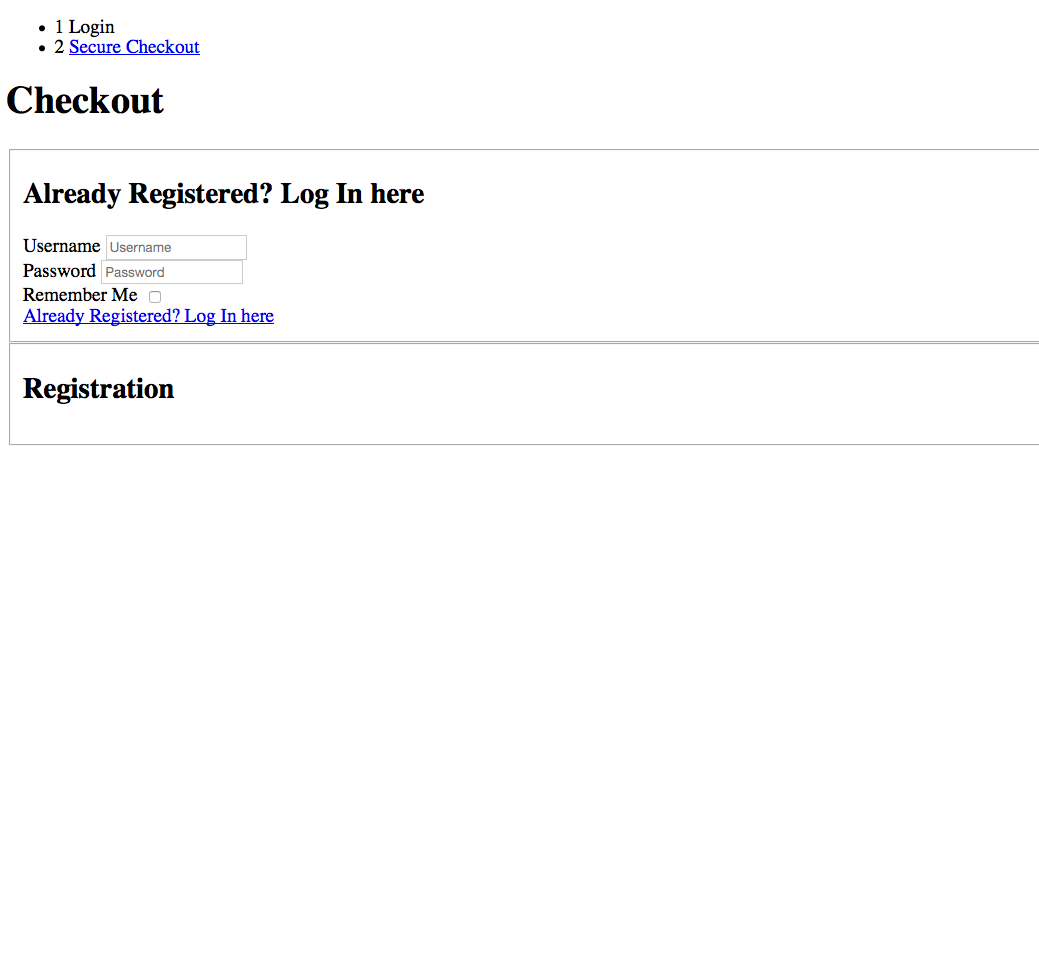
starting at line 112 I removed the code below
here's the first 25 lines from the registration_bootstrap that i have now
I've tried moving the code you mentioned above line 22 which is - if(!$this->simplified_registration){ ?>
but it breaks the form. see below
starting at line 112 I removed the code below
Code:
<?php
}
}
if($this->config->get('address_on_registration',1)){
?>
<div class=""><legend><?php echo JText::_( 'ADDRESS_INFORMATION' ); ?></legend></div>
<?php
$this->type = 'address';
echo $this->loadTemplate();
}
?>
Code:
<<?php
/**
* @package HikaShop for Joomla!
* @version 2.5.0
* @author hikashop.com
* @copyright (C) 2010-2015 HIKARI SOFTWARE. All rights reserved.
* @license GNU/GPLv3 http://www.gnu.org/licenses/gpl-3.0.html
*/
defined('_JEXEC') or die('Restricted access');
?><fieldset class="form-horizontal">
<?php
if($this->display_method==1){
$this->simplified_registration=explode(',',$this->simplified_registration);
if(in_array('2',$this->simplified_registration)){ $registration=2; }
if(in_array('0',$this->simplified_registration)){ $registration=0; }
if(in_array('1',$this->simplified_registration)){ $registration=1; }
if(in_array('3',$this->simplified_registration)){ $registration=3; }
$this->simplified_registration = $registration;
}
if(!$this->simplified_registration){ ?>
<div class="control-group hikashop_registration_name_line" id="hikashop_registration_name_line">
Last edit: 11 years 2 months ago by Jerome. Reason: [code] is nice
Please Log in or Create an account to join the conversation.

11 years 2 months ago #211562
by Jerome
Jerome - Obsidev.com
HikaMarket & HikaSerial developer / HikaShop core dev team.
Replied by Jerome on topic Modify Registration Custom Fields Position
Hi,
Please check your PHP error log ; you should have a PHP syntax error.
Regards,
Please check your PHP error log ; you should have a PHP syntax error.
Regards,
Jerome - Obsidev.com
HikaMarket & HikaSerial developer / HikaShop core dev team.
Please Log in or Create an account to join the conversation.
- mlevin@cfisa.org
-
Topic Author
- Offline
Less
More
- Posts: 11
- Thank you received: 0
11 years 2 months ago #211672
by mlevin@cfisa.org
Replied by mlevin@cfisa.org on topic Modify Registration Custom Fields Position
there does seem to be a syntax error - but i'm not a php expert.
seems like this portion of the code could be moved up
above the lines
as nicolas suggested. any help or insight would be great
seems like this portion of the code could be moved up
Code:
<?php
}
}
if($this->config->get('address_on_registration',1)){
?>
<div class=""><legend><?php echo JText::_( 'ADDRESS_INFORMATION' ); ?></legend></div>
<?php
$this->type = 'address';
echo $this->loadTemplate();
}
?>
above the lines
Code:
if(!$this->simplified_registration){ ?>
<div class="control-group hikashop_registration_name_line" id="hikashop_registration_name_line">
as nicolas suggested. any help or insight would be great
Please Log in or Create an account to join the conversation.
11 years 2 months ago #211682
by nicolas
Replied by nicolas on topic Modify Registration Custom Fields Position
Hi,
It doesn't seem that you did what I said you should do.
I didn't say that you should remove the code
but only the code
But It doesn't seems that it is what you did based on what you wrote here:
www.hikashop.com/forum/checkout/878751-m...position.html#211558
The modification I gave cannot produce a syntax error so you must have done something wrong when trying to do it.
It doesn't seem that you did what I said you should do.
I didn't say that you should remove the code
Code:
<?php
}
}
if($this->config->get('address_on_registration',1)){
?>
<div class=""><legend><?php echo JText::_( 'ADDRESS_INFORMATION' ); ?></legend></div>
<?php
$this->type = 'address';
echo $this->loadTemplate();
}
?>
Code:
$this->type = 'address';
echo $this->loadTemplate();
www.hikashop.com/forum/checkout/878751-m...position.html#211558
The modification I gave cannot produce a syntax error so you must have done something wrong when trying to do it.
Please Log in or Create an account to join the conversation.
- mlevin@cfisa.org
-
Topic Author
- Offline
Less
More
- Posts: 11
- Thank you received: 0
11 years 2 months ago #211735
by mlevin@cfisa.org
Replied by mlevin@cfisa.org on topic Modify Registration Custom Fields Position
thanks nicolas! the first time i edited the file i thought i did exactly as you said but the form was broken. I tried a couple of things after that to try and get it to work . i must have messed up removing the code below:
$this->type = 'address';
echo $this->loadTemplate();
The custom fields now load first but now without the same format as before. the fields seem to be all on one wrapped line
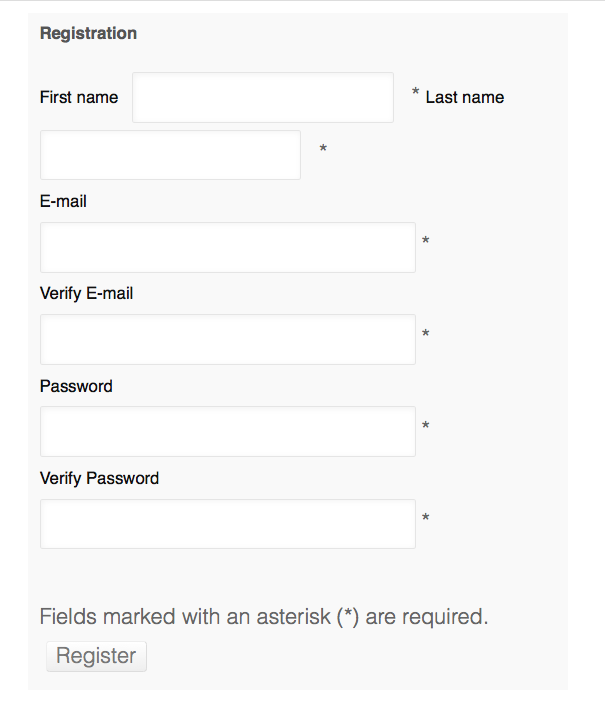
$this->type = 'address';
echo $this->loadTemplate();
The custom fields now load first but now without the same format as before. the fields seem to be all on one wrapped line
Please Log in or Create an account to join the conversation.
11 years 2 months ago #211747
by nicolas
Replied by nicolas on topic Modify Registration Custom Fields Position
Hi,
It can probably be fixed with some CSS code, but I'm not able to access your checkout and I couldn't find any product page to add a product to the cart in order to access the checkout, so I couldn't analyse the CSS on the form.
Could you provide the necessary information to access that form on your website ?
It can probably be fixed with some CSS code, but I'm not able to access your checkout and I couldn't find any product page to add a product to the cart in order to access the checkout, so I couldn't analyse the CSS on the form.
Could you provide the necessary information to access that form on your website ?
Please Log in or Create an account to join the conversation.
- mlevin@cfisa.org
-
Topic Author
- Offline
Less
More
- Posts: 11
- Thank you received: 0
11 years 2 months ago #211870
by mlevin@cfisa.org
Replied by mlevin@cfisa.org on topic Modify Registration Custom Fields Position
you can add an item to the cart by clicking on the courses menu item (or dropdown item) and then one of the 3 course on that page. scroll down a little on the course page and click the Buy Now button below the price.
Please Log in or Create an account to join the conversation.
11 years 2 months ago #211873
by nicolas
Replied by nicolas on topic Modify Registration Custom Fields Position
Hi,
You can add such CSS on your website:
.hikashop_checkout_login_right_part label{ display:block; }
www.hikashop.com/support/documentation/1...ize-the-display.html
You can add such CSS on your website:
.hikashop_checkout_login_right_part label{ display:block; }
www.hikashop.com/support/documentation/1...ize-the-display.html
The following user(s) said Thank You: mlevin@cfisa.org
Please Log in or Create an account to join the conversation.
- mlevin@cfisa.org
-
Topic Author
- Offline
Less
More
- Posts: 11
- Thank you received: 0
11 years 2 months ago #211975
by mlevin@cfisa.org
Replied by mlevin@cfisa.org on topic Modify Registration Custom Fields Position
Thanks Nicolas! that did the trick
Please Log in or Create an account to join the conversation.
Time to create page: 0.085 seconds