

- Posts: 105
- Thank you received: 6
Change the way the payment method is displayed
11 years 2 months ago #213492
by panefs
Change the way the payment method is displayed was created by panefs
Hello team.
I am using Paypal as the sole payment method on my site.
The Paypal button as it appears below the payment method, has confused a number of my site visitors:
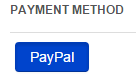
These visitors clicked on the Paypal button;, they expected they would be transferred to Paypal to complete the transaction. Since nothing happened, they thought something was wrong and abandoned the purchase.
So, my question is: can I replace this button with e.g. a text string that says that "We are using Paypal for the purposes of processing your payments" ? Do you recommend another solution?
Thanks
Panos
I am using Paypal as the sole payment method on my site.
The Paypal button as it appears below the payment method, has confused a number of my site visitors:
These visitors clicked on the Paypal button;, they expected they would be transferred to Paypal to complete the transaction. Since nothing happened, they thought something was wrong and abandoned the purchase.
So, my question is: can I replace this button with e.g. a text string that says that "We are using Paypal for the purposes of processing your payments" ? Do you recommend another solution?
Thanks
Panos
Please Log in or Create an account to join the conversation.

11 years 2 months ago #213503
by nicolas
Replied by nicolas on topic Change the way the payment method is displayed
Hi,
Edit the file "payment" of the view "checkout" via the menu Display>Views and change the text HIKASHOP_RESPONSIVE to false
That will display the payment methods selection differently.
Edit the file "payment" of the view "checkout" via the menu Display>Views and change the text HIKASHOP_RESPONSIVE to false
That will display the payment methods selection differently.
Please Log in or Create an account to join the conversation.
11 years 2 months ago #213595
by panefs
Replied by panefs on topic Change the way the payment method is displayed
Thanks for the reply Nicolas.
Unfortunately the new display doesn't fit very well in my template. The "Paypal" text appears very far from the button.
I had to revert to the old look
Unfortunately the new display doesn't fit very well in my template. The "Paypal" text appears very far from the button.
I had to revert to the old look
Please Log in or Create an account to join the conversation.

11 years 2 months ago #213604
by Jerome
Jerome - Obsidev.com
HikaMarket & HikaSerial developer / HikaShop core dev team.
Replied by Jerome on topic Change the way the payment method is displayed
Hi,
You can still create your own design thanks to the view override system.
Just edit the view "checkout | payment" for your front-end template and you will be able to have exactly the HTML you want.
www.hikashop.com/support/support/documen...ize-the-display.html
Regards,
You can still create your own design thanks to the view override system.
Just edit the view "checkout | payment" for your front-end template and you will be able to have exactly the HTML you want.
www.hikashop.com/support/support/documen...ize-the-display.html
Regards,
Jerome - Obsidev.com
HikaMarket & HikaSerial developer / HikaShop core dev team.
Please Log in or Create an account to join the conversation.
Time to create page: 0.049 seconds