
Problem after creating new shipping address

11 years 8 hours ago #216664
by helenbn
Pretty Good Designs | prettygooddesigns.com | Hey, that's pretty good!
Problem after creating new shipping address was created by helenbn
-- url of the page with the problem -- : localhost
-- HikaShop version -- : 2.6.0
-- Joomla version -- : 3.4.4
-- PHP version -- : 5.4.10
-- Browser(s) name and version -- : FireFox 41.0.1
Hi,
I have a problem when checking out when creating a new shipping address.
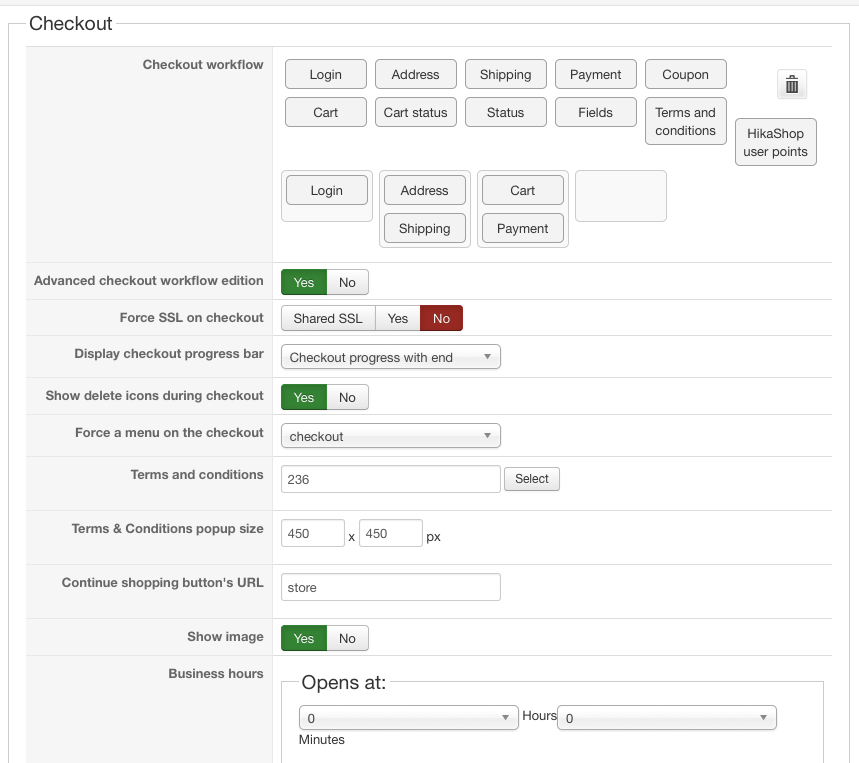
Checkout is forced to menu "checkout" and Guest login.
Checkout workflow is:
After creating a new shipping address, my page reloads to http://mysite/checkout/task-step/step-0 and I get the Message "Product not found". In reality, I have no Step-0 in my checkout that I can find. If it would load ...task-step/step-1 then it would be loading the page where I added the new shipping address and all would proceed correctly.
Thanks,
Helen
-- HikaShop version -- : 2.6.0
-- Joomla version -- : 3.4.4
-- PHP version -- : 5.4.10
-- Browser(s) name and version -- : FireFox 41.0.1
Hi,
I have a problem when checking out when creating a new shipping address.
Checkout is forced to menu "checkout" and Guest login.
Checkout workflow is:
- Login - Address
- Shipping
- Cart - Payment
After creating a new shipping address, my page reloads to http://mysite/checkout/task-step/step-0 and I get the Message "Product not found". In reality, I have no Step-0 in my checkout that I can find. If it would load ...task-step/step-1 then it would be loading the page where I added the new shipping address and all would proceed correctly.
Thanks,
Helen
Pretty Good Designs | prettygooddesigns.com | Hey, that's pretty good!
Please Log in or Create an account to join the conversation.

10 years 11 months ago #216680
by nicolas
Replied by nicolas on topic Problem after creating new shipping address
Hi,
In computing we start counting at 0. So step 0 is actually your first checkout step.
If you have a "product not found" error, it actually means that there is a problem with the SEF settings.
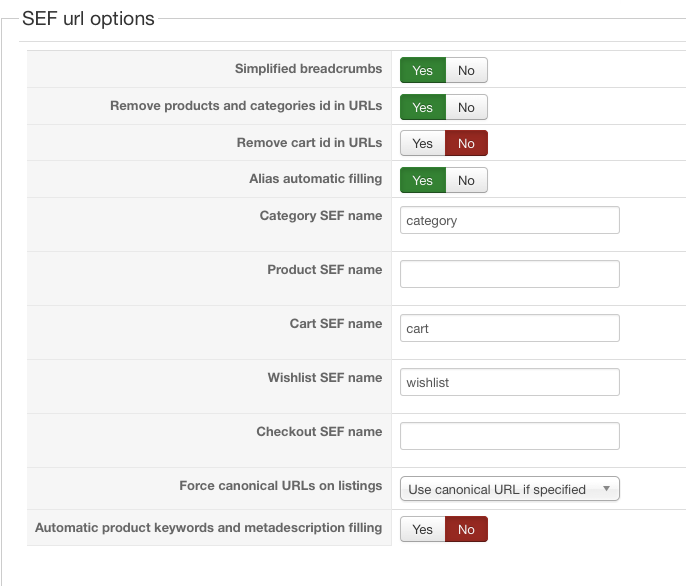
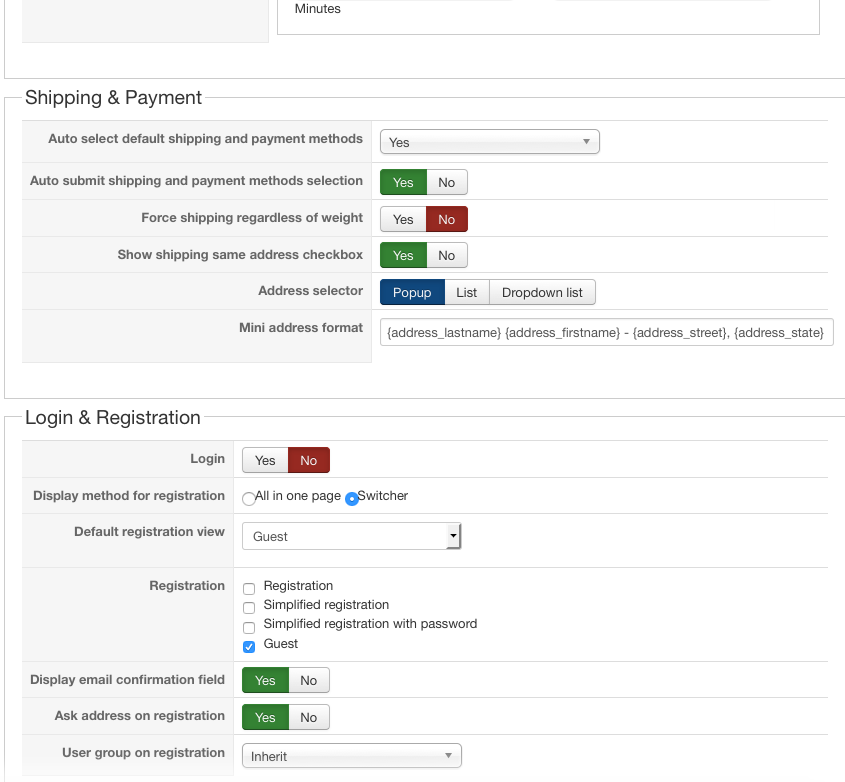
Could you do a screenshot of the SEF section of the Features tab of the HikaShop configuration ? Also, could you do a screenshot of all the settings of the Checkout tab of the HikaShop configuration ?
That would allow us to have a better understand of the issue with the SEF.
In computing we start counting at 0. So step 0 is actually your first checkout step.
If you have a "product not found" error, it actually means that there is a problem with the SEF settings.
Could you do a screenshot of the SEF section of the Features tab of the HikaShop configuration ? Also, could you do a screenshot of all the settings of the Checkout tab of the HikaShop configuration ?
That would allow us to have a better understand of the issue with the SEF.
Please Log in or Create an account to join the conversation.
10 years 11 months ago #216787
by helenbn
Pretty Good Designs | prettygooddesigns.com | Hey, that's pretty good!
Replied by helenbn on topic Problem after creating new shipping address
Ah yes, step-0 is my first step. I can never get back there unless I restart the browser.
Pretty Good Designs | prettygooddesigns.com | Hey, that's pretty good!
Please Log in or Create an account to join the conversation.
10 years 11 months ago #216817
by nicolas
Replied by nicolas on topic Problem after creating new shipping address
Hi,
I think that the problem is the combination of the fact that you didn't put anything in both the "Product SEF name" and the "Checkout SEF name" settings and that you have set the "Force a menu on checkout" setting to a checkout menu item.
Could you try to put back the word "checkout" in the "Checkout SEF name" setting ?
I think that the problem is the combination of the fact that you didn't put anything in both the "Product SEF name" and the "Checkout SEF name" settings and that you have set the "Force a menu on checkout" setting to a checkout menu item.
Could you try to put back the word "checkout" in the "Checkout SEF name" setting ?
Please Log in or Create an account to join the conversation.
10 years 11 months ago #216849
by helenbn
Pretty Good Designs | prettygooddesigns.com | Hey, that's pretty good!
Replied by helenbn on topic Problem after creating new shipping address
Hi Nicolas,
I only have category populated as stated here hikashop.com/support/support/documentati...ig.html#features_sef that I can leave either category or product blank but not both.
If I put "checkout" in the checkout, the I get duplicate checkout/checkout in the url. If I don't link checkout to a menu then I get an ugly url.
Helen
I only have category populated as stated here hikashop.com/support/support/documentati...ig.html#features_sef that I can leave either category or product blank but not both.
If I put "checkout" in the checkout, the I get duplicate checkout/checkout in the url. If I don't link checkout to a menu then I get an ugly url.
Helen
Pretty Good Designs | prettygooddesigns.com | Hey, that's pretty good!
Please Log in or Create an account to join the conversation.
10 years 11 months ago #216857
by nicolas
Replied by nicolas on topic Problem after creating new shipping address
Hi,
Then put back "product" in the "product SEF name" and leave the "checkout SEF name" setting empty. That should hopefully also solve the problem.
Then put back "product" in the "product SEF name" and leave the "checkout SEF name" setting empty. That should hopefully also solve the problem.
The following user(s) said Thank You: helenbn
Please Log in or Create an account to join the conversation.
10 years 11 months ago #216900
by helenbn
Pretty Good Designs | prettygooddesigns.com | Hey, that's pretty good!
Replied by helenbn on topic Problem after creating new shipping address
That did it! Thank you so much!
Pretty Good Designs | prettygooddesigns.com | Hey, that's pretty good!
Please Log in or Create an account to join the conversation.
Time to create page: 0.223 seconds