

- Posts: 139
- Thank you received: 1
Removing the +/- ie the option to add or remove
10 years 11 months ago #219933
by abasel
Removing the +/- ie the option to add or remove was created by abasel
-- HikaShop version -- : 2.6.0
-- Joomla version -- : 3.4.5
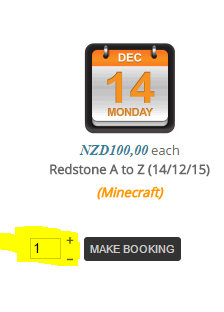
My products are suddenly showing the +/- next to the add to cart. This should not be the case. Where can I go to remove it again (can't remember how I did it before).
See the yellow highlight in the image.
-- Joomla version -- : 3.4.5
My products are suddenly showing the +/- next to the add to cart. This should not be the case. Where can I go to remove it again (can't remember how I did it before).
See the yellow highlight in the image.
Please Log in or Create an account to join the conversation.

10 years 11 months ago #219944
by lousyfool
Need help with customisations of layouts, style or other site development? PM me!
(Don't forget to turn on "E-mail notification of new messages" )
Replied by lousyfool on topic Removing the +/- ie the option to add or remove
Hi,
The + and - show because you have it configured this way.
Look for the option "Display the quantity field on the product page" in the main configuration:
www.hikashop.com/support/support/documen...ig.html#main_product
And check for any overrides for this setting per product: www.hikashop.com/support/documentation/i...terface.html#display
The + and - show because you have it configured this way.
Look for the option "Display the quantity field on the product page" in the main configuration:
www.hikashop.com/support/support/documen...ig.html#main_product
And check for any overrides for this setting per product: www.hikashop.com/support/documentation/i...terface.html#display
Need help with customisations of layouts, style or other site development? PM me!
(Don't forget to turn on "E-mail notification of new messages" )
The following user(s) said Thank You: abasel
Please Log in or Create an account to join the conversation.
10 years 11 months ago #220048
by abasel
Replied by abasel on topic Removing the +/- ie the option to add or remove
Hi, I have done all this
Configuration->Product
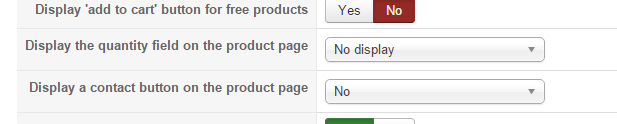
Product Setting:
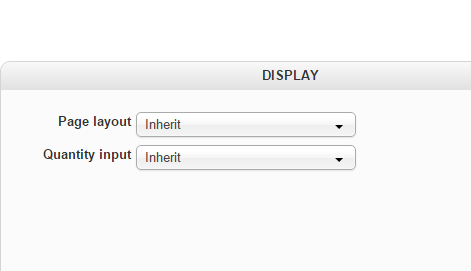
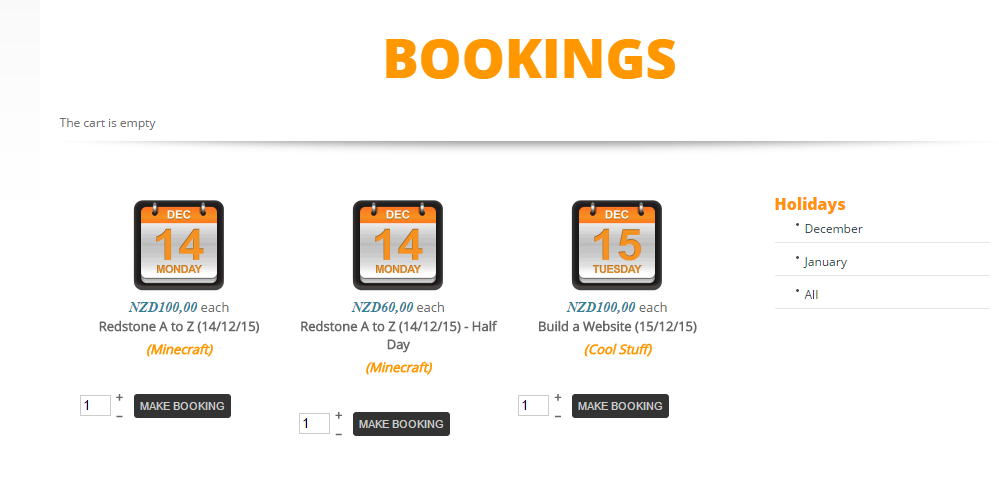
And it is still there:
Configuration->Product
Product Setting:
And it is still there:
Please Log in or Create an account to join the conversation.
10 years 11 months ago #220086
by abasel
Replied by abasel on topic Removing the +/- ie the option to add or remove
If I can't hide it using the settings, which view try and modify?
Please Log in or Create an account to join the conversation.

10 years 11 months ago #220083
by Xavier
Replied by Xavier on topic Removing the +/- ie the option to add or remove
Hi,
Please check the settings of the menu with the id "155", the option "Quantity field" is potentially enabled.
Please check the settings of the menu with the id "155", the option "Quantity field" is potentially enabled.
The following user(s) said Thank You: abasel
Please Log in or Create an account to join the conversation.
10 years 11 months ago #220109
by abasel
Replied by abasel on topic Removing the +/- ie the option to add or remove
Thanks, I changed it from inherited to none and that sorted it our 
Please Log in or Create an account to join the conversation.
Time to create page: 0.067 seconds