

- Posts: 18
- Thank you received: 0
Products cant be removed and updated (on cart)!
11 years 5 days ago - 11 years 4 days ago #221686
by besar
Products cant be removed and updated (on cart)! was created by besar
-- HikaShop version -- : 2.6.0
-- Joomla version -- : 3.4.5
-- PHP version -- : 5.5.30
Hello!
When one ore several products are added to the cart, the order no longer can be modified!
When i increase or decrease the products and hit the refresh button, there is no change made. Same with the X delete icon. It sets the amount of product in zero but still in the upper part shown the number of products avaliable in cart-and its not zero. Also, if i have multiple products on the cart, and wish to remove one product, i want to stay in the same page since it redirects me to login/register page!
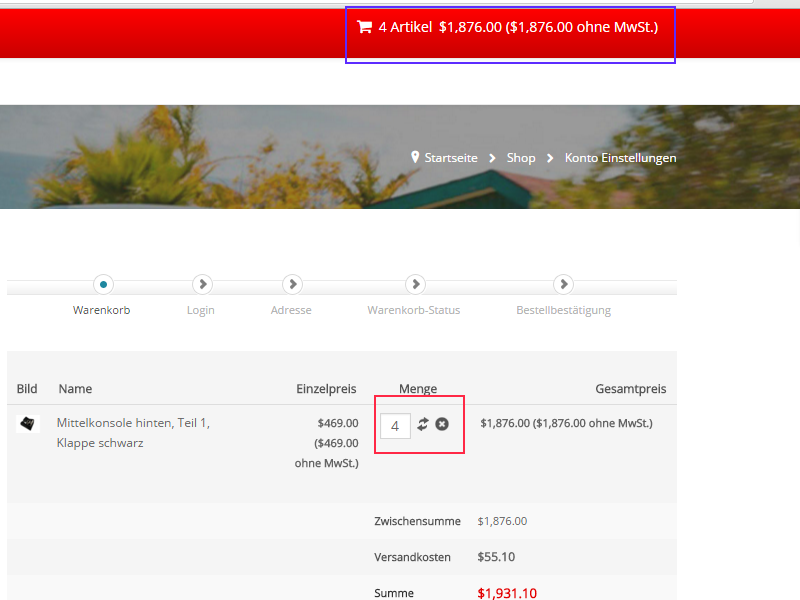
-- Joomla version -- : 3.4.5
-- PHP version -- : 5.5.30
Hello!
When one ore several products are added to the cart, the order no longer can be modified!
When i increase or decrease the products and hit the refresh button, there is no change made. Same with the X delete icon. It sets the amount of product in zero but still in the upper part shown the number of products avaliable in cart-and its not zero. Also, if i have multiple products on the cart, and wish to remove one product, i want to stay in the same page since it redirects me to login/register page!
Last edit: 11 years 4 days ago by besar.
Please Log in or Create an account to join the conversation.

11 years 4 days ago #221701
by nicolas
Replied by nicolas on topic Products cant be removed and updated!
Hi,
The issue is that you have some customization of the cart on your checkout which actually displays the cart twice on the page:
take.ms/XeHto
And you have CSS on your template to hide the second one and only display it on mobile devices.
Because of that, when you change the quantity of a product in the first cart, it is not taken into account as the second one overwrite the quantity value.
You'll have to remove that customization of the cart display in order to only display it once, as it is the case by default in HikaShop and it will work fine.
Please Log in or Create an account to join the conversation.
11 years 4 days ago #221745
by besar
Replied by besar on topic Products cant be removed and updated!
Thank you on the problem detection. But how can I fix this issue. Some guy playing around with the template did this and now we decided to go online and have this big problem on our shop.
Our old site was hika,teslaandmore.com and we transfered on e-driver.net
Thank you for your help
Our old site was hika,teslaandmore.com and we transfered on e-driver.net
Thank you for your help
Please Log in or Create an account to join the conversation.

11 years 4 days ago #221751
by Xavier
Replied by Xavier on topic Products cant be removed and updated!
Hi,
As Nicolas said:
www.hikashop.com/support/documentation/s...ize-the-display.html
As Nicolas said:
You have to remove the override of the view "checkout / cart" (do a backup first) and then only edit it with some css rules to display / hide elements inside.You'll have to remove that customization of the cart display in order to only display it once, as it is the case by default in HikaShop and it will work fine.
www.hikashop.com/support/documentation/s...ize-the-display.html
Please Log in or Create an account to join the conversation.
Time to create page: 0.048 seconds