

- Posts: 78
- Thank you received: 0
How to redirect the page when continue shopping
10 years 8 months ago #226777
by featha
How to redirect the page when continue shopping was created by featha
-- HikaShop version -- : 2.6.1
-- Joomla version -- : 3.4.8
-- Browser(s) name and version -- : Chrome 47
-- Error-message(debug-mod must be tuned on) -- : Error 404 - page not found
Once I am in my shopping cart and click 'continue shopping' at the bottom left, then I am re-directed to the website host page and get an Error 404 - page not found.
The redirect page is: bigskyhost.com/clients/komnik/index.php/products
How do I set the redirect to stay on the webpage and relink to products?
The web page is:
www.kfcc.com.na/index.php/component/hika.../checkout?Itemid=389
-- Joomla version -- : 3.4.8
-- Browser(s) name and version -- : Chrome 47
-- Error-message(debug-mod must be tuned on) -- : Error 404 - page not found
Once I am in my shopping cart and click 'continue shopping' at the bottom left, then I am re-directed to the website host page and get an Error 404 - page not found.
The redirect page is: bigskyhost.com/clients/komnik/index.php/products
How do I set the redirect to stay on the webpage and relink to products?
The web page is:
www.kfcc.com.na/index.php/component/hika.../checkout?Itemid=389
Please Log in or Create an account to join the conversation.

10 years 8 months ago #226780
by Xavier
Replied by Xavier on topic How to redirect the page when continue shopping
Hi,
I think that you have a view override on the view "checkout / cart", please do a backup of this view and remove the override.
Or user this line of code for the Continue shopping button:
This code is the default one, and is just closing the popup.
I think that you have a view override on the view "checkout / cart", please do a backup of this view and remove the override.
Or user this line of code for the Continue shopping button:
Code:
<?php echo $this->cartClass->displayButton(JText::_('CONTINUE_SHOPPING'),'continue_shopping',$this->params,'','window.parent.hikashop.closeBox(); return false;','id="hikashop_add_to_cart_continue_button"'); ?>
Please Log in or Create an account to join the conversation.
10 years 8 months ago #227033
by featha
Replied by featha on topic How to redirect the page when continue shopping
Ah, I also noticed in the checkout configuration that my 'Continue shopping button's URL' was incorrect
Please Log in or Create an account to join the conversation.
10 years 8 months ago #227156
by featha
Replied by featha on topic How to redirect the page when continue shopping
I did not understand on which line exactly to change the code.
But I have now made a screenshot and explanation of my problem as I think it is less complicated. I was able to change the URL of the redirect in the checkout configuration.
But the pop-up 'continue shopping' still redirects to the wrong page. Please have a look at the JPG attached
But I have now made a screenshot and explanation of my problem as I think it is less complicated. I was able to change the URL of the redirect in the checkout configuration.
But the pop-up 'continue shopping' still redirects to the wrong page. Please have a look at the JPG attached
Please Log in or Create an account to join the conversation.

10 years 8 months ago #227184
by Jerome
Jerome - Obsidev.com
HikaMarket & HikaSerial developer / HikaShop core dev team.
Replied by Jerome on topic How to redirect the page when continue shopping
Hi,
I am sorry but there is no image attached to your message.
If you have issues with inclusion of images in the forum ; you can use external services, like pasteboard.co/ (or other).
Regards,
I am sorry but there is no image attached to your message.
If you have issues with inclusion of images in the forum ; you can use external services, like pasteboard.co/ (or other).
Regards,
Jerome - Obsidev.com
HikaMarket & HikaSerial developer / HikaShop core dev team.
Please Log in or Create an account to join the conversation.
10 years 8 months ago #227258
by featha
Replied by featha on topic How to redirect the page when continue shopping
Oh sorry about that. Here goes.
Please Log in or Create an account to join the conversation.
10 years 8 months ago #227263
by featha
Replied by featha on topic How to redirect the page when continue shopping
Somehow having trouble with this silly task 
Otherwise, go to this link
pasteboard.co/YJoYjcc.jpg
cdn.pbrd.co/images/YJoYjcc.jpg
Otherwise, go to this link
pasteboard.co/YJoYjcc.jpg
cdn.pbrd.co/images/YJoYjcc.jpg
Please Log in or Create an account to join the conversation.

10 years 8 months ago - 10 years 8 months ago #227305
by Philip
Replied by Philip on topic How to redirect the page when continue shopping
Hello,
For config the "continue shopping URL", follow this steps :
- Components => HikaShop => Configuration
- Click on Checkout Tab like image on below
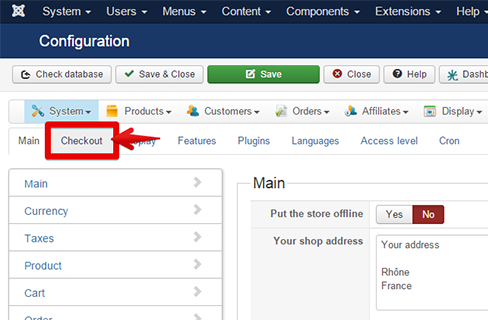
- Find the "Continue shopping button's URL" input, and edit it.
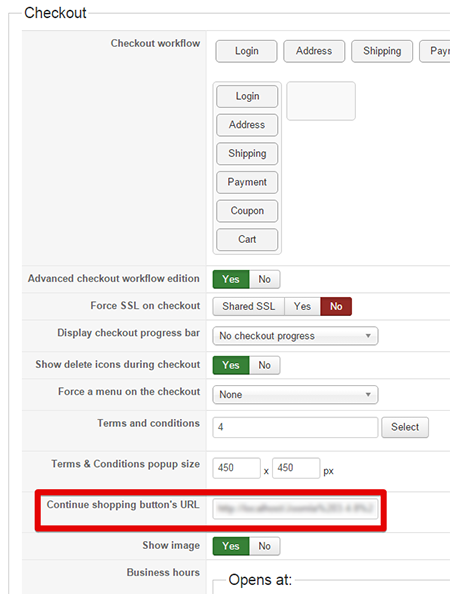
Regards,
For config the "continue shopping URL", follow this steps :
- Components => HikaShop => Configuration
- Click on Checkout Tab like image on below
- Find the "Continue shopping button's URL" input, and edit it.
Regards,
Last edit: 10 years 8 months ago by Philip.
Please Log in or Create an account to join the conversation.
10 years 8 months ago #227613
by featha
Replied by featha on topic How to redirect the page when continue shopping
Thank you for the reply. The problem has not been solved.
Please check again on my attachment.
The continue button redirects to the correct page when I am IN MY shopping cart.
I have set this up as you showed below, in the Checkout tab
BUT when I click the POP-UP 'continue shopping' then I am re-directed to a different/incorrect page.
Please check the attachment where I have shown the screenshot with the incorrect page.
The continue shopping button directs to:
www.kfcc.com.na/index.php/products
**This is correct
The pop-up button to:
www.kfcc.com.na/index.php/products/coffe...art/www.yoursite.com
**This is incorrect.
Where do I set the redirect of the pop-up button?
Please check again on my attachment.
The continue button redirects to the correct page when I am IN MY shopping cart.
I have set this up as you showed below, in the Checkout tab
BUT when I click the POP-UP 'continue shopping' then I am re-directed to a different/incorrect page.
Please check the attachment where I have shown the screenshot with the incorrect page.
The continue shopping button directs to:
www.kfcc.com.na/index.php/products
**This is correct
The pop-up button to:
www.kfcc.com.na/index.php/products/coffe...art/www.yoursite.com
**This is incorrect.
Where do I set the redirect of the pop-up button?
Please Log in or Create an account to join the conversation.
10 years 8 months ago #227628
by Jerome
Jerome - Obsidev.com
HikaMarket & HikaSerial developer / HikaShop core dev team.
Replied by Jerome on topic How to redirect the page when continue shopping
Hi,
The button "continue shopping" in the "add to cart" popup is just there to close the popup.
But you can customize your "checkout | notice" view if you want to do something else.
Regards,
The button "continue shopping" in the "add to cart" popup is just there to close the popup.
But you can customize your "checkout | notice" view if you want to do something else.
Regards,
Jerome - Obsidev.com
HikaMarket & HikaSerial developer / HikaShop core dev team.
Please Log in or Create an account to join the conversation.
Time to create page: 0.302 seconds