

- Posts: 78
- Thank you received: 0
How to set up my account > show the carts
10 years 10 months ago #227616
by featha
How to set up my account > show the carts was created by featha
-- HikaShop version -- : 2.6.1
-- Joomla version -- : 3.4.8
-- PHP version -- : 5.5.30
Where can I set up the display for 'Show the carts' under My account?
For example:
Under the field 'Name' it should show the product which I have in my cart, but this field is blank.
I would like to remove 'Last Modified' and 'Current' and 'Delete'. The last fields are anyway blank, so you cannot select them.
Please Log in or Create an account to join the conversation.
10 years 10 months ago - 10 years 10 months ago #227623
by Philip
Replied by Philip on topic How to set up my account > show the carts
Hello,
To display and configure your cart, follow this steps :
- Extensions => Modules
- Search for : "HikaShop Cart Module"
- Here you already published by clicking here like on image :
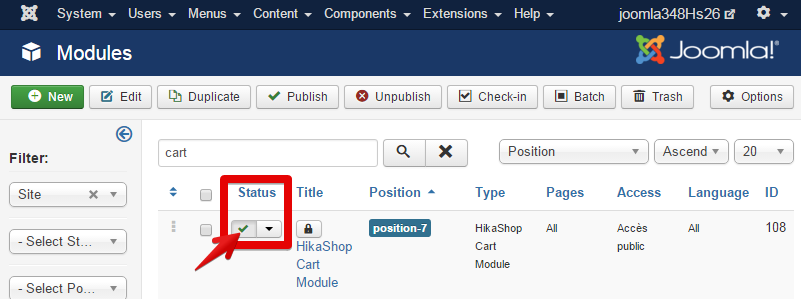
- To configure it, click on your module name.
- On the right side, you will be able to define the Position of your module
- And on "HikaShop Options" tab you will find different switch for published or not cart elements
Hope this will help.
Regards,
To display and configure your cart, follow this steps :
- Extensions => Modules
- Search for : "HikaShop Cart Module"
- Here you already published by clicking here like on image :
- To configure it, click on your module name.
- On the right side, you will be able to define the Position of your module
- And on "HikaShop Options" tab you will find different switch for published or not cart elements
Hope this will help.
Regards,
Last edit: 10 years 10 months ago by Philip.
Please Log in or Create an account to join the conversation.
10 years 10 months ago #227697
by featha
Replied by featha on topic How to set up my account > show the carts
Hi, I made a screenshot of what I want to change. I do not find this in the module cart settings.
pasteboard.co/14Kv1MFX.jpg
Currently the 'Name' field is empty. Should show the product description.
I would like to remove 'Current' and 'Delete'
I want to rename '#' to 'Order #'
pasteboard.co/14Kv1MFX.jpg
Currently the 'Name' field is empty. Should show the product description.
I would like to remove 'Current' and 'Delete'
I want to rename '#' to 'Order #'
Please Log in or Create an account to join the conversation.
10 years 10 months ago - 10 years 10 months ago #227746
by Philip
Replied by Philip on topic How to set up my account > show the carts
Hello,
Sorry I misunderstand your needs, for this you have to custom a view.
For this, reach the display view like this :
- Components => HikaShop => Configuration
- Then go on Display then Views
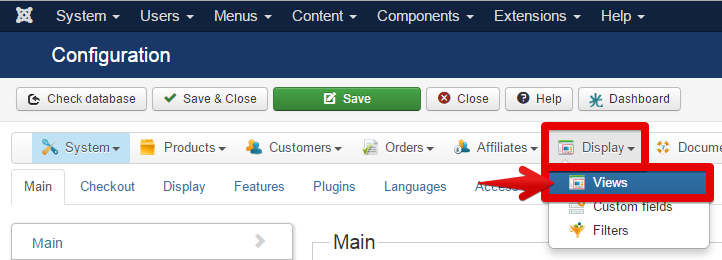
- Select to only display Dashboard views
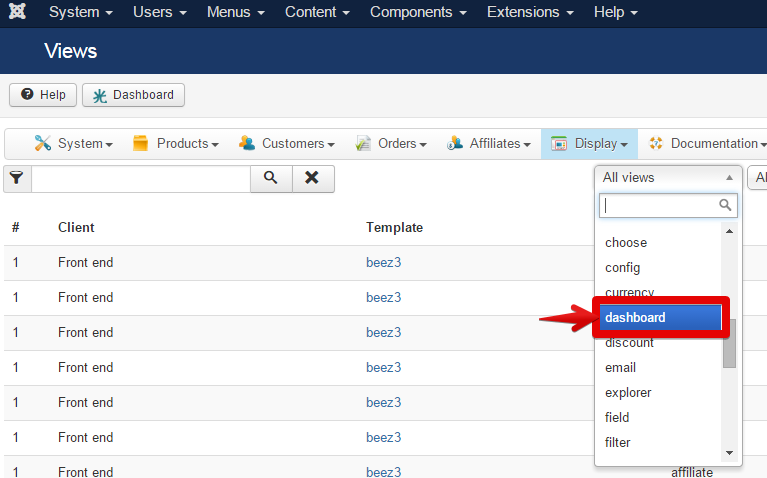
- select the file showcart in view cart, by clicking on showcart
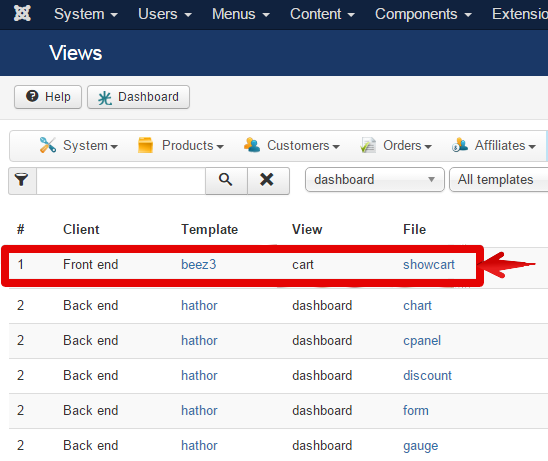
- You will now see the code to custom.
And so, you can remove elements or change some values
Regards,
Sorry I misunderstand your needs, for this you have to custom a view.
For this, reach the display view like this :
- Components => HikaShop => Configuration
- Then go on Display then Views
- Select to only display Dashboard views
- select the file showcart in view cart, by clicking on showcart
- You will now see the code to custom.
And so, you can remove elements or change some values
Regards,
Last edit: 10 years 10 months ago by Philip.
The following user(s) said Thank You: featha
Please Log in or Create an account to join the conversation.
Time to create page: 0.052 seconds