

- Posts: 34
- Thank you received: 1
hikashop_notice_box_content popup size problem
10 years 9 months ago - 10 years 9 months ago #229259
by plengyel
hikashop_notice_box_content popup size problem was created by plengyel
-- HikaShop version -- : 2.6.1 Business
-- Joomla version -- : 3.4.8
-- PHP version -- : 5.3.27
-- Browser(s) name and version -- : Chrome 48.0.2564.103m
-- Error-message(debug-mod must be tuned on) -- :
Hi,
Could you please help me, how I can set the size of the "hikashop_notice_box_content" popup.
In desktop mode it has a correct size, but in mobile view it has always about 100% height.
Attached I send screenshots about the difference.
Thank you in advance for your help.
-- Joomla version -- : 3.4.8
-- PHP version -- : 5.3.27
-- Browser(s) name and version -- : Chrome 48.0.2564.103m
-- Error-message(debug-mod must be tuned on) -- :
Hi,
Could you please help me, how I can set the size of the "hikashop_notice_box_content" popup.
In desktop mode it has a correct size, but in mobile view it has always about 100% height.
Attached I send screenshots about the difference.
Thank you in advance for your help.
Last edit: 10 years 9 months ago by plengyel.
Please Log in or Create an account to join the conversation.
10 years 9 months ago #229268
by EnerW
Replied by EnerW on topic hikashop_notice_box_content popup size problem
I think that you use Mootools for the Popup mode and that the iframe size is not set in your template or responsive template.
You could try to add the following css to one of those templates:
iframe {
height: auto !important;
width: 100% !important;
}
Or you can switch from Mootools to Vex (see the image)
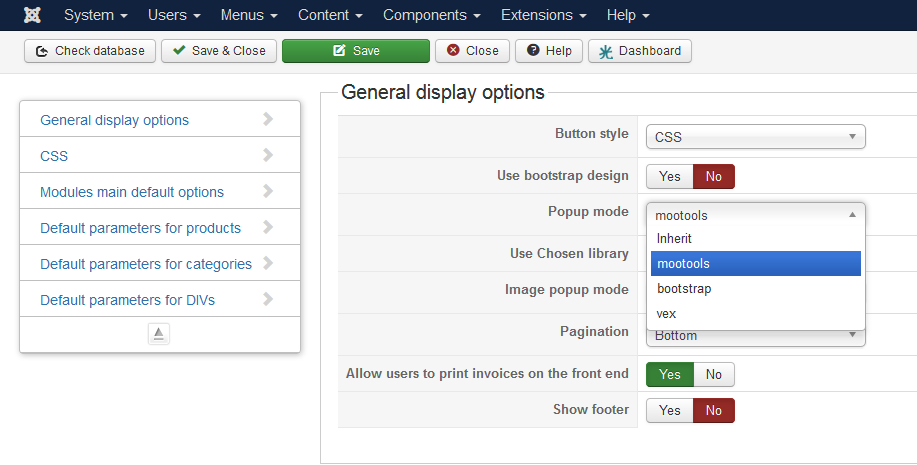
You could try to add the following css to one of those templates:
iframe {
height: auto !important;
width: 100% !important;
}
Or you can switch from Mootools to Vex (see the image)
The following user(s) said Thank You: plengyel
Please Log in or Create an account to join the conversation.

10 years 9 months ago #229262
by Jerome
Jerome - Obsidev.com
HikaMarket & HikaSerial developer / HikaShop core dev team.
Replied by Jerome on topic hikashop_notice_box_content popup size problem
Hi,
I think that there should have some CSS rules with @media which make the popup "fullscreen" on small screens.
www.hikashop.com/support/documentation/1...ize-the-display.html
Regards,
I think that there should have some CSS rules with @media which make the popup "fullscreen" on small screens.
www.hikashop.com/support/documentation/1...ize-the-display.html
Regards,
Jerome - Obsidev.com
HikaMarket & HikaSerial developer / HikaShop core dev team.
The following user(s) said Thank You: plengyel
Please Log in or Create an account to join the conversation.
10 years 9 months ago #229342
by plengyel
Replied by plengyel on topic hikashop_notice_box_content popup size problem
Dear Jerome,
Dear EnerW,
Unfortunately the iframe settings or the popup mode switch didn't solve the problem.
I added a max-height setting to modal.css and it is ok now.
Thank you for your help.
Dear EnerW,
Unfortunately the iframe settings or the popup mode switch didn't solve the problem.
I added a max-height setting to modal.css and it is ok now.
Thank you for your help.
Please Log in or Create an account to join the conversation.
10 years 9 months ago #229423
by EnerW
Replied by EnerW on topic hikashop_notice_box_content popup size problem
Jerome is correct that you should add an @media declaration to the CSS rule, but the change to the modal.css will work as well.
Please note that as soon as there is a change or update you could loose your setting.
Regards, Rene
Please note that as soon as there is a change or update you could loose your setting.
Regards, Rene
Please Log in or Create an account to join the conversation.
10 years 9 months ago #229656
by plengyel
Replied by plengyel on topic hikashop_notice_box_content popup size problem
Hi EnerW,
Unfortunately the max-height setting in the modal.css cause a problem,
every modal boxes, iframes will be affected.
Thank you, I will test the @media declaration.
Unfortunately the max-height setting in the modal.css cause a problem,
every modal boxes, iframes will be affected.
Thank you, I will test the @media declaration.
Please Log in or Create an account to join the conversation.
10 years 9 months ago #229785
by EnerW
Replied by EnerW on topic hikashop_notice_box_content popup size problem
Morning,
this is the css I used in my responsive template:
/* give the popup window a responsive size */
/* like the add to cart notification popup*/
@media all and (max-width: 979px){
.body-overlayed > div {
height: auto !important;
width: auto !important;
}
iframe {
width: 100% !important;
height: auto !important;
}
}
If you do test it with Firebug or Chrome you better set the cart popup time temporary to a lager time, just do not forget to set it back again afterwards
Configuration > Main > Cart > Notice popup display time > 500000 ms
This should also cure the image deformation if you use mootools for the Image popup mode in some cases.
Please note that this is working with my template, which is not that fancy or sophisticated.
Rene
this is the css I used in my responsive template:
/* give the popup window a responsive size */
/* like the add to cart notification popup*/
@media all and (max-width: 979px){
.body-overlayed > div {
height: auto !important;
width: auto !important;
}
iframe {
width: 100% !important;
height: auto !important;
}
}
If you do test it with Firebug or Chrome you better set the cart popup time temporary to a lager time, just do not forget to set it back again afterwards
Configuration > Main > Cart > Notice popup display time > 500000 ms
This should also cure the image deformation if you use mootools for the Image popup mode in some cases.
Please note that this is working with my template, which is not that fancy or sophisticated.
Rene
Please Log in or Create an account to join the conversation.
10 years 9 months ago #229806
by plengyel
Replied by plengyel on topic hikashop_notice_box_content popup size problem
Dear EnerW,
Thank you ! The cart popup is fine now.
Only two questions. Could we somehow switch back the sbox-overlay around the cart popup,
and position the cart popup to the center of the visible screen?
Thank you in advance.
Thank you ! The cart popup is fine now.
Only two questions. Could we somehow switch back the sbox-overlay around the cart popup,
and position the cart popup to the center of the visible screen?
Thank you in advance.
Please Log in or Create an account to join the conversation.
10 years 9 months ago #229826
by EnerW
Replied by EnerW on topic hikashop_notice_box_content popup size problem
Did have something to fix that, but it did set the background back to a smaller size and this whas more of a problem to the users then the offset popup because it did make the screen look jerking.
Rene
Rene
Please Log in or Create an account to join the conversation.
10 years 8 months ago #231515
by EnerW
Replied by EnerW on topic hikashop_notice_box_content popup size problem
@plengyel
Afternoon,
did some more tests with the sbox function to get a better display in responsive view.
To get a better display below a screen width of 979 pixels I did modify the modal.js and did add just one rule to the frontend.css
Not sure if this is a save solution with regard to a joomla update or some other functions that could be not working as expected but the result is looking fine.
Depending on the script file loaded you should change media/system/js/modal.js (compressed version) or media/system/js/modal-uncompressed.js or both if you do not know what is loaded.
Just change the: if (box.x > 979) line to: if (box.x > 319) in my system it's on line 244 and 447 of the uncompressed modal.js
and add the following to the frontend.css file of Hikashop:
/* set the sbox height for small screens */
@media all and (max-width: 479px){
.sbox-content-image img, #sbox-window {
min-height: 150px !important;
}
}
All the previous CSS changes I made are disabled for the moment and replaced with the one above.
The checkout pop-up is now centered on all screen sizes from 320px upwards, the image pop-up is also correct in portrait and landscape view and you have the sbox-overlay back again.
Below 320px the pop-up still needs correction, will test that with the old CSS corrections, but I am not sure what kind of mobile view is the lowest used on most phones.
Please note that I do not have any js or css skills and my changes could break your setup, so keep backups at hand.
Regards, Rene
Afternoon,
did some more tests with the sbox function to get a better display in responsive view.
To get a better display below a screen width of 979 pixels I did modify the modal.js and did add just one rule to the frontend.css
Not sure if this is a save solution with regard to a joomla update or some other functions that could be not working as expected but the result is looking fine.
Depending on the script file loaded you should change media/system/js/modal.js (compressed version) or media/system/js/modal-uncompressed.js or both if you do not know what is loaded.
Just change the: if (box.x > 979) line to: if (box.x > 319) in my system it's on line 244 and 447 of the uncompressed modal.js
and add the following to the frontend.css file of Hikashop:
/* set the sbox height for small screens */
@media all and (max-width: 479px){
.sbox-content-image img, #sbox-window {
min-height: 150px !important;
}
}
All the previous CSS changes I made are disabled for the moment and replaced with the one above.
The checkout pop-up is now centered on all screen sizes from 320px upwards, the image pop-up is also correct in portrait and landscape view and you have the sbox-overlay back again.
Below 320px the pop-up still needs correction, will test that with the old CSS corrections, but I am not sure what kind of mobile view is the lowest used on most phones.
Please note that I do not have any js or css skills and my changes could break your setup, so keep backups at hand.
Regards, Rene
Please Log in or Create an account to join the conversation.
Time to create page: 0.074 seconds