
- Posts: 112
- Thank you received: 3
Variant Name Not Showing
- tbroderick
-
 Topic Author
- Offline
Less
More
10 years 9 months ago #229511
by tbroderick
Variant Name Not Showing was created by tbroderick
-- HikaShop version -- : 2.6.1
-- Joomla version -- : 3.4.8
-- PHP version -- : 5.5.30
-- Browser(s) name and version -- : Safari 9.0.3
-- Error-message(debug-mod must be tuned on) -- : none
I have entered the product_name for the product variants on this site. But, only the parent product_name displays for the variants in the cart and at checkout. Is that normal?
I would like to have a better description of the product in the cart and checkout. So, if Product X comes in 90 count and 240 count bottles, the name on the product page would be "Product X" and the variant names in the cart would be "Product X - 90 count bottle" and "Product X - 240 count bottle". How can I make that happen? Is custom programming involved?
Please Log in or Create an account to join the conversation.

10 years 9 months ago #229536
by nicolas
Replied by nicolas on topic Variant Name Not Showing
Hi,
Wouldn't that be because the "Append characteristics value to the product name" setting of the HikaShop configuration has been turned off ?
If not, please provide a link to the product page so that we can see the isssue.
Please Log in or Create an account to join the conversation.
- tbroderick
-
Topic Author
- Offline
Less
More
- Posts: 112
- Thank you received: 3
10 years 9 months ago #229593
by tbroderick
Replied by tbroderick on topic Variant Name Not Showing
I think you are right. But, I do not see the option in the Main > Product section in configuration. Attached is a screenshot. Am I looking in the wrong place?
Please Log in or Create an account to join the conversation.
- tbroderick
-
Topic Author
- Offline
Less
More
- Posts: 112
- Thank you received: 3
10 years 9 months ago #229594
by tbroderick
Replied by tbroderick on topic Variant Name Not Showing
Also, this is a product page. There has been a lot of customization on this page. But, the description in the cart is what I am looking for:
igsites.us/effihealth/index.php/products.../116-acai-trim-60-ct
Please Log in or Create an account to join the conversation.
- tbroderick
-
Topic Author
- Offline
Less
More
- Posts: 112
- Thank you received: 3
10 years 9 months ago #229596
by tbroderick
Replied by tbroderick on topic Variant Name Not Showing
Also, this is a product page. There has been a lot of customization on this page. But, the description in the cart is what I am looking for:
igsites.us/effihealth/index.php/products.../116-acai-trim-60-ct
Please Log in or Create an account to join the conversation.
10 years 9 months ago #229620
by nicolas
Replied by nicolas on topic Variant Name Not Showing
Hi,
If you don't have the option, then it's fine.
If you try with the default template of Joomla, do you still have the problem ?
Could you provide screenshots of the settings of the product of your link and of the default variant of that product so that we can better understand the situation ?
The following user(s) said Thank You: tbroderick
Please Log in or Create an account to join the conversation.
- tbroderick
-
Topic Author
- Offline
Less
More
- Posts: 112
- Thank you received: 3
10 years 9 months ago #229722
by tbroderick
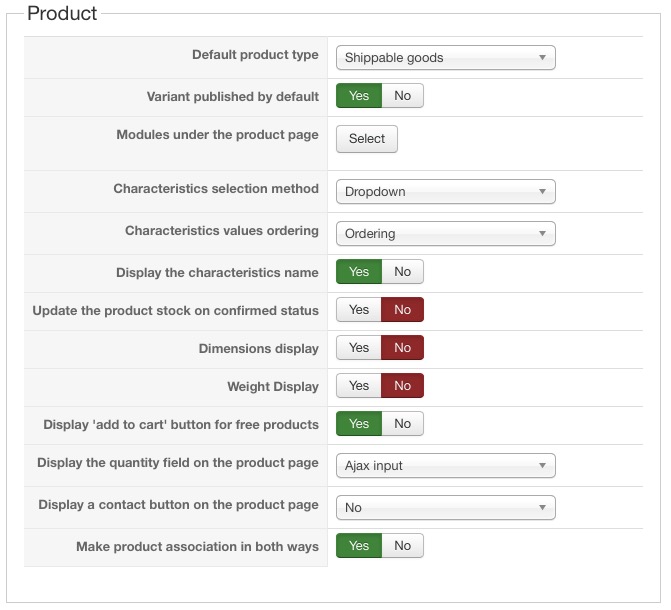
I do not have the option to add the characteristics title to the cart or checkout. The same product name is being used. So, if the product is "Product X", the offer in the cart is "Product X". But, if there are two variants, I need to also have the product name in the cart and during checkout as "Product X - Variant name". There is supposed to be an option to do this. But, I cannot find it. The screenshot shows you what I am seeing. I really need your help on this to show me what I am doing wrong or what I need to do to fix this.
Replied by tbroderick on topic Variant Name Not Showing
I do not have the option to add the characteristics title to the cart or checkout. The same product name is being used. So, if the product is "Product X", the offer in the cart is "Product X". But, if there are two variants, I need to also have the product name in the cart and during checkout as "Product X - Variant name". There is supposed to be an option to do this. But, I cannot find it. The screenshot shows you what I am seeing. I really need your help on this to show me what I am doing wrong or what I need to do to fix this.
Please Log in or Create an account to join the conversation.
- tbroderick
-
Topic Author
- Offline
Less
More
- Posts: 112
- Thank you received: 3
10 years 9 months ago #229735
by tbroderick
Replied by tbroderick on topic Variant Name Not Showing
This was our mistake. When I loaded the default Joomla template, the names worked properly. So, it was a coding problem we caused and fixed.
Please Log in or Create an account to join the conversation.

Less
More
- Posts: 4
- Thank you received: 0
10 years 7 months ago #235765
by redemotion
Replied by redemotion on topic Variant Name Not Showing
Hi,
I have the same problem... I only see variant (characteristics) value on the product title but not label
Es.
product name = PARFUM
product variant name = gradation
product variant value= 100%
I would see in the product title "PARFUM GRADATION: 100%" but I only see "PARFUM 100%".
Can you help me??
thanks
Please Log in or Create an account to join the conversation.
10 years 1 month ago #251302
by nicolas
Replied by nicolas on topic Variant Name Not Showing
Hi,
The system will either use the variant name or the characteristic value.
So PARFUM GRADATION: 100% is not possible with the way you setup your product.
If you still have a problem with that, please provide a link to the product page.
Please Log in or Create an account to join the conversation.
Time to create page: 0.066 seconds