
- Posts: 6
- Thank you received: 0
Items not added to cart
- paulgoosen
-
 Topic Author
- Offline
Less
More
10 years 8 months ago #232007
by paulgoosen
Items not added to cart was created by paulgoosen
-- url of the page with the problem -- :
www.paulg.co.za/index.php/order/product/listing
-- HikaShop version -- : 2.6.1
-- Joomla version -- : 3.4.4
-- PHP version -- : 5.5.31
-- Browser(s) name and version -- : Chrome
-- Error-message(debug-mod must be tuned on) -- : None
When selecting "add to cart" visitor is returned to list of products without going to cart.
when you select add to cart the user is returned to the list of products and unable to see the cart.
Please Log in or Create an account to join the conversation.
10 years 8 months ago - 10 years 8 months ago #232011
by Philip
Replied by Philip on topic Items not added to cart
Hello,
Can you check this specific option "After a product is added to the cart"?
For reach it, follow this steps :
- go to "Components" => "HikaShop" => "Configuration"
- On "Main" tab, click on "Cart" part options
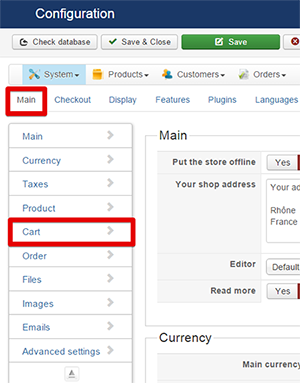
- Look for "After a product is added to the cart" option, and in the dropdown select "Always go to the checkout"
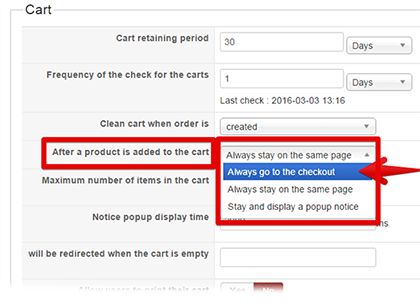
- And don't forget as usual to Save.
Hope this will help you.
Regards,
Can you check this specific option "After a product is added to the cart"?
For reach it, follow this steps :
- go to "Components" => "HikaShop" => "Configuration"
- On "Main" tab, click on "Cart" part options
- Look for "After a product is added to the cart" option, and in the dropdown select "Always go to the checkout"
- And don't forget as usual to Save.
Hope this will help you.
Regards,
Last edit: 10 years 8 months ago by Philip.
Please Log in or Create an account to join the conversation.
- paulgoosen
-
Topic Author
- Offline
Less
More
- Posts: 6
- Thank you received: 0
10 years 8 months ago #232063
by paulgoosen
Replied by paulgoosen on topic Items not added to cart
Dear Philip Thanks fo the feedback. My settings was already as you suggested. What I have also noticed is, if is set it to "stay on page and display pop-up notice" also does nothing. I
I have changed my stock level to 10 and have noticed that the stock level does not change when added to cart.
My hosting provider has recently upgraded their servers, is there something that we can look at on the server side?
Regards
Paul
I have changed my stock level to 10 and have noticed that the stock level does not change when added to cart.
My hosting provider has recently upgraded their servers, is there something that we can look at on the server side?
Regards
Paul
Please Log in or Create an account to join the conversation.
- paulgoosen
-
Topic Author
- Offline
Less
More
- Posts: 6
- Thank you received: 0
10 years 8 months ago - 10 years 8 months ago #232066
by paulgoosen
Replied by paulgoosen on topic Items not added to cart
If I operate the site on my local computer it works as expected, as soon as I upload it to my hosting provider i experience the problem.
If I go directly to the link www.paulg.co.za/index.php/order/checkout it reacts similarly to when clicking on the add to cart button.
If I go directly to the link www.paulg.co.za/index.php/order/checkout it reacts similarly to when clicking on the add to cart button.
Last edit: 10 years 8 months ago by paulgoosen. Reason: additional information
Please Log in or Create an account to join the conversation.

10 years 8 months ago #232078
by nicolas
Replied by nicolas on topic Items not added to cart
Hi,
Could you try to change the "Use AJAX when possible for add to cart buttons" setting of the HikaShop configuration ?
It might help circumvent the problem.
It's normal that the stock level doesn't change when you add something to the cart. The stock only changes when an order is created (end of checkout) or confirmed (after the payment).
The following user(s) said Thank You: paulgoosen
Please Log in or Create an account to join the conversation.
- paulgoosen
-
Topic Author
- Offline
Less
More
- Posts: 6
- Thank you received: 0
10 years 8 months ago #232263
by paulgoosen
Replied by paulgoosen on topic Items not added to cart
Thanks Nicolas I have tried, but am still struggling. I have now also uploaded it to a new server to see if it is server related, but am still experiencing the same.
Is there a way that I can send you the login information to have a look for yourself? I have tried so many things that I am concerned that I am damaging things even more.
Regards
Paul
Is there a way that I can send you the login information to have a look for yourself? I have tried so many things that I am concerned that I am damaging things even more.
Regards
Paul
Please Log in or Create an account to join the conversation.
- paulgoosen
-
Topic Author
- Offline
Less
More
- Posts: 6
- Thank you received: 0
10 years 8 months ago #232265
by paulgoosen
Replied by paulgoosen on topic Items not added to cart
i think i have it, will let you know if it works
Please Log in or Create an account to join the conversation.
- paulgoosen
-
Topic Author
- Offline
Less
More
- Posts: 6
- Thank you received: 0
10 years 8 months ago #232269
by paulgoosen
Replied by paulgoosen on topic Items not added to cart
I ended up updating from Joomla 3.4.4 to Joomla 3.4.8 and it seems to work fine now.
Regards
Paul
Regards
Paul
Please Log in or Create an account to join the conversation.
Time to create page: 0.075 seconds