
- Posts: 611
- Thank you received: 13
404 error if 1 item only in checkout
- mohairbears
-
 Topic Author
- Offline
Less
More
10 years 7 months ago #237349
by mohairbears
404 error if 1 item only in checkout was created by mohairbears
-- HikaShop version -- : 2.6.2
-- Joomla version -- : 3.51
-- PHP version -- : 5.4.24
-- Browser(s) name and version -- : Firefox
-- Error-message(debug-mod must be tuned on) -- : 404
Hi, I am getting a 404 error if only 1 item is in the cart at checkout. If you add another item to the cart it works ok?
The 404 error is generated when you try to select the shipping method
thanks
Please Log in or Create an account to join the conversation.
10 years 7 months ago - 10 years 7 months ago #237360
by Philip
Replied by Philip on topic 404 error if 1 item only in checkout
Hello,
We will need more elements to help you like :
- Url link with issue
- Backend screenshot (here, backend shipping configuration & checkout steps configuration)
- Screenshot of checkout steps
- Other useful details
Don't forget more you help us, better our support will be efficient.
Regards,
We will need more elements to help you like :
- Url link with issue
- Backend screenshot (here, backend shipping configuration & checkout steps configuration)
- Screenshot of checkout steps
- Other useful details
Don't forget more you help us, better our support will be efficient.
Regards,
Last edit: 10 years 7 months ago by Philip.
Please Log in or Create an account to join the conversation.
- mohairbears
-
Topic Author
- Offline
Less
More
- Posts: 611
- Thank you received: 13
10 years 7 months ago #237473
by mohairbears
Replied by mohairbears on topic 404 error if 1 item only in checkout
Url link with issue! if one item is in the cart in checkout and you get a 404 error more than one and it's ok?
www.mohairbearmakingsupplies.co.uk/fabri...hop_shipping_methods
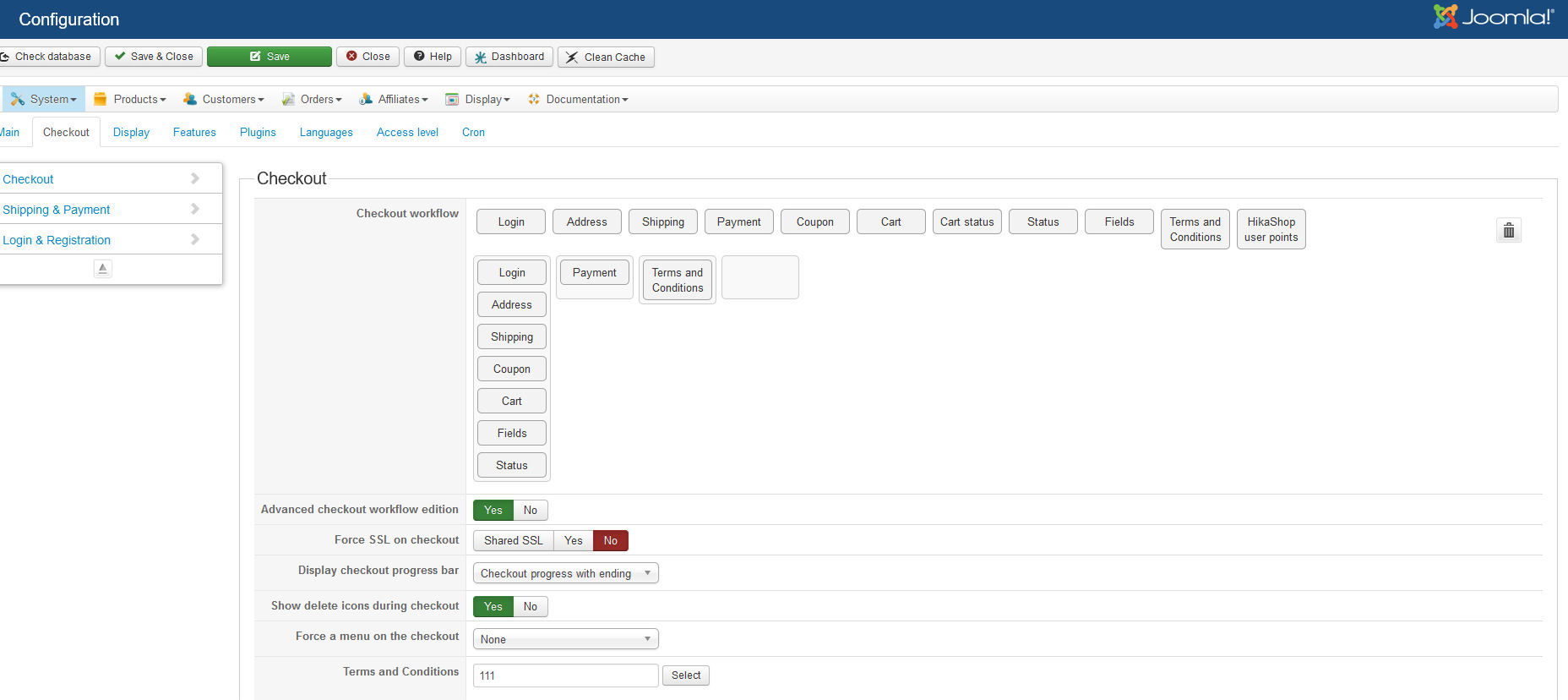
Screen dump with configuration attached
Have used Hikashop for around 4 years! is this useful enough?
www.mohairbearmakingsupplies.co.uk/fabri...hop_shipping_methods
Screen dump with configuration attached
Have used Hikashop for around 4 years! is this useful enough?
Please Log in or Create an account to join the conversation.
10 years 7 months ago - 10 years 7 months ago #237516
by Philip
Replied by Philip on topic 404 error if 1 item only in checkout
Hello,
There is something strange, I just had a little look on your website and succeed to reach payment step with one product AND when I select other shipping method, everything well work.
Maybe the trouble come from one or several products? Or I suspect something is wrong with your shipping method...
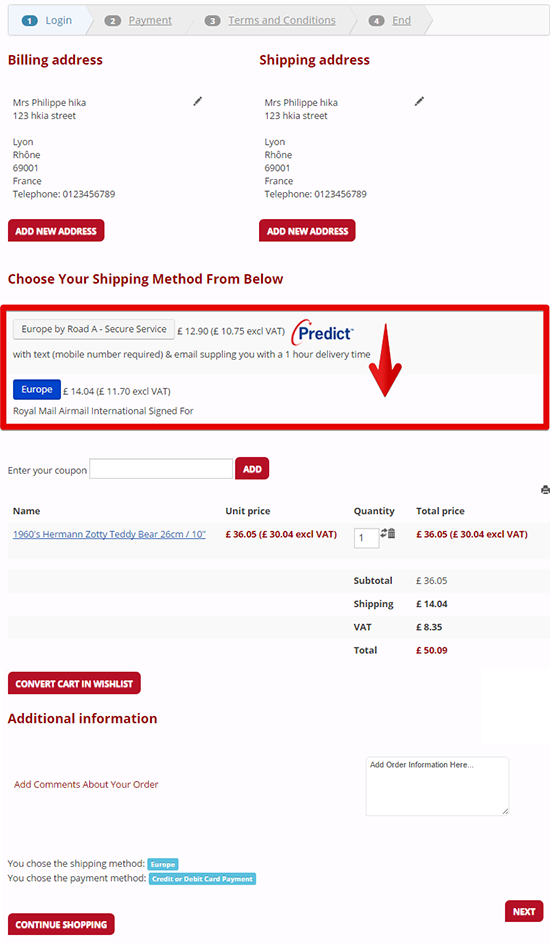
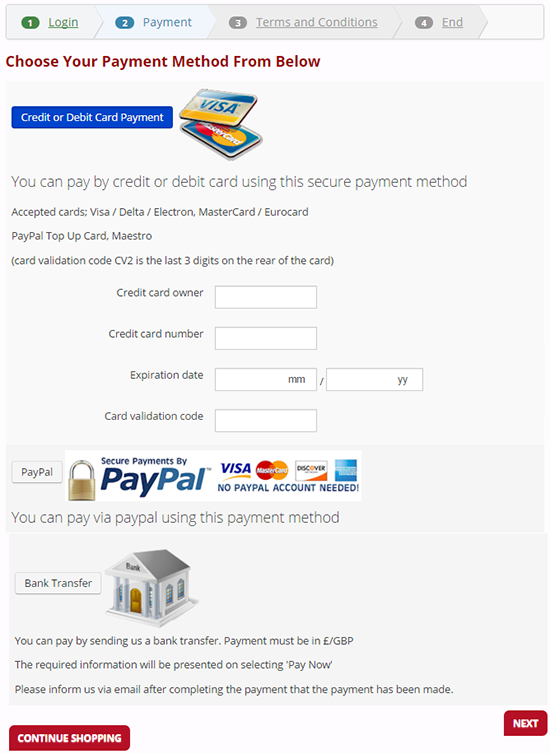
Can you :
- Create a customer account, create with this account a cart which make appear your issue, don't erase the cart AND sends us via our "Contact Us" this account references (don't forget to put a url link of this topic) I will be able to see your issue.
- Send me a screenshot of your shippings backend configuration.
Awaiting news from you.
Regards,
There is something strange, I just had a little look on your website and succeed to reach payment step with one product AND when I select other shipping method, everything well work.
Maybe the trouble come from one or several products? Or I suspect something is wrong with your shipping method...
Can you :
- Create a customer account, create with this account a cart which make appear your issue, don't erase the cart AND sends us via our "Contact Us" this account references (don't forget to put a url link of this topic) I will be able to see your issue.
- Send me a screenshot of your shippings backend configuration.
Awaiting news from you.
Regards,
Last edit: 10 years 7 months ago by Philip.
Please Log in or Create an account to join the conversation.
- mohairbears
-
Topic Author
- Offline
Less
More
- Posts: 611
- Thank you received: 13
10 years 7 months ago #237629
by mohairbears
Replied by mohairbears on topic 404 error if 1 item only in checkout
Hi, That may be so BUT did you try to change the shipping option? it is currently set to auto select the methods as that was the only way I could get it to work, the problem arises when you try to change the shipping option.
Please Log in or Create an account to join the conversation.
10 years 7 months ago - 10 years 7 months ago #237657
by Philip
Replied by Philip on topic 404 error if 1 item only in checkout
Hello,
I did it as I wrote :
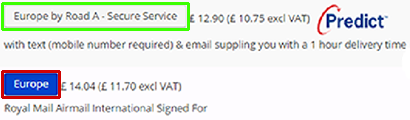
The best way for me to help you is to proceed like I told you in my previous message.
Regards,
I did it as I wrote :
...product AND when I select other shipping method...
The best way for me to help you is to proceed like I told you in my previous message.
Regards,
Last edit: 10 years 7 months ago by Philip.
Please Log in or Create an account to join the conversation.
- mohairbears
-
Topic Author
- Offline
Less
More
- Posts: 611
- Thank you received: 13
10 years 7 months ago #238203
by mohairbears
Replied by mohairbears on topic 404 error if 1 item only in checkout
Hi, Still having problems with the cart and getting lot's of complaints from customers.
1. Add two items to the cart, delete 1 item and after the refresh it takes you through to the payment option?
2. This should not happen but it should stay on the same page?
3. You then go back to select shipping option from payment option and you get a 404 error when trying to change the shipping option?
4. the only way I have found to then stop the 404 is to completely empty the cart and start again?
Please Log in or Create an account to join the conversation.
10 years 7 months ago - 10 years 7 months ago #238220
by Philip
Replied by Philip on topic 404 error if 1 item only in checkout
Hello,
As I'm unable to reproduce the issue, there is only ONE way for me to help you :
Can you :
- Create a customer account, create with this account a cart which make appear your issue, don't erase the cart AND sends us via our "Contact Us" this account references (don't forget to put a url link of this topic) I will be able to see your issue.
- Send me a screenshot of your shippings backend configuration.
Awaiting news from you.
Regards,
Last edit: 10 years 7 months ago by Philip.
Please Log in or Create an account to join the conversation.
- mohairbears
-
Topic Author
- Offline
Less
More
- Posts: 611
- Thank you received: 13
10 years 7 months ago #238470
by mohairbears
Replied by mohairbears on topic 404 error if 1 item only in checkout
pm sent.
Please Log in or Create an account to join the conversation.
- mohairbears
-
Topic Author
- Offline
Less
More
- Posts: 611
- Thank you received: 13
10 years 7 months ago #238473
by mohairbears
Replied by mohairbears on topic 404 error if 1 item only in checkout
Hi I seem to have found the root cause.
On the top menu there is a link to 'checkout' this is created using the Hikashop 'checkout' menu link in Joomla. By choosing this link to checkout you get the errors, if you go to checkout via 'your cart' link then on to checkout it works ok? another strange one is the 'checkout' link will not go to checkout using IE but returns to the home page, I use Firefox 99% of the time.
thanks
Please Log in or Create an account to join the conversation.
10 years 7 months ago - 10 years 7 months ago #238529
by Philip
Replied by Philip on topic 404 error if 1 item only in checkout
Hello,
I look your html code, and especially for your checkout button, see screnshot on below :
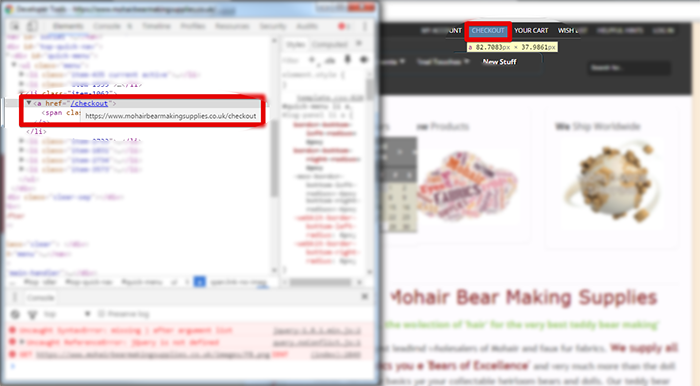
Your link is : /checkout
Change it for : /components1/checkout/task-step/
Hope this will help.
Regards.
I look your html code, and especially for your checkout button, see screnshot on below :
Your link is : /checkout
Change it for : /components1/checkout/task-step/
Hope this will help.
Regards.
Last edit: 10 years 7 months ago by Philip.
Please Log in or Create an account to join the conversation.
- mohairbears
-
Topic Author
- Offline
Less
More
- Posts: 611
- Thank you received: 13
10 years 7 months ago #238634
by mohairbears
Replied by mohairbears on topic 404 error if 1 item only in checkout
Hi, Sorry I do appear to be able to change this as it's created via the Joomla menu system and the link is locked?
Please Log in or Create an account to join the conversation.
10 years 6 months ago - 10 years 7 months ago #238672
by Philip
Replied by Philip on topic 404 error if 1 item only in checkout
Hello,
You can modify your Checkout SEF url, for this follow this steps :
- Go to Components => HikaShop => Configuration
- Click on Features tab, and go on SEF url options part
- Find your Checkout SEF name and change it for : "/checkout/task-step/"
See screenshot on below
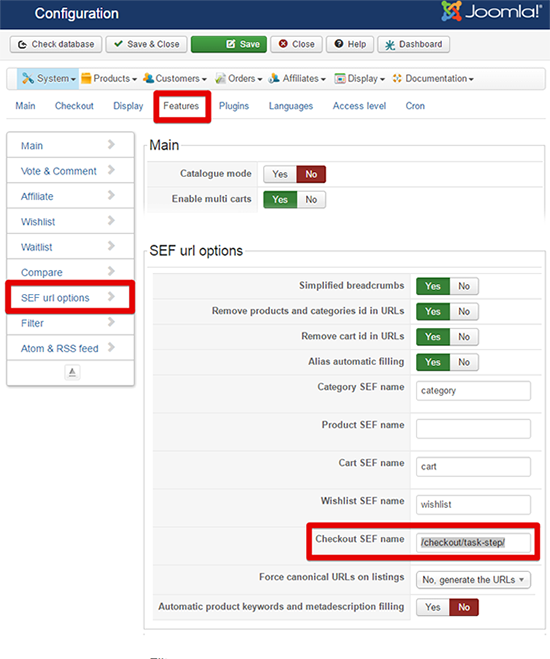
Hope this will solve your issue.
Regards,
You can modify your Checkout SEF url, for this follow this steps :
- Go to Components => HikaShop => Configuration
- Click on Features tab, and go on SEF url options part
- Find your Checkout SEF name and change it for : "/checkout/task-step/"
See screenshot on below
Hope this will solve your issue.
Regards,
Last edit: 10 years 7 months ago by Philip.
The following user(s) said Thank You: mohairbears
Please Log in or Create an account to join the conversation.
Time to create page: 0.092 seconds