
- Posts: 575
- Thank you received: 11
Billing & Shipping Address Problem during checkout
- ler@singmuiheng.com
-
 Topic Author
- Offline
Less
More
10 years 5 months ago #243865
by ler@singmuiheng.com
-- HikaShop version -- : 2.6.3
-- Joomla version -- : 3.5.1
-- PHP version -- : 5.4.45
Hi nicolas
we face quite many of bug during recent version of hikashop
below are one of it
We are having this setting as configuration setting
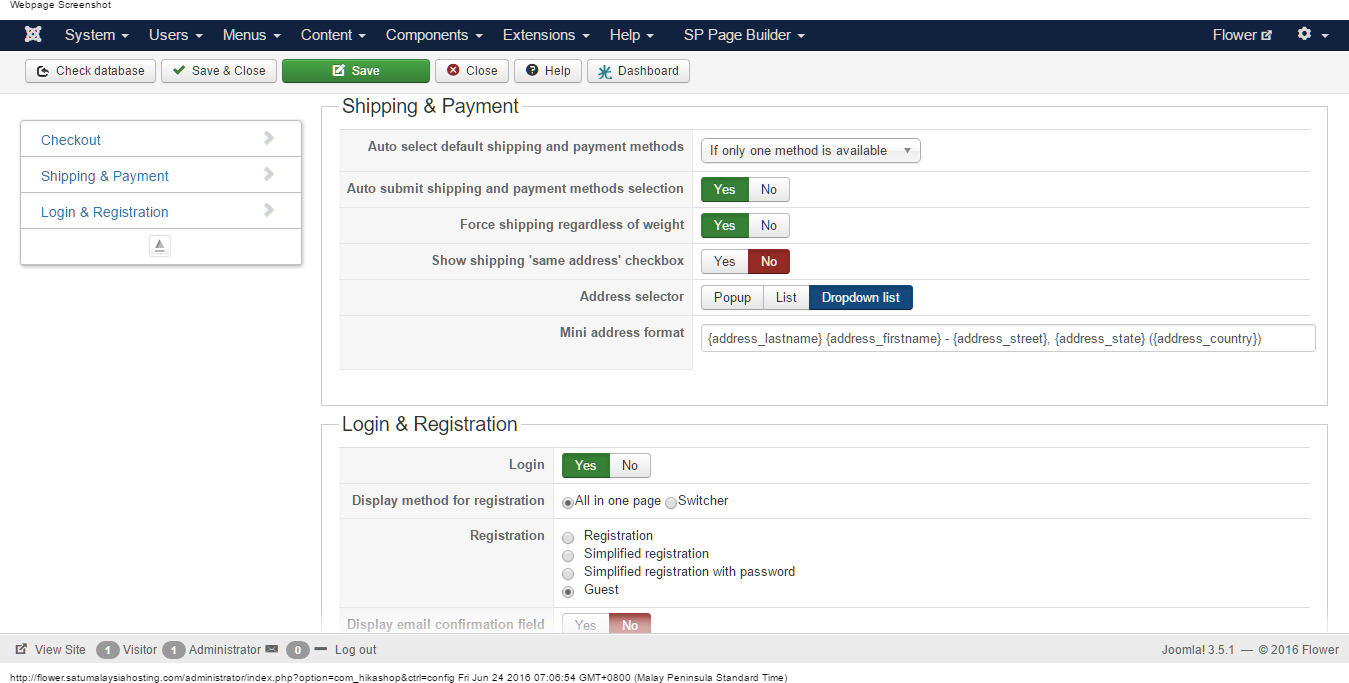
However, during checkout, billing address are not saved after clicking the "tick: icon of billing section
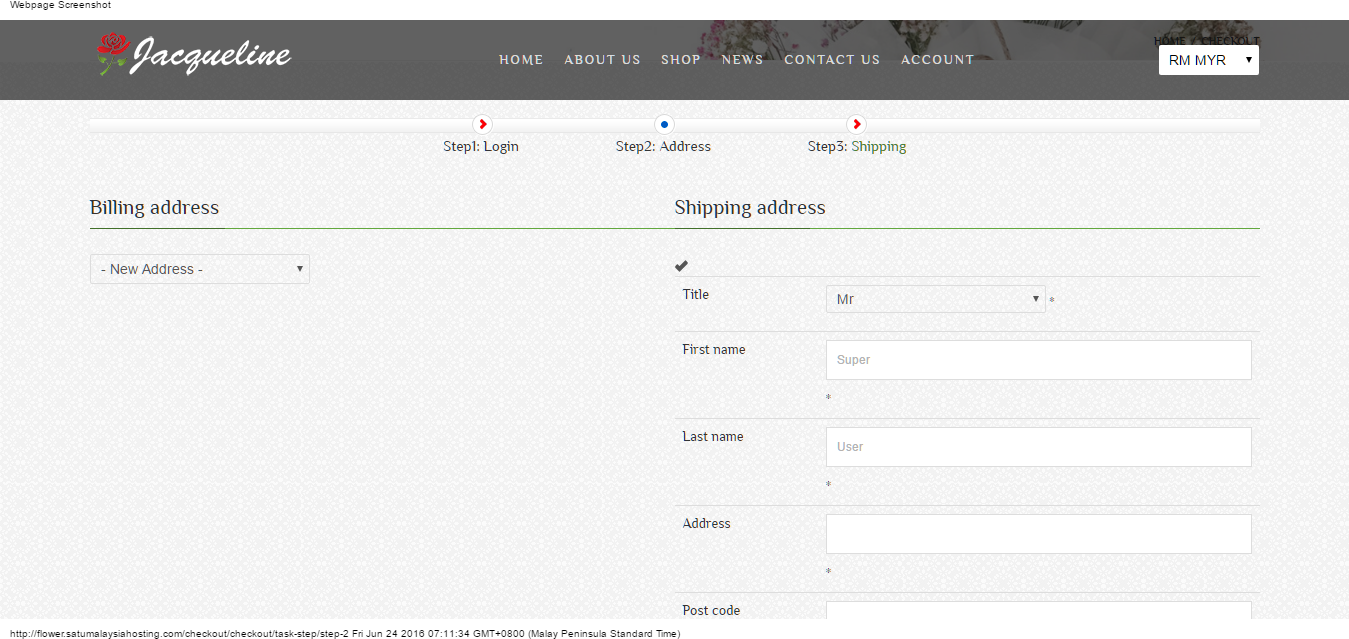
Moreover, both the billing and shipping address save together when we click the "tick" icon of shipping address section
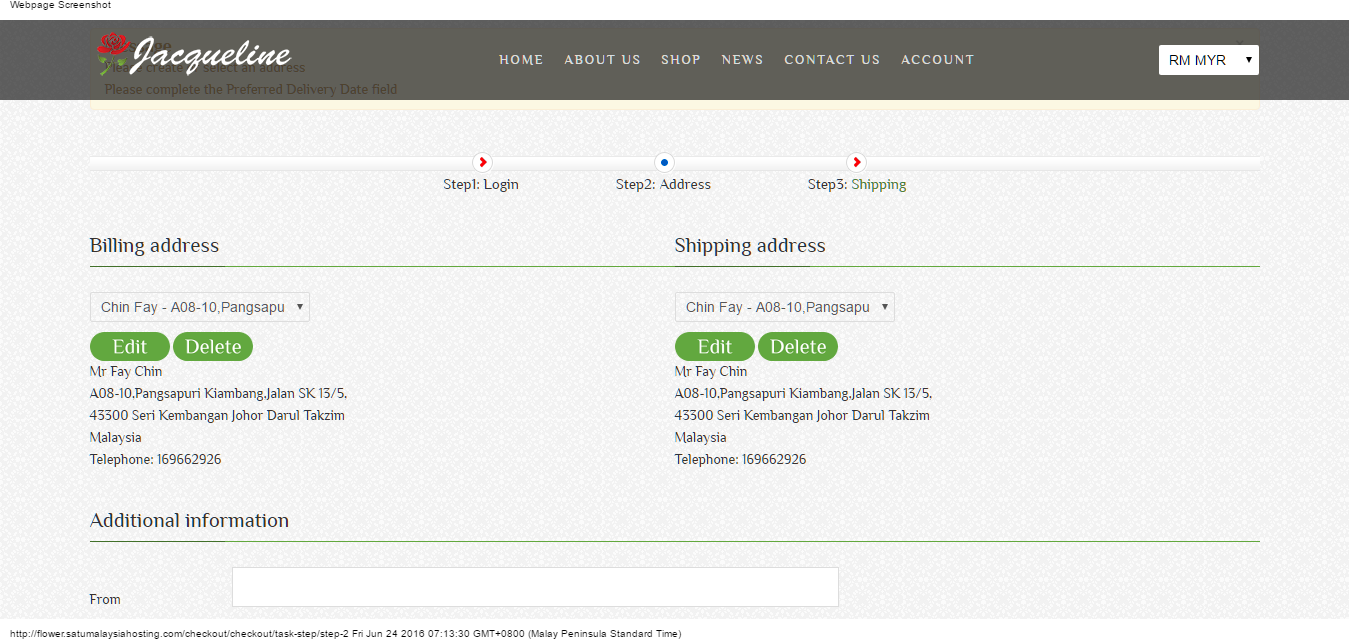
it make the customer unable to input different billing and shipping address "easily" which is a very important function for commercial billing
before upgrading this website to 2.6.3, it was on 2.6.0, this problem did not oocur
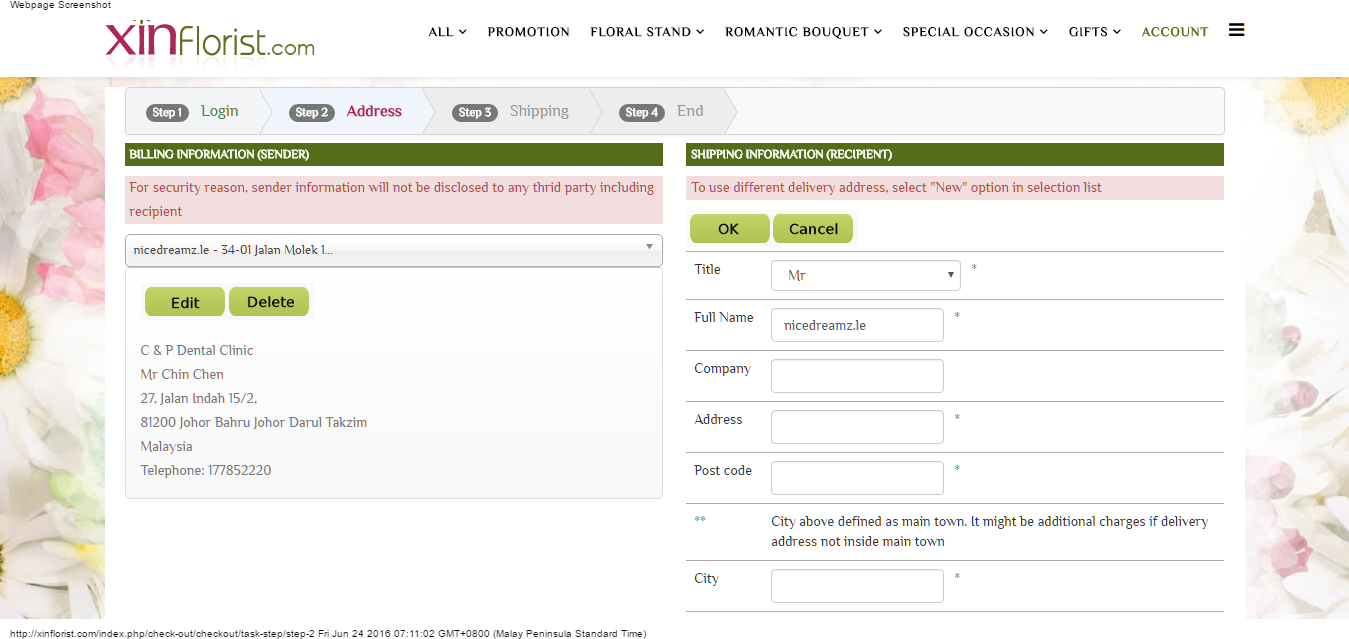
-- Joomla version -- : 3.5.1
-- PHP version -- : 5.4.45
Hi nicolas
we face quite many of bug during recent version of hikashop
below are one of it
We are having this setting as configuration setting
However, during checkout, billing address are not saved after clicking the "tick: icon of billing section
Moreover, both the billing and shipping address save together when we click the "tick" icon of shipping address section
it make the customer unable to input different billing and shipping address "easily" which is a very important function for commercial billing
before upgrading this website to 2.6.3, it was on 2.6.0, this problem did not oocur
Please Log in or Create an account to join the conversation.

10 years 5 months ago #243886
by Jerome
Jerome - Obsidev.com
HikaMarket & HikaSerial developer / HikaShop core dev team.
Replied by Jerome on topic Billing & Shipping Address Problem during checkout
Hi,
There was indeed some modification for the checkout address edition in recent HikaShop releases.
Do you have some view override for the views "checkout / address_select" or "address / select" ?
If not, do you have some other view overrides ?
Regards,
There was indeed some modification for the checkout address edition in recent HikaShop releases.
Do you have some view override for the views "checkout / address_select" or "address / select" ?
If not, do you have some other view overrides ?
Regards,
Jerome - Obsidev.com
HikaMarket & HikaSerial developer / HikaShop core dev team.
Please Log in or Create an account to join the conversation.
- ler@singmuiheng.com
-
Topic Author
- Offline
Less
More
- Posts: 575
- Thank you received: 11
10 years 5 months ago #243912
by ler@singmuiheng.com
Replied by ler@singmuiheng.com on topic Billing & Shipping Address Problem during checkout
nope, no override for view checkout/adress for template helix3
Please Log in or Create an account to join the conversation.

10 years 5 months ago #243915
by nicolas
Replied by nicolas on topic Billing & Shipping Address Problem during checkout
Hi,
I can't think of anything else than modifications that were made in the views, by you or your template.
Switch to the default template of Joomla ans see if it works fine with it.
Also, try to rename the folders address and/or checkout in the folder templates/YOUR_TEMPLATE/html/com_hikashop/ via FTP and see if that helps.
Please Log in or Create an account to join the conversation.
- ler@singmuiheng.com
-
Topic Author
- Offline
Less
More
- Posts: 575
- Thank you received: 11
10 years 5 months ago #243952
by ler@singmuiheng.com
Replied by ler@singmuiheng.com on topic Billing & Shipping Address Problem during checkout
Dear Nicolas
Thanks for your advise and i have checked very carefully on the template override folder and did not find anything
and i also tried to switch to other template beez4 and protostar but it is the same,
billing address "saved" will display only " - new - address -"
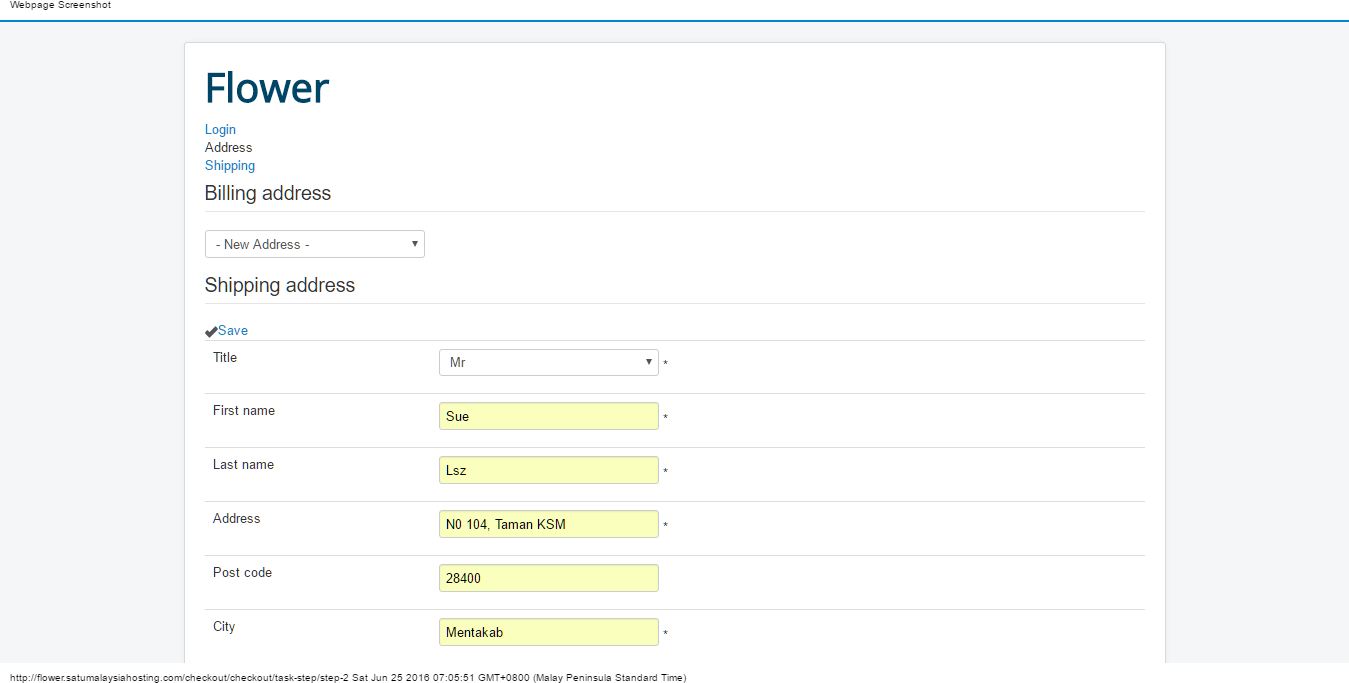
shpping address "Saved" will make both become shipping address
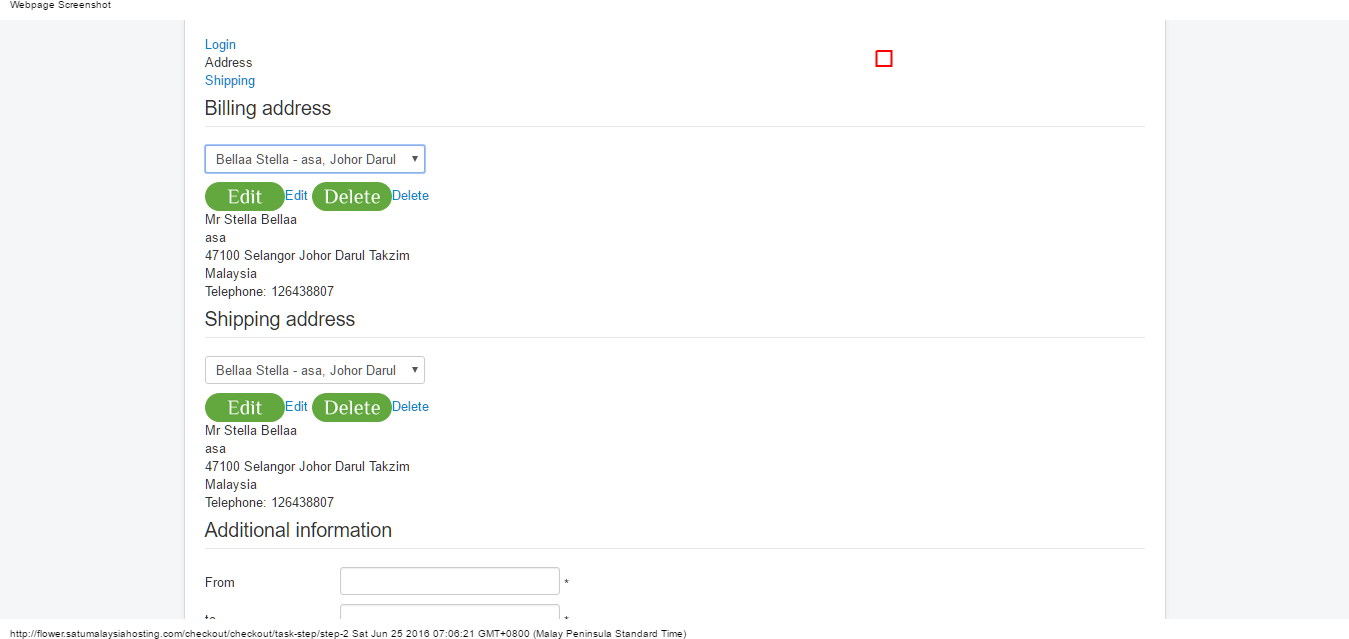
two record are shown in drop down after both address displayed
i think the logic during the handling is somehow got problem
Thanks for your advise and i have checked very carefully on the template override folder and did not find anything
and i also tried to switch to other template beez4 and protostar but it is the same,
billing address "saved" will display only " - new - address -"
shpping address "Saved" will make both become shipping address
two record are shown in drop down after both address displayed
i think the logic during the handling is somehow got problem
Please Log in or Create an account to join the conversation.
- ler@singmuiheng.com
-
Topic Author
- Offline
Less
More
- Posts: 575
- Thank you received: 11
10 years 5 months ago #243953
by ler@singmuiheng.com
Replied by ler@singmuiheng.com on topic Billing & Shipping Address Problem during checkout
We have also done another testing
we copy the 2.6.3 site address_select view and paste into 2.6.0 site address select view, it works fine
we copy 2.6.0 site address_select view to 2.6.3 site, it have the strange behaviour as mentioned
i think this related to some other "core" of the 2.6.3?
we copy the 2.6.3 site address_select view and paste into 2.6.0 site address select view, it works fine
we copy 2.6.0 site address_select view to 2.6.3 site, it have the strange behaviour as mentioned
i think this related to some other "core" of the 2.6.3?
Please Log in or Create an account to join the conversation.
10 years 5 months ago #243974
by nicolas
Replied by nicolas on topic Billing & Shipping Address Problem during checkout
Hi,
The fact that if you don't have any address and you save an address it gets used for both the shipping and the billing is the normal behavior.
An address is an address. Whether you enter it for the shipping or the billing, it can be used for both.
It has always been like that.
You're not supposed to do that. The address_select view from the 2.6.0 is not completely compatible with the address system of the 2.6.3. You're supposed to use the address_select view of the 2.6.3 with the 2.6.3.
The fact that if you don't have any address and you save an address it gets used for both the shipping and the billing is the normal behavior.
An address is an address. Whether you enter it for the shipping or the billing, it can be used for both.
It has always been like that.
Code:
we copy 2.6.0 site address_select view to 2.6.3 site, it have the strange behaviour as mentioned
Please Log in or Create an account to join the conversation.
- ler@singmuiheng.com
-
Topic Author
- Offline
Less
More
- Posts: 575
- Thank you received: 11
10 years 5 months ago #243997
by ler@singmuiheng.com
Replied by ler@singmuiheng.com on topic Billing & Shipping Address Problem during checkout
dear nicolas,
i am not sure if you have tested the problem url
as per screen shot, when we save billing address, the billing adrrss becomr empty, and when we save shipping adress, both billing and shipping become shipping address, i am not sure is this the normal behavior u mention
we have the site before upgrade to 2.6.3 it is working perfectly to have different address
and that is why we "help" to copy the view to different version so that u can have more clue on this problem
this problem exisit before we copy it and remove it on site 2.6.3 but not on site 2.6.0
hope this make u clear on the problem
Please Log in or Create an account to join the conversation.
10 years 5 months ago - 10 years 5 months ago #244060
by Philip
Replied by Philip on topic Billing & Shipping Address Problem during checkout
Hello,
Can you make a screenshot of your view listing WITH the same 3 Filters dropdown parameters ?
See this example :
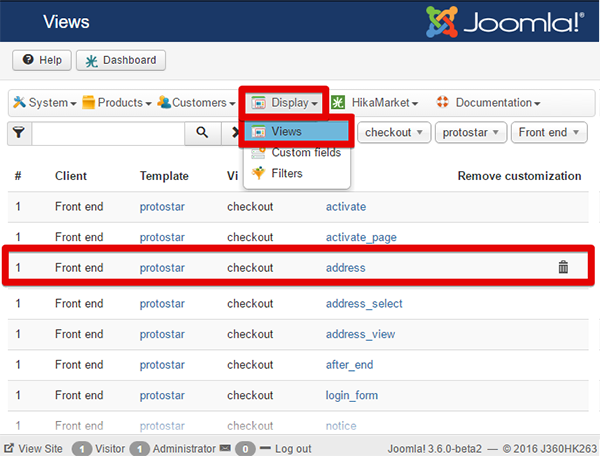
Note : that for the second filter parameter use your front end template, instead of Protostar in the screenshot.
If you see, like on this screenshot example a little Trash icon that means that you have an override view, and maybe this one was designed for the old checkout processing, and must be updated for the new checkout features...
Awaiting news from you.
Regards
Can you make a screenshot of your view listing WITH the same 3 Filters dropdown parameters ?
See this example :
Note : that for the second filter parameter use your front end template, instead of Protostar in the screenshot.
If you see, like on this screenshot example a little Trash icon that means that you have an override view, and maybe this one was designed for the old checkout processing, and must be updated for the new checkout features...
Awaiting news from you.
Regards
Last edit: 10 years 5 months ago by Philip.
Please Log in or Create an account to join the conversation.
- ler@singmuiheng.com
-
Topic Author
- Offline
Less
More
- Posts: 575
- Thank you received: 11
10 years 5 months ago #244068
by ler@singmuiheng.com
Replied by ler@singmuiheng.com on topic Billing & Shipping Address Problem during checkout
Please see below, we do not have any override on address part
neither protostar or helix template are working
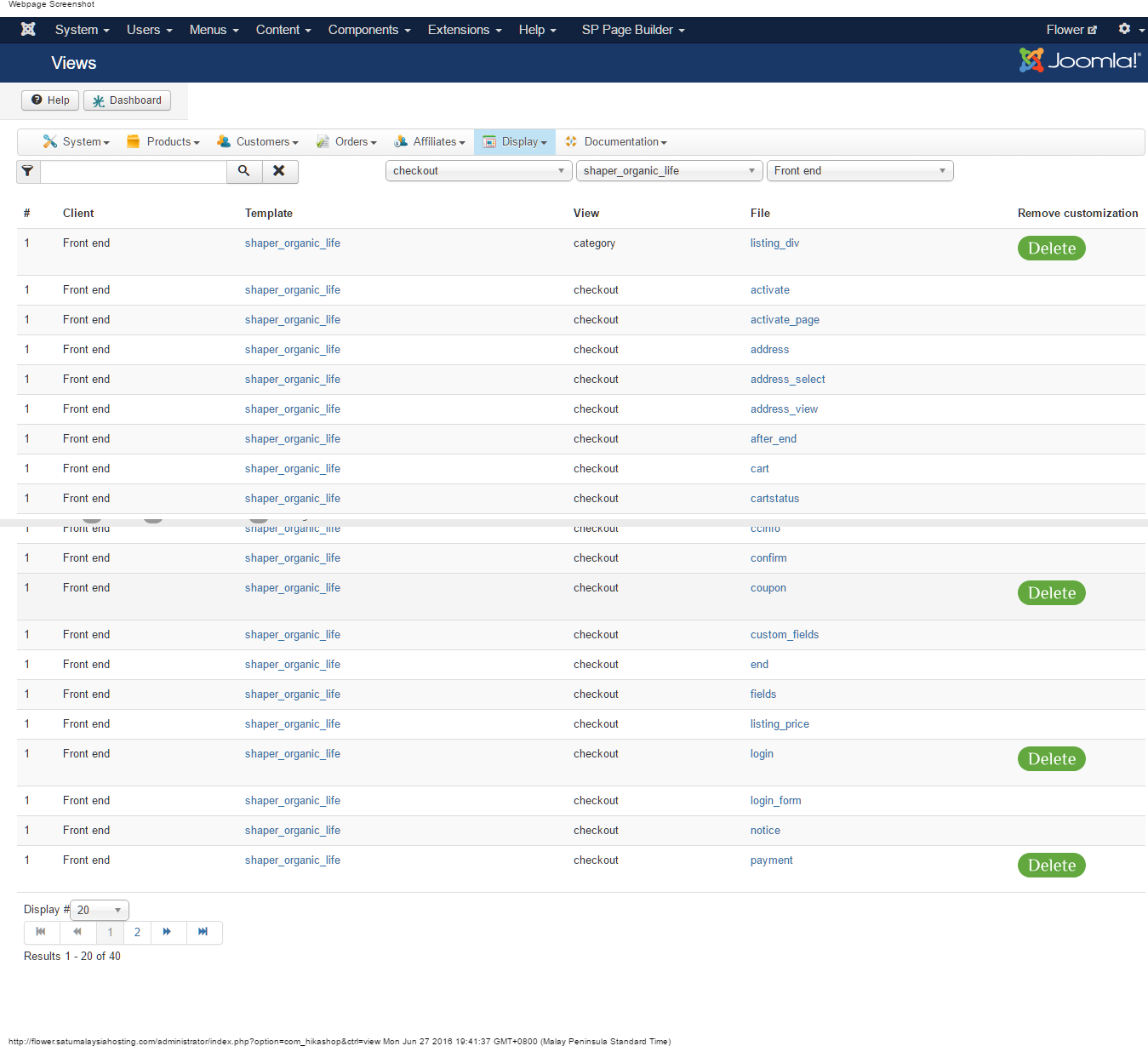
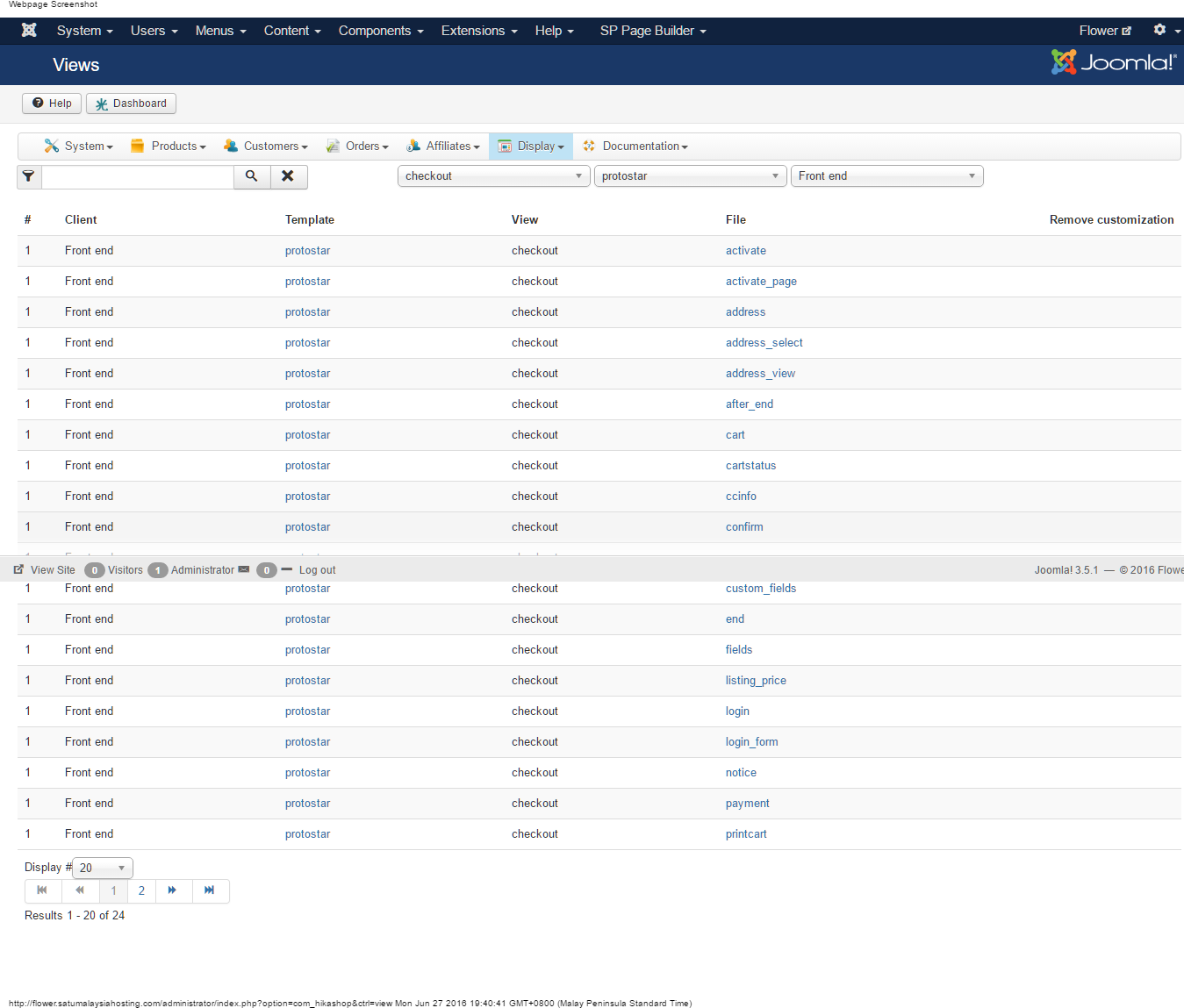
neither protostar or helix template are working
Please Log in or Create an account to join the conversation.
10 years 5 months ago #244089
by nicolas
Replied by nicolas on topic Billing & Shipping Address Problem during checkout
Hi,
I see what you mean and that should indeed not happen. When you validate the billing address, the billing address should appear not a blank area.
But In my tests on my local computer and on your website, that's not what I see:
take.ms/l41d7
I see the normal display of the address after I validate the billing address.
Please Log in or Create an account to join the conversation.
- ler@singmuiheng.com
-
Topic Author
- Offline
Less
More
- Posts: 575
- Thank you received: 11
10 years 5 months ago #244124
by ler@singmuiheng.com
Replied by ler@singmuiheng.com on topic Billing & Shipping Address Problem during checkout
Dear Nicolas
Your screen shot is exactly the problem,
as you can see from your screen shot there are several problem
1. adress line 1 field are not saved and loaded on display
2. postcode are not saved and loaded as well
And after you key in the billing address, please try also to key in shipping address
1. this action will make the both address having the same display as your current screen shot, address line and postcode are missing
2. after 1 second, page will refresh and both address will become the shipping address you entered just now
that is why i say something is wrong on the handling of the address system
Please Log in or Create an account to join the conversation.
- ler@singmuiheng.com
-
Topic Author
- Offline
Less
More
- Posts: 575
- Thank you received: 11
10 years 5 months ago - 10 years 5 months ago #244155
by ler@singmuiheng.com
Replied by ler@singmuiheng.com on topic Billing & Shipping Address Problem during checkout
Dear Nicolas
Update on our latest finding, the problem was fixed after enable url rewrite and sef url
however, when we change back to sef url only or do not have any rewrite, the problem occurs again
P/S : our system running on nginx instead of apache
Update on our latest finding, the problem was fixed after enable url rewrite and sef url
however, when we change back to sef url only or do not have any rewrite, the problem occurs again
P/S : our system running on nginx instead of apache
Last edit: 10 years 5 months ago by ler@singmuiheng.com.
The following user(s) said Thank You: PolishedGeek
Please Log in or Create an account to join the conversation.
Time to create page: 0.094 seconds